Hello! Welcome back to our backend development module.
In the last lesson, we successfully built a basic but complete REST API for CRUD operations. A key discovery was that to handle data from POST and PUT requests, we needed to add app.use(express.json()) to our server. This line is an example of middleware, and it's a fundamental concept in Express.
Today, we'll dive deeper into this topic. Your goal is to learn how to parse incoming JSON and URL-encoded request bodies using Express middleware. We'll formalize what middleware is, why it's so powerful, and how to use the specific built-in middleware functions that handle the most common types of data your API will receive from clients.
What is Middleware?
Think of middleware as an assembly line for incoming requests. Before a request reaches its final destination (your route handler), it passes through a series of "stations." Each station is a middleware function that can inspect the request, modify it, or even decide to stop the process and send a response immediately.
At its core, an Express middleware is a function with access to the request object (req), the response object (res), and a special function called next.
req: The incoming request from the client.res: The response object we use to send data back to the client.next(): A callback function that passes control to the next middleware in the chain.
If a middleware function doesn't call next() or send a response with res.send(), the request will be left hanging.
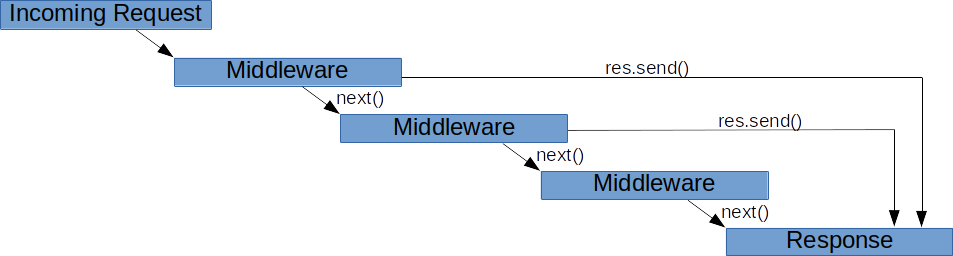
To get a solid conceptual understanding, please read the first two sections of the following article from W3Schools.
This article, 'Node.js Middleware', provides a clear definition of middleware and explains its role in the request-response cycle. It's a great starting point for understanding this core concept.
Read the sections 'Introduction to Middleware' and 'How Middleware Works in the Request-Response Cycle'. Focus on the (req, res, next) pattern and the concept of the middleware 'pipeline'.
Parsing Different Types of Request Bodies
When a client sends data to your server (e.g., in a POST request), it specifies the data's format in the Content-Type HTTP header. Your Express server needs to know how to interpret this format. By default, Express doesn't parse any request bodies, which is why req.body was undefined before we added any middleware.
We'll focus on the two most common content types for web applications:
application/jsonapplication/x-www-form-urlencoded
Express provides built-in middleware for each.
| Content Type | Middleware | Use Case |
|---|---|---|
application/json |
express.json() |
Typical for REST APIs consumed by clients like React. |
application/x-www-form-urlencoded |
express.urlencoded({ extended: true }) |
Standard HTML form submissions. |
1. Parsing JSON Bodies with express.json()
You've already used this one! As a quick refresher, express.json() is a middleware that specifically looks for requests with a Content-Type of application/json. When it finds one, it parses the raw JSON string from the request body into a JavaScript object and attaches it to req.body.

The following short video clip provides a concise recap of why this is necessary.
RESTful APIs in 100 Seconds // Build an API from Scratch with Node.js Express
In this clip from 'RESTful APIs in 100 Seconds', you'll see a quick, practical demonstration of a POST request failing and then succeeding after express.json() is added.
Watch from 08:34 to 09:59. Notice how the request body is inaccessible until the middleware is applied with app.use().
To add this to your application, you simply use app.use():
import express from 'express';
const app = express();

// Middleware for parsing JSON bodies
app.use(express.json());

// ... your routes
app.post('/api/courses', (req, res) => {
    // Thanks to the middleware, req.body is now a populated object!
    console.log(req.body);
    // ...
});
2. Parsing URL-Encoded Bodies with express.urlencoded()
The other common data format comes from traditional HTML forms. When a user fills out a form and clicks "Submit", the browser typically packages the data as a URL-encoded string and sends it with a Content-Type of application/x-www-form-urlencoded.
To handle this, we use another built-in middleware: express.urlencoded().
// Middleware for parsing URL-encoded bodies (from HTML forms)
app.use(express.urlencoded({ extended: true }));
The extended: true option allows for parsing nested objects from the form data, which is more powerful and generally the recommended setting.
Let's see this in action. The following video demonstrates exactly how to set up a form, submit it, and use this middleware to access the data on the server.
Learn Express JS In 35 Minutes
This clip from 'Learn Express JS In 35 Minutes' by Web Dev Simplified provides an excellent walkthrough of handling form data.
Watch from 29:32 to 34:44. Pay close attention to the error that occurs when the form is submitted without the middleware, and how express.urlencoded() solves the problem by populating req.body.
Test your understanding!
Imagine you have an Express server with only app.use(express.json()); configured. What would happen if a client submitted a standard HTML form to one of your POST endpoints? What would the value of req.body be inside your route handler?
Show answer
The value of req.body would be undefined. This is because the HTML form sends data with a Content-Type of application/x-www-form-urlencoded. Since the server is only configured to parse application/json, it ignores the request body from the form, and the req.body property is never created.
The Importance of Order
One of the most common mistakes for beginners is putting middleware in the wrong place. Middleware functions are executed in the order they are added to the app.
A body-parsing middleware must be registered before any routes that need to access the parsed body.
If you define a route before you use app.use(express.json()), that route's handler will execute before the JSON middleware has a chance to run, and req.body will be undefined.
Correct Order:
const app = express();

// 1. Register middleware first
app.use(express.json());
app.use(express.urlencoded({ extended: true }));

// 2. Then, define your routes
app.post('/submit-data', (req, res) => {
    // req.body will be available here
    res.json(req.body);
});

// ...
app.listen(3000);
For more details on the available options for both express.json() and express.urlencoded(), you can refer to the following guide.
How to Process POST Data in Express.js
The article 'How to Process POST Data in Express.js' provides concise code examples and explanations for both JSON and URL-encoded parsing, including the configuration options available.
Review the sections 'Parsing JSON Data' and 'Parsing URL-Encoded Form Data'. You don't need to memorize all the options, but it's good to be aware of them.
Conclusion
You've now taken a significant step in understanding how Express works under the hood. Middleware is the backbone of any Express application, enabling you to add layers of functionality like logging, authentication, and—as we saw today—request parsing.
Key Takeaways:
- Middleware is a chain of functions that process a request before it reaches the final route handler.
- Each middleware has access to
req,res, and thenextfunction to continue the chain. - Express does not parse request bodies by default; you must use middleware.
app.use(express.json())parsesapplication/jsonbodies.app.use(express.urlencoded({ extended: true }))parses bodies from HTML form submissions.- The order is critical: you must register middleware with
app.use()before the routes that rely on it.
Preview of the Next Lesson:
As we add more endpoints for different resources, our main server file (index.mjs or index.js) can become long and cluttered. To keep our project organized and scalable, we need a way to group related routes. In the next lesson, we will learn how to organize API routes into modular files using Express Router.