Hello! In our last lesson, we successfully made your to-do list persistent by saving and loading tasks from localStorage. This is great for data that lives only in the browser, but most modern web applications need to communicate with a server to fetch or save data. This introduces a new challenge: what happens while we wait for the server to respond?
This lesson begins our journey into Asynchronous JavaScript. Our goal today is to address the first, most fundamental learning outcome of this module: to explain the need for asynchronous code to prevent blocking in web applications.
Before we can learn the modern techniques for writing asynchronous code (like Promises and async/await), we must first deeply understand the problem they are designed to solve. This conceptual foundation is crucial for writing efficient and user-friendly web applications.
The Single-Threaded World of JavaScript
At its core, JavaScript is a single-threaded language. This means it has a single call stack and can only execute one piece of code at a time. Think of it like a single chef in a kitchen who can only cook one dish at a time, step-by-step.
The browser uses this single thread for everything:
- Running your JavaScript code.
- Updating the page's appearance (rendering).
- Responding to user interactions (like clicks, typing, and scrolling).
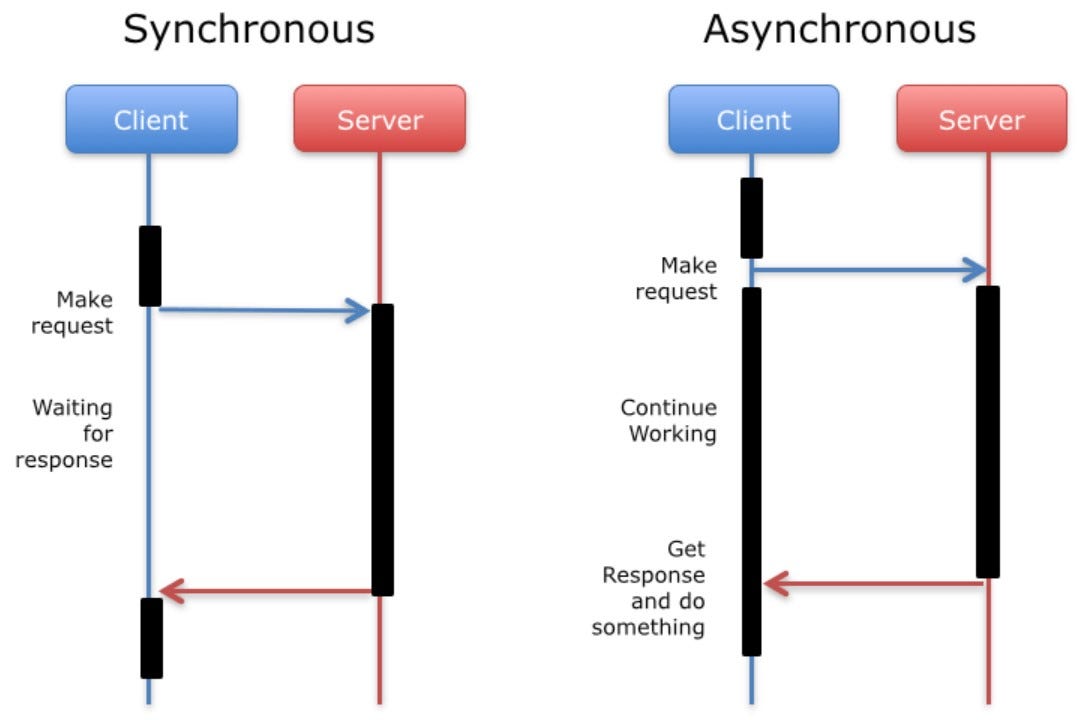
In a synchronous programming model, tasks are executed sequentially. The program waits for each task to finish before moving on to the next one. For many operations, this is perfectly fine.
However, what happens when one of those tasks is very slow?
To see the problem this creates, let's explore an article from the Mozilla Developer Network (MDN).
Introducing asynchronous JavaScript - Learn web development
This article, 'Introducing asynchronous JavaScript', provides a perfect demonstration of the problem with long-running synchronous functions.
Please read the sections titled 'Synchronous programming', 'A long-running synchronous function', and 'The trouble with long-running synchronous functions'. The interactive example in the last section is key: click 'Generate primes' and immediately try to type in the text box. Observe what happens.
As you experienced in the MDN example, when a slow synchronous function is running, the entire browser page freezes. You can't click buttons, you can't type in input fields, and even GIFs or animations will stop. This is called blocking. The single thread is so busy executing the slow function that it's blocked from doing anything else, including rendering updates or responding to user input.
This is the fundamental problem we need to solve. A user will perceive an application that freezes as broken or buggy.
The Solution: Non-Blocking Asynchronous Code
How can we perform long-running operations, like network requests, without blocking the main thread and freezing the UI? The answer is asynchronous execution.
The core idea is to start a task (e.g., a network request) but not wait for it to finish. The JavaScript engine hands the task off to another part of the browser, immediately frees up the main thread to continue executing other code, and says, "Let me know when you're done."
This allows the browser to remain responsive, handling user clicks and updating the UI, while the long-running task happens in the background.
How Does JavaScript Manage Asynchronous Tasks?
If JavaScript has only one thread, how does it manage tasks happening "in the background"? This is possible because the JavaScript runtime environment (what your code runs in) is more than just the JavaScript engine.
A phenomenal talk by Philip Roberts at JSConf EU breaks this down visually. We'll watch a few key parts to build a mental model of how this works.
What the heck is the event loop anyway? | Philip Roberts | JSConf EU
This video, 'What the heck is the event loop anyway?', is a classic explanation of the JavaScript runtime. We'll focus on the sections that explain blocking and the core components that enable non-blocking behavior.
Please watch the following segments: The Call Stack (4:08 - 7:18): This will visualize how JavaScript executes synchronous code. Since you're familiar with stacks from your CSE background, this should be a good refresher in the context of JS. The Problem of Blocking (7:18 - 10:24): This directly visualizes the problem we discussed earlier, showing why a blocked call stack leads to an unresponsive browser. Rendering and the Event Loop (22:06 - 24:44): This is the most crucial part. It explains why the UI freezes by showing that rendering itself needs the call stack to be empty.
The Key Components
From the video, we can identify the main players that work together to manage asynchronous code:
- Call Stack: We already know this. It's where JavaScript functions are executed one by one.
- Web APIs: These are part of the browser, not the JavaScript engine. They handle tasks that might take time, like
setTimeout, DOM events (e.g., clicks), and network requests (fetch). They can do their work on separate threads without blocking JavaScript's main thread. - Task Queue (or Callback Queue): When a Web API finishes its task (e.g., a timer runs out or network data arrives), it doesn't interrupt the main JavaScript code. Instead, it places the function that needs to be run (the callback function) in the Task Queue.
- Event Loop: This is the manager that connects everything. Its job is simple but critical: it continuously checks if the Call Stack is empty. If it is, the Event Loop takes the first task from the Task Queue and pushes it onto the Call Stack to be executed.

Let's walk through a simple setTimeout example to see this in action:
console.log("Start");

setTimeout(() => {
  console.log("Inside setTimeout");
}, 1000);

console.log("End");
Here's the execution flow:
console.log("Start")is pushed to the Call Stack, "Start" is logged, and it's popped off.setTimeout(...)is pushed to the Call Stack. The JS engine sees it's an async function and hands the callback function() => console.log(...)and the 1000ms delay over to the Web API timer.setTimeoutthen finishes its job and is popped off the Call Stack.- The Call Stack is now free, so the engine immediately moves to the next line.
console.log("End")is pushed to the stack, "End" is logged, and it's popped off. - The main script is now finished. Meanwhile, the Web API timer is counting down.
- After 1000ms, the timer finishes. The Web API places the callback function into the Task Queue.
- The Event Loop sees the Call Stack is empty and there's a task in the queue. It pushes the callback onto the Call Stack.
- The callback executes:
console.log("Inside setTimeout")is pushed to the stack, "Inside setTimeout" is logged, and it's popped off. - The program is now completely finished.
The output is:
Start
End
Inside setTimeout
This demonstrates that the program did not wait for the timer. It continued executing synchronous code, keeping the main thread free.
Test your understanding!
Based on the Event Loop model, what do you predict will be logged to the console by the following code, and why?
console.log("A");

setTimeout(() => {
  console.log("B");
}, 0);

console.log("C");
Show answer
The output will be:
A
C
B
Reasoning:
console.log("A")runs synchronously and "A" is logged.setTimeoutis called. Even with a 0ms delay, it hands its callback (() => console.log("B")) to the Web API and is popped from the stack. The Web API immediately places the callback in the Task Queue.- The Event Loop checks the Call Stack, but it's not empty yet. The main script is still running.
console.log("C")runs synchronously, and "C" is logged.- Now the main script is finished, and the Call Stack is empty.
- The Event Loop checks the Task Queue, finds the callback for "B", and pushes it onto the Call Stack.
- "B" is logged.
This is a classic example showing that asynchronous callbacks in the Task Queue always wait for the synchronous code on the Call Stack to finish executing completely.
Conclusion
You've now grasped the single most important reason for asynchronous programming in JavaScript: to maintain a responsive user interface.
Key Takeaways:
- JavaScript is single-threaded, meaning it can only do one thing at a time.
- Synchronous (or "blocking") operations that take a long time will freeze the browser, as the single thread is occupied and cannot handle UI rendering or user input.
- Asynchronous (or "non-blocking") operations solve this by handing tasks off to the browser's Web APIs, which run in the background.
- The Event Loop is the mechanism that ensures these background tasks don't interrupt the main thread. It waits for the Call Stack to be empty before moving a completed task's callback from the Task Queue to the Call Stack for execution.
- The ultimate goal is to keep the Call Stack clear of long-running tasks so the browser can frequently repaint the screen and respond to user events, creating a smooth experience.
In our next lesson, we will move from the why to the how. You'll learn about Promises, the modern JavaScript object used to manage the eventual result of an asynchronous operation, and how to use .then() and .catch() to handle success and failure.