Hello! Welcome to your lesson on building asynchronous AI processing pipelines for file uploads.
In our last session, you mastered the "submit and poll" pattern, creating API endpoints to delegate long-running, text-based ML tasks to Celery workers. This is a vital skill for building responsive applications.
Today, we'll build on that foundation to tackle one of the most common use cases in AI: processing files. Many AI applications, from document analysis to computer vision, start with a user uploading a file. Our goal is to handle file uploads and trigger async AI processing pipelines.
You will learn how to:
- Build a FastAPI endpoint that robustly handles file uploads.
- Design a scalable architecture where the API server offloads file processing to Celery workers.
- Implement the full pipeline: uploading a file, saving it, and triggering a background task to process it.
By the end of this lesson, you'll be able to connect your front-end file upload forms to a powerful, non-blocking backend capable of handling intensive AI workloads.
1. Handling File Uploads in FastAPI
Before we can process a file, we need to receive it. FastAPI makes this straightforward with the UploadFile class. Unlike simply declaring the type as bytes, UploadFile is more powerful because it handles large files efficiently by streaming them to disk instead of loading them entirely into memory.
This video provides an excellent overview of the different methods for file uploads in FastAPI and the best practices.
Every FastAPI File Upload Method | Working and Best Practices!
The video 'Every FastAPI File Upload Method' explains how to use the UploadFile class and its underlying mechanisms.
Please watch the following segments: Introduction to UploadFile (00:00:09 - 00:00:49): Understand the basic usage of UploadFile and the await file.read() method. How UploadFile Works (00:01:47 - 00:03:58): This is the most important part. Pay close attention to the explanation of SpooledTemporaryFile, which stores small files in memory and large files on disk. This is key to a robust server. Reading Large Files in Chunks (00:03:58 - 00:04:52): Learn how to process a file piece by piece, which is essential for very large files that might not fit in your available RAM even temporarily.
As the video explains, UploadFile gives you an awaitable read() method and a standard Python file-like object. Let's see a basic endpoint that receives a file and saves it to a local directory.
import shutil
from pathlib import Path
from fastapi import FastAPI, UploadFile, File

app = FastAPI()


# Create a directory to store uploaded files
UPLOAD_DIR = Path("uploads")
UPLOAD_DIR.mkdir(exist_ok=True)

@app.post("/upload-and-save/")
async def upload_and_save_file(file: UploadFile = File(...)):
    """
    Accepts a file upload and saves it to the local 'uploads' directory.
    """


    # Create a safe path for the file within the UPLOAD_DIR
    file_path = UPLOAD_DIR / file.filename


    # Use shutil.copyfileobj to efficiently save the file
    # file.file is the spooled temporary file object
    with open(file_path, "wb") as buffer:
        shutil.copyfileobj(file.file, buffer)

    return {"filename": file.filename, "saved_path": str(file_path)}
This endpoint provides the first piece of our puzzle: accepting a file and saving it to a persistent location that our background workers can access.
2. Architecture for Async File Processing
Now, let's connect this to our Celery workers. A common mistake is to try to pass the file's binary content directly in the Celery task message. This is not scalable, as message brokers like Redis have size limits, and sending large files this way would be slow and memory-intensive.
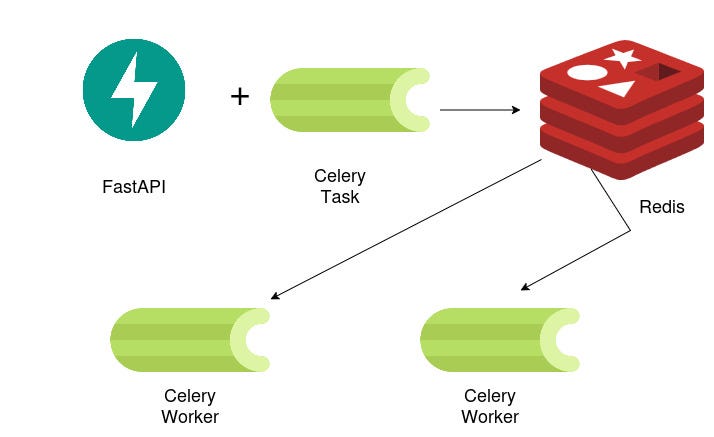
The robust and standard architecture is as follows:
- Client Uploads: The user uploads a file to a specific API endpoint.
- API Saves File: The FastAPI server receives the
UploadFileand saves it to a shared storage location. For development, this can be a local directory. In production, this would be a cloud storage service like Amazon S3 or Google Cloud Storage. - API Enqueues Task: The API then creates a Celery task, passing a reference to the file (e.g., its path or URL), not the file itself. It immediately returns a
task_idto the client. - Worker Processes File: A Celery worker picks up the task, uses the file path to access the file from shared storage, performs the long-running AI processing, and stores the result.
This architecture is illustrated in the diagram below.
3. Implementing the Full Pipeline
Let's combine what we've learned to build the complete pipeline. We'll create an endpoint that accepts a file, saves it, and triggers a Celery task to process it.
The following article demonstrates a very similar pattern for an LLM SaaS application. We will adapt its core logic for our purpose.
FastAPI Template for LLM SaaS Part 2 — Celery and Pg-vector
The article 'FastAPI Template for LLM SaaS Part 2' details a full-stack approach to handling file uploads for AI processing, which is exactly our goal. We'll focus on the backend implementation.
Please read through the following sections to understand the end-to-end flow: Overall Process (Section: "File upload and vector datastore"): Read the first two paragraphs to get a high-level overview of the process, from uploading the file to triggering the Celery task. FastAPI Endpoint (Section: "Define Routes and Endpoints"): Study the code for the @upload_router.post("/upload") endpoint. Notice how it reads the file, saves it (in their case to cloud storage), and then calls process_file.delay() with the file's information. Celery Task (Section: "Celery worker and tasks"): Examine the process_file task definition. See how it receives the file name, downloads the file, and then calls a handler to process it.
Drawing inspiration from that article, let's implement our own version. Assume you have your Celery app configured in celery_worker.py as in the previous lesson.
Step 1: The Celery Worker Task
First, define the task that will perform the heavy lifting. This task will receive a file path, simulate some work, and return a result.
# celery_worker.py

import os
import time
from celery import Celery


# --- Celery App Initialization ---
celery_app = Celery(
    'tasks',
    broker=os.getenv("REDIS_URL", "redis://localhost:6379/0"),
    backend=os.getenv("REDIS_URL", "redis://localhost:6379/1")
)

@celery_app.task(name="tasks.process_file")
def process_file_task(file_path: str) -> dict:
    """
    A Celery task that simulates processing a file.
    In a real app, this would contain your ML model inference code.
    """
    print(f"Worker starting to process file: {file_path}")


    # Simulate a long-running AI task (e.g., transcription, feature extraction)
    processing_time = 10
    time.sleep(processing_time)


    # Check if file exists before processing
    if not os.path.exists(file_path):
        print(f"Error: File not found at {file_path}")
        raise FileNotFoundError(f"File not found at worker: {file_path}")


    # Get file size as an example of processing
    file_size_bytes = os.path.getsize(file_path)

    print(f"Worker finished processing file: {file_path}")

    return {
        "message": "File processed successfully",
        "file_path_at_worker": file_path,
        "file_size_bytes": file_size_bytes,
        "processing_time_sec": processing_time
    }
Step 2: The FastAPI Upload Endpoint
Next, create the FastAPI endpoint that receives the file and delegates the work to the Celery task you just defined.
# main.py

import shutil
from pathlib import Path
from fastapi import FastAPI, UploadFile, File, status
from pydantic import BaseModel
from celery.result import AsyncResult


# Import the celery app instance from your worker file
from celery_worker import celery_app, process_file_task

app = FastAPI()

UPLOAD_DIR = Path("shared_uploads")
UPLOAD_DIR.mkdir(exist_ok=True)

class TaskResponse(BaseModel):
    task_id: str
    status: str

@app.post("/files/process", response_model=TaskResponse, status_code=status.HTTP_202_ACCEPTED)
async def create_file_processing_task(file: UploadFile = File(...)):
    """
    1. Accepts a file upload.
    2. Saves it to a shared directory.
    3. Triggers a background Celery task to process it.
    """
    file_path = UPLOAD_DIR / file.filename


    # Save the uploaded file to the shared directory
    with open(file_path, "wb") as buffer:
        shutil.copyfileobj(file.file, buffer)


    # Enqueue the task, passing the string representation of the path
    task = process_file_task.delay(str(file_path))

    return {"task_id": task.id, "status": "Processing"}


@app.get("/tasks/result/{task_id}")
def get_task_result(task_id: str):
    """
    Fetches the result of a task using the "submit and poll" pattern.
    (This is the same endpoint from the previous lesson).
    """
    task_result = AsyncResult(task_id, app=celery_app)

    if task_result.ready():
        if task_result.successful():
            return {"status": task_result.status, "result": task_result.result}
        else:
            return {"status": task_result.status, "result": str(task_result.info)}

    return {"status": task_result.status, "result": "Processing..."}
This setup cleanly separates concerns: the API server is responsible for handling web requests and is highly available, while the resource-intensive work is handled by dedicated, scalable workers.
4. Alternative: FastAPI's Built-in BackgroundTasks
It's worth noting that FastAPI offers a simpler, built-in mechanism called BackgroundTasks.

You can inject BackgroundTasks into your endpoint and add a function call that will run after the response has been sent.
from fastapi import BackgroundTasks


# This is NOT for heavy tasks
async def send_confirmation_email(email: str, filename: str):


    # This function would send an email. It's quick.
    print(f"Sending confirmation to {email} about file {filename}")
    time.sleep(3) # Simulate sending email
    print("Email sent.")

@app.post("/upload-and-notify/")
async def upload_and_notify(file: UploadFile, bg_tasks: BackgroundTasks):


    # ... save file logic ...


    # Add a lightweight task to run in the background
    bg_tasks.add_task(send_confirmation_email, "user@example.com", file.filename)

    return {"message": "File uploaded, confirmation email will be sent."}
The key difference is that BackgroundTasks run in the same process as your FastAPI application. This makes them suitable for light, I/O-bound tasks that shouldn't block the response (like sending an email or logging an event). They are not suitable for long-running, CPU-bound AI tasks, as these would still consume the resources of your API server, potentially slowing it down or causing it to crash. For our AI pipelines, Celery remains the correct choice.
Conclusion
You have successfully extended your asynchronous processing system to handle file uploads. This is a powerful and essential pattern for building real-world AI applications.
Key Takeaways:
- Use FastAPI's
UploadFileto efficiently handle incoming files, as it intelligently buffers them to memory or disk. - The most scalable architecture for async file processing involves saving the file to a shared storage location and passing its path or URL to the Celery worker, not the file content itself.
- The implementation requires two main components: a FastAPI endpoint to manage the file upload and task creation, and a Celery task that retrieves and processes the file.
- While FastAPI's
BackgroundTasksare useful for lightweight, non-blocking operations, Celery is the appropriate tool for heavy, CPU-intensive AI workloads that need to be run in separate, scalable worker processes.
Preview of the Next Lesson:
Now that we can process data and generate results, what's next? In the next lesson, "Collect user feedback on predictions for model improvement," we will explore how to build mechanisms to gather feedback from users on the AI's output. This is the first step toward creating systems that learn and improve over time—a core concept in MLOps.