Hello! Welcome to the first lesson of our module on Natural Language Processing (NLP).
In the previous module, we explored how computers can "see" and interpret the world through Computer Vision. We're now shifting our focus to an equally fascinating domain: how computers can understand, process, and generate human language.
Your learning outcome for this lesson is to preprocess text: tokenization, stopword removal, and lemmatization. This is the foundational first step for almost any NLP task. Raw text from websites, books, or user reviews is often messy and unstructured. To prepare it for a machine learning model, we must first clean and standardize it. This process is known as text preprocessing.
Let's begin by looking at the big picture of a typical text cleaning pipeline.
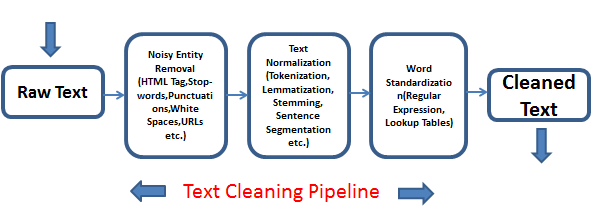
1. The "Why" of Preprocessing: Trade-offs and Goals
Before we jump into the "how," it's crucial to understand the "why." Each preprocessing step is a choice with trade-offs. The primary goal is to reduce the "noise" in the text and distill the meaningful signal, but an overly aggressive approach can sometimes remove important context.
The following video provides an excellent overview of the most common preprocessing steps and, more importantly, discusses the trade-offs you must consider for each one.
NLP Demystified 3: Basic Preprocessing (case-folding, stop words, stemming, lemmatization)
This video, "NLP Demystified 3: Basic Preprocessing" from the Future Mojo channel, will serve as our conceptual guide. It explains the purpose and potential downsides of each technique.
Please watch from the beginning until 04:35. Pay close attention to: The concept of preprocessing as a pipeline. Case Folding: The benefits (reducing vocabulary size) and the risks (losing information, like the difference between 'Cook' the name and 'cook' the verb). Stop Word Removal: Why we remove common words and the critical exceptions where they should be kept (e.g., in sentiment analysis, removing 'not' could flip the meaning of a sentence).
Now that you have a high-level understanding of the goals and trade-offs, let's dive into the specific techniques and their implementation in Python. We will explore two of the most popular NLP libraries: NLTK and spaCy. NLTK (Natural Language Toolkit) is often used in academic settings and provides granular control, while spaCy is designed for performance and is very popular for building production systems.
2. Tokenization: Breaking Text into Pieces
Tokenization is the process of breaking down a string of text into smaller units called tokens. These tokens are often words, but they can also be punctuation marks, numbers, or sentences.
Example:
- Text: "The quick brown fox jumps."
- Tokens:
["The", "quick", "brown", "fox", "jumps", "."]
This is the very first step in making text manageable for analysis.
Tokenization with NLTK
The NLTK library is a classic tool for tokenization. The following resource will introduce you to its word_tokenize function.
NLTK Sentiment Analysis Tutorial for Beginners - DataCamp
This DataCamp tutorial, "NLTK Sentiment Analysis Tutorial for Beginners," provides a clear definition and context for tokenization.
Read the short section titled 'Tokenization'. It explains the concept and mentions the word_tokenize function we'll be using.
Tokenization with spaCy
The spaCy library takes a more object-oriented approach. When you process a text with spaCy, it automatically tokenizes it and gives you a Doc object, which is a sequence of Token objects. Each Token object comes with a rich set of attributes.
Natural Language Processing With spaCy in Python - Real Python
The Real Python article, "Natural Language Processing With spaCy in Python," offers a deep dive into how spaCy handles tokenization and the powerful attributes it provides.
Read the section titled 'Tokens in spaCy'. Focus on how iterating over a Doc object yields tokens and look at the table showing token attributes like .is_alpha, .is_punct, and .is_stop. This is a key difference from NLTK, which just returns a list of strings.
3. Stop Word Removal: Filtering Out the Noise
As mentioned in the first video, stop words are extremely common words that usually add little semantic value to a sentence (e.g., 'the', 'a', 'in', 'is'). Removing them helps our model focus on the more important words.
Both NLTK and spaCy come with built-in lists of stop words.
Removing Stop Words with spaCy
In spaCy, removing stop words is as simple as checking a token's boolean attribute.
Natural Language Processing With spaCy in Python - Real Python
Let's return to the Real Python article to see how to use the .is_stop attribute for filtering.
Read the section 'Stop Words'. It shows you how to access spaCy's list of stopwords and, more importantly, how to use a list comprehension with if not token.is_stop to create a list of non-stop-word tokens.
Removing Stop Words with NLTK
NLTK provides a corpus of stop words that you can import and use to filter your token list. The code example in the "Putting it All Together" section will demonstrate this.
4. Stemming and Lemmatization: Finding Word Roots
Words often appear in different forms (e.g., run, ran, running). To treat these as the same concept, we need to reduce them to a common base form. There are two main ways to do this: stemming and lemmatization.
- Stemming: A crude, rule-based process that chops off suffixes. It's fast but can result in non-existent words (e.g., "studies" might become "studi").
- Lemmatization: A more sophisticated, dictionary-based process that considers a word's part-of-speech to return its true dictionary form, or lemma. (e.g., "studies" becomes "study", and "was" becomes "be").
Lemmatization is generally preferred for its accuracy, though it is computationally more expensive than stemming. The spaCy library focuses on lemmatization and does not include a stemmer by default.
Let's watch a video that clearly explains the difference.
NLP Demystified 3: Basic Preprocessing (case-folding, stop words, stemming, lemmatization)
We'll go back to the "NLP Demystified" video, which provides a great comparison of these two techniques.
Watch the segments on Stemming (04:35 - 06:28) and Lemmatization (06:28 - 07:46). Focus on understanding the core difference in their approach and output. Notice how lemmatization is more 'intelligent' by considering the word's role in the sentence.
Lemmatization with spaCy
spaCy makes lemmatization incredibly easy. When you process a text, each Token object has a lemma_ attribute that holds its lemmatized form.
Natural Language Processing With spaCy in Python - Real Python
The Real Python article demonstrates this simple but powerful feature of spaCy.
Read the section 'Lemmatization'. The code example clearly shows how to access the .lemma_ attribute for each token.
5. Putting It All Together: A Preprocessing Pipeline
Now, let's combine these steps into reusable functions, which is standard practice in any coding project. Below are two examples showing how to build a complete preprocessing pipeline, one with NLTK and one with spaCy.
NLTK Pipeline Example
The following resource shows how to build a function that tokenizes, removes stop words, and lemmatizes text using NLTK.
NLTK Sentiment Analysis Tutorial for Beginners - DataCamp
The DataCamp article provides a very concise and practical Python function that encapsulates the entire NLTK preprocessing workflow.
Find the section 'Step 2 - Preprocess text'. Study the preprocess_text function. Note the sequence of operations: word_tokenize to create tokens. A list comprehension to filter out tokens that are in stopwords.words('english'). Another list comprehension to apply lemmatizer.lemmatize() to each remaining token.
spaCy Pipeline Example
Here is a similar pipeline built with spaCy, which leverages the token attributes we've discussed.
Natural Language Processing With spaCy in Python - Real Python
The Real Python article demonstrates a common and efficient way to build a preprocessing pipeline using spaCy.
Read the section 'Preprocessing Functions'. Analyze the list comprehension at the end. It elegantly combines filtering and transformation in one go: The if is_token_allowed(token) part handles the removal of stop words and punctuation. The preprocess_token(token) part handles lemmatization and lowercasing.
Comparing these two pipeline examples gives you a clear view of the different philosophies of the NLTK and spaCy libraries and equips you with the tools to handle preprocessing in various contexts.
Conclusion
Congratulations on completing your first step into Natural Language Processing! You now have the essential skills to clean and prepare raw text for analysis.
Key Takeaways:
- Text preprocessing is a critical first step to convert messy, unstructured text into a clean format for machine learning.
- Tokenization is the process of breaking text into words or other meaningful units (tokens).
- Stop word removal filters out common, low-information words to help models focus on what's important.
- Lemmatization reduces words to their dictionary root form (lemma), which is generally more accurate than the cruder method of stemming.
- Every preprocessing step involves trade-offs, and the right choices depend on your specific NLP goal.
- You can implement these techniques using libraries like
NLTK(for granular control) andspaCy(for efficient, production-ready pipelines).
Preview of the Next Lesson:
Now that we can turn a sentence into a clean list of tokens, what's next? Machine learning models don't understand words; they understand numbers. In our next lesson, you will learn how to represent text using Bag-of-Words and TF-IDF vectors, turning your clean tokens into the numerical features that power NLP models.