Welcome back! In our last few lessons, we've built a solid foundation in sorting by implementing fundamental algorithms like Merge Sort and Quick Sort from scratch. We analyzed their performance and understood their inner workings. While this knowledge is crucial for a deep understanding of computer science, in practical programming and interviews, you will almost always use the highly optimized sorting functions provided by the language's standard library.
Today, we'll bridge that gap between theory and practice. We will focus on how to effectively use Java's built-in Arrays.sort() and Collections.sort() methods. The real power lies not in re-implementing the sort, but in telling these methods how to sort complex, custom objects according to your specific needs. By the end of this lesson, you will be ableto master this skill by writing custom Comparators, enabling you to handle any sorting requirement with clean, modern Java code.
1. Sorting Primitives and Simple Objects
Java's standard library provides convenient methods for sorting. Let's start with the basics.
Arrays.sort(): This is used for sorting arrays. For arrays of primitive types likeint[],double[], etc., Java typically uses a highly optimized Dual-Pivot Quicksort algorithm.Collections.sort(): This is used for sorting collections that implement theListinterface, such asArrayList. For lists of objects, Java uses Timsort, which is an efficient, stable sorting algorithm derived from Merge Sort and Insertion Sort.
You can see that the algorithms we studied previously are exactly what power these industrial-strength tools.
The following reading provides a quick look at how to use these methods for simple arrays and lists of integers.
This article from Baeldung provides an excellent overview of sorting in Java. It begins with the most straightforward use cases.
Please read the introduction and the first two sections: Sorting With Array Sorting a List Focus on the syntax for sorting a full array/list and how the underlying algorithm choice differs for primitives versus objects.
2. The Challenge: Sorting Custom Objects
Sorting integers is straightforward because the concept of "less than" or "greater than" is inherent. But what if you have a collection of custom objects?
Consider a Student class:
class Student {
    String name;
    int age;
    double gpa;

    // constructor, getters...
}
If you have a List<Student>, how should Collections.sort() arrange them? By name alphabetically? By age in ascending order? Or by gpa in descending order? Java has no way of knowing your intent. If you try to sort a list of such objects directly, the compiler will raise an error because it doesn't know how to compare two Student objects.
This is where you, the programmer, must provide the comparison logic. Java offers two primary interfaces for this purpose: Comparable and Comparator.
3. Comparable: Defining a Natural Order
The Comparable interface lets you define a single, "natural" ordering for a class. This is done by having the class itself implement the Comparable interface and its compareTo() method.
The compareTo(Object o) method must return:
- A negative integer if the current object (
this) is "less than" the other object (o). - Zero if the objects are "equal".
- A positive integer if the current object (
this) is "greater than" the other object (o).
For example, let's say the "natural" order for our Student class is by age.
class Student implements Comparable<Student> {
    String name;
    int age;
    // ...

    @Override
    public int compareTo(Student other) {
        // Using Integer.compare is a safe way to avoid overflow issues
        return Integer.compare(this.age, other.age);
    }
}
Once a class implements Comparable, Collections.sort() can use its compareTo method to sort a list of its objects without needing any extra information.
The video below demonstrates this concept clearly, showing first how sorting a custom Student object fails, and then how implementing Comparable makes it work.
#95 Comparator vs Comparable in Java
In this segment, the instructor from Telusko attempts to sort a list of Student objects and explains why it initially fails. He then implements the Comparable interface to provide a "natural" sorting logic based on age.
Watch the section from explaining the problem to implementing a solution with Comparable. Pay attention to how the compareTo method is implemented and how it enables Collections.sort() to work.
Comparable is useful, but it's limiting. What if you want to sort students by name sometimes, and by GPA at other times? Modifying the class for every sorting criterion is not feasible. This is where Comparator comes in.
4. Comparator: Flexible, Custom Ordering
The Comparator interface is more flexible. It allows you to define comparison logic outside of the class you want to sort. You can create multiple Comparator classes, each with a different sorting strategy, and pass them to the sort method as needed.
A Comparator implements the compare(T o1, T o2) method, which follows the same negative/zero/positive return value contract as compareTo.
Let's watch a clear explanation of how the return value of compare influences the sorting algorithm.
Java Comparator Made EASY! 🔥 Learn Object Sorting Like a Pro
This video from Engineering Digest gives one of the clearest explanations of the compare method's contract. Understanding this is key to writing correct comparators.
Please watch the segment from explaining the return values. The instructor walks through how returning a positive, negative, or zero value tells the sort algorithm whether o1 should come before or after o2.
4.1. The "Old Style": Anonymous Inner Classes
Before Java 8, the common way to create a one-off Comparator was with an anonymous inner class. For example, to sort students by name:
Collections.sort(students, new Comparator<Student>() {
    @Override
    public int compare(Student s1, Student s2) {
        return s1.getName().compareTo(s2.getName());
    }
});
While functional, this is quite verbose.
4.2. The "New Style": Java 8 Lambdas and Method References
Your proficiency with modern Java is a key skill for interviews. Java 8 introduced features that dramatically simplify the creation of comparators. Since Comparator is a functional interface (it has only one abstract method), we can use a lambda expression.

The anonymous class from above can be rewritten as a clean, one-line lambda:
Collections.sort(students, (s1, s2) -> s1.getName().compareTo(s2.getName()));
This is much more readable. But we can do even better.
5. Advanced Sorting: Chaining and Composition
Java 8's Comparator interface also includes powerful static and default methods that allow you to build complex sorting logic by chaining comparators together.
Comparator.comparing(keyExtractor): This is a static factory method that takes a function (usually a method reference) that extracts a sort key. It returns aComparatorthat sorts by that key.thenComparing(other): This is a default method that lets you specify a secondary sort criterion. It's used when two elements are equal according to the primary criterion.
Let's say you need to sort students first by GPA in descending order, and then by name alphabetically for students with the same GPA. Here’s how you can elegantly compose this logic:
Comparator<Student> gpaSorter = Comparator.comparing(Student::getGpa).reversed();
Comparator<Student> nameSorter = Comparator.comparing(Student::getName);

students.sort(gpaSorter.thenComparing(nameSorter));
Or, even more concisely:
students.sort(
    Comparator.comparing(Student::getGpa).reversed()
              .thenComparing(Student::getName)
);
This approach is readable, reusable, and composable—all hallmarks of excellent code.
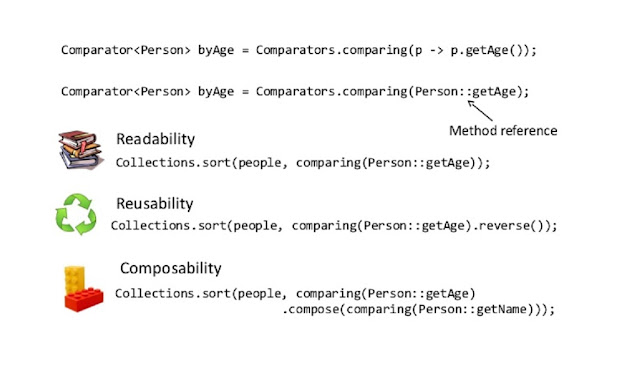
The following video demonstrates these Java 8 features in action, including Comparator.comparing() and thenComparing().
Java Comparator Made EASY! 🔥 Learn Object Sorting Like a Pro
This segment shows how to use modern Java 8 features to build complex, chained comparators in a very clean way.
Watch from the introduction of Comparator.comparing. Notice how comparing(), reversed(), and thenComparing() are used to create a multi-level sort for students first by GPA, then by name.
A Critical Warning: The Subtraction Trap
A common but dangerous "trick" for comparing integers is to return o1.getAge() - o2.getAge(). While this seems clever, it can fail spectacularly due to integer overflow. If o1.getAge() is a large positive number (like Integer.MAX_VALUE) and o2.getAge() is a negative number, their subtraction can wrap around and produce an incorrect result. Always use Integer.compare(a, b), Double.compare(a, b), or the object's compareTo method. This is a classic interview gotcha.
Comparator and Comparable in Java
This Baeldung article section explains a critical pitfall to avoid when writing comparators.
Read the short section titled Avoiding the Subtraction Trick. This knowledge can prevent subtle bugs and demonstrates a mature understanding of potential edge cases.
Conclusion
In this lesson, we've moved from theoretical sorting algorithms to their practical application in Java. You now have the tools to sort any collection of objects based on any criteria, from simple to complex.
Key Takeaways:
- Built-in Sorts: Use
Arrays.sort()for arrays andCollections.sort()(orList.sort()) for lists. They are highly optimized for you. Comparable: Defines the single, "natural" ordering of a class. The class itself implements thecompareTomethod.Comparator: Provides flexible, external sorting logic. It's ideal when you need multiple sort orders or can't modify the class.- Modern Java (8+): Leverage lambda expressions and the
Comparator.comparing()andthenComparing()methods to write clean, concise, and powerful sorting logic. This is the current industry standard. - Safety First: Avoid the integer subtraction trap; use
Integer.compare()or equivalent safe methods.
Now that we are proficient at sorting data, the next logical step is to search through it efficiently. In our upcoming lesson, we will dive into Binary Search, a powerful algorithm that leverages a sorted array to find elements in time, a massive improvement over linear scanning.