Welcome to the first lesson of our second module, "Arrays & Hashing." In our previous module, we built a strong foundation by exploring complexity analysis, recursion, and the crucial concept of overlapping subproblems. You learned how to analyze an algorithm's performance by examining its structure, a skill we will now apply directly to the data structures that underpin so much of computer science.
Today, we transition from abstract algorithms to a concrete and ubiquitous data structure: the dynamic array. This lesson will focus on ArrayList, Java's primary implementation of a dynamic array. Our goal is to go beyond simply using it. By the end of this lesson, you will be able to perform all the essential operations on an ArrayList and, more importantly, you'll understand how it works internally. This knowledge is key to reasoning about its time complexity—a fundamental requirement for any technical interview.
From Fixed to Flexible: The Need for Dynamic Arrays
If you've used Java before, you're likely familiar with its standard Array type. Arrays are powerful and fast because they store elements in a contiguous block of memory, allowing for instant access to any element by its index. However, they have one major limitation: their size is fixed upon creation.
// A standard Java array of size 4. It can never hold more or less.
String[] friendsArray = new String[4];
This rigidity is often impractical. What if you don't know how many items you'll need to store beforehand? You could allocate a huge array, but that wastes memory. You could create a new, larger array and copy everything over when you run out of space, but this is cumbersome to manage manually.
This is precisely the problem ArrayList solves. It provides the convenience of a list that can grow and shrink on demand, while still offering the benefits of array-based storage.
Array vs. ArrayList in Java Tutorial - What's The Difference?
To start, let's watch a clear comparison between standard arrays and ArrayList from the "Coding with John" YouTube channel. This video does an excellent job of motivating why ArrayList is so useful.
First, watch the introduction, which explains the use case for collections: why use them. Next, see how standard arrays are declared with a fixed size: declaring arrays. This highlights the core limitation we need to overcome. Then, observe how an ArrayList is created without a fixed size: creating an ArrayList. Pay attention to the concept of dynamic sizing. Finally, see the practical difference when trying to add an element. For an array, you simply can't if it's full, but with an ArrayList, it's a simple method call.
How ArrayList Works Internally
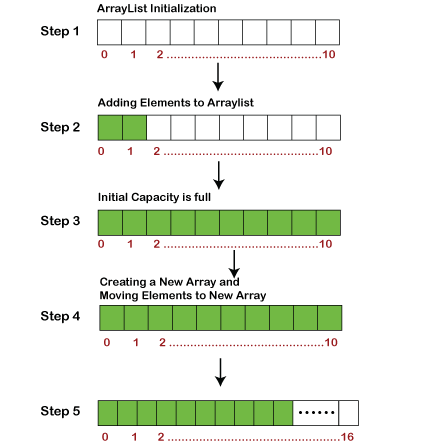
As you saw, ArrayList appears to be a magical, resizable array. But there's no magic—just a clever implementation. Internally, an ArrayList object holds a regular, fixed-size array. Let's call this the backing array.
When you add elements, they are placed into this backing array. The ArrayList keeps track of two things: its size (the number of elements you've actually added) and the backing array's capacity (the total number of slots available in that array).
The critical moment occurs when the size is about to exceed the capacity. When you try to add an element to a full ArrayList, it performs the following steps automatically:
- A new, larger backing array is created in memory. Typically, its capacity is 1.5 times the old capacity.
- All elements from the old array are copied over to the new array.
- The
ArrayListobject discards the old array and points to the new one as its backing array. - Finally, your new element is added to this new, expanded array.
This resizing process is the "dynamic" part of the dynamic array.
Understanding the Operations and Their Time Complexities
Now that we understand the internal mechanics, we can analyze the performance of common operations. This is crucial for interviews.
Access: get(index) and set(index, element)
To get or set an element at a specific index, the ArrayList simply performs an index lookup on its internal backing array. This is a direct memory access operation.
- Time Complexity: (Constant time)
Adding an Element: add(element)
Adding an element to the end of the list is usually very fast. It just places the element at the next available spot (array[size]) and increments the size counter.
- Best Case: If there is still room in the backing array, this is an operation.
- Worst Case: If the backing array is full, the
ArrayListmust perform the resizing operation we discussed (create new array, copy N elements). This takes time, where is the current number of elements.
Because the expensive resize happens only occasionally, we say the add operation has an amortized time complexity of . Over many additions, the total time spent is proportional to the number of additions, so the average cost per addition is constant.
Inserting or Removing in the Middle: add(index, element) and remove(index)
This is where the array-based structure reveals its main drawback.
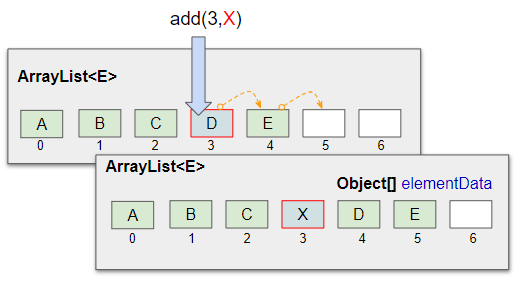
add(index, element): To insert an element at indexi, all elements fromito the end of the list must be shifted one position to the right to make room. In the worst case (inserting at the beginning, index 0), you have to shift all elements.remove(index): Similarly, to remove an element at indexi, all elements fromi+1to the end must be shifted one position to the left to fill the gap.
Because of this element shifting, both insertion and removal in the middle of the list are slow.
- Time Complexity: (Linear time)
Practical Guide and Complexity Summary
Let's solidify this with some reference material. The following article from GeeksforGeeks provides excellent code examples for the basic operations and a clear complexity table.
This article is a great practical reference for using ArrayList. We'll focus on the sections covering its creation, basic operations, and complexity.
First, read the introduction and the section on constructors to see how to create an ArrayList. Note the mention of using wrapper classes (Integer) for primitives (int). Next, review the examples in the Operations section to see the syntax for adding, removing, and updating elements. The most important part is the Complexity table. Study this carefully, as it summarizes the performance we've just discussed. Finally, quickly scan the Methods table to get an idea of the rich functionality available. You don't need to memorize it, but be aware of methods like size(), isEmpty(), and contains().
To connect this back to the Striver material you prefer, the takeUforward article on Java Collections provides a high-level summary that places ArrayList in context.
This article frames ArrayList within the broader Java Collections Framework and offers a concise performance summary.
Read the subsection on Lists to see how ArrayList is defined as being "internally backed by a dynamic array." Then, find the Summary table and focus on the first row for List. The "Performance Notes" column for ArrayList succinctly confirms the complexities: O(1) for get/add-end; O(n) for mid insert/remove.
Conclusion
In this lesson, you've taken your first step into the world of concrete data structures. You've learned not just how to use Java's ArrayList, but also the critical "why" and "how" of its internal implementation. This deeper understanding is what separates a novice programmer from an engineer who can build efficient and scalable systems.
Key Takeaways:
ArrayListis a dynamic array: It provides a flexible, resizable list interface while being built on top of a standard, fixed-size array internally.- Resizing is the key: When the internal array runs out of capacity, a new, larger array is created, and all elements are copied over. This is an operation.
- Performance varies by operation:
- for
get()andset()(random access). - Amortized for adding elements to the end (
add()). - for adding or removing elements from the beginning or middle, due to the need to shift subsequent elements.
- for
This knowledge of time complexities is not just academic; it's essential for choosing the right data structure for a given problem, a skill you will hone throughout this course.
In our next lesson, we will stick with arrays and learn a powerful problem-solving pattern called the two-pointer technique. You will see how to use this simple but effective method to solve a variety of array-based interview questions efficiently.