Hello! In our previous lesson, we compared TCP and UDP, highlighting that while TCP offers reliability, UDP prioritizes speed and is ideal for quick, simple transactions. We noted that the Domain Name System (DNS) is a classic example of a service that leverages UDP for precisely these reasons.
Today, we will dissect that process. Our goal is to describe the DNS resolution process step by step. Understanding how a human-readable domain name like google.com gets translated into a machine-readable IP address is fundamental knowledge for any backend engineer. It's the very first step in nearly every network request and a common topic in technical interviews.
The Internet's Phonebook
At its core, DNS acts as the "phonebook of the Internet." Humans are good at remembering names, while computers communicate using numerical IP addresses (like 142.251.46.238). DNS is the distributed, hierarchical system that bridges this gap.
When you type a domain name into your browser, a process called DNS resolution (or DNS lookup) kicks in to find the corresponding IP address. This isn't a simple, one-step lookup. It involves a chain of queries to several specialized servers.
The Key Players in DNS Resolution
To understand the lookup process, you first need to know the cast of characters involved.
Everything You Need to Know About DNS: Crash Course System Design #4
The video "Everything You Need to Know About DNS" from ByteByteGo provides a quick and clear introduction to the different types of servers in the DNS hierarchy.
Watch the segment from the start of the server-type discussion to understand the roles of the four key players. Pay attention to the hierarchical relationship between them.
As the video explained, the DNS lookup process is a coordinated effort between four types of servers:
-
DNS Recursor (or Resolver): This is the server that receives the initial query from your computer (the client). Think of it as a helpful librarian who is tasked with finding the answer. It's often operated by your Internet Service Provider (ISP) or a public provider like Google (
8.8.8.8) or Cloudflare (1.1.1.1). It does the "heavy lifting" of the lookup process by talking to the other servers. -
Root Name Server: This is the first stop for the recursor. The root servers don't know the IP address for
google.com, but they know who to ask next. They sit at the top of the DNS hierarchy and direct traffic to the correct Top-Level Domain server. There are only 13 logical root server IP addresses in the world, operated by various organizations and scaled globally using a technique called Anycast routing. -
Top-Level Domain (TLD) Name Server: This server manages all the domain information for a specific TLD, such as
.com,.org, or country-specific TLDs like.in. When the recursor asks the.comTLD server aboutgoogle.com, the TLD server doesn't know the final IP address, but it knows the address of the server that does: the authoritative nameserver. -
Authoritative Name Server: This is the final authority, the "source of truth" for a specific domain. It holds the actual DNS records for that domain (e.g.,
google.com) and provides the definitive IP address to the recursor. When you configure DNS records for a domain you own, you are editing them on an authoritative nameserver.
The Step-by-Step DNS Lookup
Now, let's put these pieces together and trace the full journey of a DNS query. Imagine you're trying to visit www.google.com.
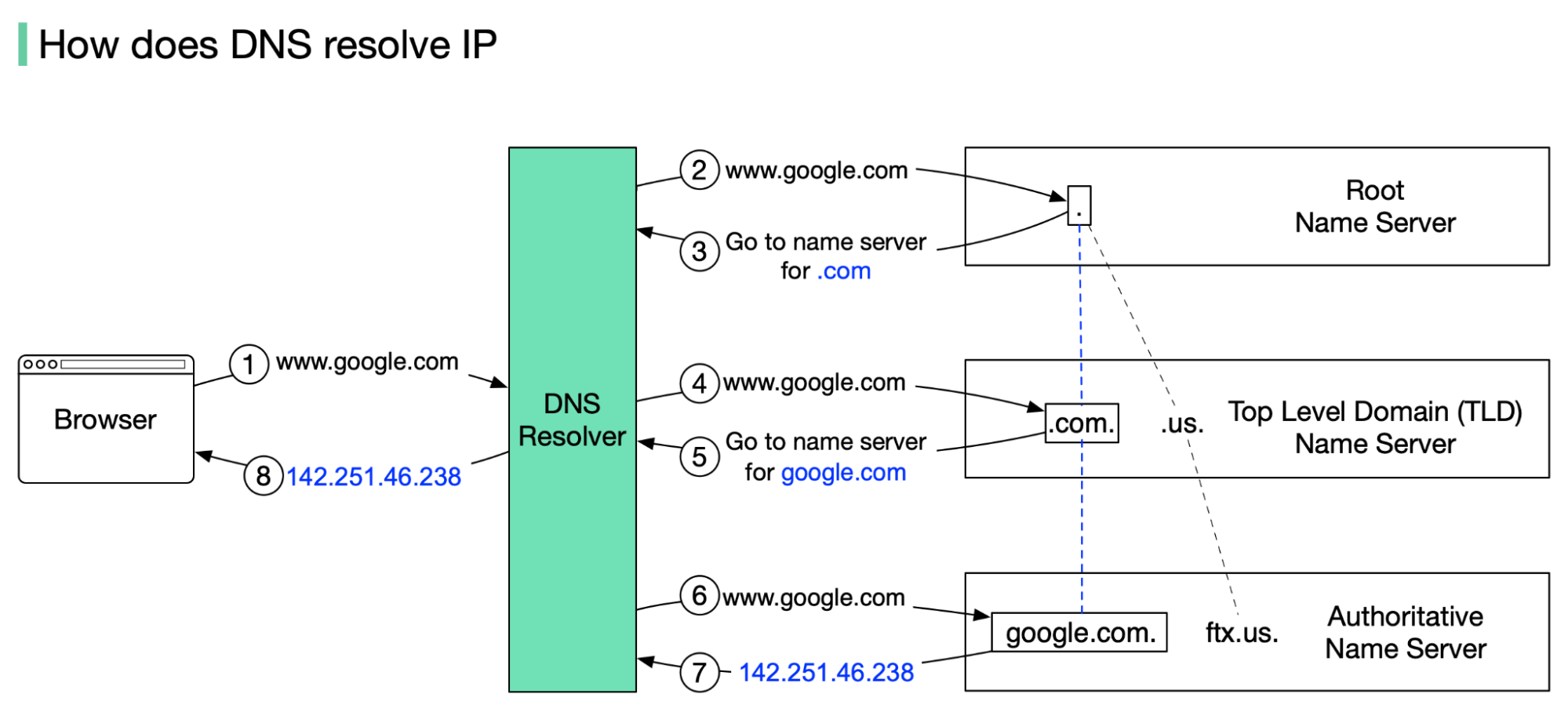
This diagram shows the sequence of requests and responses between the DNS Resolver and the various name servers to resolve a domain name into an IP address.
Here is the step-by-step flow, assuming the answer is not already in a local cache:
-
You type
www.google.cominto your browser. The browser first checks its own cache, then the operating system's cache. If the IP address isn't found, the OS forwards the query to the configured DNS Resolver. -
The DNS Resolver queries a Root Name Server. The resolver asks, "I need the IP for
www.google.com. Where do I start?" The root server doesn't know the answer, but it sees the.comsuffix and replies, "I don't know, but here is the IP address for the TLD name server that handles.comdomains." -
The DNS Resolver queries a
.comTLD Name Server. The resolver now asks the TLD server, "I need the IP forwww.google.com." The TLD server manages all.comdomains. It doesn't have the final IP but replies, "I don't know, but I know who does. Here is the IP address forgoogle.com's authoritative name server." -
The DNS Resolver queries the Authoritative Name Server. Finally, the resolver queries Google's authoritative name server: "What is the IP address for
www.google.com?" -
The Authoritative Name Server responds. This server holds the actual DNS records for the
google.comdomain. It finds theArecord forwwwand responds with the final IP address (e.g.,142.251.46.238). -
The DNS Resolver returns the IP to your browser. The resolver passes the IP address back to your operating system, which gives it to the browser. The resolver also caches this result for a specific duration (defined by the TTL, or Time-To-Live), so it can answer subsequent requests for
www.google.cominstantly without repeating the entire process. -
The browser initiates a connection. With the IP address in hand, your browser can now establish a TCP connection to Google's server and request the webpage content via HTTP/S.
To solidify this process, let's review it with a detailed reading and another video walkthrough.
SDC#24 - How DNS Works? - System Design Codex
The article "How DNS Works?" by Saurabh Dashora provides a great breakdown of the lookup process, including examples of what the queries look like under the hood using the dig command. As someone with a CSE background, you might find this practical detail interesting.
Please read the section titled Steps in a DNS Lookup. Focus on how each step corresponds to querying a different server in the hierarchy we just discussed.
Recursive vs. Iterative Queries
An important detail that interviewers often probe for is the distinction between recursive and iterative queries.
-
A Recursive Query is a request where the client expects a complete answer. The query from your browser/OS to the DNS Resolver is recursive: "Please find the IP for
www.google.comand give it to me. I'll wait." The resolver takes on the full responsibility of finding the answer. -
An Iterative Query is a request where the server provides the best answer it has, which might be a referral to another server. The queries from the Resolver to the Root, TLD, and Authoritative servers are iterative. In each step, the server being asked either provides the final answer or says, "I don't know, but try asking this other server."

This diagram illustrates the two types of queries in a DNS lookup. The single round-trip between the client and the DNS Resolver is a recursive query, while the multiple queries from the resolver to the name servers are iterative.
To get a formal definition of these query types and the role of caching, let's refer back to our reading.
SDC#24 - How DNS Works? - System Design Codex
This article clearly defines the query types and explains the critical role of caching.
First, read the section Types of DNS Queries to understand the formal definitions of recursive, iterative, and non-recursive queries. Then, read the section on DNS Caching to see how caching at multiple levels (browser, OS, resolver) optimizes this process by avoiding unnecessary steps.
The concept of caching and its associated Time-To-Live (TTL) value is a practical concern for backend developers. When you update a DNS record (for example, to point your domain to a new server), the propagation of this change across the internet is governed by the TTL. A lower TTL means the change propagates faster, as resolvers will need to re-fetch the record sooner.
Key Takeaways
- DNS is a hierarchical, distributed system that translates human-readable domain names into machine-readable IP addresses.
- The resolution process involves four main server types: DNS Resolver, Root Name Server, TLD Name Server, and Authoritative Name Server.
- The lookup starts with a recursive query from a client to a resolver. The resolver then makes a series of iterative queries to the root, TLD, and authoritative servers to find the IP address.
- Caching at the browser, OS, and resolver levels is crucial for performance, reducing latency and load on the DNS system by storing results for a duration specified by the TTL.
With this knowledge, you can now confidently describe the journey of a DNS query from start to finish. This process is the first critical step in the lifecycle of almost any request made on the internet.
In our next lesson, we will zoom out and put all the pieces together. We will trace the entire lifecycle of an HTTPS request, starting with the DNS lookup you've just learned about, followed by the TCP handshake, the TLS handshake for security, and finally, the HTTP request and response.