Welcome back! In our last few lessons, we've been building the foundational layers of network communication. We started with the TCP three-way handshake to establish a reliable connection, compared it with the speed-focused UDP, and then detailed the DNS resolution process that translates a domain name into an IP address.
Today, we will synthesize all these pieces into a single, cohesive narrative. Our goal is to trace the lifecycle of an HTTPS request from client to server, including DNS, TCP, and TLS handshakes. Answering the question "what happens when you type google.com into your browser and press Enter?" is a classic in backend engineering interviews. A thorough answer demonstrates a strong command of fundamental networking principles, which is exactly what we'll build today.
The Anatomy of a Web Request
When you ask your browser to fetch a secure webpage, you trigger a multi-stage process that happens in milliseconds. Before a single byte of the webpage's content is sent, your browser and the server perform an intricate dance to find each other, establish a reliable communication channel, and secure it from eavesdroppers.
This journey can be broken down into four main phases:
- DNS Lookup: Finding the server's address.
- TCP Handshake: Establishing a reliable connection to that address.
- TLS Handshake: Securing the connection with encryption.
- HTTP Request & Response: Exchanging the actual data.
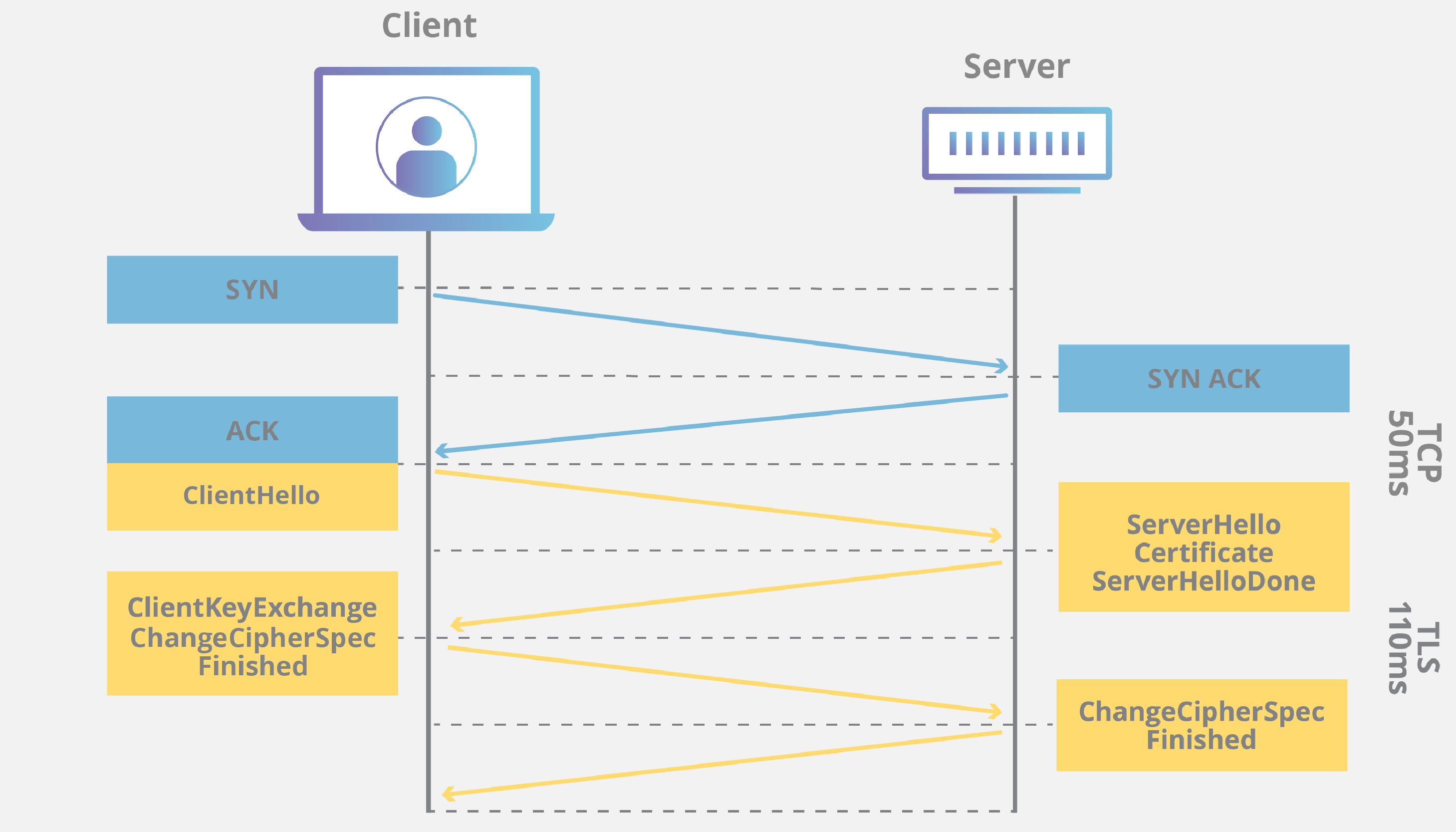
Let's look at a diagram that visualizes the connection establishment part of this flow.
Phase 1: Finding the Server (DNS Lookup)
As we covered in our last lesson, the browser's first task is to translate the human-readable domain name (e.g., www.example.com) into a machine-readable IP address (e.g., 93.184.216.34).
Your computer initiates a DNS query, which, after checking various caches, typically follows a path from a DNS Resolver to the Root, TLD, and finally the Authoritative nameservers to get the definitive IP address.

Without this IP address, no further communication is possible.
Phase 2: Establishing a Connection (TCP Handshake)
With the server's IP address in hand, the client's operating system can now open a connection to it. Since web browsing requires that all data arrives intact and in the correct order, this is done using TCP.
As you'll recall from our lesson on TCP, this involves the three-way handshake:
- SYN: The client sends a
SYN(synchronize) packet to the server to initiate a connection, proposing a starting sequence number. - SYN-ACK: The server responds with a
SYN-ACKpacket, acknowledging the client's sequence number and proposing its own. - ACK: The client sends a final
ACK(acknowledgment) packet, confirming the server's sequence number.
Once the ACK is received, a stable, reliable, two-way communication channel is open. However, at this point, the channel is completely unencrypted. Anyone listening on the network path between you and the server could read all the data in plain text.
Journey of a web page 🛣️ - How browsers work
The article "Journey of a web page" provides a clear, step-by-step walkthrough of this entire process. We'll use it as a guide.
Start by reading the section Establishing a connection to the server. This will serve as a good recap of the TCP handshake's role in this lifecycle.
Phase 3: Securing the Connection (TLS Handshake)
This is where HTTPS (HTTP Secure) gets its "S". To protect the data from being intercepted, the client and server must perform another handshake, this time for the Transport Layer Security (TLS) protocol (the modern successor to SSL).
The goal of the TLS handshake is twofold:
- Authenticate the server: The client needs to verify that the server it's talking to is genuinely who it claims to be (e.g., really
google.comand not an impersonator). - Agree on an encryption key: The client and server must securely negotiate a shared secret key (a symmetric session key) that will be used to encrypt all data for the remainder of the session.
While the specifics can vary, especially with modern versions like TLS 1.3, the general flow involves these key steps:
- Client Hello: The client sends a message indicating the TLS versions and cipher suites (encryption algorithms) it supports, along with a random string of bytes.
- Server Hello & Certificate: The server picks a cipher suite from the client's list, sends back its own random string of bytes, and, crucially, provides its SSL certificate. This certificate contains the server's public key and has been digitally signed by a trusted Certificate Authority (CA).
- Client Verification & Key Exchange:
- The client's browser verifies the server's certificate by checking the signature with the CA's public key (which is pre-installed in the browser). This step authenticates the server.
- The client and server then use a key exchange algorithm (like Diffie-Hellman) to securely compute a shared secret key. They do this by exchanging public key information, allowing both sides to independently arrive at the same secret key without ever sending the key itself over the network.
- Finished: Both client and server exchange a "Finished" message, encrypted with the new session key, to confirm that the handshake was successful.
After this process, all subsequent communication is encrypted using the shared symmetric key.
What happens when you type google.com into your browser and press enter? (Detailed Analysis)
For a really deep and technically rich explanation, the video from Hussein Nasser on this topic is excellent. His breakdown of the TLS 1.3 handshake is particularly relevant for modern systems.
Watch the segment from the beginning of the TLS section. As you watch, focus on understanding the purpose of the ClientHello, the role of the certificate and SNI (Server Name Indication), and how the Diffie-Hellman key exchange allows for the creation of a shared secret.
Phase 4: The Actual HTTP Request
Only after all three preceding phases are complete—DNS resolution, TCP connection, and TLS handshake—can the browser finally send the application-level HTTP request.
The request, such as GET /index.html HTTP/1.1, along with all its headers (like User-Agent, Accept-Language, and any Cookies), is encrypted using the session key and sent over the secure TCP connection.
The server receives the encrypted data, decrypts it using the same session key, and processes the request. It then formulates an HTTP response (e.g., 200 OK with the page's HTML in the body), encrypts that with the session key, and sends it back to the client. The browser decrypts the response and begins parsing the HTML to render the page.
Understanding the Complete HTTP Request-Response Lifecycle
This article frames the entire sequence within a practical scenario and provides realistic timings for each phase, which is great context for an interview setting.
Read through the sections covering the TCP/TLS Handshake, HTTP Request Construction, Server-Side Processing, and HTTP Response Construction. Pay attention to how the author breaks down the total time and attributes it to each step.
Conclusion
You can now trace the complete journey of a single HTTPS request from a browser keystroke to a rendered page. This isn't one monolithic action but a carefully choreographed sequence of protocols.
Key Takeaways:
- Sequential Dependency: The lifecycle follows a strict order: DNS lookup must succeed to get an IP, the TCP handshake uses that IP to build a connection, the TLS handshake secures that connection, and only then is the HTTP request sent.
- Purpose of Each Layer: DNS provides the address, TCP provides the reliable channel, TLS provides the security, and HTTP handles the application data.
- Performance Overhead: Each handshake adds round-trip latency. This is why connection reuse (HTTP Keep-Alive, HTTP/2) is so important for performance, as it avoids repeating these expensive setup steps for every request.
Being able to articulate this process clearly is a powerful way to demonstrate your understanding of how the web fundamentally works.
In our next lesson, we'll dive deeper into what happens inside the server. We will start by looking at the operating system concepts of processes and threads, which are critical for understanding how modern backend applications handle thousands of concurrent requests efficiently.