Hello! Let's continue our journey into React.
In the last lesson, we broke our UI into smaller, reusable pieces by creating our first functional components, Header and Footer. While this organized our code nicely, the components were static—they always rendered the same content.
Today, we'll unlock the true power of components by making them dynamic. We'll learn how to pass data from a parent component to a child component, allowing us to configure and reuse components in different contexts. This lesson focuses on the learning outcome: Pass data from parent to child components using props.
The Core Idea: Props are like Function Arguments
Given your JavaScript background, you know that functions can accept arguments to change their behavior:
function greet(name) {
  return `Hello, ${name}!`;
}

greet("Alice"); // Returns "Hello, Alice!"
greet("Bob");   // Returns "Hello, Bob!"
React props (short for "properties") work on the same principle. They are the arguments you pass to your components to make them dynamic. A React component is a function that returns UI; props are the inputs to that function.
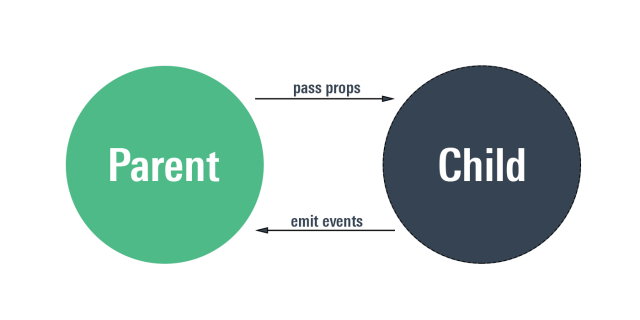
This diagram illustrates the fundamental data flow in React. Data (props) flows down from parent to child, while user interactions (events) flow up. For today, we are focusing entirely on that downward flow of props.
How Props Work: A Two-Step Process
Passing and using props is a straightforward two-step process:
- Pass props to the child: In the parent component's JSX, you add props to the child component's tag, much like you'd add attributes to an HTML tag.
- Read props in the child: The child component receives the props as a single object, which is the first argument to its function.
Let's watch a video that perfectly bridges the gap between plain JavaScript functions and React props.
This video from Sam Meech-Ward starts with a pure JavaScript example of passing arguments to a function before showing how the exact same concept applies to passing props to a React component. It's a great mental model to start with.
Watch from 04:06 to 10:49. Pay attention to: The initial analogy of passing parameters to a regular JavaScript function. How props are passed as key-value pairs in JSX (like HTML attributes). How React bundles these props into a single object that the child component receives.
As you saw, React takes all the attributes you define on your component tag:
<Joke joke="My wife told me to stop acting like a flamingo." rating={4} />
And bundles them into a single object that it passes to your Joke component function:
{
  joke: "My wife told me to stop acting like a flamingo.",
  rating: 4
}
Hands-On: Making Your Header Component Dynamic
Let's apply this to the Header component we created in the last lesson.
1. Pass a Prop from App.jsx
Open src/App.jsx. We'll pass a title prop to our Header component.
// src/App.jsx

import Header from './components/Header';
import Footer from './components/Footer';
import './App.css';

function App() {
  const appTitle = "Welcome to My Dynamic App";

  return (
    <>
      {/* Step 1: Pass the prop here */}
      <Header title={appTitle} />
      <main>
        <p>This is the main content of my application.</p>
      </main>
      <Footer />
    </>
  );
}

export default App;
Notice we're passing the appTitle variable inside curly braces {}. As you learned in the JSX lesson, this is how we embed JavaScript expressions. You could also pass a string literal directly: title="My Title".
2. Read the Prop in Header.jsx
Now, open src/components/Header.jsx. We need to read the title prop and use it. The props are passed as the first argument to our component function. By convention, this object is called props.
// src/components/Header.jsx

const Header = (props) => {
  // props is an object: { title: "Welcome to My Dynamic App" }
  console.log(props); // Add this line to see the props object in your browser's console!

  return (
    <header style={{ backgroundColor: '#f8f9fa', padding: '1rem', textAlign: 'center' }}>
      {/* Step 2: Use the prop here */}
      <h1>{props.title}</h1>
      <p>Learning about props!</p>
    </header>
  );
};

export default Header;
Save both files. Your browser should now display the title "Welcome to My Dynamic App". You've successfully passed data from a parent to a child!
A Cleaner Approach: Prop Destructuring
Writing props.title, props.user, props.theme everywhere can become repetitive. Since you're familiar with ES6 destructuring, you can use it to make your component code cleaner and more readable.
You can destructure the props object right in the function's signature.
This is the most common and recommended way to access props in modern React.
// Instead of this:
// const Header = (props) => {
//   return <h1>{props.title}</h1>;
// };

// You can do this:
const Header = ({ title }) => {
  return <h1>{title}</h1>;
};
This is much cleaner. It extracts the title property from the props object into a title variable directly.
Let's read the official documentation to solidify this concept.
The official React docs provide a concise explanation of the two-step process of passing and reading props, with a clear focus on using destructuring.
Read the sections 'Step 1: Pass props to the child component' and 'Step 2: Read props inside the child component'. Notice how the example immediately uses destructuring ({ person, size }) as the standard way to read props.
Now, refactor your Header.jsx to use destructuring. The functionality will be identical, but the code will be more idiomatic.
Click for the refactored `Header.jsx` code
// src/components/Header.jsx

const Header = ({ title }) => {
  return (
    <header style={{ backgroundColor: '#f8f9fa', padding: '1rem', textAlign: 'center' }}>
      <h1>{title}</h1>
      <p>Learning about props!</p>
    </header>
  );
};

export default Header;
This simple image perfectly visualizes the flow we just implemented.

A Crucial Rule: Props are Read-Only
One of the most important rules in React is that props are immutable. This means a component must never change its own props.
Think of it this way: the parent component owns the data. The child component only borrows it to display it. If the child needs to change the data (for example, in response to a button click), it must ask the parent to do so. We'll learn how to handle this with state and events in a future module.
This article from Robin Wieruch reinforces the concept of props being read-only. It's a short but critical section to read.
Read the short section under the heading 'React Props vs. State'. The key takeaway is: "It's also important to note that React's props are read only (immutable). As a developer, you should never mutate props but only read them in your components."
Attempting to do something like props.title = "A New Title"; inside the Header component will result in an error and goes against React's one-way data flow principle.
Conclusion
Excellent work! You've grasped one of the most fundamental concepts in React. Making components configurable with props is the key to building complex, reusable, and maintainable user interfaces.
Key Takeaways:
- Parent-to-Child Data Flow: Props are used to pass data down the component tree, from a parent to a child.
- Passed as Attributes: You pass props to a component using a syntax that looks like HTML attributes:
<MyComponent propName={value} />. - Received as an Object: A child component receives all its props bundled into a single object as the first argument to its function.
- Destructuring is Best: Using destructuring in the component's function signature (
const MyComponent = ({ propName }) => ...) is the standard, clean way to access props. - Props are Read-Only: A component must never modify its own props. They are immutable.
Next Up:
What happens if a parent component forgets to pass a prop? The child component might receive undefined, which could cause errors. In our next lesson, we will learn how to define default values for props to make our components more robust and prevent these kinds of bugs. We'll also start exploring how to compose components in more flexible ways using the special children prop.