Hello! Welcome to the start of our second module, "React Fundamentals: Components, JSX, and Props."
In our last module, you built a solid foundation in modern JavaScript, culminating in mastering async/await for handling asynchronous operations. You are now fully equipped with the core JavaScript skills needed to dive into React.
Today's lesson addresses the first and most fundamental concept in React: its architecture. Our goal is to explain React's component-based architecture and its benefits. We will explore how React applications are structured by breaking down the user interface into small, independent pieces called "components," and why this approach is so powerful for building modern web applications.
1. What is a Component?
At its heart, React is all about components. A component is an independent, reusable piece of the user interface (UI).
Think about how you write code. Instead of writing one gigantic script, you create functions to handle specific tasks. You can then call these functions wherever you need them. React components apply the same principle to the UI. Instead of building a whole page as one large block of HTML, you build smaller, self-contained UI elements.
Let's watch a short video to see this idea in action.
What Is React (React js) & Why Is It So Popular?
This video from Programming with Mosh gives a great high-level introduction to components. Pay attention to how he defines a component and uses a Twitter-like application to show how a complex UI can be broken down.
Watch the segment from 00:32 to 01:48. Focus on the core ideas: components are independent, isolated, reusable, and can be composed to build complex UIs.
As the video explained, you can look at any web page and start mentally dividing it into components. A navigation bar, a user profile card, a search box, a button—each of these can be a component.
2. The Component Tree
When you build an application by nesting components inside each other, you naturally create a hierarchical structure, or a tree. This is a central concept in React.
Every React application has a single root component (often called App), which represents the entire application. This root component then renders other components, which may in turn render even more components, forming a tree structure.
The official React documentation has an excellent article that explains this.
Understanding Your UI as a Tree
This article from the official React documentation, titled 'Understanding Your UI as a Tree', formalizes the concepts we've just discussed. It introduces the idea of a 'Render Tree'.
Please read the first two main sections of the article: 'Your UI as a tree': This section introduces the core concept. 'The Render Tree': This part explains how React builds a tree from your components. \nYou can stop reading before you reach the section titled 'The Module Dependency Tree,' as we'll focus only on the UI structure for now.
To make this more concrete, let's look at a diagram for a simple "Contacts" application.
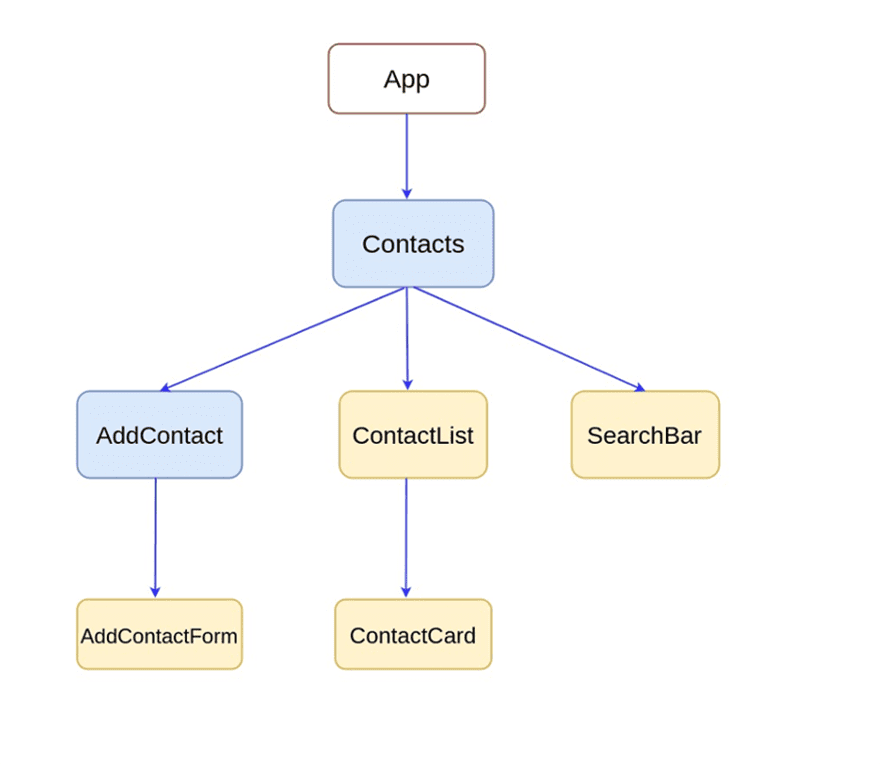
As you can see, the entire application UI is a tree of components. This structure is not just a mental model; it's how React understands and manages your application.
3. The Benefits of Component-Based Architecture
Now that we understand what the architecture is, let's discuss why it's so beneficial. Why go to the trouble of breaking everything down into tiny pieces?
This architectural choice brings several powerful advantages that have made React and similar libraries the standard for modern web development.
Basic React Concepts for Interviews
This article from GreatFrontEnd provides a concise and clear breakdown of the key reasons why component-based architecture is so effective.
Read the section titled 'Components'. Focus on the bulleted list of benefits, such as Reusability, Modularity, and Maintainability.
Let's summarize those key benefits:
- Reusability: This is the most obvious benefit. A
Buttoncomponent can be used dozens of times across your application. If you need to change its style, you only need to edit theButtoncomponent's code once, and the change will apply everywhere. - Modularity & Maintainability: By breaking a complex UI into smaller, independent parts, your codebase becomes much easier to understand, navigate, and debug. If there's a bug in the navigation bar, you know to look in the
NavBarcomponent. This isolation prevents changes in one component from unexpectedly breaking another. - Composition: Components are like building blocks. You can start with simple components (like an
Iconor aLabel) and combine them to create more complex ones (like aButtonWithIcon), which can then be used to build even larger components (like aLoginForm). - Separation of Concerns: Each component manages its own logic, styles, and markup. This encapsulation means you can reason about one piece of the UI without having to hold the entire application's complexity in your head at once.
A Glimpse of Component Code
You're probably wondering what a component actually looks like in code. In modern React, they are typically just JavaScript functions that return something that looks like HTML. This HTML-like syntax is called JSX, which we will cover in detail soon.
ReactJS Tutorial - 4 - Components
Let's watch a brief clip from Codevolution that shows the two historical types of components—functional and class-based. We will be using the modern functional style throughout this course.
Watch the segment from 01:25 to 03:24. Don't worry about memorizing the syntax. The goal is simply to get a feel for how a component is defined in a JavaScript file. Note the distinction between functional components (which we will use) and class components (the older way).
The key takeaway is that a component is just a function that returns the UI for that piece of the application. Simple, yet incredibly powerful.
Conclusion
In this lesson, we've unpacked the core philosophy behind React. You now understand the what, how, and why of its architecture.
Key Takeaways:
- React applications are built using a component-based architecture.
- A component is an independent and reusable piece of the UI, much like a JavaScript function is a reusable piece of logic.
- Components are nested to form a component tree (or "render tree"), with a single root component at the top.
- This architecture provides significant benefits, including reusability, maintainability, modularity, and easier composition of complex UIs.
Next Up:
Understanding the theory is the first step. The next is to put it into practice. In our next lesson, we will get our hands on the keyboard and set up a new React project using Vite. You'll see how the files are organized and where our root component lives, turning these abstract concepts into a tangible project structure.