Hello! Welcome to the final lesson in our module on working with APIs.
In our last session, we created a powerful useFetch custom hook to make our data-fetching logic reusable and clean. We also added a didCancel flag to prevent a common React warning about updating state on an unmounted component. This was a good first step, but it has two limitations:
- It doesn't actually stop the network request; it just ignores the result.
- It doesn't solve a more subtle and dangerous bug known as a race condition.
Today, we'll address both issues. You will learn how to handle API request cancellation in a useEffect cleanup function to prevent race conditions. We will upgrade our useFetch hook to use a modern browser feature called AbortController, which allows us to truly cancel in-flight fetch requests. This will make our hook more efficient and robust.
What is a Race Condition?
Before we dive into the code, it's crucial to understand the problem we're solving. A race condition occurs when you have multiple asynchronous operations, and you can't guarantee the order in which they will complete.
Imagine a user typing quickly into a search bar. A new API request is fired with every keystroke.
- User types "re". A request for "re" is sent.
- Before that request finishes, the user types "react". A request for "react" is sent.
What if the "re" request is slow and the "react" request is fast? The "react" results might arrive first and be displayed. Then, a moment later, the "re" results arrive and overwrite the correct "react" results. The UI now shows data for "re" even though the user's final input was "react". This is a classic race condition.
Handling API request race conditions in React
This article by Sébastien Lorber provides an excellent visual and explanation of this exact problem. It clearly illustrates why assuming the last request will finish last is a dangerous mistake.
Read the sections "Introduction" and "Why this happens?". Focus on the animated GIF example and the list of reasons why network requests can resolve out of order.
To see a live demonstration of this bug, the following video presents a clear and simple case.
Be Cautious of React.useEffect Race Condition Bugs | JavaScript
This video from Joel Codes demonstrates a race condition using a simple component that fetches data for different Star Wars characters. Notice how clicking the buttons in a specific sequence leads to an inconsistent UI state.
Watch from the beginning to 02:09. Pay close attention to the bug demonstrated around 01:55, where the UI shows that ID '1' corresponds to 'C-3PO', which is incorrect.
The Solution: Cancelling Stale Requests
To prevent race conditions, we need to ensure that only the result from the most recently sent request can update our state. Any previously sent, still-pending requests should be invalidated.
There are two main strategies for this, both using the useEffect cleanup function:
- Ignore the response: We can use a boolean flag. When the effect re-runs, the cleanup function from the previous effect sets its flag to
true, telling its pending request to be ignored when it finally resolves. This is similar to thedidCancelflag we saw previously. - Cancel the request: A more efficient approach is to cancel the network request itself. This not only prevents the state update but also saves the user's bandwidth and reduces load on the server.
We will focus on the second, more robust approach using the AbortController API.
Upgrading useFetch with AbortController
AbortController is a browser API designed to signal abortion to one or more asynchronous operations, including fetch requests. Here's how it works:
- You create an
AbortControllerinstance. - You pass its
signalproperty to yourfetchcall's options. This links the request to the controller. - You call the controller's
abort()method when you want to cancel the request.
The perfect place to call abort() is inside the useEffect cleanup function. When our useFetch hook's dependency (the url) changes, a new effect runs. But before it does, React runs the cleanup function from the previous effect, which will abort the previous, now-stale fetch request.
The following video from Net Ninja provides a step-by-step guide to integrating this into the very useFetch hook we've been working with.
Full React Tutorial #24 - useEffect Cleanup
Let's walk through the implementation. This video explains the problem of updating an unmounted component and then introduces AbortController as the solution. It's the same problem as our race condition, just viewed from a slightly different angle.
Watch from the beginning to 02:34. This will recap the problem and show you how to structure the useEffect cleanup function.
Now, let's see how to wire up the AbortController.
Full React Tutorial #24 - useEffect Cleanup
The next part of the video shows how to create the AbortController, associate its signal with the fetch request, and call the abort() method in the cleanup function.
Watch from 02:34 to 04:08. Pay close attention to how the signal is passed as a second argument to fetch and how abortCont.abort() is called in the returned cleanup function.
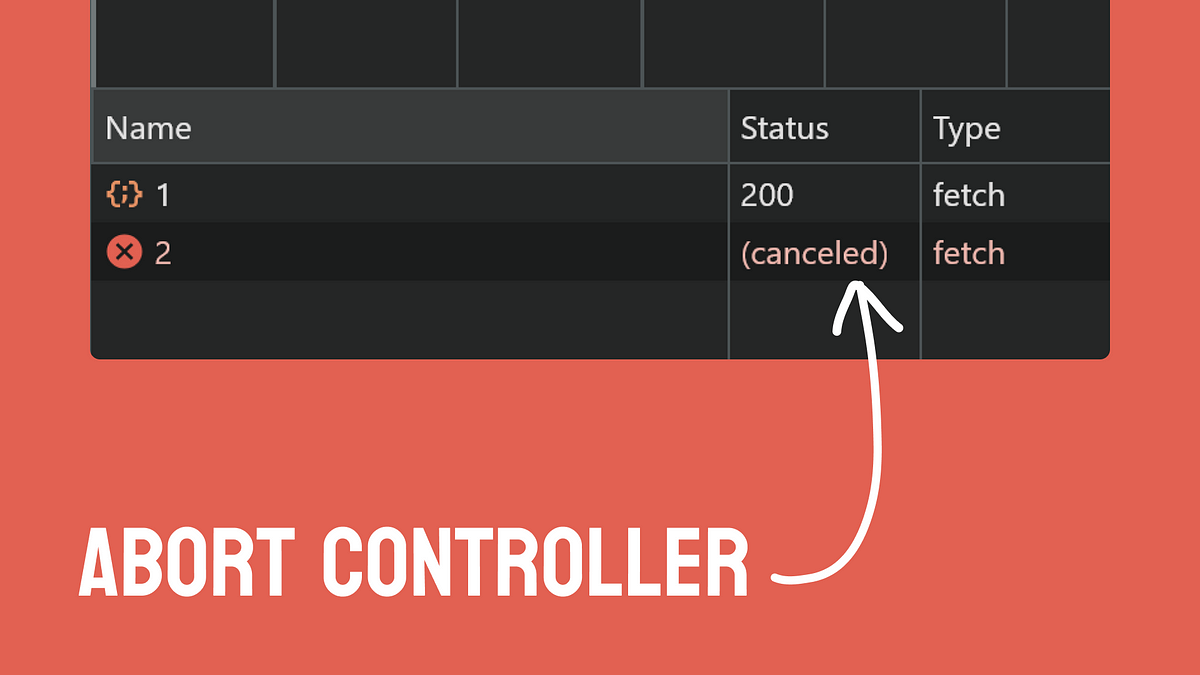
When you abort a fetch request, you can see its status change to (canceled) in your browser's developer tools.
Handling the AbortError
There's one last, critical piece of the puzzle. When you call abort(), the fetch promise doesn't just go away quietly. It rejects with a special type of error called an AbortError.
This means the catch block in our useFetch hook will be triggered. If we're not careful, our hook will think a real error occurred and set the error state, which is not what we want. We need to specifically check for this error and ignore it.
Full React Tutorial #24 - useEffect Cleanup
This final clip shows how to handle the AbortError so that it doesn't incorrectly trigger our error state logic.
Watch from 04:08 to the end. The key is the if (error.name === 'AbortError') check. This allows us to differentiate between an intentional cancellation and a genuine network or server error.
The Final useFetch Hook
Let's put it all together. Here is our robust, production-ready useFetch hook that handles loading states, errors, and race conditions via request cancellation.
import { useState, useEffect } from 'react';

const useFetch = (url) => {
  const [data, setData] = useState(null);
  const [isLoading, setIsLoading] = useState(true);
  const [error, setError] = useState(null);

  useEffect(() => {
    // Create an AbortController for each fetch request
    const abortCont = new AbortController();

    // The fetch logic is wrapped in a timeout to simulate network delay,
    // making race conditions easier to observe. In a real app,
    // you would just have the fetch call.
    setTimeout(() => {
      fetch(url, { signal: abortCont.signal }) // Pass the signal to fetch
        .then(res => {
          if (!res.ok) {
            throw Error('Could not fetch the data for that resource');
          }
          return res.json();
        })
        .then(data => {
          setIsLoading(false);
          setData(data);
          setError(null);
        })
        .catch(err => {
          // Check if the error was because of the abort
          if (err.name === 'AbortError') {
            console.log('Fetch aborted');
          } else {
            // A real network/server error occurred
            setIsLoading(false);
            setError(err.message);
          }
        });
    }, 1000);

    // The cleanup function. This runs when the component unmounts
    // OR when the effect re-runs due to a dependency change.
    return () => abortCont.abort();

  }, [url]); // Re-run the effect if the URL changes

  return { data, isLoading, error };
};

export default useFetch;
For another excellent explanation of this entire pattern, you can review the following article.
Fixing Race Conditions in React with useEffect
This article by Max Rozen provides a concise summary of fixing race conditions, comparing the boolean flag approach with the AbortController approach.
Read the introductory section "Fixing the useEffect race condition" and then the section "useEffect Clean-up Function with AbortController". This will reinforce the concepts you just learned and provide another clear code example.
Conclusion
You have now mastered a critical pattern for working with APIs in React. By canceling stale requests, you not only prevent subtle UI bugs like race conditions but also make your application more efficient by avoiding unnecessary network traffic.
Key Takeaways:
- Race conditions occur when asynchronous operations complete in an unexpected order, leading to inconsistent UI.
- The
useEffectcleanup function is the key to preventing race conditions, as it allows you to invalidate previous, stale requests. - The
AbortControllerAPI is the modern and most efficient way to cancelfetchrequests. - You create an
AbortControllerinsideuseEffect, pass itssignaltofetch, and callabort()in the cleanup function. - Aborting a fetch rejects the promise with an
AbortError, which you must specifically catch and handle to avoid incorrectly setting an error state.
Next Up:
We have spent the last several lessons diving deep into a very specific and important side effect: fetching data from an API. In our next module, we will broaden our perspective. We will formally define what side effects are in React, explore other common examples (like timers or manual DOM manipulation), and gain a deeper understanding of how the useEffect hook relates to the component lifecycle phases of mounting, updating, and unmounting.