Hello! Welcome to the fourth lesson in our "JavaScript Essentials for React" module.
In our last lesson, we focused on the spread operator (...) and its crucial role in practicing immutability—creating new arrays and objects instead of changing existing ones. Today, we'll learn the primary tools for creating those new, transformed arrays: the powerful and expressive array methods map, filter, find, and reduce.
Your goal for this lesson is to learn how to apply these methods to transform data. Mastering them is essential for building dynamic React applications, as you will use them constantly to render lists of components, filter data based on user input, and reshape data from APIs before displaying it.
1. A New Way of Thinking: Declarative Data Transformation
Before we dive in, let's look at the big picture. Traditionally, you might use a for loop to iterate over an array and produce a result. This is an imperative approach—you tell the computer how to do something step-by-step.
Array methods like map and filter allow for a declarative approach. You describe what you want the result to be, and the method handles the looping and details for you. This leads to code that is often more readable, concise, and less error-prone.
Let's start with a simple visual that beautifully illustrates the core purpose of three of these methods.
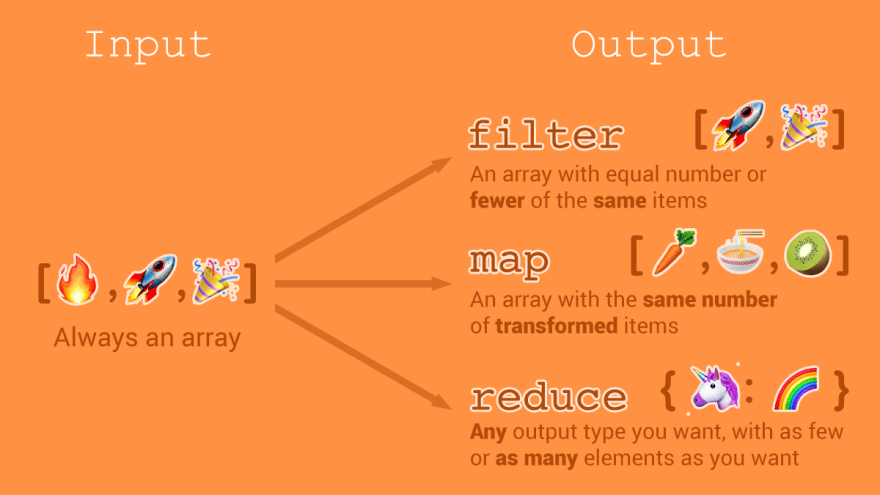
2. map(): Transforming Every Item in an Array
The .map() method is arguably the most common array method you'll use in React. Its job is to create a new array by calling a function on every element of the original array and collecting the results.
Key characteristics of map:
- It always returns a new array.
- The new array will always have the same length as the original array.
- It does not modify the original array.
Let's watch a detailed explanation of how map works and the different ways you can write the function it requires.
map, filter & reduce 🙏 Namaste JavaScript Ep. 19 🔥
This video from Akshay Saini's 'Namaste JavaScript' series provides a fantastic, in-depth look at map. It starts by explaining the core concept of transformation and shows different function syntaxes.
Watch from 00:41 to 06:36. Pay attention to how a simple array of numbers is transformed. While the video shows multiple syntaxes, the final arrow function example is the style you'll see most often in modern codebases.
In a React application, you won't just be transforming numbers. You'll typically be transforming an array of data objects into an array of JSX elements to be rendered on the screen.
Here's a preview of what that looks like:
const users = [
  { id: 1, name: 'Alice' },
  { id: 2, name: 'Bob' },
  { id: 3, name: 'Charlie' }
];

// Using .map() to create a list of JSX elements
const userListItems = users.map(user => {
  return <li key={user.id}>{user.name}</li>;
});

// `userListItems` is now an array of list item components:
// [ <li key={1}>Alice</li>, <li key={2}>Bob</li>, <li key={3}>Charlie</li> ]
We'll cover JSX and keys in detail later, but for now, focus on the pattern: an array of data is mapped to an array of UI elements.
3. filter(): Selecting a Subset of an Array
The .filter() method creates a new array containing only the elements from the original array that pass a certain test. The test is a function you provide that must return either true (to keep the element) or false (to discard it).
Key characteristics of filter:
- It returns a new array.
- The new array's length will be less than or equal to the original array's length.
- It does not modify the original array.
Let's continue with the "Namaste JavaScript" video to see filter in action.
map, filter & reduce 🙏 Namaste JavaScript Ep. 19 🔥
This next segment explains the filter method. Notice the similarity in syntax to map, but the difference in purpose: map transforms, while filter selects.
Watch from 06:36 to 11:10. The video demonstrates filtering for odd numbers, even numbers, and numbers greater than a certain value. This illustrates the core idea of using a condition to create a subset.
In a React UI, you might use filter to implement a search feature or to show items that match a certain category.
const products = [
  { name: 'Laptop', category: 'Electronics', price: 1200 },
  { name: 'T-shirt', category: 'Apparel', price: 25 },
  { name: 'Headphones', category: 'Electronics', price: 150 }
];

const electronics = products.filter(product => product.category === 'Electronics');

// `electronics` is a new array:
// [ { name: 'Laptop', ... }, { name: 'Headphones', ... } ]
4. find(): Getting the First Matching Item
Sometimes you don't need an array of all matching items; you just need the first one that matches your criteria. For this, we use .find().
Key characteristics of find:
- It returns the first element in the array that satisfies the provided testing function.
- If no values satisfy the testing function,
undefinedis returned. - It is different from
filter, which always returns an array (even if it's empty).
This next video gives a quick, clear explanation.
8 Must Know JavaScript Array Methods
This video from Web Dev Simplified gives a concise overview of the find method.
Watch from 02:53 to 03:45. The key takeaway is that find stops searching and returns as soon as it finds a match.
This is useful for tasks like retrieving a specific item from a list to display its details.
const posts = [
  { id: 101, title: 'Intro to React' },
  { id: 102, title: 'State Management' },
  { id: 103, title: 'Styling in React' }
];

const postIdToFind = 102;
const foundPost = posts.find(post => post.id === postIdToFind);

// `foundPost` is the single object:
// { id: 102, title: 'State Management' }
5. reduce(): The Powerhouse of Aggregation
The .reduce() method is the most versatile of the bunch. It executes a "reducer" function on each element of the array, resulting in a single output value. That "single value" can be anything: a number, a string, an object, or even another array.
The reducer function takes two main arguments:
- Accumulator: The value resulting from the previous iteration. On the first call, it's the
initialValueyou provide. - Current Value: The current element being processed in the array.
reduce also takes a second argument: the initialValue for the accumulator.
Let's watch how reduce can be used, starting with a simple sum and moving to a more complex, real-world example.
map, filter & reduce 🙏 Namaste JavaScript Ep. 19 🔥
The first video segment breaks down the reduce method by first showing how you'd calculate a sum with a traditional for loop, then refactoring it to use reduce. This comparison makes the accumulator concept much clearer.
Watch from 11:10 to 18:47. Focus on how the sum variable in the loop corresponds to the accumulator in reduce, and how the 0 initial value is passed.
Now for a more advanced use case that is very common in data processing: reducing an array to an object to group or count items.
map, filter & reduce 🙏 Namaste JavaScript Ep. 19 🔥
This second video shows a brilliant real-world example: counting how many users have a particular age. This demonstrates how reduce can build up an object from an array of data.
Watch from 25:46 to 31:54. The initial value here is an empty object {}. Notice the logic: if a key for the age doesn't exist on the accumulator object, create it; otherwise, increment its value.
6. Chaining Methods for Complex Transformations
The true power of these methods shines when you chain them together. Since .filter() and .map() both return new arrays, you can immediately call another array method on the result. This allows you to perform multi-step transformations in a single, readable statement.
map, filter & reduce 🙏 Namaste JavaScript Ep. 19 🔥
This final clip demonstrates chaining by solving a practical problem: find the first names of all people younger than 30.
Watch from 31:54 to 35:29. The solution chains .filter() first to select the right users, and then .map() on that result to extract their first names. This is a very common and powerful pattern.
Here's the pattern in code:
const users = [
  { name: 'Akshay', age: 26 },
  { name: 'Donald', age: 75 },
  { name: 'Elon', age: 50 },
  { name: 'Deepika', age: 26 }
];

const youngUserNames = users
  .filter(user => user.age < 30) // Returns an array with Akshay and Deepika
  .map(user => user.name);        // Maps over that new array

// `youngUserNames` is now ['Akshay', 'Deepika']
Conclusion
Great job! You've just covered some of the most fundamental functions in modern JavaScript development. They allow you to manipulate data declaratively and immutably, which are core principles of writing clean React code.
Key Takeaways:
map(): Transforms each element into something new. Returns a new array of the same length.filter(): Selects elements that meet a condition. Returns a new array that can be shorter.find(): Gets the first element that meets a condition. Returns a single item orundefined.reduce(): Aggregates an entire array into a single value (of any type: number, string, object, etc.).- These methods are chainable, allowing for powerful and readable multi-step data transformations.
For a quick written reference, the article "Exploring Map, Reduce, and Filter in JavaScript" from GeeksforGeeks is an excellent resource to bookmark.
Next Up:
In the next lesson, we will shift gears to handle asynchronous operations. We'll explore Promises, the foundation of how JavaScript manages tasks like fetching data from a server without freezing the user interface. This is essential for building any real-world React application that interacts with APIs.