Hello! Welcome to the third lesson in our "JavaScript Essentials for React" module.
In our last lesson, we explored destructuring and saw how the ... syntax can be used as a rest operator to gather multiple elements into a single array or object. Today, we're going to look at the other side of that coin. The same ... syntax can be used as a spread operator, but its function is the exact opposite: to expand an array's elements or an object's properties.
Your goal for this lesson is to master the spread operator for copying and merging arrays and objects. This is one of the most frequently used ES6 features in modern React. It is the key to managing application data in a predictable way, a concept known as immutability, which is fundamental to how React updates the user interface.
1. The Spread Operator: Unpacking Iterables
The spread operator ... takes an iterable (like an array) or an object and "spreads" its individual elements or properties into another data structure or a function call.
Think of it like this:
- The rest operator collects many items into one.
- The spread operator expands one collection into many items.
Let's start with a video that introduces the concept and its main uses.
JS Spread Operator: How It Works & Why I Love It
This video from Colt Steele provides an excellent overview of the spread operator. We'll start with the introduction to get a feel for what it does.
Watch the first 1 minute and 46 seconds of the video. The presenter will introduce the ... syntax and outline the three main places it's used: function calls, array literals, and object literals. We'll focus on the last two.
2. Using Spread with Arrays
The most common use cases for the spread operator with arrays are copying and merging them. This is far more elegant than older methods like slice() or concat().
Copying and Merging Arrays
Let's see how this works in practice. Pay close attention to how spread allows you to create a new array from an existing one, which is a critical concept.
JS Spread Operator: How It Works & Why I Love It
Continuing with the same video, this segment demonstrates how to use the spread operator to create copies of arrays and combine multiple arrays into one.
Watch from 05:21 to 09:26. Focus on: The syntax for combining two or more arrays into a new one. How to create a true copy of an array, and why this is different from assigning an array to a new variable (const arr2 = arr1). The note about 'shallow copy': we will explore this more later.
Let's review the key patterns:
Copying an array:
This creates a new array with the same elements. Changes to the new array won't affect the original.
const originalFruits = ['apple', 'banana'];
const newFruits = [...originalFruits];

newFruits.push('orange');

console.log(originalFruits); // -> ['apple', 'banana'] (unaffected)
console.log(newFruits);      // -> ['apple', 'banana', 'orange']
Merging (concatenating) arrays:
You can combine multiple arrays and even add individual elements in one go.
const veggies = ['carrot', 'broccoli'];
const meats = ['chicken', 'beef'];

const groceryList = [...veggies, 'rice', ...meats];

console.log(groceryList);
// -> ['carrot', 'broccoli', 'rice', 'chicken', 'beef']
3. Using Spread with Objects
The spread operator is just as useful for objects. It allows you to copy, merge, and update object properties seamlessly.
Copying and Merging Objects
The principles are the same as with arrays: you can create a new object by spreading the properties of existing ones.
JS Spread Operator: How It Works & Why I Love It
This short clip from the same video demonstrates using spread with object literals.
Watch from 09:26 to 10:48. Notice how the properties from existing objects are 'poured' into the new object.
Let's look at the patterns:
Copying an object:
const user = { name: 'Alex', city: 'New York' };
const userCopy = { ...user };

console.log(userCopy); // -> { name: 'Alex', city: 'New York' }
Merging objects and overriding properties:
When you merge objects that have the same property key, the property from the last object in the sequence wins.
const defaults = { theme: 'light', notifications: true };
const userSettings = { notifications: false, timezone: 'GMT' };

// userSettings properties will overwrite defaults where they conflict
const finalSettings = { ...defaults, ...userSettings };

console.log(finalSettings);
// -> { theme: 'light', notifications: false, timezone: 'GMT' }
Adding or updating properties:
This is a very common pattern for updating data in React.
const book = { title: '1984', author: 'George Orwell' };

// Create a new object with an added 'published' property
const withYear = { ...book, published: 1949 };

// Create a new object with an updated 'title'
const updatedTitle = { ...book, title: 'Nineteen Eighty-Four' };
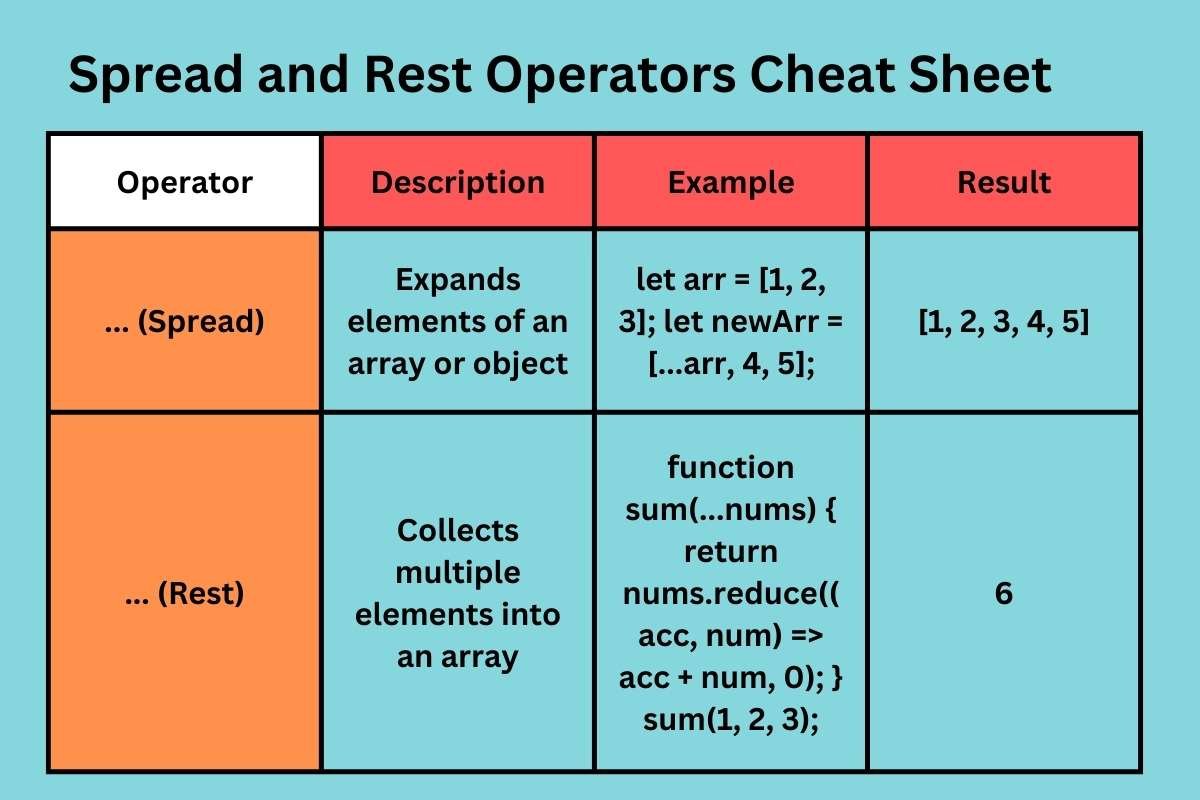
4. Spread vs. Rest: Clearing the Confusion
Since they both use ..., it's easy to confuse the spread and rest operators. The key difference is the context in which they are used.
- Rest Operator: Gathers remaining items. It's used in destructuring assignments or as the last item in a function's parameter list. It creates an array from a list of items.
- Spread Operator: Expands an iterable's items. It's used inside array literals
[], object literals{}, or in function calls. It unpacks items from an existing collection.
5. Why This Matters for React: The Principle of Immutability
Now for the most important part: why is the spread operator so crucial for your goal of learning React?
React's rendering process is triggered when its state changes. To efficiently detect changes, React relies on a simple comparison: has the reference to the state object or array changed?
If you modify an array or object directly (a "mutation"), its reference in memory stays the same, and React might not "see" the change, failing to update the UI.
The solution is immutability: never change existing data. Instead, use the spread operator to create a new array or object with the updated values. This new data structure has a new reference, which React can easily detect.
Let's watch the final segment of the video, where the presenter connects this exact idea to React.
JS Spread Operator: How It Works & Why I Love It
This final clip explains the concept of immutability and demonstrates why creating copies with the spread operator is the preferred way to handle data updates in frameworks like React.
Watch from 11:11 to the end of the video. The core idea is that instead of mutating (changing) the original data, we create a new version of it with our updates included. This is the foundation of state management in React.
To see this applied in code that looks more like what you'll write in React, take a look at the following examples from an article by CoreUI.
Mastering the Spread Operator (`...`) in React.js
This article, 'Mastering the Spread Operator (...) in React.js', provides practical examples of how spread is used to manage state.
Please read the sections 'Merging State in React Components' and 'Copying and Updating Arrays'. Notice how in both examples, a set... function is called with a new object or array created using the spread syntax. This is the standard pattern for updating state.
Conclusion
Excellent work! You've just learned one of the most powerful and practical features of modern JavaScript. Understanding how and why to use the spread operator is a huge step toward writing clean, professional React code.
Key Takeaways:
- The spread operator
...expands the elements of an array or the properties of an object. - It is used to easily copy and merge arrays and objects.
- When merging objects, properties from later objects in the sequence will overwrite earlier ones.
- Its primary role in React is to facilitate immutability: creating new copies of state with updates, rather than modifying the original state directly. This ensures React can efficiently detect changes and re-render the UI.
Next Up:
In our next lesson, we'll dive into essential array methods like .map(), .filter(), and .reduce(). These methods, often used together with the spread operator, are the primary tools you'll use to transform data and render dynamic lists of elements in your React applications.