Hello! Welcome to the first lesson in our module on Applying AI Builder Models.
In our last module, we explored how to build, deploy, and monitor conversational AI using Microsoft Copilot Studio. We saw how copilots can handle user interactions through natural language. Now, we're shifting our focus to a different but equally powerful set of AI capabilities within the Power Platform: AI Builder.
While Copilot Studio is about conversations, AI Builder provides a suite of trainable AI models designed to automate processes and extract insights from various types of business data. This lesson is foundational for the entire module. Your goal is to learn how to select the appropriate AI Builder model type for a given business problem. This involves understanding the available models and, more importantly, developing a framework for mapping a business need to the right AI tool.
For a solution architect or developer, choosing the correct tool is the most critical first step. Selecting the wrong model can lead to wasted effort and a solution that fails to meet requirements. This lesson will equip you to make that initial choice correctly, setting you up for success in building intelligent Power Platform solutions.
1. Introduction to AI Builder
AI Builder is a Microsoft Power Platform capability that allows you to add intelligence to your business applications and flows with a low-code interface. It democratizes AI by providing a set of pre-trained models for common tasks and allowing you to build, train, and publish your own custom models without needing deep data science expertise.
You can think of AI Builder models in two main categories:
- Prebuilt Models: These are ready-to-use models for common business scenarios like scanning business cards, processing receipts, or analyzing text sentiment. They are analogous to using a well-defined library or API in C#—you provide the input, and you get a structured output without worrying about the internal implementation.
- Custom Models: These are models that you train with your own data. This is necessary when your business problem is unique, such as processing a custom-designed form, identifying company-specific products in images, or predicting outcomes based on your historical business data. This is conceptually similar to training your own machine learning model, but with the heavy lifting of framework selection and infrastructure management handled by the platform.
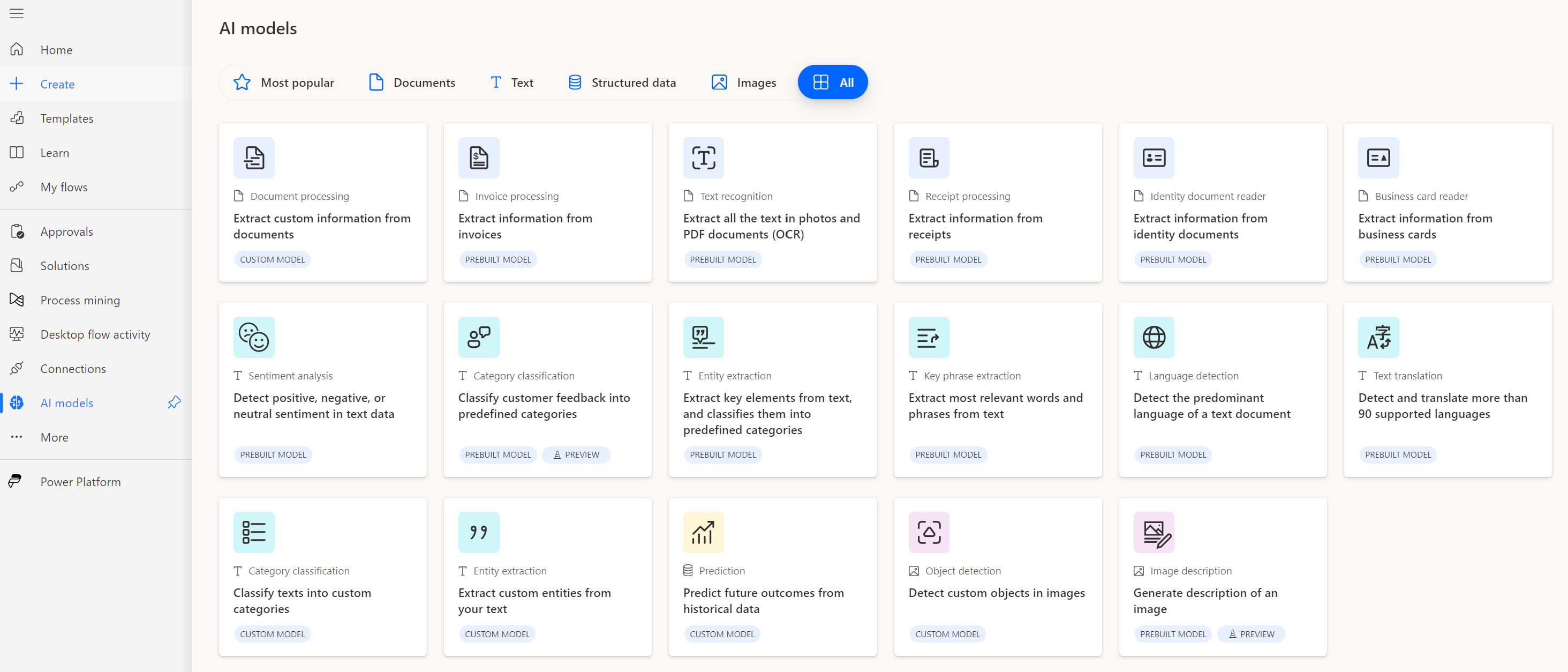
Navigating the available models is your first task. Let's see what the landscape looks like.
2. A Tour of AI Builder Model Types
The best way to start selecting models is to understand what's available. The official Microsoft documentation provides an excellent overview.
AI models and business scenarios - AI Builder
This Microsoft Learn article, 'AI models and business scenarios', provides a comprehensive catalog of the AI Builder models. It's the definitive guide to what's possible.
Please read the introduction and the 'Model types' section, paying close attention to the table that lists all the models. Focus on how the models are grouped by the Data type they handle: Documents, Text, Structured data, and Images. Note the Build type (Custom or Prebuilt) for each.
As you've just read, the models are organized logically based on the type of data they operate on. Let's briefly summarize the key capabilities in each category:
-
Documents: This category is focused on extracting information from files like PDFs and images.
- Document processing (Custom): The workhorse for extracting data from structured or semi-structured documents like invoices, purchase orders, or proprietary forms. You train it by showing it examples of your documents.
- Prebuilt Models: For common scenarios like
Invoice processing,Receipt processing,Business card reader, andID reader. Always check if a prebuilt model meets your needs before building a custom one.
-
Text: These models understand and process natural language.
- Category classification (Custom/Prebuilt): Assigns predefined tags or categories to text. Perfect for routing support tickets or classifying customer feedback.
- Entity extraction (Custom/Prebuilt): Pulls out specific pieces of information from a block of text, like names, dates, amounts, or custom-defined entities (e.g., policy numbers, product codes).
- Other Prebuilt Models:
Sentiment analysis,Key phrase extraction,Language detection, andText translationprovide powerful, ready-to-use text analytics. - Text generation (Prebuilt): This uses GPT to perform tasks like summarizing text, drafting replies, or extracting information in a conversational way.
-
Structured Data: This is for classic machine learning on tabular data, like you would find in a Dataverse table or SQL database.
- Prediction (Custom): Predicts a binary (yes/no) outcome based on historical data. For example, "Will this customer churn?" or "Is this transaction likely fraudulent?". This is a powerful tool for proactive business decisions.
-
Images: These models analyze the content of images.
- Object detection (Custom): Identify, locate, and count specific items within an image. You could use this to count products on a shelf or identify damaged parts in a photo.
- Text recognition (Prebuilt): A straightforward Optical Character Recognition (OCR) model to extract printed or handwritten text from images.
3. The Decision Framework: Choosing the Right AI Tool
Knowing the models is one thing; choosing the right one for a specific business need is another. Furthermore, you need to know when AI Builder is the right tool versus when to use a different technology, like a generative AI model (GPT) or a full-scale Azure Machine Learning solution.
Let's start with a resource that excellently contrasts AI Builder with Generative AI. Given your background, understanding this strategic distinction is key.
AI in Power Automate: An Overview | OfficePro Consulting
This article from OfficePro Consulting, 'AI in Power Automate: An Overview', offers a practical perspective on when to use AI Builder versus when to use GPT-based generative AI.
Read the sections 'AI Builder: Structured AI for reliable business automation', 'Generative AI and GPT in Power Automate', and especially 'AI Builder vs GPT: Choosing the right tool inside a flow'. Focus on the comparison table which clearly outlines the strengths and weaknesses of each.
The key takeaway is that AI Builder excels at producing reliable, structured, and auditable outputs. It's designed for predictable automation. In contrast, GPT-based models excel at understanding and generating unstructured language, but their outputs are probabilistic and less suited for driving critical, deterministic business logic.
With that distinction in mind, here is a simple framework for selecting the right AI Builder model:
- Define the Business Problem: Clearly state what you want to achieve. Use the business scenarios from the Microsoft Learn article as a guide.
- Identify the Input Data: What data will the model process? Is it a PDF invoice, a customer email, a row in a Dataverse table, or a photo from a phone? This immediately points you to one of the four main categories (Documents, Text, Structured Data, Images).
- Check for a Prebuilt Solution: For your data type and problem, is there a prebuilt model available? (e.g., processing a standard receipt). If a prebuilt model fits, it is almost always the fastest and most cost-effective option.
- Evaluate the Need for a Custom Model: If no prebuilt model exists, or if your data is unique to your business (e.g., custom inspection forms, company-specific terminology), you will need a custom model.
- Confirm AI Builder is the Right Platform: For most in-platform automation, AI Builder is perfect. However, if you need to train a complex neural network with terabytes of data or require an extremely high-throughput, low-latency API for an external application, you might consider a dedicated Azure Cognitive Service or Azure Machine Learning model. For your PL-400 goals, we'll focus on scenarios where AI Builder is the intended solution.
Applying the Framework: Examples
Let's walk through a few scenarios:
-
Scenario A: Automating Expense Reports
- Problem: Employees submit photos of receipts, and an admin manually enters the vendor, date, and total into the finance system. The goal is to automate this data entry.
- Data: Images of receipts. This points to the Documents category.
- Prebuilt? Yes, there is a prebuilt Receipt processing model designed for exactly this.
- Conclusion: Use the prebuilt Receipt processing model in a Power Automate flow.
-
Scenario B: Predicting Customer Churn
- Problem: A subscription-based service wants to proactively identify customers who are at high risk of cancelling their subscription in the next quarter.
- Data: Historical customer data in Dataverse, including subscription start date, usage logs, support ticket history, and payment status. This is Structured Data.
- Prebuilt? No, there's no prebuilt model for predicting churn for your specific business.
- Custom? Yes. The problem is a yes/no question ("Will they churn?") based on historical data. This is a perfect fit for a custom Prediction model.

- Scenario C: Triaging Incoming Support Requests
- Problem: Support requests arriving via email need to be automatically routed to the correct support queue (e.g., "Technical Issue," "Billing Inquiry," "Feature Request").
- Data: The body of an email. This is Text.
- Prebuilt? There is a prebuilt category classification model, but the categories ("Technical Issue," "Billing Inquiry") are specific to your business.
- Custom? Yes. You will need to train a custom Category classification model using examples of emails you have already categorized.
Test your understanding!
For each of the following business problems, which AI Builder model type would you choose and why? Is it custom or prebuilt?
- A construction company wants to automate its weekly site safety inspections. Inspectors fill out a standardized, multi-page paper form. The goal is to digitize this form data into Dataverse.
- A global marketing team wants to monitor social media mentions of their new product and get a daily summary of the overall public feeling (positive, negative, or neutral).
- A manufacturing firm wants to perform quality control by having an app that can identify and count different types of defects (e.g., "scratch," "dent") on a metal sheet from a photo taken by a line worker.
Show answer
-
Model: Custom Document processing.
- Why: The input is a document (the paper form). Since the form's layout is specific to the company, a prebuilt model won't work. You need to train a custom model on examples of the safety inspection form to teach it where to find each field.
-
Model: Prebuilt Sentiment analysis.
- Why: The input is text (social media mentions), and the goal is to determine the emotional tone. This is a classic, universal NLP problem, making the prebuilt model ideal. It's ready to use without any training. You might also use the prebuilt Key phrase extraction model to identify what people are talking about in those mentions.
-
Model: Custom Object detection.
- Why: The input is an image, and the goal is to locate and classify specific items (defects) within it. The types of defects ("scratch," "dent") are unique to this manufacturing process, so a custom model must be trained by providing many images where you have tagged and labeled examples of each defect type.
Conclusion
In this lesson, you've taken the first and most important step in using AI Builder: learning how to map a business problem to the correct AI model. This strategic skill is crucial for designing effective and efficient solutions on the Power Platform.
Key Takeaways:
- AI Builder offers prebuilt models for common scenarios and custom models for business-specific needs.
- Models are categorized by the data they process: Documents, Text, Structured Data, and Images.
- The selection process involves defining the problem, identifying the data, and then choosing between a prebuilt or custom model.
- AI Builder is ideal for structured, reliable, and auditable AI to drive business process automation, whereas generative AI (GPT) is better for tasks involving natural language generation and summarization.
What's Next?
Now that you know how to select a model, our next lesson will move into practical application. You will learn how to create and train a custom AI Builder form processing model to extract data from documents. We will take one of the most common business problems—automating data entry from custom forms—and build a solution from start to finish.