Hello! Welcome to the final lesson in our "Professional ALM and DevOps" module.
Throughout this module, we've built a complete, professional CI/CD process using Azure DevOps. We've automated solution exports, unpacked code into source control, set up build and release pipelines, and even integrated automated quality checks with the Power Apps Checker. You now have the technical machinery for robust ALM.
In this capstone lesson, we'll shift from the "how" to the "what" and "why." The goal is to answer the question: How do you organize multiple developers, all working on the same project, without creating chaos? Our learning outcome is to develop an environment and branching strategy for team-based Power Platform development.
This is a strategic topic that brings everything we've learned together. A well-designed strategy is the blueprint that makes your pipelines, solutions, and environments work in concert to enable parallel development, ensure quality, and provide a clear path to production.
The Three Pillars of Team Development Strategy
A successful strategy for team development rests on three interconnected pillars:
- Environment Strategy: How you provision, configure, and use your Power Platform environments to support different stages of the development lifecycle.
- Branching Strategy: How you use source control branches (e.g., in Git) to manage code contributions from multiple developers, track features, and isolate releases.
- Solution Architecture Strategy: How you structure your application components into one or more solutions to manage dependencies and promote modularity.
Let's explore each of these pillars and then see how they combine into common, effective models.
Pillar 1: Environment Strategy
An environment is more than just a container; it's a purpose-built stage in your ALM process. Given your experience leading development teams, you know the importance of having separate environments for development, testing, and production. In Power Platform, this is formalized and crucial for governance.
To start, let's watch a segment that provides an excellent overview of the different types of environments and a recommended layout for a development team.
Setting Up a Power Platform Environment Strategy
This video from Pragmatic Works, titled 'Setting Up a Power Platform Environment Strategy', clearly explains the role of different environments and provides a practical model for team use.
Please watch from 0:46 to 05:54. Pay attention to: The different environment types (Developer, Sandbox, Production). The specific role and limitations of the 'Default' environment. The recommended layout involving personal developer environments and shared Dev, Test, and Prod environments.
A Recommended Environment Model
Based on the video and industry best practices, a robust environment strategy for a development team typically includes:
- Developer Environments: Each developer gets their own isolated environment. These are often of the Developer type, which doesn't consume your paid Dataverse capacity. This is where developers do their daily work, build new features, and fix bugs without impacting others.
- Integration (or Shared Dev) Environment: A shared Sandbox environment where changes from multiple developers are merged and tested together. This is often the first target for your CI build pipeline after a pull request is completed.
- Test/QA Environment: A Sandbox environment for the quality assurance team to conduct formal testing. It should be a stable environment where only tested builds from the Integration environment are deployed.
- UAT/Staging (or Pre-Prod) Environment: An environment that mimics production as closely as possible, often of the Production type. This is where business stakeholders perform User Acceptance Testing before a release goes live.
- Production Environment: The live environment used by end-users. This is the most critical and locked-down environment, where only fully tested and approved managed solutions are deployed.

Pillar 2: Branching Strategy
With your background in C# and ADO, you're well-versed in Git. The same branching strategies you use for traditional code apply directly to Power Platform ALM when you unpack your solution into a source control repository.
The fundamental goals are:
- To have a stable branch (
mainormaster) that always represents a deployable, high-quality version of your solution. - To allow developers to work on new features or bug fixes in isolation using short-lived branches (
featurebranches). - To use Pull Requests (PRs) as a quality gate for code reviews and automated checks before merging changes into the main stable branch.
We will explore specific branching models in more detail when we combine the pillars.
Pillar 3: Solution Architecture Strategy
How you organize your components within solutions is a critical design decision. A poorly planned solution architecture can lead to a monolithic, tangled mess of dependencies that is difficult to maintain and deploy.
Microsoft provides excellent guidance on different ways to organize your solutions. Let's review the common patterns.
This Microsoft Learn article, 'Organize your solutions', details three primary strategies for solution architecture, moving from the simplest to the most robust enterprise pattern.
Please read the sections on the 'Single solution strategy', 'Multiple solutions in the same development environment', and 'Multiple solutions with dedicated development environments'. Pay close attention to the advantages and disadvantages of each, and the step-by-step guide for implementing solution layering.
To summarize the key enterprise pattern:
Modular Architecture with Solution Layering:
For any large-scale project, you should adopt a modular approach similar to microservices architecture.
- Base/Core Solution: Contains common components shared across your entire platform (e.g., Account and Contact tables, base security roles, core plugins). This solution is managed and deployed as a dependency into other development environments.
- App/Feature Solutions: Separate solutions for distinct functional areas (e.g., Sales App, Service App, a specific integration). These are developed in their own dedicated environments and have a dependency on the Base solution.
This approach provides isolation, allows independent team development, simplifies deployments (smaller solutions deploy faster), and makes troubleshooting easier.
Putting It All Together: End-to-End Strategy Models
Now, let's combine these three pillars into concrete, actionable strategies. The complexity of your strategy should match the criticality of your project. The following article provides an excellent breakdown of two common models.
From Chaos to Control: Git-enabled Branching Strategies ...
This article by Huodong Yuan offers a fantastic, practical design for combining environment, branching, and solution strategies for both 'business-critical' and 'mission-critical' projects.
Please read the sections titled 'Branching Strategy for Business-critical Project', 'Branching Strategy for Mission-critical Project – Daily', and 'Mission-critical Project – Hotfix'. Focus on understanding the flow of changes from branch creation to production deployment in each model.
Let's synthesize those models.
Model 1: Business-Critical Strategy (GitHub Flow)
This is a straightforward and highly effective model for many projects.
- Branches:
main: The single source of truth. Always deployable.feature/*: Short-lived branches for new features, bugs, etc. Branched frommain.
- Workflow:
- A developer creates a
feature/work-item-123branch frommain. - They work in their personal Developer Environment. Using the Power Platform CLI, they unpack changes and commit them to their feature branch.
- When work is complete, they create a Pull Request to merge the feature branch into
main. - The PR triggers automated checks (like the Power Apps Checker we set up) and requires a peer review.
- Once the PR is approved and merged, the CI/CD pipeline triggers automatically from the
mainbranch. - The pipeline builds a managed solution and deploys it sequentially to the Integration, Test, UAT, and finally Production environments.
- A developer creates a
Model 2: Mission-Critical Strategy (GitFlow)
For projects with strict release schedules, long development cycles, or the need for extensive stabilization, a GitFlow-like model provides more control.
- Branches:
main: Represents only what is in Production. Highly protected.develop: The primary integration branch for ongoing development. This is where features are merged.feature/*: Branched fromdevelop.release/*: Branched fromdevelopwhen preparing for a release. No new features are added here, only bug fixes.hotfix/*: Branched frommainto address urgent production issues.
- Daily Workflow: Same as the business-critical model, but feature branches are merged into
develop, notmain. The CI/CD pipeline deploys fromdevelopto the non-production environments. - Release Workflow:
- Create a
release/v1.1branch fromdevelop. - Deploy this branch to UAT/Staging.
- Any bugs found are fixed directly in the release branch.
- Once stable, the release branch is merged into
main(triggering the production deploy) and also back intodevelop(to ensure bug fixes aren't lost).
- Create a
- Hotfix Workflow:
- A critical bug is found in Production.
- Create a
hotfix/urgent-fixbranch directly frommain. - Fix the bug in a dedicated Hotfix Environment.
- Deploy and test the fix rapidly through a streamlined pipeline.
- Merge the hotfix branch back into
mainanddevelopto prevent the bug from reappearing in the next release.
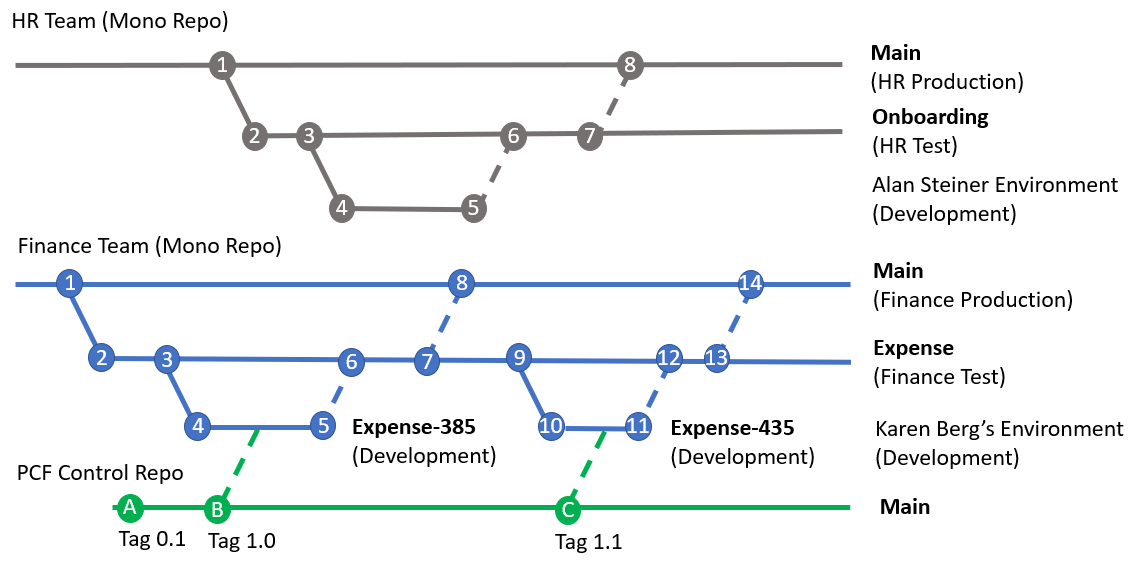
Test your understanding!
A developer on your team is working on a new feature (feature/new-invoicing). They are halfway done when a critical, system-down bug is reported in Production that needs an immediate fix. You are using the Mission-Critical (GitFlow) strategy. What branch should the hotfix be created from, and why is it critical to merge it back into two different branches after deployment?
Show answer
The hotfix branch should be created directly from the main branch. This is because main reflects the exact state of Production, allowing you to isolate the fix without including any unfinished work from the develop branch (like the new invoicing feature).
After deploying the hotfix, it's critical to merge it back into both main (to update the production code baseline) and develop. If you forget to merge it back into develop, the same bug will be reintroduced into production with the next scheduled release, because the develop branch never received the fix.
An Alternative: In-Product ALM with Power Platform Pipelines
While the Azure DevOps approach we've detailed offers maximum power and flexibility, Microsoft also provides a simpler, in-product solution for ALM called Power Platform Pipelines. It's important for you to be aware of this as a lighter-weight alternative or a complementary tool.
How to do ALM with Power Platform
Let's watch this segment from Microsoft Developer that demonstrates Power Platform Pipelines. Notice how it simplifies the deployment process for makers, abstracting away the complexities of Azure DevOps.
Watch from 18:29 to 28:05. This is a comprehensive demo. Focus on: The concept of a 'Host' environment for pipeline configuration. The simplified user experience for a maker to initiate a deployment. The key difference noted: this process does not inherently involve unpacking to a source code repository.
Key Differences from Azure DevOps:
- Simplicity vs. Power: Pipelines are configured through a simple UI within the Power Platform, whereas Azure DevOps uses YAML or a classic editor, offering far more customization.
- No Native Source Control: Pipelines manage solutions as artifacts stored within a Dataverse environment (the "Host"). The Azure DevOps approach is fundamentally built around unpacking solutions to a Git repository, providing true source code management.
- Target Audience: Pipelines are designed to empower citizen developers and makers to participate in a structured ALM process, while the Azure DevOps approach is tailored for pro-dev teams requiring full control.
These two approaches are not mutually exclusive. A pipeline can be extended to trigger an Azure DevOps pipeline, allowing a hybrid model where makers use a simple UI to kick off complex backend processes managed by the professional development team.
Conclusion and Course Wrap-up
Congratulations on completing the "Professional ALM and DevOps" module, and with it, the final lesson of this course! You have journeyed from foundational Power Platform concepts to the most advanced, enterprise-grade development and deployment strategies.
Key Takeaways from this Lesson:
- A robust team development strategy requires aligning your environment strategy, branching strategy, and solution architecture.
- Isolate developers in personal environments and use a clear promotion path (e.g., Dev -> Test -> UAT -> Prod).
- Adopt a modular solution architecture with a
basesolution and multipleappsolutions to manage dependencies and scale. - Choose a branching model based on your project's needs: GitHub Flow for simplicity and speed, or GitFlow for control and scheduled releases.
- Always have a plan for hotfixes that bypasses the standard development cycle to address urgent production issues quickly and safely.
- Be aware of Power Platform Pipelines as a simpler, in-product alternative to Azure DevOps for ALM.
You have built a tremendous set of skills throughout this course, from server-side logic in Dataverse and advanced Canvas App techniques to PCF development and professional DevOps. You are now exceptionally well-prepared to not only tackle the PL-400: Microsoft Power Platform Developer exam but also to lead and architect sophisticated, enterprise-scale Power Platform solutions.
Your next steps should be to review the topics we've covered, explore the official Microsoft Learn paths, and work through practice exams to solidify your knowledge. Good luck