Introduction
Welcome back! In our last lesson, we built a cost model for an AI feature and discovered a critical architectural insight: the choice of model can lead to a 30x difference in monthly operational costs. We saw that a premium model might cost $900/month, while an economy model for the exact same task could be just $30/month.
This raises a crucial question: What if you need the high performance of the premium model for complex user requests, but want the cost savings of the economy model for simpler ones? Forcing a single model to handle all tasks is either wastefully expensive or unacceptably low-quality.
Today's lesson addresses this exact problem. Your learning outcome is to explain model tiering as a strategy for balancing cost and performance. This strategy, also known as model routing, moves you from thinking about a single AI model to architecting a system of models that work together intelligently. For a UI/UX architect, this is a core competency—it's about designing a system that delivers the right level of quality at a sustainable cost, which directly impacts the user experience and business viability.
1. What is Model Tiering? The "Right Tool for the Job" Principle
At its core, model tiering is the practice of using a collection of different AI models—each with its own capabilities, speed, and cost—and dynamically routing user requests to the most appropriate one.
Think of it like managing a team of specialists. You wouldn't ask your top, most expensive surgeon to handle routine paperwork. You'd assign that to an administrative assistant. Similarly, you wouldn't ask the assistant to perform open-heart surgery. Model tiering applies this same "right tool for the job" logic to your AI stack.
To understand the "tiers," let's look at the trade-offs between different models.
Small vs. Large AI Models: Trade-offs & Use Cases Explained
The video 'Small vs. Large AI Models' from IBM Technology provides an excellent overview of the fundamental trade-offs. It explains what makes a model 'large' and why bigger isn't always better.
Please watch the following segments: 00:00 - 01:39: This introduces 'parameters' as the measure of model size. 01:39 - 02:21: This directly explains the core trade-off: more parameters mean more capability but also exponentially more cost. 05:53 - 09:18: This provides concrete use cases for both large (high-tier) and small (low-tier) models, which is the essence of a tiering strategy.
As the video explained, models can be tiered based on several factors:
- Capability & Performance: Larger, more complex models (like GPT-4, Claude 3 Opus) can handle nuanced, multi-step reasoning. Smaller models (like Llama 3 8B, Claude 3 Haiku) are better for straightforward tasks like classification or simple summarization.
- Cost: The cost difference isn't linear; it's exponential. A premium model can be 100-200 times more expensive than a smaller one for the same number of tokens.
- Speed (Latency): Smaller models are generally much faster, resulting in lower latency. This is a critical factor for a good user experience, especially in real-time chat applications.
This scatter plot perfectly visualizes the cost-performance landscape.
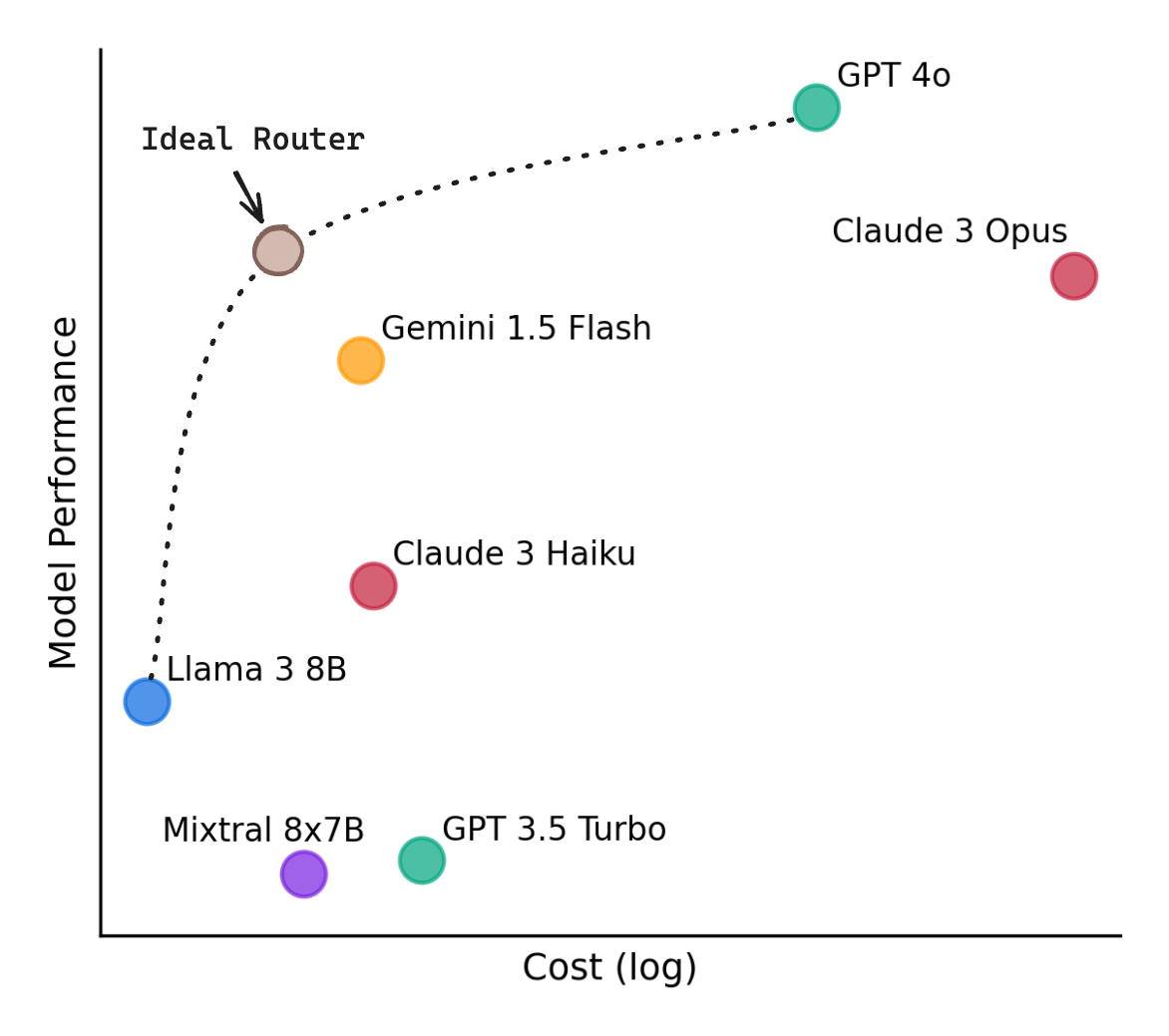
Your job as an architect is to navigate this landscape, picking a set of models that allows your system to operate efficiently along that "ideal" curve.
2. How Does Model Tiering Work? The Role of the Router
So, if you have multiple models, how does the system decide which one to use for any given user request? The answer is a component called a model router.
A model router is an intelligent layer that sits between your application and your pool of AI models. It intercepts an incoming request, analyzes it, and directs it to the most suitable model based on a set of rules or logic.

There are several strategies for building a router. Let's explore the most common ones.
How to Set Up an AI Model Router for Your LLM Stack - MindStudio
The article 'How to Set Up an AI Model Router' from MindStudio provides a clear breakdown of what a model router is and the different strategies for implementing one.
Please read the following sections: 'What Is AI Model Routing': Focus on the definition and how it differs from simple load balancing. 'Why Your LLM Stack Needs Routing': This section reinforces the key benefits related to cost, performance, and reliability. 'Types of Model Routing Strategies': Pay close attention to 'Rule-Based Routing' and 'LLM-Assisted Routing'. You can skim 'Semantic' and 'Hybrid' routing for now.
As the article explained, the two most relevant strategies for our purposes are:
-
Rule-Based Routing: This is the simplest approach. You create explicit rules. For example:
- If a user is on a "Pro" subscription tier, route to the premium GPT-4o model.
- If a user is on a "Free" tier, route to the economy Claude 3 Haiku model.
- If a request comes from the "Code Generation" feature, route it to a specialized code model.
-
LLM-Assisted Routing: This is a more sophisticated and powerful approach. It uses a small, fast, and cheap AI model as the router itself. This "router LLM" reads the user's prompt and classifies its complexity or intent, then passes it to the appropriate downstream model.
Let's see a concrete, costed example of LLM-assisted routing in action.
Multi-LLM routing strategies for generative AI applications on AWS
This blog post from Amazon Web Services, 'Multi-LLM routing strategies', demonstrates a practical implementation of an LLM-assisted router for an educational chatbot.
Read the sections titled 'LLM-assisted routing' (under 'Custom prompt routing') and 'Cost analysis for custom prompt routing'. Notice how they use a cheap model (Titan Express) to decide whether a question is about 'history' or 'math', and then route it to a cheaper (Haiku) or more powerful (Sonnet) model accordingly. The cost analysis table clearly shows the massive savings this enables.
The AWS example is a perfect illustration of model tiering:
- Router: A fast, cheap classification model (Titan Express).
- Tier 1 (Economy): A cost-effective model for simple tasks (Claude 3 Haiku for history questions).
- Tier 2 (Premium): A powerful model for complex reasoning (Claude 3.5 Sonnet for math problems).
The result? They achieve significant cost savings by not using the expensive math model for simple history questions, while still providing high-quality answers for complex math problems. The small cost of running the router is negligible compared to the savings.
3. Practical Application: Architecting Our Fintech Assistant
Let's revisit the "AI Financial Assistant" from our previous lesson.
Previous Scenario:
- User Base: 10,000 users
- Usage: 8 requests/user/month (80,000 total requests)
- We had to choose one model:
- Premium Model (A): $900/month
- Economy Model (B): $30/month
Now, let's re-architect this feature using a model tiering strategy.
First, as the architect, you'd analyze the types of user requests. You might find:
- 70% are Simple Queries: "What was my biggest expense last month?", "How much did I spend on groceries?" These are factual lookups that Model B can handle.
- 30% are Complex Queries: "Analyze my spending and suggest a new budget," "Is my current saving rate on track for retirement?" These require the reasoning power of Model A.
Here is our new, tiered architecture:
- Router: A very fast, cheap model (costing ~$0.0001 per request).
- Tier 1 (Economy): Model B ($0.000375 per request) for simple queries.
- Tier 2 (Premium): Model A ($0.01125 per request) for complex queries.
Let's model the new monthly cost:
-
Total Simple Queries: 80,000 requests * 70% = 56,000 requests
-
Total Complex Queries: 80,000 requests * 30% = 24,000 requests
-
Cost of Simple Queries: 56,000 * $0.000375 = $21.00
-
Cost of Complex Queries: 24,000 * $0.01125 = $270.00
-
Cost of the Router: 80,000 requests * $0.0001 = $8.00
Total Tiered Monthly Cost: $21.00 + $270.00 + $8.00 = $299.00 per month
Let's compare the outcomes:
- All-Premium Strategy: $900/month (Great performance, very expensive)
- All-Economy Strategy: $30/month (Cheap, but fails on 30% of user queries)
- Tiered Strategy: $299/month (Best of both worlds: high performance where it matters, with over 65% cost savings compared to the all-premium approach).
This is the power of model tiering. As the architect, you have designed a system that is both economically sustainable and delivers a high-quality user experience.
Conclusion
You now have a powerful new strategy in your architectural toolkit. Instead of being forced into an all-or-nothing choice, you can design sophisticated systems that intelligently manage the trade-off between cost and performance.
Key Takeaways:
- Model tiering (or routing) is a strategy for using a mix of AI models and directing user requests to the one best suited for the task.
- The goal is to balance cost and performance, using expensive, high-capability models only when necessary.
- A model router is the component that analyzes requests and decides which model "tier" to use. This can be a simple rules engine or a sophisticated, LLM-assisted classifier.
- This strategy allows you to build features that are both economically viable and provide a high-quality user experience, moving beyond the limitations of a single-model architecture.
Next Steps
We've seen how choosing the right model impacts cost and performance. But what happens when the model, no matter how powerful, is simply wrong? In our next lesson, we will explore the financial and user-trust implications of AI errors by defining and estimating 'hallucination cost'.