Hello! Welcome to your seventh lesson in the Architect Track.
In our last session, we explored the economic architecture of software, distinguishing between marginal costs (the near-zero cost to serve one more user) and operational costs (the high cost of running the business). We saw how in SaaS, the line blurs, as continuous R&D becomes a cost of retaining customers.
Today, we shift from economic architecture to data architecture. The speed at which data is collected, processed, and displayed is a fundamental architectural choice with massive consequences for user experience, technical complexity, and cost. As a UI/UX designer, you design the surfaces where users interact with data, so understanding its timeliness is critical.
Our goal for this lesson is to distinguish between real-time, near-real-time, and delayed data systems with product examples. We will explore this as a spectrum and understand the trade-offs an architect must make when choosing a point on that spectrum.
1. The Two Clocks: Data Freshness vs. Data Latency
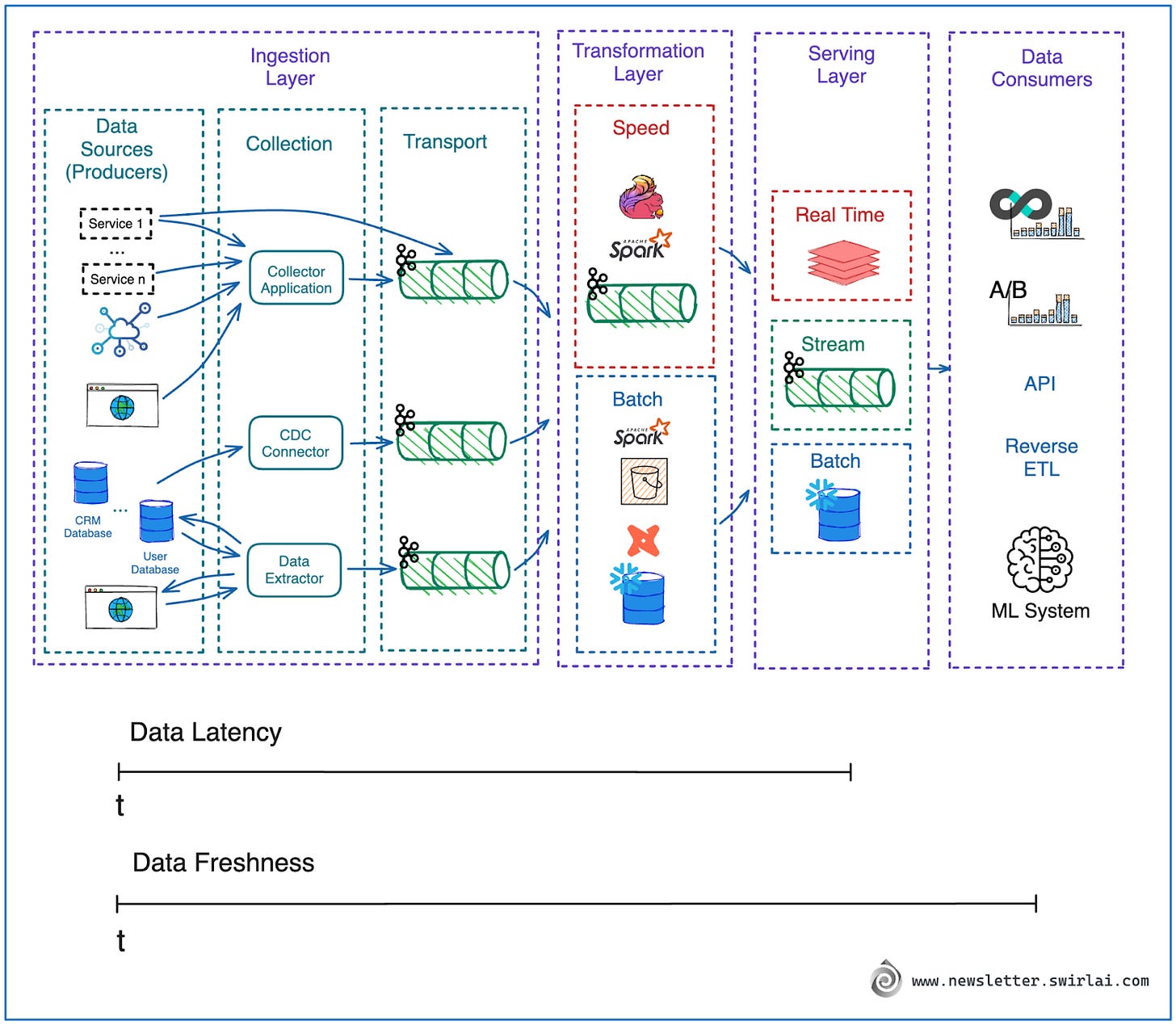
Before we can talk about different system speeds, we need to clarify two critical and often-confused concepts: freshness and latency. They both involve time, but they measure fundamentally different things. Getting this distinction right is one of the most important first steps in data architecture.
Data Freshness vs Data Latency: What's the Difference?
The article 'Data Freshness vs Data Latency' from Tacnode provides an excellent and clear distinction between these two key metrics. It's essential reading for anyone designing data-driven products.
Please read the first three sections: 'What Is Data Freshness?', 'What Is Data Latency?', and 'Data Freshness vs Latency: Key Differences'. Pay close attention to the definitions and the comparison table.
To summarize the key points:
- Data Latency is about system speed. It's the time it takes for a system to respond to a request (e.g., you click a button, and the screen loads in 100ms). This is what engineers often focus on optimizing.
- Data Freshness is about data currency. It's the "age" of the data you're seeing. If a stock price is from 5 minutes ago, its freshness is 5 minutes.
As a UI/UX designer, you can immediately see the problem: a user interface can feel very fast (low latency) but be completely useless or even dangerous if it's showing old data (high staleness). This leads to what the article calls the "Dangerous Quadrant."
The "Fast + Stale" quadrant is where systems appear healthy but lead to flawed decisions. Imagine a fintech app that loads an account balance instantly (fast!), but the balance is from an hour ago (stale!). A user might make a purchase based on this old information, resulting in an overdraft. This is a critical failure of system design, not just UI.
2. A Spectrum of Processing Models
Data processing models exist on a spectrum defined by their approach to data freshness. We'll examine the three main points on this spectrum: delayed (batch), real-time, and near-real-time.
A. Delayed (Batch) Processing: High Volume, Low Urgency
Batch processing is the classic approach. Data is collected over a period (an hour, a day), grouped into a "batch," and then processed all at once on a schedule. This is the least "fresh" method but is very efficient for large volumes of non-urgent data.
What is Stream Processing? | Batch vs Stream Processing | Data Pipelines | Real-Time Data Processing
The video 'What is Stream Processing?' offers a very clear explanation of batch processing at the beginning.
Watch the segment from 00:12 to 01:26. It uses a nightly data warehouse update as a perfect example of a batch process, highlighting the resulting day-long latency.
Key Characteristics:
- Data Freshness: Low (data can be hours or days old).
- Throughput: High (optimized for processing massive datasets).
- Complexity: Generally lower than real-time systems.
- Cost: Often more cost-effective for large-scale analytics.
Product Examples:
- Billing Systems: Generating monthly phone bills or invoices. There's no need to calculate the bill in real-time throughout the month.
- Payroll Processing: Calculating employee salaries at the end of a pay period.
- Daily Sales Reports: A retail manager reviewing the total sales figures from the previous day.
B. Real-Time Processing: Instantaneous, High-Stakes
At the other end of the spectrum is real-time processing, also known as stream processing. Here, data is processed individually and instantaneously as it is generated. The goal is to minimize the delay between an event happening and the system reacting to it.
Batch vs. Real-Time Data Processing: What's The Difference?
The article 'Batch vs. Real-Time Data Processing' provides a concise definition and a perfect example for real-time systems.
Read the section 'Real-Time Data Processing'. The stock market example, with its millisecond-level requirements, is the quintessential use case.
Key Characteristics:
- Data Freshness: Extremely high (data is seconds or milliseconds old).
- Throughput: Designed for a continuous flow of individual events.
- Complexity: High, requiring specialized tools and careful architecture.
- Cost: Can be expensive due to the need for "always-on" infrastructure.
Product Examples:
- Fraud Detection: A banking system analyzing a credit card transaction as it happens to approve or deny it.
- Live Multiplayer Gaming: Synchronizing the actions of multiple players in a game world with no perceptible lag.
- Factory Automation: A safety system that immediately shuts down a machine when a sensor detects a critical failure.
C. Near Real-Time Processing: The Balanced Middle Ground
Most modern applications live in the middle. They need data to be fresh, but they can tolerate a small delay of a few seconds or minutes. This is near real-time processing. It often uses a technique called "micro-batching," where data is processed in very small, frequent batches.
Batch Processing vs Stream Processing | System Design Primer | Tech Primers
The video 'Batch Processing vs Stream Processing' introduces this middle ground perfectly.
Watch the segment from 01:00 to 02:13. The narrator explicitly defines 'micro-batching' as the best of both worlds, processing small collections of data continuously.
Key Characteristics:
- Data Freshness: High (data is typically seconds to a few minutes old).
- Throughput: Balances continuous flow with small-batch efficiency.
- Complexity: Can be complex, but often strikes a good balance between a full batch and a full real-time system.
- Cost: Often a cost-effective way to achieve "good enough" freshness.
Product Examples:
- Social Media Feeds: Your Twitter or LinkedIn feed doesn't update every millisecond, but it refreshes every few seconds to show new posts.
- Ride-Sharing Apps: The location of cars on the map in your Uber or Lyft app is updated frequently, but not truly instantaneously.
- Web Analytics Dashboards: Tools like Google Analytics showing you how many users are on your site "right now."
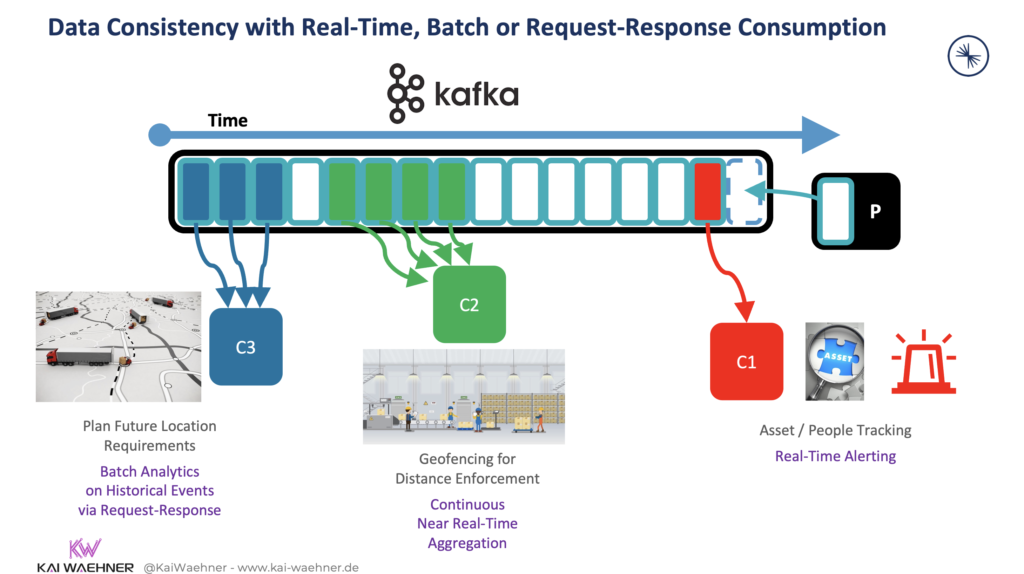
3. Visualizing a Unified System
It's rare for a large product to use only one of these models. More often, a single stream of data is consumed by different parts of the system with different freshness requirements.
4. Making the Architectural Choice
As an architect, your job is to choose the right point on the spectrum for each part of your system. This is a trade-off decision based on several factors.
Batch vs. Real-Time Data Processing: What's The Difference?
The Finworks article provides a practical checklist for making this decision.
Read the section 'Guidelines for Selecting the Appropriate Processing Method'. Focus on the factors (Latency, Throughput, Complexity, Resources) and the decision criteria (Application Requirements, Data Volume, Response Time).
The core question you must always ask is: What is the business or user impact of stale data?
- If stale data leads to a catastrophic failure (e.g., fraud, physical danger), you need real-time.
- If stale data leads to a poor user experience (e.g., an outdated social feed), you need near real-time.
- If stale data has no immediate impact (e.g., a monthly financial report), batch processing is sufficient and more efficient.
Conclusion
In this lesson, we moved from the abstract concept of "data" to a more structured understanding of its timeliness. We've seen that data processing isn't a single activity but a spectrum of choices, each with profound implications for user experience, cost, and complexity.
Key Takeaways:
- Latency vs. Freshness: Latency is how fast a system responds; freshness is how current the data in that response is. A system can be fast but stale, which is often the most dangerous failure mode.
- The Three Models:
- Batch (Delayed): Processes large, scheduled chunks of data. Best for non-urgent, high-volume tasks like billing.
- Real-Time (Streaming): Processes events instantaneously. Essential for high-stakes, time-critical applications like fraud detection.
- Near Real-Time (Micro-batching): A balanced approach for applications that need high freshness but can tolerate a few seconds of delay, like social media feeds.
- The Architect's Trade-off: The choice of processing model is a core architectural decision that balances user needs against technical complexity and cost.
In our next lesson, we will build directly on this foundation. Now that we understand how data is delivered, we'll examine what happens when we try to measure it. We'll explore Goodhart's Law and discover why focusing on a single metric can unintentionally distort and damage the very system you're trying to improve.