Hello! Welcome back to our module on Risk Management and Portfolio Maintenance.
In our last lesson, you mastered the crucial skill of calculating the correct position size for any trade. You learned how to use your account size, risk percentage, and the distance to your stop-loss to determine exactly how many shares to buy. This ensures that any single loss is kept within your predetermined limit (e.g., 1-2% of your capital).
Today, we're taking the final and most important step in this process. We will shift from planning our risk to actively enforcing it. The learning outcome for this lesson is to be able to set a stop-loss order to define and limit the maximum potential loss on a trade. This is where your risk management plan moves from a spreadsheet to a live order with your broker, acting as an automatic safety net for your capital.
What is a Stop-Loss Order?
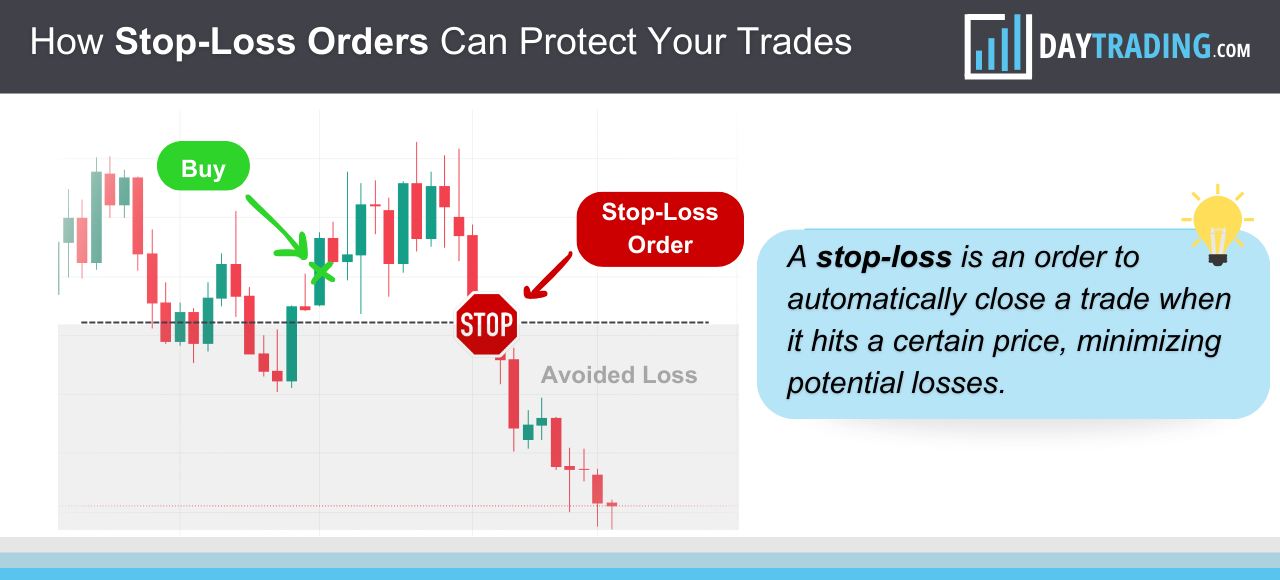
A stop-loss is an order you place with your broker to automatically sell a security when it reaches a certain price. Its primary purpose is to take your emotions—like fear, hope, and greed—out of the equation when a trade goes against you. By deciding your exit point before you even enter the trade, you pre-commit to a disciplined action, turning trading from a pure gamble into a calculated risk.
How to Set Stop Losses A Trader's Guide
The article 'How to Set Stop Losses: A Trader's Guide' from Finzer.io gives an excellent introduction to why a stop-loss is the most important part of your trade.
Please read the introduction and the section 'Why a Stop Loss Is Your Most Important Trade'. Focus on how it helps in preserving capital and removing emotion from decision-making.
Think of it this way: you already calculated that you can risk $250 on a trade. The stop-loss is the mechanism that ensures you actually lose only $250 (or very close to it) if you're wrong.
The Mechanics: Types of Stop-Loss Orders
When you go to place a stop-loss, you'll generally encounter two main types. It's crucial to understand the difference.
Order Types in Fidelity | What Are Limit Orders, Stop Losses, Stop Limits, and Trailing Stops?
The video 'Order Types in Fidelity' provides a clear, practical look at how these orders function on a real brokerage platform. We'll focus on the sections explaining stop-loss and stop-limit orders.
Watch the segment from 02:38 to 05:44. Pay close attention to the distinction the presenter makes between a standard 'Stop Loss' order and a 'Stop Limit' order.
Let's break down what you just watched:
-
Stop Order (or Stop-Market Order):
- How it works: When your stock hits the stop price you set, it immediately triggers a market order. Your shares are sold at the next available price.
- Advantage: Guarantees you will exit the trade.
- Disadvantage: Does not guarantee the price. In a fast-moving market or if the stock "gaps down" overnight, the price you sell at could be significantly lower than your stop price. This difference is called slippage.
-
Stop-Limit Order:
- How it works: This order has two prices: a stop price and a limit price. When the stock hits the stop price, it triggers a limit order. This limit order will only execute if your shares can be sold at the limit price or better.
- Advantage: Protects you from slippage. You control the minimum price you're willing to accept.
- Disadvantage: Your exit is not guaranteed. If the stock price gaps down past your limit price, your order won't be filled, and you could be stuck in a trade that is rapidly losing value.
For most active trading situations, a standard stop-market order is preferred because its primary goal—getting you out of a bad trade—is guaranteed.
Test your understanding!
You own a stock currently trading at $100. You place a stop-limit order with a stop price of $95 and a limit price of $94.50. The next morning, due to bad news, the stock opens at $94. What happens to your order?
Show answer
Your order will likely not be filled. The stop price of $95 was triggered, which activated a limit order to sell at $94.50 or better. Since the market price immediately gapped down to $94, your order to sell at a minimum of $94.50 cannot be executed. You would remain in the position. If you had used a standard stop-market order at $95, it would have triggered and sold your shares at the next available price, likely around $94.
Where Should You Place Your Stop-Loss?
This is the most critical question. In the last lesson, we used a stop-loss price to calculate position size. Now, we'll learn how to determine that price.
A stop-loss should not be placed based on an arbitrary percentage or dollar amount you're willing to lose. It should be placed at a logical price level that invalidates your original reason for entering the trade.
How To Set A Correct Stop Loss And Avoid Stop Hunting (Video 9 Of 12)
Trader Rayner Teo provides an excellent framework for this in his video 'How To Set A Correct Stop Loss'. He introduces the core concept of invalidation and a powerful tool to quantify it.
Watch from the beginning to 08:49. This is a dense but extremely practical segment. Focus on: The core idea: placing your stop at a level that 'invalidates your trading setup' (00:21). What the Average True Range (ATR) indicator is and how it measures volatility (03:04). The step-by-step example of setting a stop-loss 1 ATR below a key support level (06:42).
As Rayner Teo explained, using a volatility-based tool like the ATR helps you avoid getting stopped out by a stock's normal, everyday "noise." It forces you to place your stop-loss outside the range of typical price fluctuations.
Here are the most common methods, which you can combine:
- Support Levels: Place your stop just below a clear area of price support on the chart. The logic is that if a known floor of buyers breaks, the trade idea is likely wrong.
- Moving Averages: For a trending stock, you can place your stop just below a key moving average (like the 20- or 50-day MA) that has been acting as dynamic support.
- Volatility (ATR): As shown in the video, find a logical level (like the low of a support candle) and then subtract 1x the ATR value to give your trade adequate "breathing room."
Common and Costly Mistakes
Knowing the theory is one thing, but execution under pressure is another. Here are the cardinal sins of using stop-losses that you must avoid.
How to Set Stop Losses A Trader's Guide
The Finzer.io article we looked at earlier also has a great section on common mistakes. Recognizing these traps is the first step to avoiding them.
Read the section 'Common Stop Loss Mistakes That Are Costing You Money.' Pay special attention to the dangers of setting stops too tight, too wide, and, most importantly, the 'cardinal sin' of moving a stop-loss further away.
The single most destructive mistake a trader can make is moving a stop-loss down (further away from your entry) once a trade is going against you. This turns a calculated risk into a hopeful prayer and is the fastest way to suffer a catastrophic loss. Your stop-loss is your pre-commitment; you must honor it.
How to Place a Stop-Loss Order: A Step-by-Step Guide
Now, let's put it all together. Once you've analyzed the chart, chosen your stop-loss price, and calculated your position size, you're ready to place the order. While every brokerage platform looks slightly different, the steps are universal.
The article from Investopedia below provides a fantastic, generic guide that applies to almost any broker.
Stop Loss Order: Advantages & Why You Should Use It
The article 'Stop Loss Order: Advantages & Why You Should Use It' by Investopedia contains a clear, numbered guide for placing stop orders.
Please scroll down to the section '3. Placing an Order'. Review the steps for placing a 'Basic Stop-Loss Order' and a 'Stop-Limit Order'. This gives you the exact sequence of actions you'll take on your trading platform.
Here is a summary of the typical workflow:
- After buying your shares, navigate to your portfolio/positions page.
- Select the option to "Sell" or "Close" the position you just opened.
- On the trade ticket, change the Order Type from "Market" to "Stop" (or "Stop Market").
- An input box for the Stop Price will appear. Enter the price you determined from your chart analysis.
- Enter the Quantity (the full number of shares you own for that position).
- Set the Time-in-Force to "Good 'til Canceled" (GTC). This keeps the order active on subsequent days. A "Day" order will expire at the market close.
- Review the order to ensure all details are correct, and then submit it.
Your protective stop-loss is now live and will execute automatically if the price hits your level.
Conclusion
You have now closed the loop on trade execution and risk management. You know why you must limit your risk (Module 11, Lesson 1), how to calculate your position size to adhere to that risk (Module 11, Lesson 2), and now, how to place the actual order that enforces your plan.
Key Takeaways:
- A stop-loss order is an automated sell order that removes emotion and enforces discipline.
- Stop-market orders guarantee an exit but not the price; stop-limit orders guarantee the price but not the exit.
- Your stop-loss should be placed at a logical level that invalidates your trade idea, not at an arbitrary price.
- Use chart features like support, moving averages, and the ATR indicator to find logical stop-loss placements.
- Never move your stop-loss further away from your entry to accommodate a losing trade.
A Look Ahead:
With your risk defined by a stop-loss, there is one final piece to the puzzle before you take a trade: is the potential profit worth the risk you're taking? In our next lesson, we will learn how to calculate the risk/reward ratio of a potential trade before entry. This will help you filter for high-quality trade setups and avoid trades where the potential upside doesn't justify the risk.