Hello! Welcome back to your Rust journey.
In our first lesson, we set up your development environment and created the rust_chess project with Cargo. You now have a running "Hello, world!" program and are familiar with the basic cargo commands. That's a solid foundation to build upon.
Today, we'll start adding some real logic to our program. To do that, we need to understand two of the most fundamental building blocks of any programming language: variables and functions. We'll explore how Rust handles these, and you'll see some key features that make Rust unique, such as its focus on safety.
By the end of this lesson, you will be able to declare variables, understand the difference between mutable and immutable data, add type annotations when needed, and define your own functions with parameters and return values.
Let's dive in and start writing some code.
1. Storing Data: Variables and Mutability
In Rust, as in C and Java, we use variables to store data. You declare a variable with the let keyword. However, Rust has a very important rule that makes it different from many other languages.
// In your src/main.rs file
fn main() {
    let x = 5;
    println!("The value of x is: {}", x);
}
Now, what if we want to change the value of x? Let's try it. Modify your main.rs file like this:
fn main() {
    let x = 5;
    println!("The value of x is: {}", x);
    x = 6; // Attempt to assign a new value
    println!("The value of x is now: {}", x);
}
If you run cargo check in your terminal, you'll get a compiler error. This is intentional. By default, variables in Rust are immutable. This is a core safety feature that prevents you from accidentally changing values, which is a common source of bugs.
To make a variable changeable, you must explicitly mark it as mutable using the mut keyword.
The following video provides an excellent walkthrough of this concept, demonstrating the compiler error and how to fix it—a great way to learn, just as you prefer.
Rust Tutorial #3 - Variables, Constants and Shadowing
Watch this segment from Tech With Tim's tutorial to see a practical demonstration of variable immutability and the mut keyword.
Watch the video from 03:48 to 05:40. Pay attention to the compiler error message and how adding mut resolves it.
Hands-on Activity:
- Go back to your
src/main.rsfile. - Fix the compiler error by adding
mutto the variable declaration:let mut x = 5; - Run
cargo run. It should now compile and run successfully, printing both values ofx.
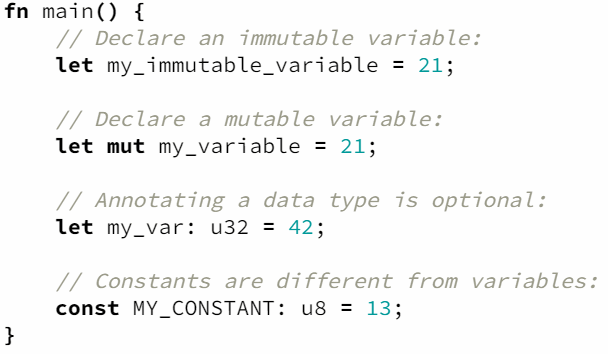
This image provides a clear visual summary of the syntax for declaring immutable variables, mutable variables, and constants (which we won't focus on now, but are good to be aware of).
2. Data Types and Type Annotations
Rust is a statically typed language, meaning it must know the type of every variable at compile time. However, you probably noticed we didn't have to write the type for x. That's because Rust has powerful type inference.
let x = 5; // Rust infers the type i32 (a 32-bit signed integer) by default
let y = 2.5; // Rust infers the type f64 (a 64-bit float) by default
Sometimes, you need to be explicit about the type, or you want to choose a different type than the default. For this, you use a type annotation—a colon (:) followed by the type name.
let logical: bool = true;
let a_float: f32 = 3.14; // A 32-bit float
let an_integer: u32 = 20; // A 32-bit unsigned integer
You have experience with types from C and Java, but Rust's naming is very specific. For example, i32 is a 32-bit signed integer, and u8 is an 8-bit unsigned integer. We'll use these specific types throughout our chess project.
The best way to understand why you'd need a type annotation is to see it in a real scenario. The following reading from the official Rust book walks through building a guessing game and runs into a "mismatched types" error, which is solved by adding a type annotation.
Comparing the Guess to the Secret Number
This section of the official Rust book demonstrates a practical use case for type annotations when converting a string to a number.
Read the section 'Comparing the Guess to the Secret Number.' Focus on the 'mismatched types' error and understand how let guess: u32 = ... is used to fix it by telling Rust exactly which number type we want to parse the string into.
3. A Convenient Feature: Shadowing
The reading above also mentioned a concept called shadowing. This can be a bit confusing at first, as it looks like you're changing an immutable variable.
Shadowing allows you to declare a new variable with the same name as a previous one. This is different from marking a variable mut because we are creating an entirely new variable. A major advantage is that you can also change the type of the variable when you shadow it.
fn main() {
    let x = 5;

    // Here, we shadow the first 'x' with a new 'x'.
    // This is a completely new variable.
    let x = x + 1;

    {
        // In this inner scope, we shadow 'x' again.
        let x = x * 2;
        println!("The value of x in the inner scope is: {}", x); // Prints 12
    }

    println!("The value of x is: {}", x); // Prints 6
}
This is extremely useful for conversions, like in the guessing game example where guess starts as a String and is then shadowed by a new guess that is a u32. We'll use this pattern frequently.
4. Organizing Code: Functions
You're already familiar with functions from C and Java, and you've been using Rust's main function. Defining your own functions in Rust is straightforward. You use the fn keyword.
Key points about Rust functions:
- You must declare the type of each function parameter.
- You can declare a return type after an arrow (
->). - The function body can end in an expression, and Rust will automatically return the value of that expression. This is different from many languages where
returnis always required. An expression does not have a semicolon at the end. A line ending with a semicolon is a statement.
Let's see a simple example.
fn main() {
    let result = add_five(10);
    println!("The result is {}", result);
}

// This function takes one parameter 'x' of type i32
// and returns a value of type i32.
fn add_five(x: i32) -> i32 {
    x + 5 // This is an expression; its value is returned.
          // Note the lack of a semicolon.
}
For a concise text explanation of function syntax, including parameters, return values, and the important distinction between statements and expressions, please read the following.
Rust Tutorial: Starter Guide - Functions
This section from the CodePorting tutorial provides a clear, structured overview of defining and using functions in Rust.
Read the 'Functions' section. Pay close attention to the syntax for parameters, the -> for return types, and the explanation of how the final expression in a function body is used as the return value.
Hands-on Activity:
Now, let's practice in our rust_chess project.
- Open
src/main.rs. - Delete the previous code we wrote about
x. - Write a new function called
print_board_sizethat takes no parameters and doesn't return anything. Inside it, useprintln!to print "The board is 8x8." - Call this new function from inside your
mainfunction. - Run your program with
cargo runto see the output.
Your code should look something like this:
fn main() {
    println!("Welcome to Rust Chess!");
    print_board_size();
}

fn print_board_size() {
    println!("The board is 8x8.");
}
This is a simple start, but we'll soon be creating functions to initialize the board, move pieces, and check for wins.
Conclusion
Great job! You've just covered the absolute essentials of writing code in Rust. These concepts are the foundation for everything we'll do next.
Here's a quick summary of what we learned:
- Variables are declared with
letand are immutable by default. - You can make variables mutable with the
let mutsyntax. - Rust is statically typed, but its type inference means you don't always have to write the types.
- You can provide type annotations using a colon (e.g.,
let x: u32). - Shadowing allows you to declare a new variable with the same name, which is useful for type conversions.
- Functions are declared with
fn, require types for all parameters, and can return values using->and a final expression.
In the next lesson, we will tackle a topic that is often tricky for newcomers to Rust but is essential for working with text: the difference between the String and &str types. Understanding this is crucial for our chess game, where we'll eventually need to handle things like algebraic notation for moves.