Hello! Welcome back to our journey into Rust.
In the last lesson, we learned about borrowing and references (& and &mut). We saw how they let us access data without taking ownership, which is incredibly efficient and is the preferred way to pass data around in most cases. We fixed the clunky pattern of passing ownership to a function and then returning it.
However, sometimes you genuinely need a completely separate, independent copy of your data. What if you want to create a backup of a game state before making a move, or pass a value to another part of your program that needs to own it, while you also keep a copy for yourself? Borrowing won't work in these cases because it doesn't create a new, owned value.
This lesson introduces the final piece of this ownership puzzle: the clone() method. You'll learn how to explicitly create a "deep copy" of data. This gives you maximum flexibility, but as we'll see, it comes with a cost. Understanding when to borrow and when to clone is a key skill for writing effective Rust code.
1. What Does It Mean to "Clone" Data?
In Rust, when we talk about owned types that manage data on the heap, like the String type we've been using, the variable itself lives on the stack and holds a pointer to the actual data on the heap.
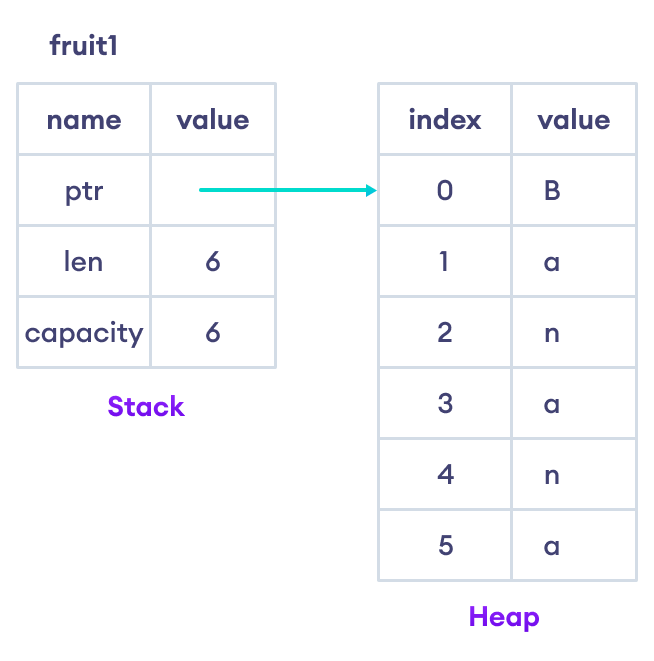
When you move a String, you are just copying the stack data (the pointer, length, and capacity) to a new variable. The heap data itself is not touched; ownership is simply transferred.
Cloning is different. Calling .clone() on a String tells Rust to allocate new memory on the heap and copy the data from the original location to the new one. The result is two completely independent String instances.
The following video provides a clear demonstration of this difference.
The 'Rustfully' channel provides a concise explanation of how .clone() creates a true copy of a String, allowing both the original and the new variable to be used independently.
Watch from 01:13 to 02:42. The first part is a quick review of move semantics, which will be familiar. The second part introduces the .clone() method and shows how it solves the 'value moved' error.
As the video showed, the syntax is straightforward:
fn main() {
    let s1 = String::from("hello");

    // .clone() creates a new String on the heap with the same content.
    let s2 = s1.clone();

    // Now both s1 and s2 are valid and own their own data.
    println!("s1 = {}, s2 = {}", s1, s2);
}
This is powerful, but the video also gives an important warning: cloning can be an expensive operation, especially if the data on the heap is large. This is why Rust makes cloning an explicit action; you should think about whether you really need it.
2. Clone vs. Copy: Why Integers are Different
You might be wondering: "If moving is the default, why could I assign integers to new variables without the original becoming invalid?"
let x = 5;
let y = x; // This works fine!
println!("x = {}, y = {}", x, y); // We can still use x.
The reason is that simple types like integers (i32), booleans (bool), and characters (char) don't have data on the heap. Their values are stored entirely on the stack. Copying them is trivial and cheap.
Rust has a special trait called Copy. If a type implements the Copy trait, assignments don't move the value; they create a bit-for-bit copy. All primitive scalar types implement Copy.
String, on the other hand, does not implement Copy because it manages heap memory. A cheap bit-for-bit copy would mean two String variables pointing to the same heap data, which would lead to memory safety problems (the "double free" error we discussed earlier).
So, the rule is:
- Types that are
Copyare implicitly copied on assignment. - Types that are not
Copy(but areClone) must be explicitly duplicated with the.clone()method.
Let's return to the video to see this distinction explained.
This next segment from the same 'Rustfully' video explains exactly why types like integers are copied, introducing the Copy trait.
Watch from 02:42 to 05:46. Pay close attention to the explanation of the Copy trait and the list of types that can implement it. The final summary contrasts the behavior of Copy types with String.
3. Making Your Own Types Clonable
This is all great for built-in types, but what about the structs we'll be creating for our chess game, like Piece or BoardPosition? By default, your own structs have move semantics, just like String.
If you want to be able to clone your struct, you need to explicitly tell Rust how to do it. Thankfully, this is usually very easy using the derive attribute.
Clone trait - 100 Exercises To Learn Rust
The '100 Exercises To Learn Rust' resource provides an excellent and practical walkthrough of the Clone trait. It explains why it's needed and how to implement it for your own types.
Read from the beginning of the page down to the 'Exercise' section. Focus on these parts: The problem: The first code block shows a scenario where a function consumer takes ownership, causing a compiler error. Clone and In action: These sections show how s.clone() solves the problem. In memory: The diagrams here visually reinforce what a deep copy means. Implementing Clone: This is the key part! Note the use of #[derive(Clone)] on a struct. This is the standard way to make your types clonable.
As the article explains, adding #[derive(Clone)] tells the compiler to generate the code for the clone() method automatically. It will do this by cloning each field of the struct individually. A struct can only derive Clone if all of its fields are also Clone.
4. Hands-On Activity: Log a Player
Let's put this into practice with a scenario you might encounter. Imagine you have a function that logs player information to a database or a file. This function needs to take ownership of the player data, but you still want to use the player variable in your main game loop.
-
Open your
rust_chessproject insrc/main.rs. -
Use the
ChessPlayerstruct from our last lesson. If you removed it, here it is again. Notice we've added#[derive(Clone)]to it.#[derive(Clone)] // This allows us to call .clone() on ChessPlayer struct ChessPlayer { username: String, elo: u32, } -
Create a "consuming" function. This function simulates a process that needs to take full ownership of the data.
// This function takes ownership of the player data fn log_player_session(player: ChessPlayer) { println!("[LOG] Player '{}' session started.", player.username); // The `player` value is dropped here at the end of the function. } -
Now, in your
mainfunction, try to log the player and then use the player variable again.fn main() { let player1 = ChessPlayer { username: String::from("Hikaru"), elo: 2785, }; // Try to log the player log_player_session(player1); // What happens when you try to use player1 again? println!("Welcome back, {}!", player1.username); // <-- This will cause an error! } -
Run
cargo run. You will see the familiarvalue borrowed here after moveerror. Thelog_player_sessionfunction consumedplayer1. -
Fix it with
clone()! As the error message suggests, the solution is to pass a clone to the logging function. Modify the function call inmain:fn main() { let player1 = ChessPlayer { username: String::from("Hikaru"), elo: 2785, }; // Pass a CLONE of player1 to the function. // The original player1 remains owned by the main function. log_player_session(player1.clone()); // Now this works perfectly! println!("Welcome back, {}!", player1.username); } -
Run
cargo runagain. Everything now compiles and runs as expected. You successfully gave owned data to another function while retaining your own copy.
A Look Ahead at Our Chess Game
This concept is directly applicable to our chess project. Imagine you're writing the logic to check for valid moves. You might want to:
- Take the current board state.
- Create a temporary clone of the board.
- Apply a hypothetical move to the cloned board.
- Check if that move puts your own king in check.
- Discard the cloned board.
Without clone(), you'd have to make the move on your main board and then undo it if it was illegal, which is much more complex. Cloning allows you to explore possibilities in a safe, isolated way.
You'll also see clone() used frequently in graphics programming, as shown in the "Chess game in Rust using Bevy" tutorial you have. Often, you're not cloning huge amounts of data, but rather lightweight "handles" (smart pointers) to graphical assets like models or materials. This is a cheap operation that allows multiple objects to share the same underlying asset.
Conclusion
You've now completed the trifecta of Rust's ownership system: moving, borrowing, and cloning.
Key Takeaways:
clone()creates a deep copy of data, including any data on the heap.- It's an explicit method you must call; it's not automatic for types like
String. - Use
clone()when you need a separate, owned copy of data and borrowing isn't sufficient. - Be mindful that
clone()can be expensive for large data structures. Prefer borrowing (&,&mut) when possible. - You can make your own
structs clonable by adding the#[derive(Clone)]attribute, as long as all their fields are alsoClone.
This concludes our first module on Rust's fundamentals and its powerful ownership system. You've built a solid foundation.
In the next module, Core Data Types and Control Flow, we will start modeling our chess game in earnest. We'll begin by defining structs and enums to represent all the core concepts of chess: the pieces, their colors, and the board squares.