Introduction
In the previous module, we focused on service-level resilience, culminating in the circuit breaker pattern—a way to prevent cascading failures when a service becomes unresponsive. This ensures your application remains stable even when parts of it are down.
Now, we shift our focus from service health to performance, moving down the stack to the database. A resilient service that's unacceptably slow is still a failing service in the eyes of the user. Your learning outcome for this lesson is to formulate an indexing strategy for a PostgreSQL database using B-tree, composite, and partial indexes to optimize specific query patterns.
For a senior backend interview, simply knowing CREATE INDEX is not enough. You must demonstrate a deep understanding of why certain indexes work, the crucial trade-offs involved (read speed vs. write overhead), and how to methodically diagnose and solve performance bottlenecks. This lesson will equip you with that strategic mindset.
The Problem: The Dreaded Sequential Scan
Imagine a users table with 10 million rows. When you run a query like SELECT * FROM users WHERE email = 'some.user@example.com';, without an index, PostgreSQL has no choice but to perform a sequential scan (or full table scan). It reads every single row from disk and checks if the email matches. This is incredibly inefficient and a common cause of slow APIs.
An index is a separate data structure that provides a fast lookup path to the data, much like the index in the back of a book lets you find a topic without reading every page. The default and most common index type in PostgreSQL is the B-tree.
To understand how B-trees solve the sequential scan problem, let's look at their structure.
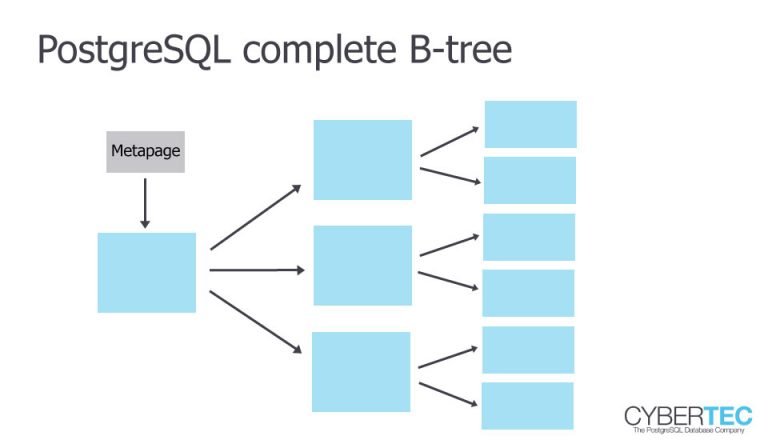
A B-tree is a balanced, self-organizing tree structure. To find a value, the database traverses the tree from the root, making a few efficient hops to land on the correct leaf node, which points directly to the row(s) you need. This reduces the work from scanning millions of rows to just a handful of disk reads.
How SQL Indexes Actually Work (Step-by-Step)
To see the dramatic difference an index makes in practice, we'll start with a practical demonstration from the video 'How SQL Indexes Actually Work (Step-by-Step)'.
Watch from the beginning to 03:25. The video sets up a PostgreSQL database and uses the EXPLAIN ANALYZE command to show a query's execution plan. Pay close attention to the difference between a 'Sequential Scan' and the improved plan after adding an index.
As you saw, EXPLAIN ANALYZE is your primary diagnostic tool. Seeing a Seq Scan on a large table is the first signal that you need an indexing strategy.
Core Strategy: Mastering Composite Indexes
Most real-world queries don't filter on a single column. You'll often have WHERE clauses with multiple conditions, like finding orders for a specific user with a certain status. This is where composite indexes (or multi-column indexes) come in.
A composite index includes multiple columns, but the order in which you define them is the single most important decision you will make.
Database Indexes - You Might Be Using Them Wrong
The video 'Database Indexes - You Might Be Using Them Wrong' provides an excellent explanation of why column order is so critical. The phonebook analogy is a perfect mental model.
Watch from 05:43 to 08:25. Focus on understanding the 'leftmost prefix rule'. Note how an index on (customer_id, status) can serve a query on customer_id alone, but is useless for a query on status alone.
The ESR Rule: Your Blueprint for Column Order
The "leftmost prefix" principle is a good start, but senior engineers use a more refined heuristic: the ESR (Equality, Sort, Range) rule. It provides a clear guideline for ordering columns in a composite index to serve complex queries efficiently.
The rule states you should order your index columns as follows:
- Equality (
E): First, list all columns used in equality checks (e.g.,user_id = 123,status = 'shipped'). - Sort (
S): Next, list all columns used in theORDER BYclause. - Range (
R): Finally, list columns used in range filters (e.g.,created_at > '2024-01-01',price BETWEEN 10 AND 50).
Why this order?
- Equality predicates are most selective; they let the database jump to a very specific, small section of the index.
- Sort predicates, placed after equality, ensure the results from that small section are already in the correct order, avoiding a costly sort operation.
- Range predicates are handled last because once the database starts scanning a range, it cannot use subsequent columns in the index to further narrow the scan itself (though it can still filter).
ESR (Equality, Sort, Range) rule applied to YugabyteDB and ...
The article 'ESR (Equality, Sort, Range) rule applied to YugabyteDB and PostgreSQL indexes' provides a practical demonstration of this rule. While it uses YugabyteDB, the principles and execution plans are nearly identical to PostgreSQL.
Read the sections 'PostgreSQL Index Scan with Sort and Range' and the summary paragraph that follows it. Notice how an index with the (transaction_date, user_id) order (Sort, Range) is far more efficient for the given query than an improperly ordered one, as it avoids a separate sort step and reads far fewer data blocks ('buffers').
Interview Scenario:
Interviewer: "You have a query: SELECT * FROM orders WHERE customer_id = ? AND created_at > ? ORDER BY total_amount DESC;. How would you index this?"
Your thought process:
- E (Equality):
customer_id - S (Sort):
total_amount DESC - R (Range):
created_at
Your answer: "I would create a composite index: CREATE INDEX idx_orders_customer_amount_date ON orders (customer_id, total_amount DESC, created_at);. This allows the database to first seek directly to the block for the specific customer_id, find the records already sorted by total_amount, and then filter that sorted subset for the created_at range. This is highly efficient and avoids an expensive filesort operation."
Advanced Optimizations for Specific Patterns
Sometimes, a general-purpose composite index isn't enough. For very specific, high-frequency query patterns, you can use more surgical techniques.
1. Partial Indexes: Indexing a Subset of Data
What if 99% of your queries for users only care about active users? (WHERE status = 'active'). It's wasteful to index all 10 million users, including the millions who are inactive or deleted.
A partial index solves this by indexing only the rows that match a WHERE clause you provide.
CREATE INDEX idx_users_active ON users (email) WHERE status = 'active';
Benefits:
- Smaller Index: The index is much smaller, saving disk space and memory.
- Faster Writes: Inserts/updates to rows that don't match the condition (e.g., creating an 'inactive' user) don't need to update this index, reducing write overhead.
- Faster Reads: The targeted query operates on a smaller, more efficient index.
How SQL Indexes Actually Work (Step-by-Step)
Let's see a demo of partial indexes in action.
Watch from 12:32 to 14:04. The video demonstrates creating an index for non-archived comments. Notice how the query plan changes and implicitly uses the index's WHERE clause.
2. Covering Indexes: The Index-Only Scan
So far, we've used an index to find pointers to the table data. The database still has to perform a second step: fetching the actual row from the main table (a "heap fetch") to get the columns you selected.
A covering index eliminates this second step. It's an index that contains every column the query needs. When a covering index is used, the database can answer the query using only the index, leading to a very fast Index-Only Scan.
You can create a covering index in PostgreSQL using the INCLUDE clause.
-- Query: SELECT user_id, email FROM users WHERE status = 'active';
-- Covering Index:CREATE INDEX idx_users_status_coverON users(status) INCLUDE (user_id, email);
Here, status is the search key in the B-tree structure. user_id and email are not part of the search key but are stored as extra "payload" in the leaf nodes. This makes the index slightly larger but avoids the costly table lookups.
Database Indexes - You Might Be Using Them Wrong
This concept is a powerful optimization. Let's get a clear explanation from 'Database Indexes - You Might Be Using Them Wrong'.
Watch from 10:22 to 12:26. Focus on the difference between a standard index lookup (which requires a second 'table lookup' step) and an 'index-only scan'. The explanation of the INCLUDE clause is particularly important.
Formulating a Holistic Strategy
In an interview, you'll be expected to bring these concepts together into a coherent strategy. Here is a step-by-step process you can articulate:
- Identify the Slow Query: Start by identifying the specific query that is causing performance issues, often through application performance monitoring (APM) tools.
- Analyze the Execution Plan: Run
EXPLAIN ANALYZEon the query. Look forSeq Scanon large tables or other inefficiencies. - Design the Primary Index:
- Identify all columns in the
WHERE,JOIN,ORDER BY, andGROUP BYclauses. - Apply the ESR rule to determine the optimal column order for a composite index.
- Identify all columns in the
- Refine with Advanced Techniques:
- Partial Index: Ask, "Does this query almost always filter on a small, predictable subset of data (e.g., active, not-deleted, recent)?" If so, a partial index is a strong candidate to reduce index size and write overhead.
- Covering Index: Look at the
SELECTlist. Can youINCLUDEthe selected columns to enable an index-only scan? This is a huge win for high-frequency, read-heavy queries.
- Verify and Consider Trade-offs:
- Run
EXPLAIN ANALYZEagain to confirm the new, faster plan (Index ScanorIndex Only Scan). - Acknowledge the trade-offs. State that while this new index speeds up this specific read query, it adds storage cost and overhead to every
INSERT,UPDATE, andDELETEon the table. The decision to add an index is always a balance between read performance and write cost.
- Run
Conclusion
You now have a structured framework for tackling database performance issues—a critical skill for a senior backend engineer. You've moved beyond simply creating indexes to strategically formulating an approach based on specific query patterns and their underlying trade-offs.
Key Takeaways:
EXPLAIN ANALYZEis your essential tool for diagnosing query performance. ASeq Scanon a large table is a major red flag.- B-tree is the default index type, excellent for equality and range queries.
- For composite indexes, column order is paramount. Use the ESR (Equality, Sort, Range) rule as your guide to avoid costly sort operations.
- Partial indexes are a powerful optimization for queries that target a small, well-defined subset of your data, reducing index size and write overhead.
- Covering indexes (using
INCLUDE) can enable extremely fast Index-Only Scans by eliminating the need to fetch data from the main table. - Every index is a trade-off between faster reads and slower writes. This is a crucial point to discuss in an interview.
Preview of the Next Lesson:
Optimizing single queries is one part of the puzzle. The other is managing what happens when hundreds of those queries run concurrently. In our next lesson, we will explore transaction isolation levels and their critical trade-offs between data consistency and performance in a high-concurrency environment.