Introduction
In our last lesson, you built a thread-safe token bucket rate limiter, a crucial component for protecting services. We used Python's threading module to handle concurrent requests in a single process. However, for backend services that are often I/O-bound (waiting on networks, databases, or other APIs), Python offers a more efficient concurrency model: asyncio.
While threading creates separate OS-level threads, which have overhead, asyncio uses a single thread and an event loop to juggle multiple tasks. When one task waits for I/O, the event loop switches to another, ensuring the CPU is always doing useful work instead of sitting idle.

Today, we'll dive deep into this model by tackling another practical interview challenge: implementing an async task executor in Python using asyncio that processes a queue of I/O-bound tasks with a configurable concurrency limit. This is the foundation for building scalable data pipelines, notification fan-out services, or any system that needs to perform many concurrent I/O operations efficiently.
1. The Foundations of asyncio
Before we build the executor, it's essential to grasp the core components of asyncio. Your experience with Django and FastAPI means you've likely used async views, but understanding what happens under the hood is key for an interview.
The main concepts are:
- Coroutine: An
async deffunction. When you call it, it doesn't run immediately but returns a coroutine object. - Event Loop: The scheduler that runs coroutines, manages I/O, and switches between tasks.
- Task: A wrapper around a coroutine that schedules it to run on the event loop as soon as possible. This is how you achieve concurrency.
Python Tutorial: AsyncIO - Complete Guide to Asynchronous Programming with Animations
To see these concepts in action, let's watch a segment from Corey Schafer's excellent guide on AsyncIO. It provides clear, animated explanations of the event loop, coroutines, and tasks.
Watch from 01:31 to 13:53. Pay close attention to: The role of asyncio.run() in starting the event loop. The await keyword, which pauses a coroutine and returns control to the event loop. The crucial difference between awaiting a coroutine directly and creating a Task to run it concurrently.
The most critical takeaway is the distinction between await my_coro() and asyncio.create_task(my_coro()).
- Awaiting a coroutine directly runs it to completion before moving on (sequential execution).
- Creating a task schedules the coroutine to run on the event loop, allowing the current function to continue. The event loop can then switch between this new task and other tasks.
2. The Worker Pool Pattern for Task Execution
To build our task executor, we will use a classic and robust concurrency pattern: the Worker Pool.
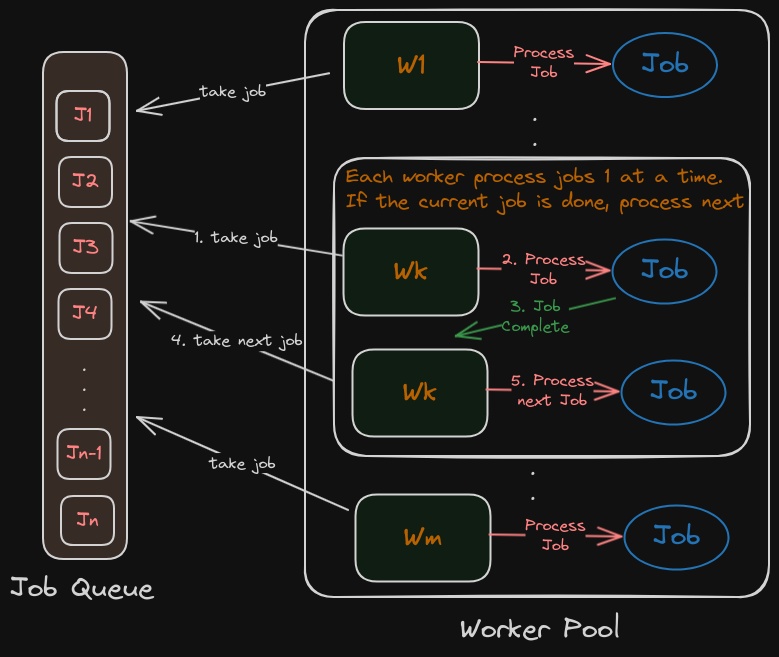
This pattern consists of three main components, which map perfectly to asyncio features:
- A Job Queue (
asyncio.Queue): A queue to hold the work items (our I/O-bound tasks) that need to be processed. - A Pool of Workers: A fixed number of coroutines that run in a loop, each pulling one item from the queue, processing it, and then repeating. The number of workers is our configurable concurrency limit.
- A Producer/Manager (
mainfunction): The main coroutine that sets up the queue, creates the worker tasks, populates the queue with jobs, and coordinates a graceful shutdown.
This pattern is highly effective because it decouples task submission from task execution and provides a clear, robust way to control concurrency.
3. Implementing the Async Task Executor
Now, let's translate the worker pool pattern into a complete Python script. We will create a system with a work queue, a result queue, and a configurable number of workers.
The code below implements a full task executor. It's structured to be easy to understand and directly applicable to an interview setting.
Worker Pool Pattern - How to Build Asyncio Queues in Python
The 'Worker Pool Pattern' section in this OneUptime article provides an excellent template for our implementation. We will analyze a similar structure.
Read through the code in the 'Worker Pool Pattern' section. Notice the clear separation of concerns: the worker function, the sample_work function (our I/O-bound task), the result_collector, and the main function that orchestrates everything.
Here is a complete, runnable example based on that pattern. Study it carefully.
import asyncio
import random
from typing import Coroutine


# --- The I/O-bound task we want to execute ---
async def io_bound_task(task_id: int, duration: float) -> str:
    """
    Simulates an I/O-bound operation like a network request or DB query.
    """
    print(f"Task {task_id}: Starting, will take {duration:.2f} seconds.")
    await asyncio.sleep(duration)


    # 10% chance of a transient failure
    if random.random() < 0.1:
        raise IOError(f"Task {task_id}: A simulated network error occurred.")
    print(f"Task {task_id}: Finished.")
    return f"Result of task {task_id}"


# --- The Worker Coroutine ---
async def worker(
    name: str,
    work_queue: asyncio.Queue,
    result_queue: asyncio.Queue
):
    """
    Pulls tasks from the work_queue, executes them, and puts results
    onto the result_queue. Runs until it receives a `None` sentinel.
    """
    print(f"Worker {name}: Started.")
    while True:
        try:
            task_id, task_coro = await work_queue.get()
            if task_coro is None:  # Sentinel for graceful shutdown
                print(f"Worker {name}: Shutdown signal received.")
                break

            try:
                result = await task_coro
                await result_queue.put(('SUCCESS', task_id, result))
            except Exception as e:
                await result_queue.put(('ERROR', task_id, e))
        finally:


            # Important to signal that the task from the queue is done
            work_queue.task_done()
    print(f"Worker {name}: Shutting down.")


# --- The Main Orchestrator ---
async def main():
    """
    Sets up queues, creates workers, populates tasks, and manages the lifecycle.
    """
    CONCURRENCY_LIMIT = 3
    NUM_TASKS = 10

    work_queue = asyncio.Queue()
    result_queue = asyncio.Queue()


    # 1. Start the worker pool
    workers = [
        asyncio.create_task(worker(f"Worker-{i}", work_queue, result_queue))
        for i in range(CONCURRENCY_LIMIT)
    ]


    # 2. Populate the work queue with tasks
    for i in range(NUM_TASKS):
        duration = random.uniform(0.5, 2.0)


        # We put the coroutine object itself in the queue
        await work_queue.put((i, io_bound_task(i, duration)))


    # 3. Wait for all work to be processed
    print("All tasks submitted to queue. Waiting for workers to finish...")
    await work_queue.join()
    print("All tasks in queue have been processed.")


    # 4. Gracefully shut down the workers by sending sentinels
    for _ in range(CONCURRENCY_LIMIT):
        await work_queue.put((None, None))


    # Wait for all worker tasks to complete
    await asyncio.gather(*workers)


    # 5. Process the results
    print("\n--- Results ---")
    while not result_queue.empty():
        status, task_id, result = await result_queue.get()
        if status == 'SUCCESS':
            print(f"Task {task_id}: Succeeded with result -> '{result}'")
        else:
            print(f"Task {task_id}: Failed with error -> {result}")

if __name__ == "__main__":
    asyncio.run(main())
Key mechanisms in this implementation:
- Concurrency Control: The
CONCURRENCY_LIMITvariable directly controls how manyworkertasks are created. This is our executor's concurrency limit. - Task Submission: The
mainfunction acts as the producer, creating coroutine objects and putting them onto thework_queue. - Graceful Shutdown: We use a sentinel value (
None) to signal to the workers that there is no more work and they should exit their loops.queue.join()is used to block until all items placed on the queue have been processed, ensuring we don't shut down prematurely. - Error Handling: The
try...exceptblock within theworkeris crucial. It catches exceptions from individual tasks, preventing one failed task from crashing the entire worker. The error is then reported to theresult_queue.
4. Alternative: Using asyncio.Semaphore
The worker pool is a very explicit and robust pattern. Another common way to limit concurrency in asyncio is by using asyncio.Semaphore. A semaphore is a synchronization primitive that allows a specified number of coroutines to enter a block of code.
Python Tutorial: AsyncIO - Complete Guide to Asynchronous Programming with Animations
Let's watch a practical example of asyncio.Semaphore being used to limit concurrent downloads. This will give you a clear idea of how to apply it.
Watch the segment from 01:31:45 to 01:36:14. Observe how a Semaphore is created and then used with an async with block to ensure that no more than a certain number of tasks execute the contained code at the same time.
Here’s how you could adapt the core logic using a semaphore:
import asyncio

async def limited_concurrent_runner(coroutines, limit):
    semaphore = asyncio.Semaphore(limit)

    async def run_with_semaphore(coro):
        async with semaphore:
            return await coro

    tasks = [asyncio.create_task(run_with_semaphore(c)) for c in coroutines]
    results = await asyncio.gather(*tasks)
    return results


# --- Example Usage ---
# async def main():
#     tasks_to_run = [io_bound_task(i, random.uniform(0.5, 2.0)) for i in range(10)]
#     results = await limited_concurrent_runner(tasks_to_run, limit=3)
#     # process results...
Trade-offs: Worker Pool vs. Semaphore
- Worker Pool:
- Pro: Excellent for continuous, long-running systems where tasks arrive over time. It clearly separates concerns (producer, consumer).
- Con: Slightly more boilerplate code (queues, worker function, shutdown logic).
- Semaphore with
gather:- Pro: Very concise for processing a known, finite list of tasks all at once.
- Con: Can be less memory-efficient if the list of coroutines is very large, as all task objects are created upfront. The article "Limiting concurrency in Python asyncio" (
resource_id="[LINK](https://death.andgravity.com/limit-concurrency)") discusses this nuance in its section on Semaphores.
For an interview, knowing both patterns is ideal. The worker pool demonstrates a deeper understanding of building robust, long-running async services.
Conclusion
You've now implemented a fully functional asynchronous task executor in Python. This is a powerful pattern that showcases your ability to handle concurrency efficiently for I/O-bound workloads—a core skill for any senior backend engineer.
Key Takeaways:
asyncioexcels at I/O-bound concurrency by using an event loop to avoid wasting CPU time on waiting.- The Worker Pool pattern (using
asyncio.Queueand worker tasks) is a robust and scalable way to build a task executor with a configurable concurrency limit. - Graceful shutdown (using sentinels and
queue.join()) and per-task error handling are critical for production-ready async systems. asyncio.Semaphoreprovides a more direct and concise way to limit concurrency for batch-style processing.
Preview of the Next Lesson:
In our executor's io_bound_task, we simulated a random failure. In the real world, many I/O operations fail due to transient issues (e.g., temporary network glitches). A simple failure isn't enough; we need a resilient retry mechanism. In the next lesson, you will implement a generic retry decorator in Python with exponential backoff, a tool you could apply directly to the tasks our new executor processes.