Introduction
Welcome to the final lesson in our "Intermediate SQL for Analytics" module. In our previous lessons, we've focused on enhancing SELECT queries with powerful tools like subqueries, CTEs, and most recently, window functions for ranking and time-series analysis. You learned how to calculate running totals and moving averages, which are vital for analyzing trends within a single dataset.
Today, we shift our focus from analyzing rows within a result set to combining and comparing entire result sets with each other. You will learn how to combine result sets using UNION, INTERSECT, and EXCEPT operators.
These operators are fundamental for tasks such as:
- Consolidating data from different tables with the same structure (e.g., sales from 2023 and sales from 2024).
- Finding common entities between two lists (e.g., customers who bought product A and product B).
- Identifying differences between two datasets (e.g., users who were active last month but are not active this month).
If JOINs are used to combine data horizontally by adding new columns, set operators combine data vertically by stacking or comparing rows. Mastering them will complete your intermediate SQL toolkit and prepare you for the advanced topics ahead.
1. The Ground Rules for Set Operators
Before we explore each operator, it's essential to understand the rules that govern all of them. These rules ensure that SQL can correctly combine or compare the result sets.
SQL Set Operators: How to UNION, INTERSECT, and EXCEPT Your Data
This article from Medium provides a great introduction to set operators and clearly outlines the fundamental rules you must follow when using them.
Please read the section titled 'The Fundamentals of SQL Set Operators'. Pay close attention to the four key rules listed.
To summarize the key rules from the article:
- Same Number of Columns: Each
SELECTstatement in the operation must retrieve the exact same number of columns. - Compatible Data Types: The data types of corresponding columns must be compatible. For instance, you can combine a
VARCHAR(50)with aTEXTcolumn, or anINTwith aBIGINT. SQL will try to implicitly convert them, but it's best practice to ensure they match. - Column Names from the First Query: The final result set will use the column names (or aliases) from the first
SELECTstatement. ORDER BYat the End: You can only place a singleORDER BYclause at the very end of the entire query to sort the final result set.
Keeping these rules in mind will help you avoid the most common errors when using set operators.
2. Combining Datasets: UNION and UNION ALL
The most common task is to stack one dataset on top of another. UNION and UNION ALL are the operators for this job. Though they sound similar, their difference has significant implications for both results and performance.
UNION ALL: The Simple Stack
This operator takes all the rows from the first query and appends all the rows from the second query. It's simple, fast, and includes all duplicate rows.
UNION: The Deduplicating Stack
This operator does the same as UNION ALL but with one extra step: it removes any duplicate rows from the final result set. A row is considered a duplicate if all of its column values are identical to another row.
SQL Set Operators: How to UNION, INTERSECT, and EXCEPT Your Data
Let's dive into the specifics of UNION and UNION ALL. This article explains both and highlights the critical performance difference between them.
Please read the sections 'UNION ALL: The Stack-and-Go Operator' and 'UNION: The Deduplicating Combiner'. Then, read the section 'Performance Considerations: UNION ALL is Your Friend'. This last part is a crucial takeaway for any data analyst.
Key Takeaway for Performance: UNION ALL is significantly faster than UNION because it doesn't need to perform a sort and comparison operation to find and remove duplicates. As an analyst, you should always prefer UNION ALL unless you have a specific reason to remove duplicates. If you're combining data from sources that you know are mutually exclusive (e.g., January sales and February sales), using UNION adds unnecessary computational overhead.
3. Comparing Datasets: INTERSECT and EXCEPT
Beyond combining data, set operators are powerful tools for comparing datasets to find overlaps and differences.
INTERSECT: Finding the Overlap
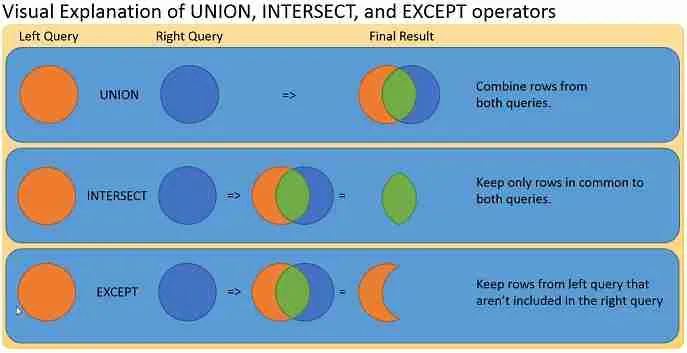
The INTERSECT operator returns only the rows that exist in both result sets. It's perfect for finding the common ground between two groups.
EXCEPT: Finding the Difference
The EXCEPT operator returns rows from the first result set that are not present in the second result set. This operator is directional: A EXCEPT B is different from B EXCEPT A. It's ideal for finding what's unique to the first group.
Note: Some SQL dialects, like Oracle, use the keyword MINUS instead of EXCEPT. The functionality is identical.
SQL Set Operators: How to UNION, INTERSECT, and EXCEPT Your Data
Now, let's explore INTERSECT and EXCEPT. The same article provides clear explanations and analyst-focused scenarios for these operators.
Please read the sections 'INTERSECT: The Common Ground Finder' and 'EXCEPT (or MINUS in Oracle): The Difference Identifier'. Focus on the example scenarios to understand when you would use each one.
To bring all these concepts together, take a look at the following image. It provides a fantastic side-by-side comparison of all the set operators with sample data.

4. Practice Exercise
Let's apply what you've learned. Imagine you are a data analyst for an e-commerce company. You have two tables:
active_users_january(user_id,name,last_login_date)active_users_february(user_id,name,last_login_date)
Your Task: Write three separate SQL queries to answer the following business questions:
- Who are the users who were active in January but were not active in February? (These are potentially churned users).
- Who are the loyal users that were active in both January and February?
- What is the complete list of all user activity across both months? Include duplicate entries if a user was active in both.
Think carefully about which set operator is the right tool for each question.
Click here for the solutions
1. Churned Users (January but not February):
This requires finding the difference, making EXCEPT the correct choice.
SELECT user_id, name FROM active_users_january
EXCEPT
SELECT user_id, name FROM active_users_february;
2. Loyal Users (Active in Both Months):
This requires finding the overlap, so INTERSECT is the right operator.
SELECT user_id, name FROM active_users_january
INTERSECT
SELECT user_id, name FROM active_users_february;
3. Complete List of Activity:
This requires stacking all records from both tables without removing duplicates, making UNION ALL the best and most performant choice.
SELECT user_id, name, last_login_date FROM active_users_january
UNION ALL
SELECT user_id, name, last_login_date FROM active_users_february
ORDER BY user_id, last_login_date;
Notice we can add an ORDER BY clause at the very end to sort the final combined result set.
Conclusion
Congratulations on completing the "Intermediate SQL for Analytics" module! In this lesson, you've learned how to use SQL's set operators to manage entire result sets, a skill that's distinct from but just as important as the row-level logic of JOINs and window functions.
Key Takeaways:
- Set operators like
UNION,INTERSECT, andEXCEPTcombine or compare rows from multipleSELECTstatements. - They require the
SELECTstatements to have the same number of columns with compatible data types. UNIONcombines results and removes duplicates;UNION ALLcombines results but keeps duplicates, making it much faster.INTERSECTreturns only the rows that are common to all result sets.EXCEPTreturns rows from the first result set that are not in the second, making it useful for finding differences or "churn".
You now have a robust set of SQL skills for complex data retrieval and manipulation.
In our next module, "Advanced SQL and Performance Tuning," we will take your skills to the next level. We'll begin by exploring correlated subqueries, which allow for sophisticated row-by-row comparisons across tables, and then dive into how to analyze and optimize your queries for better performance.