Hello! Welcome back to our journey through the internals of C++.
In our previous lesson, we explored move semantics, a powerful feature for optimizing performance by avoiding expensive copies of resource-managing objects like std::vector. We saw that this gives us control over how resources are transferred. Today, we will take this control to an even deeper level. We're going to learn how to dictate exactly how, where, and when an STL container gets its memory in the first place.
This lesson directly addresses the learning outcome: Implement a custom allocator for an STL container to control its memory management behavior. This is a cornerstone topic in high-performance C++ and aligns perfectly with your goal of understanding how things work "under the hood," far beyond simple syntax.
What is an Allocator and Why Customize It?
Every STL container that needs to manage memory, like std::vector, std::list, or std::map, takes an Allocator template parameter. If you don't specify one, it defaults to std::allocator<T>, which is a simple, stateless wrapper around the global ::operator new and ::operator delete.

For most applications, the default is fine. But in performance-critical systems, controlling memory allocation is essential. Let's watch a brief segment from a CppCon talk by Bob Steagall that outlines the powerful motivations for writing a custom allocator.
CppCon 2017: Bob Steagall “How to Write a Custom Allocator”
This video segment explains the primary reasons for writing a custom allocator, which go far beyond the default behavior of simply calling new and delete.
Watch from 02:50 to 09:25. Focus on the various allocation strategies mentioned, such as stack-based, per-thread, pooled, and arena allocators, and the benefits they provide.
As the video explains, the key reasons to write a custom allocator include:
- Performance: Avoiding costly system calls to the OS for every small allocation by managing a larger memory region yourself. This can also improve cache performance through better data locality.
- Custom Memory Strategies:
- Memory Pools: Efficiently managing many allocations of the same size, common in game development or network servers.
- Arenas/Linear Allocators: Allocating from a large block of memory by simply "bumping" a pointer. This is extremely fast, ideal for temporary data that can be discarded all at once.
- Shared Memory: Allowing containers in different processes to share data.
- Debugging and Instrumentation: Tracking memory usage, detecting leaks, or simulating allocation failures for testing.
The Allocator Interface: From Boilerplate to allocator_traits
To be used by an STL container, an allocator must conform to a specific interface. This interface has evolved significantly.
The Old Way (Pre-C++11)
Originally, an allocator had to provide a long list of typedefs (pointer, size_type, etc.) and member functions (allocate, deallocate, construct, destroy). It also needed a special nested rebind struct to allow containers to create allocators for different internal types (e.g., a std::list<T> needs to allocate Node<T>, not just T). This model was rigid and assumed allocators were stateless, meaning all instances were interchangeable. This was a major limitation.
The Modern Way (C++11 and Beyond): std::allocator_traits
C++11 introduced std::allocator_traits, a "middleman" class template that revolutionized allocators.
- It provides a uniform interface: Containers don't talk to your allocator directly; they talk to
allocator_traits<YourAllocator>. - It provides defaults: For most of the required types and functions,
allocator_traitscan deduce a sensible default. This dramatically reduces the boilerplate you need to write for a minimal allocator. - It enables stateful allocators: The C++11 standard updated containers to be "allocator-aware," allowing them to correctly handle stateful allocators, which was not possible before.
This next video segment explains this crucial evolution and the central role of allocator_traits. Understanding this is key to understanding modern allocator design.
CppCon 2017: Bob Steagall “How to Write a Custom Allocator”
This clip details the shift from the old allocator model to the modern, allocator_traits-based system, explaining how it enables more flexible and powerful custom allocators.
Watch from 18:19 to 22:45 to understand the new components, then from 28:47 to 31:18 to see how allocator_traits infers types and provides boilerplate, simplifying your job as an allocator author.
Implementing a Custom Allocator
Now, let's get practical. A good design practice is to separate your memory strategy from the allocator interface.
- The strategy is the "backend" that manages the memory (e.g., a memory pool).
- The interface is the "frontend" that plugs into the STL.
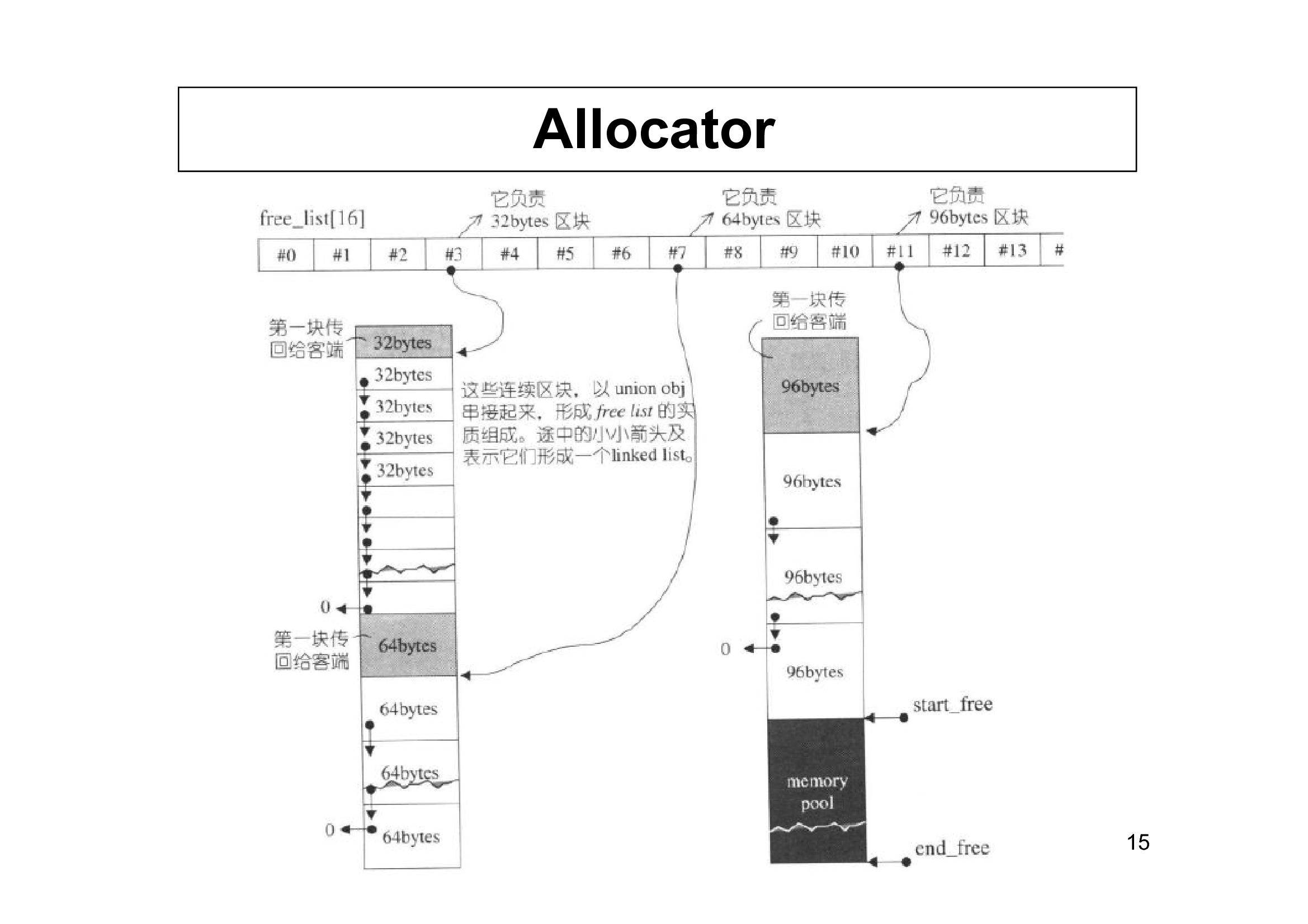
For our first implementation, we'll create a simple TrackingAllocator. Its strategy will be to just use global new and delete, but its state will be a counter to track how many allocations occur. This is an excellent way to see our allocator in action and focus on getting the STL interface right.
To create a C++20-compliant allocator that works with the STL, we need to implement a class that meets the requirements of std::allocator_traits. The article "Custom C++20 Memory Allocators for STL Containers" provides a perfect, modern template for this.
Custom C++20 Memory Allocators for STL Containers
This article provides a clear, practical guide on making a custom, stateful allocator compatible with the STL. We will follow its 'STLAdaptor' pattern.
Read the section 'STL Allocator Adaptor'. Pay close attention to the STLAdaptor class template. Note the required value_type typedef, the allocate and deallocate methods, and the templated copy constructor. This is the blueprint for our implementation.
Following that pattern, here is a minimal, stateful TrackingAllocator.
#include <iostream>
#include <vector>
#include <limits>

template<typename T>
class TrackingAllocator {
public:
    // The type of element this allocator allocates.
    // This is the one typedef that is REQUIRED.
    using value_type = T;

    // A struct to hold our state (the allocation count).
    // We use a shared_ptr so that all copies of the allocator
    // (for different types) share the same state.
    struct State {
        long allocations = 0;
    };
    std::shared_ptr<State> state;

    // Default constructor: create a new state.
    TrackingAllocator() : state(std::make_shared<State>()) {}

    // This templated copy constructor is CRITICAL for rebinding.
    // It allows an allocator of one type (e.g., TrackingAllocator<int>)
    // to be converted to an allocator of another type (e.g., TrackingAllocator<Node>).
    // All copies will share the same underlying state.
    template <class U>
    constexpr TrackingAllocator(const TrackingAllocator<U>& other) noexcept : state(other.state) {}

    // The allocation function.
    // It must allocate n * sizeof(T) bytes of raw, uninitialized memory.
    [[nodiscard]] T* allocate(std::size_t n) {
        state->allocations++;
        std::cout << "Allocating " << n << " element(s) of size " << sizeof(T) << ". Total allocations: " << state->allocations << std::endl;

        // Check for overflow before multiplication
        if (n > std::numeric_limits<std::size_t>::max() / sizeof(T)) {
            throw std::bad_alloc();
        }

        void* p = ::operator new(n * sizeof(T));
        return static_cast<T*>(p);
    }

    // The deallocation function.
    // `p` must be a pointer previously returned by `allocate`.
    // `n` is the number of elements requested in the original `allocate` call.
    void deallocate(T* p, [[maybe_unused]] std::size_t n) noexcept {
        std::cout << "Deallocating " << n << " element(s)." << std::endl;
        ::operator delete(p);
    }
};

// These comparison operators are required. For stateful allocators,
// two allocators are equal if they can deallocate each other's memory.
// In our case, they are equal if they share the same state object.
template <class T, class U>
bool operator==(const TrackingAllocator<T>& a, const TrackingAllocator<U>& b) {
    return a.state == b.state;
}

template <class T, class U>
bool operator!=(const TrackingAllocator<T>& a, const TrackingAllocator<U>& b) {
    return a.state != b.state;
}
Key Implementation Details:
value_type: This is the only mandatory type definition.allocator_traitsinfers everything else.allocate(n)anddeallocate(p, n): These are the core functions that request and release raw memory. Note that they do not construct or destroy objects. That's the container's job (usingallocator_traits::constructandallocator_traits::destroy, which default to placement new and direct destructor calls).- State Management (
std::shared_ptr<State>): Since allocators get copied, we need a way for all copies to refer to the same state. Ashared_ptris a simple way to achieve this. - Templated Copy Constructor: This is the magic that makes rebinding work for stateful allocators. When
std::vector<int, TrackingAllocator<int>>needs to create an allocator for its internal machinery, it can do so from the existing allocator, and importantly, they will share the same state. This video explains this subtle but vital concept very well.
Custom Allocator Tutorial - How-To
This short tutorial explains why a templated copy constructor is needed for rebinding and how it enables stateful allocators to work correctly with complex containers.
Watch from 12:57 to 17:35. The explanation of how a vector might internally use a re-bound allocator is the key takeaway.
Using the Custom Allocator
Now, let's use our TrackingAllocator with a std::vector. Unlike the stateless default allocator, we have to explicitly pass an instance of our stateful allocator to the vector's constructor.
int main() {
    std::cout << "--- Creating vector with custom allocator ---\n";

    // 1. Create an instance of our stateful allocator.
    TrackingAllocator<int> my_alloc;

    // 2. The allocator type is part of the vector's type.
    //    We pass our allocator instance to the constructor.
    std::vector<int, TrackingAllocator<int>> vec(my_alloc);

    // You can also get a reference to the allocator from the container
    std::cout << "Initial allocations: " << vec.get_allocator().state->allocations << std::endl;

    std::cout << "\n--- Pushing back elements ---\n";
    // This will likely trigger a few reallocations.
    vec.push_back(1);
    vec.push_back(2);
    vec.push_back(3);
    vec.push_back(4);
    vec.push_back(5);

    std::cout << "\n--- Final State ---\n";
    std::cout << "Final allocations: " << vec.get_allocator().state->allocations << std::endl;
    std::cout << "Vector size: " << vec.size() << std::endl;
    std::cout << "Vector capacity: " << vec.capacity() << std::endl;

    std::cout << "\n--- Vector goes out of scope, memory is deallocated ---\n";
    return 0;
}
When you compile and run this, you will see the output from our allocator, showing exactly when std::vector requests and releases memory as it grows.
Test your understanding!
You are building a game engine and want to allocate all objects for a single frame from a pre-allocated 1MB memory buffer (an "arena"). When the frame is over, you want to discard all of those objects instantly without calling individual destructors or `delete` for each one.Which part of the custom allocator model would you focus on to implement this, and what would the allocate and deallocate functions conceptually do?
Show answer
You would focus on implementing a custom memory strategy (the "backend") for your allocator. This strategy would be a linear or arena allocator.
- Backend Implementation:
- At the start of the frame, you'd have a class that holds a pointer to your 1MB buffer and a "current position" pointer, initially pointing to the start of the buffer.
allocate(n)method:- This function would not call
::operator new. - Instead, it would check if there is enough space left in the 1MB buffer.
- If there is, it would simply return the "current position" pointer and advance it by the requested number of bytes (plus any alignment). This is just a pointer bump, which is extremely fast.
- This function would not call
deallocate(p, n)method:- This function would do nothing. The whole point of an arena allocator for frame-based data is that you don't deallocate individual objects.
- Frame Cleanup:
- At the end of the frame, you would simply reset the "current position" pointer back to the start of the 1MB buffer. All memory from the previous frame is now considered free and will be overwritten by the next frame's allocations. This avoids thousands of
deletecalls.
- At the end of the frame, you would simply reset the "current position" pointer back to the start of the 1MB buffer. All memory from the previous frame is now considered free and will be overwritten by the next frame's allocations. This avoids thousands of
A More Modern Way: Polymorphic Memory Resources (std::pmr)
C++17 introduced std::pmr as an even cleaner way to handle custom memory strategies at runtime. Instead of baking the allocator type into the container's template parameters (std::vector<T, MyAlloc>), you use a standard container like std::pmr::vector<T> and pass it a pointer to a std::pmr::memory_resource.
This approach uses dynamic polymorphism (virtual functions), making it easy to switch allocation strategies at runtime without changing container types.
CppCon 2017: Bob Steagall “How to Write a Custom Allocator”
This final clip provides a concise overview of std::pmr, a modern C++17 feature that simplifies the use of custom memory strategies through polymorphism.
Watch from 46:41 to 48:45. Notice how std::pmr separates the container from the memory resource, avoiding the template-based complexity of traditional custom allocators.
Conclusion
You have now seen how to take complete control of memory management for STL containers, a powerful technique for building high-performance systems.
Key Takeaways:
- Custom allocators are used for performance, specialized memory models, and debugging.
- Modern C++ uses
std::allocator_traitsto provide a uniform interface to containers and reduce the boilerplate required to write a custom allocator. - A minimal, stateful allocator requires
value_type,allocate(),deallocate(), a templated copy constructor for rebinding, and equality operators. - Stateful allocators must be instantiated and passed to the container's constructor. The allocator's type becomes part of the container's type.
- C++17's
std::pmroffers a more flexible, runtime-polymorphic approach to custom memory management.
What's Next?
We have now delved deep into memory and resource management in C++. In the next module, we will shift gears to another fundamental systems topic that is critical for your career goals: concurrency. Our first lesson will introduce std::thread and explore how C++ threads map to the underlying operating system primitives you've studied in OSTEP.