Hello! Welcome to the second module of our course, "Object-Oriented C++: Memory and Mechanics."
In the last lesson, we wrapped up our C++ foundations by examining the different casting operators. We saw that static_cast can perform pointer arithmetic to navigate class hierarchies, a process that relies on objects having a predictable memory layout. This provides a perfect entry point into our new module, where we'll dissect the C++ object model from the ground up.
Our first learning outcome is to explain the memory layout of a simple class and compare it to a C struct. This is the foundational step to understanding how C++ builds its powerful object-oriented features on top of the simple memory model you're already familiar with from C. We won't just look at the syntax; we'll investigate what's happening at the binary level.
The Rules of the Game: The Application Binary Interface (ABI)
Before we look at a single byte of memory, we must address a fundamental point that is crucial for understanding C++ "under the hood." You might assume the C++ standard dictates exactly how an object's members are laid out in memory. This is not the case.
The C++ standard specifies the behavior of code but intentionally leaves the implementation—like the physical memory layout of objects—up to the compiler. This allows for platform-specific optimizations.
So, what ensures that code compiled with Clang can link against a library compiled with GCC on the same Linux system? The Application Binary Interface (ABI). The ABI is a set of low-level conventions for a specific platform, governing details like:
- Object memory layout
- Virtual function implementation (v-tables)
- Function calling conventions (how parameters are passed)
- Name mangling
For Linux and other Unix-like systems, the dominant standard is the Itanium C++ ABI. On Windows, Microsoft's MSVC compiler uses its own ABI. For this course, since your goal is C++ on Linux, we will be focusing on the rules of the Itanium ABI.
What Do C++ Objects Look Like in Memory? — A True Layout Perspective from the ABI
To get a firm grasp on this crucial distinction between the C++ standard and the ABI, please read the first two sections of the following article. It sets the stage for why we need to think in terms of the ABI to truly understand object layout.
Read the introduction and the first major section titled 'I. The “Blank Space” in the C++ Standard: Why Has the ABI Become the Final Arbiter?'. This will clarify why our entire discussion of memory layout is actually a discussion about ABI specifications.
From C struct to C++ class
With your background in C, the struct is your natural starting point. A C struct is a contiguous block of memory where members are typically laid out in the order they are declared.
Now, let's consider a simple C++ class.
CppCon 2015: Richard Powell “Intro to the C++ Object Model"
The following short video clip from a CppCon talk directly compares the memory layout of a C struct with a simple C++ class that contains only data members. This will confirm your intuition.
Watch from 05:49 to 07:17 and then from 09:26 to 10:23. The key takeaway is that for a class with only data members (what's often called a 'Plain Old Data' or POD type), the memory layout is identical to its C struct counterpart.
As the video shows, for simple data aggregation, a class and a struct are effectively the same at the memory level. The only difference in C++ is their default member access:
class: members areprivateby default.struct: members arepublicby default.
This difference is a compile-time check and has no impact on the size or memory layout of the object.
The Reality of Memory: Alignment and Padding
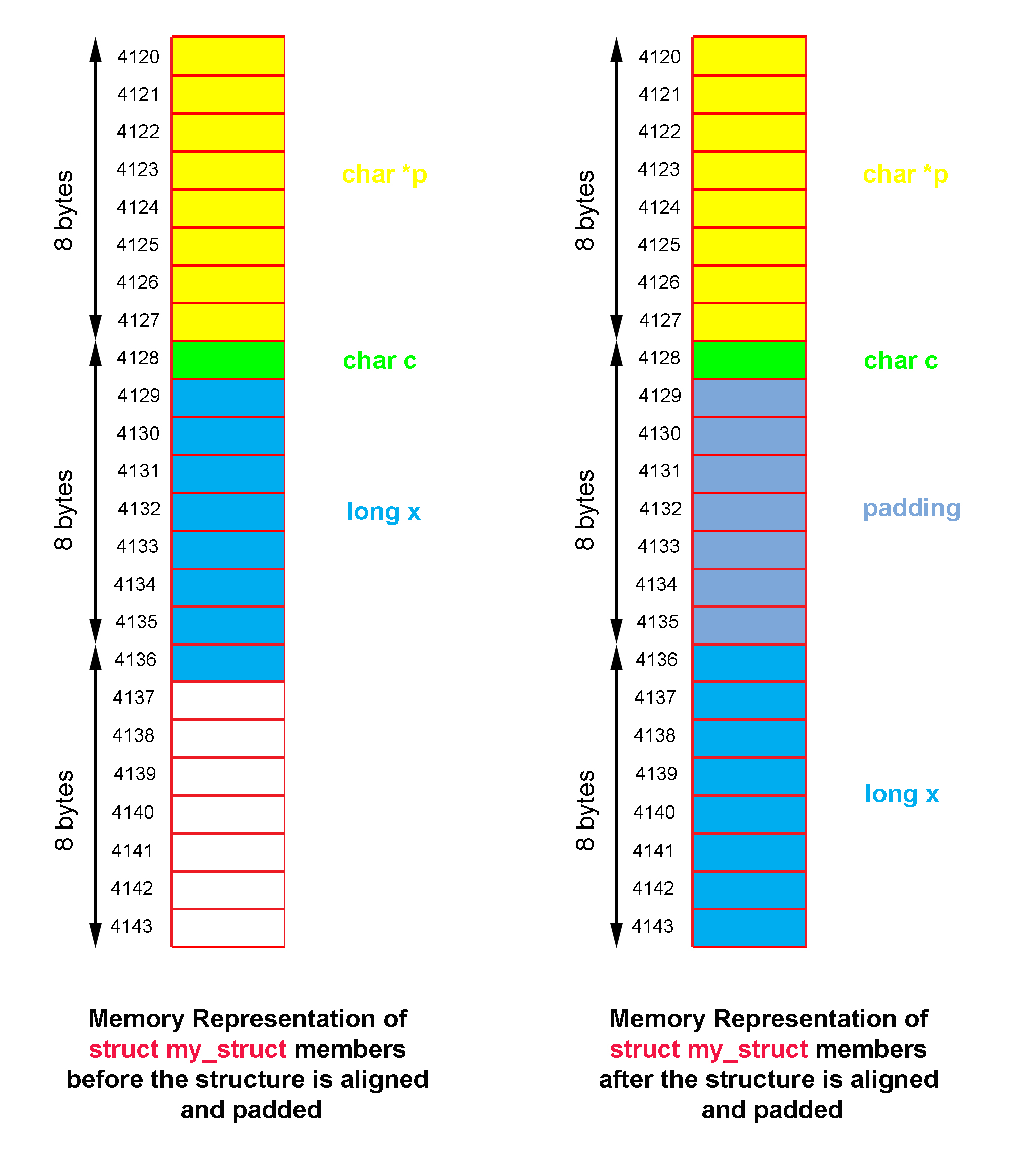
Now, let's look closer at the layout. While members are laid out sequentially, the object's total size isn't always the sum of its members' sizes. This is due to memory alignment.
CPUs are most efficient when they read data from memory addresses that are a multiple of the data's size (e.g., a 4-byte int from an address divisible by 4). To ensure this, the ABI mandates that the compiler may insert unused bytes, called padding, between members or at the end of the object.
This is a classic engineering trade-off: space is traded for time (performance).
Let's see this in action.
Dive into C++ Object Memory Layout with Examples
This article provides a fantastic, hands-on look at object layout using the GDB debugger—a tool you'll use frequently as a C++ developer on Linux. We'll start by looking at a simple class with just data members.
Read the section 'Simple Object Memory Distribution'. The author uses GDB to inspect an object with an int and a double member. Notice how the address of the double member is 8 bytes after the int, not 4. This is due to padding added to align the double on an 8-byte boundary.
The general rules for alignment (under the Itanium ABI) are:
- Each member's offset from the start of the object must be a multiple of its own alignment requirement.
- The total size of the class/struct must be a multiple of the alignment requirement of its most strictly aligned member.
Where Do the Member Functions Go?
A key difference between a C struct and a C++ class is that a class bundles data with the functions that operate on that data. A common beginner's mistake is to assume these functions are stored inside each object, increasing its size. This is incorrect.
Non-virtual member functions do not add to the size of an object. They are stored once in the program's read-only text segment (or code segment), just like any regular, non-member function.
So, how does a member function know which object's data to operate on when you call my_object.do_something()? We will cover that in detail in our next lesson, but the short answer is a hidden pointer passed to the function by the compiler.
For now, let's verify that functions and access specifiers don't affect object size.
Dive into C++ Object Memory Layout with Examples
Let's return to the GDB-based article. It extends the example to include member functions and private members, demonstrating their effect (or lack thereof) on memory layout.
Read the sections 'Object Memory Distribution with Methods' and 'Private Members'. Pay close attention to these key findings: Adding a non-virtual member method does not change the object's size. The GDB info target command confirms the method's address is in the .text segment. The layout of an object with private members is identical to one with public members, proving that access control is a compile-time feature with no runtime overhead.
This discovery is fundamental. It means that features like encapsulation through private members are a "zero-cost abstraction"—they make code safer and more maintainable without any performance penalty at runtime.
Test your understanding!
Consider a 64-bit Linux system where char is 1 byte, int is 4 bytes, and double is 8 bytes. What will sizeof(MyClass) be for the following class? Explain your reasoning.
class MyClass {
    char a;
    double b;
    int c;
};
Show answer
The size of MyClass will be 24 bytes. Here's the layout:
char a;is at offset 0. Size: 1 byte.double b;has an alignment of 8 bytes. The next available offset multiple of 8 is 8. So, 7 bytes of padding are inserted aftera.bis at offset 8. Size: 8 bytes.int c;has an alignment of 4 bytes. The next available offset is 16 (8 + 8), which is a multiple of 4. Socis at offset 16. Size: 4 bytes.- The current size is 16 (offset of c) + 4 (size of c) = 20 bytes.
- The final rule: the total size of the class must be a multiple of its most-aligned member. The
doublehas the largest alignment (8). The next multiple of 8 after 20 is 24. So, 4 bytes of padding are added at the end.
Total size = 1 (a) + 7 (padding) + 8 (b) + 4 (c) + 4 (padding) = 24 bytes.
Pro-tip: Reordering the members to double b; int c; char a; would result in a size of 16 bytes, saving 8 bytes per object!
Conclusion
In this lesson, we established the first principle of the C++ object model: for a class without virtual functions or inheritance, its memory layout is identical to a C struct. We demystified several "under the hood" aspects that are critical for systems programming.
Key Takeaways:
- Object layout is defined by the ABI, not the C++ standard, to ensure binary compatibility.
- A simple C++
classwith only data members has the same memory layout as a Cstruct. Theclassvs.structkeyword only changes the default access specifier. - Memory alignment is a crucial performance optimization where the compiler adds padding to ensure members are located at addresses that are efficient for the CPU to access.
- Non-virtual member functions are stored in the code segment and do not increase the size of an object.
- Access specifiers (
public,private) are enforced at compile time and have zero effect on memory layout or runtime performance.
We've answered the question of where data members are stored, but we've raised a new one: if member functions are just free-floating functions in the code segment, how do they know which object's data to use? Answering this will be the focus of our next two lessons, starting with an analysis of how non-virtual member functions are resolved and the role of the this pointer.