Hello! Welcome back to your course on automated deployments.
In our last lesson, we established the "why" of CI/CD—explaining how it transforms development from a slow, error-prone process into a rapid and reliable workflow. We learned that practices like Continuous Integration rely on developers frequently merging their work into a shared repository.
However, without a clear and consistent set of rules for how that merging happens, you can end up with chaos. This is where a Git branching strategy becomes essential. It provides the necessary structure to your codebase, enabling a smooth, automated pipeline. Today, we will compare the most common Git branching strategies to understand how they manage development and release cycles, helping you choose the right one for your projects.
Why Do You Need a Branching Strategy?
As you know from your development experience, Git is incredibly flexible. You can create branches, merge them, and manage your code history in countless ways. A branching strategy, or workflow, is simply a set of conventions your team agrees to follow. It answers questions like:
- Which branch represents production-ready code?
- Where do we integrate new features?
- How do we handle urgent bug fixes?
- When do we create new branches, and when do they get merged?
Having a clear strategy is the foundation for effective collaboration and, crucially, for building a predictable and automated CI/CD pipeline.
Git Flow: The Structured, Traditional Model
Let's start with a strategy that brought structure to many teams when it was introduced: Git Flow. It's a comprehensive model designed for projects with scheduled release cycles, where you might need to support multiple versions of your software simultaneously.
To understand its mechanics, please watch the following segment of the video "3 Git Workflows Every Developer Should Know" from TechWorld with Nana.
3 Git Workflows Every Developer Should Know (And When to Use Each)
This section explains the different branches in Git Flow (main, develop, feature, release, hotfix) and discusses the scenarios where it's useful, as well as its significant drawbacks for modern web development.
Watch the video from 03:11 to 08:56. Pay attention to the distinction between the main and develop branches and the purpose of release and hotfix branches.
As the video explains, Git Flow is defined by several long-lived branches:
main: Contains only production-ready, tagged release code. You never commit directly to it.develop: The primary integration branch for new features. This branch contains the latest development changes for the next release.feature/*: Branched fromdevelop. This is where you build new features. Once complete, they are merged back intodevelop.release/*: Branched fromdevelopwhen you're preparing a new production release. This branch is for final testing, bug fixes, and preparing release metadata. Once ready, it's merged into bothmain(and tagged) anddevelop(to ensure bug fixes are not lost).hotfix/*: Branched frommainto address urgent production bugs. Once fixed, the hotfix is merged back into bothmainanddevelop.
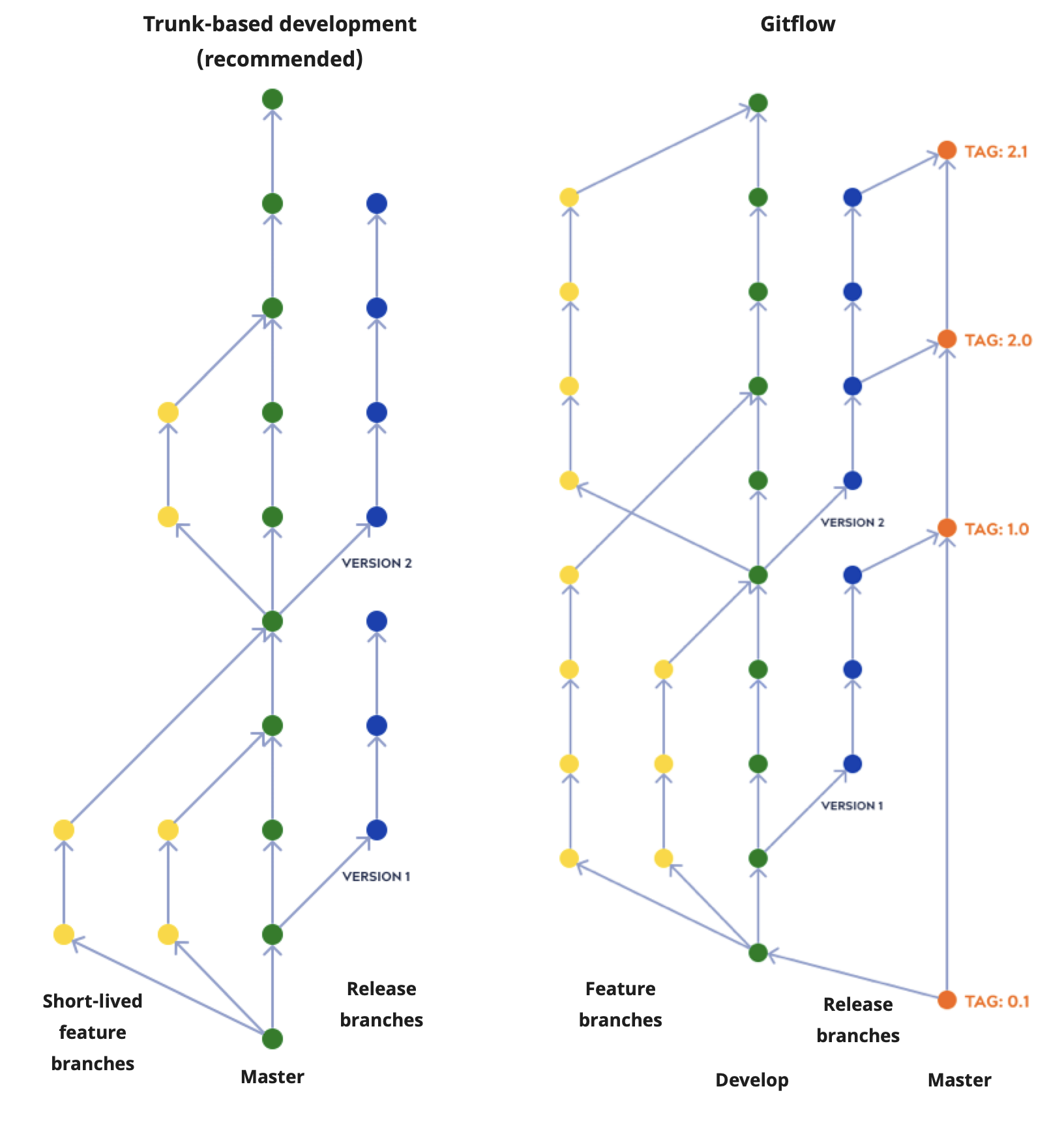
Advantages:
- Provides a very clear, robust structure.
- Excellent for managing projects with scheduled, versioned releases (e.g., desktop software, mobile apps).
- Strictly separates development work from stable production code.
Disadvantages:
- Complexity: Managing all these branches adds significant overhead. Developers spend time managing branches instead of writing code.
- Slows Down CI/CD: The long-lived
developandfeaturebranches mean code isn't integrated into the main production line frequently. This goes against the core principle of Continuous Integration and can lead to large, painful merges. - Not a good fit for web applications: As the creator of Git Flow himself later noted, this model is overkill for web apps that practice continuous delivery.
For a modern Laravel project where your goal is to deploy updates frequently, Git Flow's rigidity often becomes a bottleneck.
GitHub Flow: Simplicity for Continuous Delivery
As a direct response to the complexity of Git Flow, GitHub Flow emerged. It's a much simpler, lightweight strategy designed with one core principle in mind: your main branch is always deployable. This philosophy is a perfect match for the goals of Continuous Delivery.
Let's see how it works in the next segment of the same video.
3 Git Workflows Every Developer Should Know (And When to Use Each)
This section introduces GitHub Flow, a simpler alternative. It highlights its single guiding rule: main is always deployable. This model is ideal for teams practicing continuous deployment.
Watch from 08:56 to 13:13. Focus on the simple workflow: branch from main, build, open a pull request, review, merge, and deploy.
The GitHub Flow workflow is straightforward:
- Anything in the
mainbranch is deployable. - To work on something new, you create a descriptively named
featurebranch frommain. - Commit your changes to that branch and regularly push your work to the remote repository.
- When you need feedback or are ready to merge, you open a Pull Request (PR).
- After the feature is reviewed and approved, it is merged into the
mainbranch. - Once merged into
main, it should be deployed to production immediately.

Advantages:
- Simple and clean: Easy to learn and use.
- Enables Continuous Delivery/Deployment: Because
mainis always deployable and changes are integrated quickly, it's perfectly suited for CI/CD. - Faster feedback loops: The emphasis on Pull Requests encourages code review and collaboration early in the process.
Disadvantages:
- Requires strong automated testing: Since
mainis deployed automatically or with a single click, you must have high confidence that your test suite will catch any bugs before they reach production. - No explicit support for multiple versions: Not suitable if you need to maintain and patch older versions of your software.
- Can be challenging to manage multiple releases in different environments (e.g., staging, UAT) without additional tooling or process layers.
For your goal of automating Laravel deployments, GitHub Flow is an excellent and very common choice. It aligns perfectly with the agile, fast-paced nature of web development.
Test your understanding!
Your team is building a Laravel-based SaaS application. You want to deploy new features and bug fixes to production multiple times a day. Which of the two strategies discussed so far—Git Flow or GitHub Flow—would be more appropriate, and why?
Show answer
GitHub Flow would be the more appropriate choice. Its simple, lightweight model where main is always deployable is designed for Continuous Delivery and Continuous Deployment. Git Flow's complexity, with its separate develop and release branches, would slow down the process and add unnecessary overhead for a project that aims for multiple daily deployments.
Trunk-Based Development: The High-Velocity Standard
The evolution towards even faster integration leads us to Trunk-Based Development (TBD). This is the strategy used by high-performing DevOps teams (like those at Google and Facebook) to achieve an elite level of CI/CD. It takes the principle of frequent integration to its logical extreme.
Let's explore this modern approach.
3 Git Workflows Every Developer Should Know (And When to Use Each)
This final segment covers Trunk-Based Development (TBD), the industry's best practice for high-performing teams. It explains how TBD relies on extremely short-lived branches and introduces the critical concept of feature flags.
Watch from 14:34 to 22:02. This is a key section. Pay close attention to how teams manage incomplete features in production using 'feature flags'.
In Trunk-Based Development, there is only one long-lived branch: main (often called the "trunk"). Developers either commit directly to the trunk or, more commonly, use extremely short-lived feature branches that are merged back into main multiple times a day.
How do you manage features that are still in development? The key is feature flags (or feature toggles). This is a technique where you wrap new, incomplete features in conditional logic (e.g., an if statement). This allows you to deploy the code to production but keep the feature "hidden" from users until it's ready. Once the feature is complete, you can "flip" the flag in a configuration file to enable it for everyone, without needing a new code deployment.
Advantages:
- Ultimate CI: Eliminates merge conflicts by ensuring all developers are working on a constantly updated codebase.
- Maximum speed: Enables the fastest possible deployment frequency.
- Forces good practices: To work effectively, TBD requires a culture of comprehensive automated testing, robust CI/CD pipelines, and disciplined developers.
Disadvantages:
- High discipline required: Can be "reckless" without a mature team and solid automated guardrails. It's not suitable for inexperienced teams.
- Heavily reliant on feature flags: Adds a layer of complexity to the application code itself to manage toggles.
- Requires bulletproof automation: A single bad commit can break production if your automated tests don't catch it.
For a deeper, text-based summary of all three strategies, you can review the following guide from AWS. It provides excellent, structured lists of pros and cons for each approach.
AWS Prescriptive Guidance - Choosing a Git branching ...
To solidify your understanding, please read the overview sections for each branching strategy in the 'Choosing a Git branching strategy' guide from AWS.
Read the sections titled 'Trunk branching strategy', 'GitHub Flow branching strategy', and 'Gitflow branching strategy'. Focus on the 'Advantages and disadvantages' subsections for each to get a clear comparative view. You can skim the visual overviews and branch-specific details, as we've covered those.
Choosing the Right Strategy
There is no single "best" Git workflow. The right choice depends on your team, your project, and your release goals.
| Strategy | Best For | Pros | Cons |
|---|---|---|---|
| Git Flow | Projects with scheduled, versioned releases | Highly structured, stable production | Complex, slow, not suited for CI/CD |
| GitHub Flow | Web apps with Continuous Delivery, small-mid teams | Simple, fast, great for CI/CD | Relies on strong testing, no formal releases |
| Trunk-Based Development | High-velocity, mature DevOps teams | Fastest feedback, no merge conflicts | Requires heavy automation and feature flags |
For your goal of building an automated deployment pipeline for a Laravel application, GitHub Flow is an excellent starting point. It provides a great balance of simplicity and power that aligns perfectly with CI/CD principles. As your team and your automation practices mature, you might evolve towards Trunk-Based Development.
Conclusion
Today, we've dissected and compared three major Git branching strategies. Understanding their trade-offs is fundamental to building an effective and sustainable automated deployment workflow.
Here are your key takeaways:
- Git Flow is a structured but complex model best suited for versioned software with scheduled releases, not for modern web applications aiming for continuous delivery.
- GitHub Flow is a simple, powerful model based on the principle that
mainis always deployable. It's an excellent choice for web applications using CI/CD. - Trunk-Based Development is the modern standard for high-performing teams, emphasizing extremely frequent integration to a single
mainbranch, supported by feature flags and robust automation. - The choice of strategy is a critical decision that should align with your project's release frequency and your team's DevOps maturity.
In our next lesson, we will look at using Git tags to version your application releases. Regardless of the branching strategy you choose, tagging provides a clear, immutable reference to your production deployments, which is crucial for tracking history and enabling quick rollbacks.