Hello! Welcome back to our journey into LangChain.
In the last lesson, we got our hands dirty with the core invoke, stream, and batch methods, using ChatOpenAI to interact with the model. This was a crucial step in understanding the mechanics of making API calls. Everything we did used what LangChain calls a "Chat Model."
Today, we'll address a fundamental concept in the LangChain ecosystem: the distinction between standard LLMs and Chat Models. Understanding this difference is key to writing effective code, navigating the documentation, and even reading older LangChain tutorials. Our goal is to clearly differentiate between these two model types and understand why Chat Models are the modern standard for building applications.
1. A Tale of Two Interfaces
The evolution of large language models led to different interaction patterns. Initially, models were powerful text-completion engines. You gave them a string, and they completed it. As they grew more sophisticated and were fine-tuned for dialogue, a more structured, conversational interface became necessary.
This evolution is directly reflected in LangChain. Watch this short video clip, which provides an excellent, practical introduction to why two different classes exist in LangChain for interacting with OpenAI models.
LangChain is AMAZING | Quick Python Tutorial
In this clip from 'LangChain is AMAZING' by ArjanCodes, the presenter hits a key point: to use modern GPT models like GPT-3.5 or GPT-4, you need to switch from the standard OpenAI class to the ChatOpenAI class.
Watch from 02:22 to 04:00. Pay close attention to the code change from OpenAI to ChatOpenAI and the mention of a 'slightly different interface'.
As you just saw, the practical reality is that different underlying models require different LangChain classes. This isn't just a naming convention; it reflects a fundamental difference in how you communicate with the model.
- Standard LLMs (
LLM): These are wrappers around models that are fundamentally text-completion engines. They take a string as input and return a string as output. Thelangchain_openai.OpenAIclass is an example that wraps older models likegpt-3.5-turbo-instruct. - Chat Models (
ChatModel): These are wrappers around models fine-tuned for conversation. They take a list of messages as input and return a message as output.langchain_openai.ChatOpenAIis the class you've been using, and it's designed for models likegpt-4o-mini,gpt-4-turbo, and Anthropic's Claude models.
2. A Comprehensive Breakdown
The distinction goes beyond just the input/output format. It encompasses the models' training, capabilities, and the philosophical approach to their design. The following article provides an in-depth analysis.
Language Models vs Chat Models in LangChain
This article, 'Language Models vs Chat Models in LangChain', offers a detailed comparison that we'll use as our main theoretical guide for this lesson.
Read the article from the beginning down to the 'Conclusion'. This will cover the LangChain model ecosystem, the specifics of both LLMs and Chat Models, their philosophical differences, a comparative analysis of strengths and weaknesses, and their optimal use cases. Focus on the tables and lists that directly compare the two.
Synthesizing the Concepts
That article covered a lot of ground. Let's distill the key points, particularly those relevant to you as a software developer.
From an architectural perspective, LangChain provides a unified abstraction. Both LLM and ChatModel are specializations of a common BaseLanguageModel. This is a classic object-oriented design pattern.
This class hierarchy diagram makes the relationship clear:

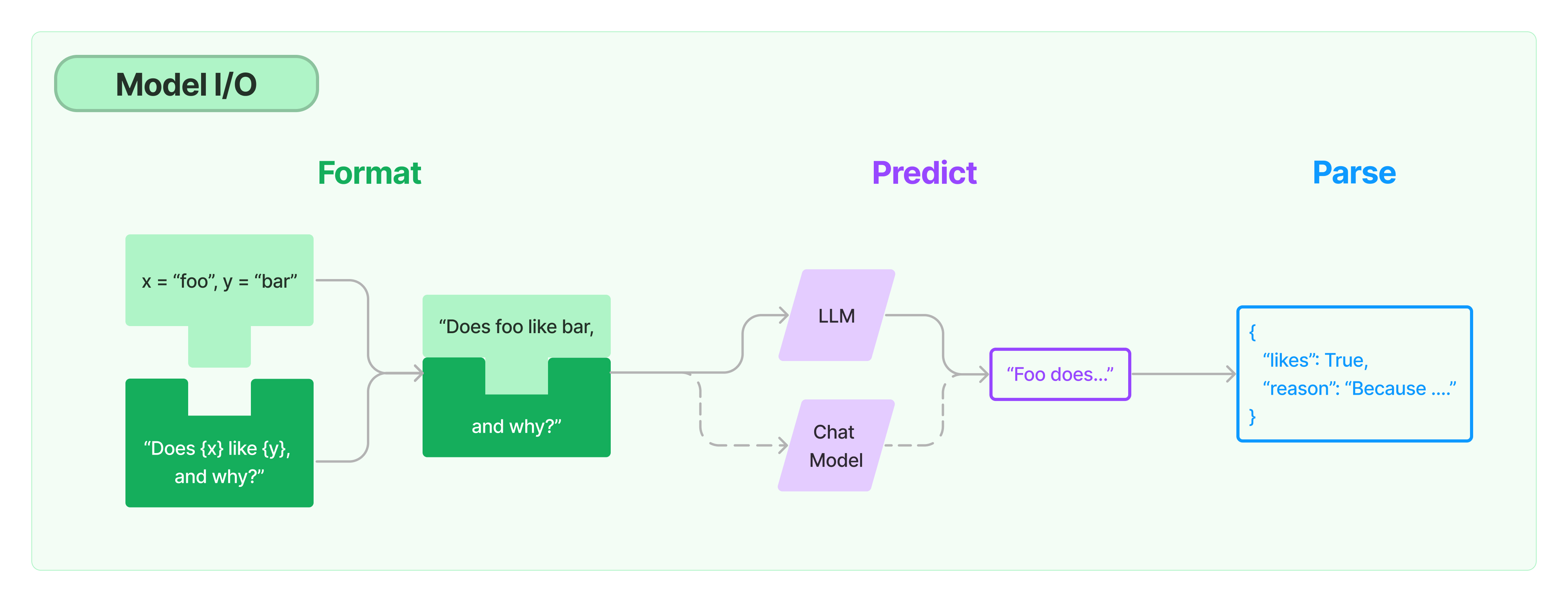
Despite this common ancestry, their immediate interfaces differ. An LLM expects a simple string, while a ChatModel expects a structured list of messages. This is because Chat Models are explicitly designed to handle conversational history and roles.
This Model I/O diagram shows where they fit into a typical workflow:
3. The Power of the Message-Based Interface
The single most important difference is the move from a single string to a list of messages. This structure is what enables robust conversational applications. LangChain's documentation provides a clear distinction.
The official LangChain documentation on 'Messages' explains the difference between text prompts and message prompts, which map directly to LLMs and Chat Models.
First, read the sections 'Text prompts' and 'Message prompts'. Then, review the 'Message types' section (System, Human, AI message) to understand the building blocks of a conversation for a Chat Model.
So, how would you manage a conversation with a standard LLM? You'd have to manually format the entire chat history into a single string, carefully denoting who said what.
LLM approach (manual formatting):
# This is how one would have to handle conversation with a legacy LLM
history = [
    "User: What is a message broker?",
    "AI: It's a system that allows applications to communicate by sending messages to each other.",
    "User: Give me an example."
]


# We must manually stitch the history into a single prompt string
prompt_string = "\n".join(history) + "\nAI:"


# response = llm.invoke(prompt_string)
# The model would try to complete this text.
This is brittle and error-prone. The model might get confused by the format, and you have no standard way to separate system instructions from user messages.
Chat Model approach (structured messages):
from langchain_core.messages import SystemMessage, HumanMessage, AIMessage


# With a Chat Model, the history is a structured list of objects
conversation = [
    SystemMessage(content="You are a distributed systems expert."),
    HumanMessage(content="What is a message broker?"),
    AIMessage(content="It's an intermediary computer program that translates a message from the formal messaging protocol of the sender to the formal messaging protocol of the receiver."),
    HumanMessage(content="Can you give me an example you might find in a project written in Go?")
]


# The model natively understands the roles and history
# response = chat_model.invoke(conversation)
The Chat Model approach is far more robust. The model has been specifically trained to understand the System, Human, and AI roles, leading to more reliable and controllable conversational behavior. This structured format is also the foundation for advanced features like tool calling, which we'll cover later.
4. Your Turn: Code It Out
Let's make this concrete. The code below instantiates both a standard LLM and a Chat Model. Note that to use a standard LLM with OpenAI, we need a model that supports the older "completions" API, like gpt-3.5-turbo-instruct. For the Chat Model, we'll use gpt-4o-mini as before.
Run this script and observe the differences in how you must prepare the input and how the output is returned.
import os
from dotenv import load_dotenv
from langchain_openai import OpenAI, ChatOpenAI
from langchain_core.messages import SystemMessage, HumanMessage, AIMessage


# --- Setup ---
load_dotenv()
if not os.getenv("OPENAI_API_KEY"):
    raise ValueError("OPENAI_API_KEY not found in .env file")


# 1. Instantiate a standard LLM
# Note: We use a model that supports the legacy completions endpoint.
llm = OpenAI(model="gpt-3.5-turbo-instruct", temperature=0)


# 2. Instantiate a Chat Model
chat_model = ChatOpenAI(model="gpt-4o-mini", temperature=0)

print("--- Task: Simple Question ---")


# --- LLM Interaction ---
llm_prompt = "What is the primary function of a reverse proxy?"
print(f"LLM Input:\n```\n{llm_prompt}\n```")
llm_response = llm.invoke(llm_prompt)
print(f"LLM Output (type: {type(llm_response)}):\n```\n{llm_response.strip()}\n```\n")


# --- Chat Model Interaction ---
chat_prompt = [HumanMessage(content="What is the primary function of a reverse proxy?")]
print(f"Chat Model Input:\n```\n{chat_prompt}\n```")
chat_response = chat_model.invoke(chat_prompt)
print(f"Chat Model Output (type: {type(chat_response)}):\n```\n{chat_response.content.strip()}\n```\n")

print("\n" + "="*40 + "\n")

print("--- Task: Follow-up Question (Conversation) ---")


# --- LLM Conversational Interaction ---
# We have to manually format the conversation history into a single string.
llm_convo_prompt = """
User: What is the primary function of a reverse proxy?
AI: A reverse proxy acts as an intermediary for requests from clients seeking resources from servers. Key functions include load balancing, SSL termination, and caching.

User: You mentioned load balancing. What's the difference between Round Robin and Least Connections?
AI:"""
print(f"LLM Conversational Input:\n```\n{llm_convo_prompt}\n```")
llm_convo_response = llm.invoke(llm_convo_prompt)
print(f"LLM Conversational Output:\n```\n{llm_convo_response.strip()}\n```\n")


# --- Chat Model Conversational Interaction ---
# We just add to the list of message objects.
chat_convo_prompt = [
    HumanMessage(content="What is the primary function of a reverse proxy?"),
    AIMessage(content="A reverse proxy acts as an intermediary for requests from clients seeking resources from servers. Key functions include load balancing, SSL termination, and caching."),
    HumanMessage(content="You mentioned load balancing. What's the difference between Round Robin and Least Connections?")
]
print(f"Chat Model Conversational Input:\n```\n{chat_convo_prompt}\n```")
chat_convo_response = chat_model.invoke(chat_convo_prompt)
print(f"Chat Model Conversational Output:\n```\n{chat_convo_response.content.strip()}\n```\n")
Notice how for the conversational task, the Chat Model's code is cleaner and the intent is clearer. You're simply appending messages to a list, a familiar pattern. The LLM requires you to become a "prompt artist," carefully crafting a single block of text.
Conclusion
You now have a clear understanding of the two primary model abstractions in LangChain. While they share a common goal—generating text—their design and interface are tailored for different purposes.
Key Takeaways:
- Standard LLMs use a
string -> stringinterface, are best for simple text completion, and are generally associated with older models. - Chat Models use a
list[message] -> messageinterface, are designed for conversation, and are the standard for all modern, dialogue-aware models (like GPT-4, Claude 3). - The message-based interface of Chat Models is superior for conversational applications because it provides a structured way to manage history and roles (
System,Human,AI). - For virtually all new development in LangChain, you will and should be using Chat Models.
Preview of the Next Lesson:
Now that we've clarified the types of models, our next step is to compare the providers of these models. We'll look at how to choose between services like OpenAI, Anthropic, Google, and open-source options based on crucial trade-offs like latency, cost, context window, and specific capabilities.