Hello! Welcome to your second lesson.
In our last session, we built the theoretical foundation for working with Large Language Models, focusing on tokens, context windows, and their impact on cost and performance. Today, we bridge that theory to practice. You'll get your hands on the keyboard and set up the environment needed to build powerful LLM applications with LangChain.
This lesson is all about configuration. By the end, you will have installed LangChain, acquired API keys from major providers like OpenAI and Anthropic, and configured your application to use them securely. This is the essential first step before writing any significant code.
1. Preparing Your Development Environment
As a seasoned developer, you know the importance of a clean and isolated development environment. We'll start by setting up a Python virtual environment and installing the necessary LangChain packages.
LangChain has a modular architecture. The core functionality is in one package, and integrations with specific LLM providers (like OpenAI, Anthropic, or Google) are in separate packages. This allows you to install only what you need.
To see this process in action, the following video provides a clear walkthrough.
LangChain Full Crash Course - AI Agents in Python
This clip from the 'LangChain Full Crash Course' by NeuralNine demonstrates how to set up a project, install LangChain, and include the specific packages for different LLM providers.
Watch from 03:56 to 06:16. The video uses a package manager called uv, but the pip install commands are equivalent and also mentioned. Focus on: How to install langchain along with provider-specific dependencies (e.g., langchain-openai). The creation of a .env file to store API keys. The installation of the python-dotenv package to load these keys into your application.
To summarize the steps for your own project:
-
Create and activate a virtual environment.
# Create a virtual environment named 'venv' python -m venv venv # Activate on macOS/Linux source venv/bin/activate # Activate on Windows .\venv\Scripts\activate -
Install the necessary packages. We'll install the core LangChain package, integrations for OpenAI and Anthropic, and
python-dotenvfor handling environment variables.pip install langchain langchain-openai langchain-anthropic python-dotenv
Your environment is now ready. The next step is to acquire the credentials to access the LLM APIs.
2. Acquiring and Managing API Keys
To use a hosted LLM from a provider like OpenAI or Anthropic, you need to authenticate your requests with an API key. This key identifies your account for billing and rate-limiting purposes. It's crucial to keep your API keys secure and never expose them in client-side code or commit them to version control.
The standard practice, which you've just prepared for, is to store these keys in a .env file in your project's root directory.
This video provides a step-by-step guide on how to get API keys from both the OpenAI and Anthropic websites.
Build an AI Agent From Scratch in Python - Tutorial for Beginners
This segment from Tech With Tim's 'Build an AI Agent From Scratch' tutorial walks you through the process of obtaining API keys from both OpenAI and Anthropic and placing them in your .env file.
Watch from 07:12 to 11:30. Pay close attention to: The specific names for the environment variables: OPENAI_API_KEY and ANTHROPIC_API_KEY. LangChain is designed to automatically detect these specific names. The process of navigating the provider's dashboard to generate a new key. The load_dotenv() function call, which loads the variables from your .env file into the environment.
After following the video's instructions, you should have a file named .env in your project folder that looks like this:
OPENAI_API_KEY="sk-..."
ANTHROPIC_API_KEY="sk-ant-..."

With your keys securely stored, let's briefly look at how LangChain's architecture makes use of them.
3. LangChain's Modular Architecture
Your experience designing microservices and working with complex system architectures will help you appreciate LangChain's design. It's not a single, monolithic library but an ecosystem of components.
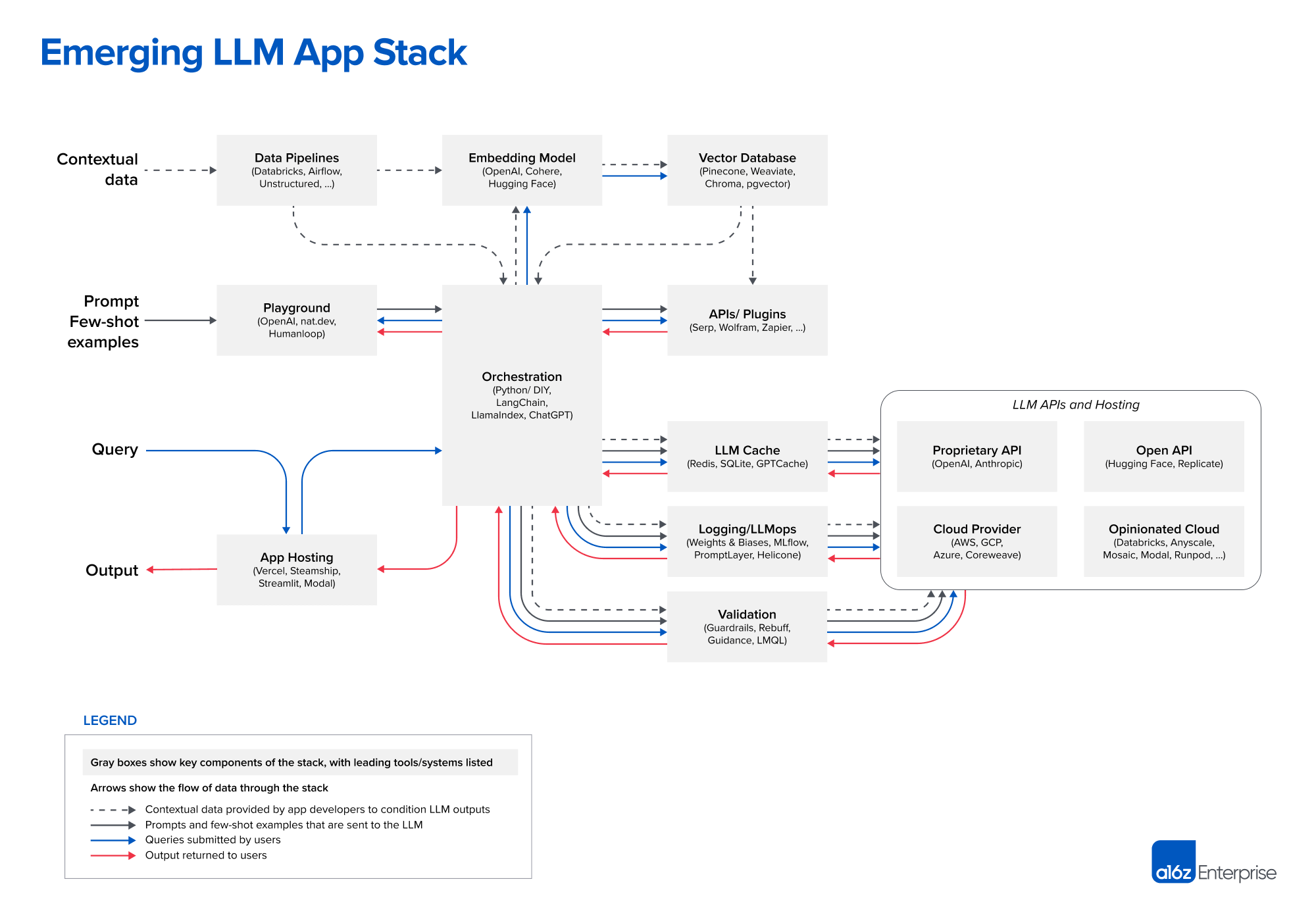
To understand this better, take a few minutes to read about LangChain's architecture.
LangChain Explained: The Ultimate Framework for Building LLM ...
This article from DigitalOcean, 'LangChain Explained,' provides a high-level overview of the framework's architecture, which clarifies why we installed separate packages earlier.
Read the section titled 'LangChain Architecture.' It explains the roles of langchain-core, the integration packages (like langchain-openai), and the main langchain meta-package.
This modularity is what enables you to swap out underlying components—like switching from an OpenAI model to an Anthropic model—often with a single line of code change, because they all adhere to the same Runnable interface defined in langchain-core.
4. Your First "Hello, World" with LangChain
Now, let's bring everything together. The following script will:
- Load the API keys from your
.envfile. - Initialize a chat model from a provider.
- Make a simple API call to verify that your configuration is working.
Create a Python file (e.g., main.py) and add the following code:
import os
from dotenv import load_dotenv


# Load environment variables from .env file
load_dotenv()


# 1. Import the chat model classes
from langchain_openai import ChatOpenAI
from langchain_anthropic import ChatAnthropic


# Check if the API keys are available
openai_api_key = os.getenv("OPENAI_API_KEY")
anthropic_api_key = os.getenv("ANTHROPIC_API_KEY")

if not openai_api_key and not anthropic_api_key:
    print("API keys not found. Please set them in your .env file.")
else:
    print("API keys loaded successfully.")


    # 2. Initialize the model(s)
    # LangChain will automatically use the respective API key from the environment


    # - For OpenAI
    try:
        openai_model = ChatOpenAI(model="gpt-4o-mini")


        # 3. Make the API call
        print("\n--- Invoking OpenAI model... ---")
        response_openai = openai_model.invoke("Explain what a container is in 20 words.")


        # The response object has several attributes, .content holds the text
        print("Response from OpenAI:")
        print(response_openai.content)
    except Exception as e:
        print(f"Error invoking OpenAI model: {e}")


    # - For Anthropic (Claude)
    try:
        anthropic_model = ChatAnthropic(model="claude-3-haiku-20240307")

        print("\n--- Invoking Anthropic model... ---")
        response_anthropic = anthropic_model.invoke("Explain what a virtual machine is in 20 words.")

        print("Response from Anthropic:")
        print(response_anthropic.content)
    except Exception as e:
        print(f"Error invoking Anthropic model: {e}")
Run this script from your terminal:
python main.py
If everything is configured correctly, you will see a short explanation from both OpenAI and Anthropic models printed to your console. You have successfully configured LangChain to work with multiple providers!
Conclusion
In this lesson, you've taken the crucial first practical step in your LangChain journey. You've moved from concepts to code, setting up a robust development environment that you'll use throughout this course.
Key Takeaways:
- Modular Installation: LangChain requires you to install provider-specific packages (
langchain-openai,langchain-anthropic) alongside the core library. - Secure API Key Management: The best practice is to store API keys in a
.envfile and load them usingpython-dotenv. Never hardcode keys in your source code. - Automatic Key Detection: LangChain automatically finds and uses API keys from environment variables if they follow the standard naming convention (e.g.,
OPENAI_API_KEY). - Unified Interface: Initializing a model from a different provider is as simple as importing a different class, but the method for using it (
.invoke()) remains the same.
Preview of the Next Lesson:
Now that your environment is set up and you can connect to LLMs, we will dive deeper into how to interact with them. In the next lesson, "Make basic API calls to foundation models using the LangChain library," we'll explore the .invoke() method in more detail, learn how to stream responses for a better user experience, and understand the crucial difference between standard LLMs and Chat Models within the LangChain framework.