Introduction
Following our previous session on the BDD workflow, we'll now proceed with the second part of our foundational recap. As you requested, this lesson will summarize the fundamentals of REST API test automation. Given your extensive experience in this area using Python and the requests library, our focus will be on structuring these core concepts and highlighting best practices that are particularly important from a test lead's perspective.
Today's learning outcome is to summarize REST API test automation fundamentals, covering how to construct requests, validate responses, and handle authentication. We will revisit the core principles of REST, see how they are implemented in Python, and discuss practical considerations like error handling and state management that are crucial for building robust and scalable API test suites.
What Makes an API "RESTful"?
Before diving into the code, it's beneficial to quickly revisit the design principles that define a RESTful API. A solid grasp of these "rules of the road" helps in designing more meaningful and effective tests. REST (REpresentational State Transfer) is not a rigid protocol but an architectural style that has become the de facto standard for web services.
Let's watch a short, high-level overview from ByteByteGo that explains these core concepts clearly.
What Is REST API? Examples And How To Use It: Crash Course System Design #3
This video provides a concise explanation of REST principles. Please watch it in its entirety. As you watch, pay close attention to these key ideas: How resources are identified with URIs (nouns, not verbs). The mapping of HTTP verbs (GET, POST, PUT, DELETE) to CRUD operations. The concept of statelessness and its importance for scalability.
Watch the full video from the beginning to the end.
As the video highlighted, the core tenets of REST—stateless communication, resource-based URIs, and the use of standard HTTP methods—provide a predictable structure for APIs. This predictability is what allows us to build generic, reusable test automation frameworks.
Anatomy of an API Test: Requests and Responses
With the conceptual framework in place, let's turn to the practical implementation. Your experience with Python's requests library means you're already familiar with the mechanics. This section will serve as a structured refresher on the key components of an API interaction.
The following video provides an excellent, concise walkthrough of using the requests library to interact with an API.
Master Python Requests In 15 Minutes. Call Any API
This video covers the end-to-end process of making API calls with Python. We'll focus on the essential segments. First, watch the section covering the structure of requests and responses. This will recap URLs, paths, query parameters, headers, and bodies. Next, review the overview of common HTTP methods like GET, POST, DELETE, and PUT. Then, see these concepts in action in the practical examples of sending GET and POST requests, including how to handle query parameters and JSON payloads.
This practical demonstration will reinforce the fundamental building blocks of an API request.
Constructing and Validating Tests
Now, let's see how these requests calls are embedded within a test automation framework like pytest, which you've used before. A test doesn't just send a request; it makes an assertion about the response to determine if the system behaved as expected.
This involves checking several aspects of the response.
1. Validating the Status Code
The HTTP status code is the first and most fundamental check. It tells you immediately whether the request was successful, if there was a client-side error, or if a server-side error occurred.
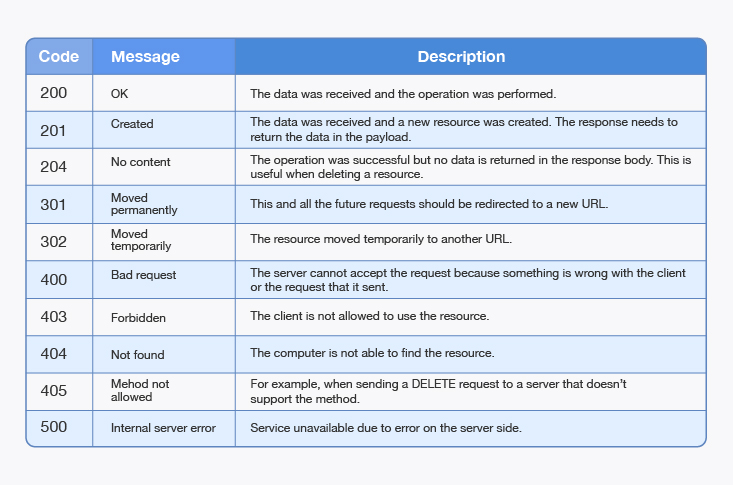
For example, a GET request to retrieve a user should return a 200 OK. A successful POST to create a new resource should return a 201 Created. A test for an invalid input might correctly assert that the API returns a 400 Bad Request.
2. Validating the Response Body and Headers
Beyond the status code, you need to validate the payload itself. For most REST APIs, this means parsing a JSON body and asserting that the correct data is present.
- Does the response contain the expected fields?
- Are the values for those fields correct?
- Does the response
Content-Typeheader correctly specifyapplication/json?
The following article demonstrates how to perform these kinds of requests and validations for all major HTTP verbs within pytest test functions.
A Complete Guide To pytest API Testing
This guide provides practical examples of API tests using pytest and requests. Focus on the section demonstrating tests against the reqres.in fake API.
Please read the section titled Demonstration: Using a Testing API. Pay attention to the code walkthroughs for Get a List of Users, Create a New User, Update User, and Delete User. Notice how each test function constructs a specific request and finishes with an assert statement on the response.status_code.
Handling Authentication and Other Best Practices
For any real-world application, your tests will need to handle authentication. As a lead, you also need to ensure the test suite is robust and efficient. Let's cover some essential patterns and practices.
Common Authentication Mechanisms
APIs use various schemes to protect resources. Your test scripts must be able to provide the necessary credentials.
- Basic Authentication: Involves sending a base64-encoded username and password in the
Authorizationheader. - Bearer Tokens (API Keys): A common pattern where a token is passed in the
Authorizationheader (e.g.,Authorization: Bearer <your-token>).
The article we just reviewed contains a great example of this.
A Complete Guide To pytest API Testing
This part of the guide demonstrates testing a real API that requires authentication.
Now, read the section Demonstration: Using a Real API. Focus on the setup and the first test case, Get TestMu AIAll Builds. Observe how the username and access_token are formatted into the URL and how custom headers are passed with the request. This is a common pattern for authentication.
Best Practice: Using Session Objects
When your test suite makes many requests to the same host, creating a new TCP connection for each one is inefficient. Furthermore, if the API uses cookies for session management, you need a way to persist them across requests. The requests.Session object solves both problems.
A Session object persists parameters, cookies, and authentication across all requests made from it, and it uses connection pooling, which can significantly speed up your test suite.
Advanced Usage — Requests 2.34.2 documentation
The official requests documentation explains this powerful feature.
In the "Advanced Usage" document, please read the section on Session Objects. Focus on how it persists cookies and how you can set session-level properties like authentication (s.auth) and headers (s.headers), which will then be sent with all subsequent requests.
Best Practice: Setting Timeouts
A test suite should never hang indefinitely. If an API is slow or unresponsive, the test should fail after a reasonable period. The requests library requires you to set timeouts explicitly. Failing to do so can lead to stuck CI/CD pipelines.
Advanced Usage — Requests 2.34.2 documentation
This is a critical aspect of writing robust automation.
Please read the section on Timeouts in the same "Advanced Usage" document. Understand the difference between the connect and read timeouts and how to set them as a tuple (e.g., timeout=(3.05, 27)).
The Big Picture: Framework Architecture
The fundamental skills of constructing requests and validating responses are the building blocks of a much larger system. As a test lead, your role is to architect or oversee a framework that organizes these tests, manages their data, and executes them efficiently.
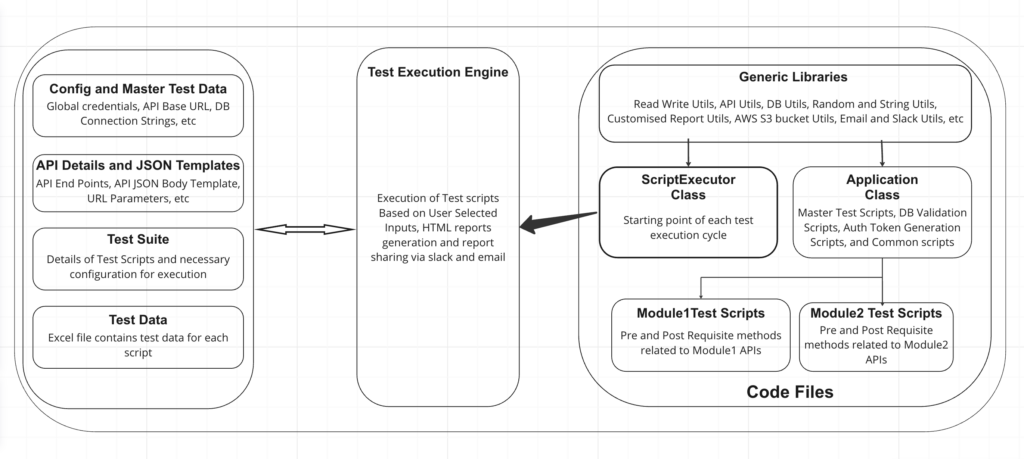
This architecture promotes separation of concerns, a key principle you'll apply when designing and scaling your team's test automation efforts.
Conclusion
In this lesson, we've recapped the core fundamentals of REST API test automation. While these concepts are familiar to you, structuring them this way helps reinforce the principles that underpin effective test suite design.
Key Takeaways:
- REST Principles: APIs are organized around resources (nouns) and manipulated with standard HTTP verbs (GET, POST, PUT, DELETE).
- Request Construction: A request is composed of a URL, method, headers, and an optional body. The
requestslibrary provides a simple interface for building these in Python. - Response Validation: A test's success is determined by asserting on the response, primarily the status code, but also the content of the headers and body.
- Leadership-Level Best Practices: For a robust, scalable, and efficient test suite, it is crucial to handle authentication correctly, use
Sessionobjects for performance and state management, and always set timeouts.
In our next lesson, we will complete our foundational refresher by summarizing the core concepts of UI automation with Selenium WebDriver.