Hello and welcome!
In our last lesson, we learned how to use searchsploit to find exploit code for vulnerabilities we discover. You may have noticed that many of the results were files ending in .rb—Ruby scripts. This was a deliberate clue leading us to our next topic. Those .rb files are often modules for the Metasploit Framework, one of the most powerful and widely used tools in a penetration tester's arsenal.
This lesson marks our entry into the world of exploitation. We'll move from simply finding vulnerabilities to understanding the primary tool used to leverage them. We will explore the purpose of the Metasploit Framework and learn how to navigate its fundamental building blocks: the modules. By the end of this lesson, you'll understand what Metasploit is, what its different components do, and how to find your way around its command-line interface.
1. What is the Metasploit Framework?
Metasploit is more than just a collection of exploits. It's an entire infrastructure designed to streamline the process of penetration testing. It provides a standardized environment for everything from reconnaissance and scanning to exploitation and post-exploitation.
Metasploit Framework - ArchWiki
To start, let's get a clear, high-level definition of Metasploit. As an Arch Linux user, you'll appreciate the concise and accurate information available on the ArchWiki. Please read the introduction and the official description it quotes.
Read the initial section of the article, starting from the top down to just before the 'Installation' heading. Focus on the official site's description of Metasploit as an 'auditing tool' and an 'infrastructure you can build upon'.
The key idea is that Metasploit provides a framework. It handles the complex, repetitive parts of exploitation (like socket handling and shellcode generation), allowing you as the tester to focus on selecting the right module, configuring it for your target, and launching the attack. This makes the process faster, more reliable, and more accessible.
2. The Architecture: How Metasploit is Organized
To understand how Metasploit achieves this, it's helpful to look at its architecture. It's built on a modular design, meaning it's composed of distinct, interchangeable pieces of code.
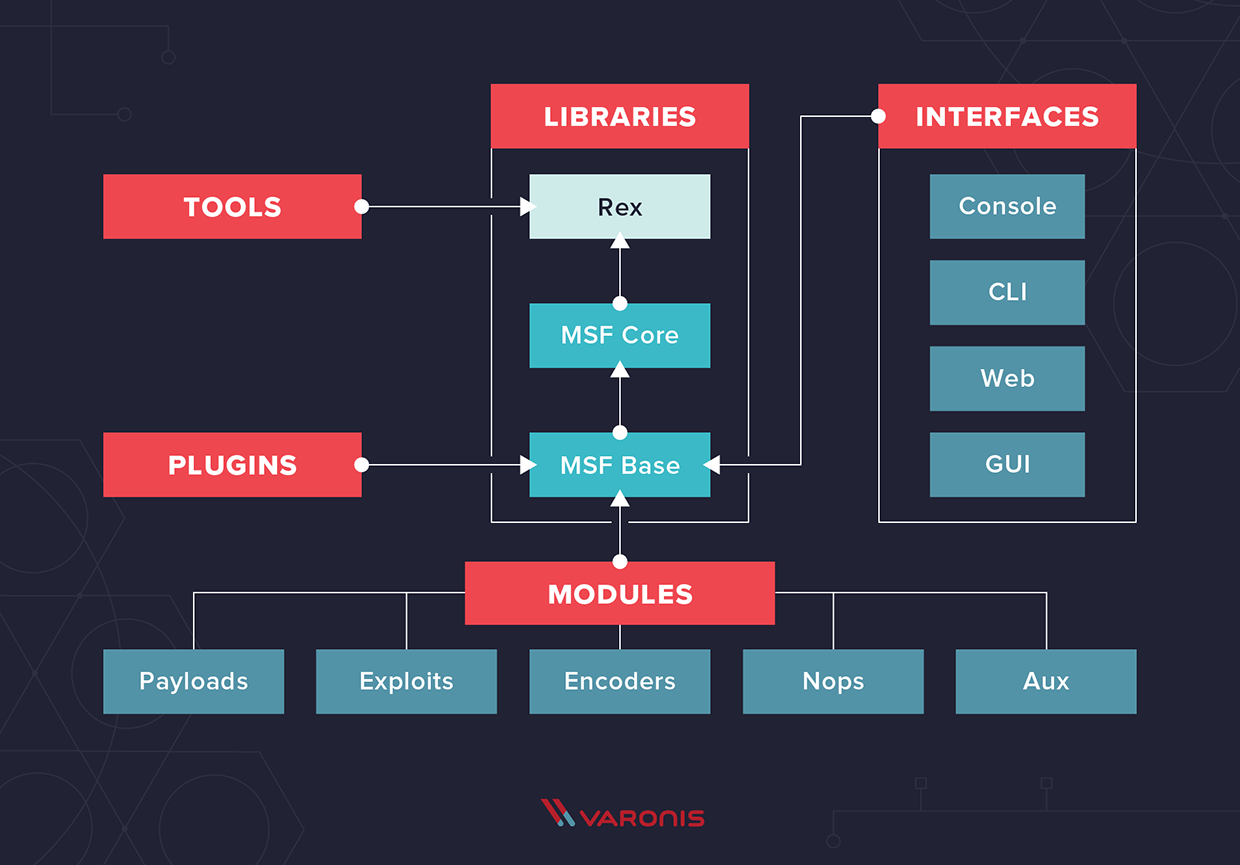
This diagram shows three main layers:
- Libraries (Rex, Core, Base): These are the foundations of the framework. They provide the core functionality, handle protocols, and offer the programming API.
- Modules: These are the individual components that perform specific tasks: exploits, payloads, scanners, etc. This is where most of the action happens.
- Interfaces: These are the different ways you can interact with the framework. We will be focusing on the
msfconsole, the powerful command-line interface.
A crucial part of understanding Metasploit, especially for a Linux user like yourself, is knowing where its components live on the filesystem.
Metasploit For Beginners - #2 - Understanding Metasploit Modules
This video from HackerSploit provides an excellent tour of the Metasploit module directory structure. Seeing the layout on the filesystem makes the abstract concept of modules much more concrete.
Watch from 02:43 to 04:41. The presenter will navigate to /usr/share/metasploit-framework/modules and show how the subdirectories correspond to the different module types.
As you saw, the directory /usr/share/metasploit-framework/modules/ contains subdirectories for each type of module. This clear, hierarchical organization is central to navigating the framework.
3. The Six Module Types
The real power of Metasploit lies in its diverse set of modules. Understanding the purpose of each type is fundamental to using the framework effectively. There are six main categories.
Metasploit Framework - ArchWiki
The ArchWiki provides a clear and concise text-based summary of the six module types. This will serve as a great reference.
Read the 'Module types' section of the article. This provides a quick definition for each of the six types.
Now, let's see a more detailed breakdown with practical examples for each module type.
Metasploit For Beginners - #2 - Understanding Metasploit Modules
The same HackerSploit video provides a fantastic, in-depth explanation of each module type, navigating through their respective directories to show how they are categorized.
Watch from 04:41 to 18:22. The video will cover each of the six module types in order. As you watch, focus on the primary purpose of each category: Exploits (04:41): What do they target? Payloads (06:12): What is their relationship to exploits? What are the different types (singles, stages, stagers)? Auxiliary (08:58): What kind of tasks do these perform if not exploitation? Encoders (11:10): What problem do they solve? Nops (12:55): What is their role in low-level exploitation like buffer overflows? Post (15:28): When are these modules used?
To summarize, here is the role of each module:
| Module Type | Purpose |
|---|---|
| Exploit | Takes advantage of a specific vulnerability on a target system. It's the code that delivers the payload. |
| Payload | The code that runs on the target system after the exploit is successful. This is what gives you access (e.g., a reverse shell). |
| Auxiliary | Performs actions that are not direct exploitation, such as port scanning, service enumeration, fuzzing, or denial-of-service. |
| Encoder | Modifies the exploit and payload to avoid detection by security systems like antivirus (AV) or intrusion detection systems (IDS). |
| Nop | Stands for "No Operation." These are used to pad buffers and ensure exploit stability, particularly in buffer overflow attacks. |
| Post | Post-exploitation modules. These are run on a system that has already been compromised to gather more information, escalate privileges, or maintain access. |
4. Navigating Metasploit with msfconsole
Now that you understand the theory, it's time for hands-on practice. The primary way to interact with Metasploit is through msfconsole, its command-line interface.
Starting the Service and Console
Metasploit uses a PostgreSQL database in the background to manage data, store information about hosts, and speed up searches. Before launching the console, it's best practice to start this database service.
Metasploit For Beginners - #1 - The Basics - Modules, Exploits & Payloads
Let's watch the first video from HackerSploit to see how to start the required service and launch the console.
Watch from 02:11 to 05:32. First, the video will mention the different interfaces, confirming we'll be using msfconsole. Then, it will demonstrate how to start the PostgreSQL service. The command shown is service postgresql start, which is common on Debian-based systems. On your Arch Linux system, you will use systemctl.
Your Turn: Launching msfconsole
Let's get msfconsole running in your Kali VM.
- Open a terminal in your Kali Linux VM.
- Start the PostgreSQL database service. On Kali (which is Debian-based), the command is:
sudo systemctl start postgresql - Launch the Metasploit console:
After a moment, you'll see an ASCII art banner and the prompt will change tomsfconsolemsf6 >(the number may vary). You are now inside the Metasploit Framework.
Basic Navigation Commands
Within msfconsole, there are a few key commands for finding and selecting modules.
Metasploit For Beginners - #1 - The Basics - Modules, Exploits & Payloads
Let's continue with the video to see a demonstration of the most essential commands for navigating the framework.
Watch from 09:01 to 16:23. Pay close attention to the workflow demonstrated: help: To see available commands. search: To find modules based on keywords. use: To load a specific module. Notice how the prompt changes. show options: To view the parameters you need to configure for the loaded module. show payloads: To list compatible payloads for the selected exploit. info: To get detailed information about the module.
Let's practice this workflow. In the last lesson, you may have found an exploit for vsftpd 2.3.4 on your Metasploitable2 target. Let's find its corresponding Metasploit module.
Your Turn: Navigating to a Module
In your running msfconsole:
-
Search for the exploit:
search vsftpd 2.3.4You should see a result with the name
exploit/unix/ftp/vsftpd_234_backdoor. The name tells you it's an exploit module, targets Unix systems, uses the FTP protocol, and relates to thevsftpd 2.3.4backdoor. -
Use the module:
use exploit/unix/ftp/vsftpd_234_backdoorNotice your prompt changes to
msf6 exploit(unix/ftp/vsftpd_234_backdoor) >, indicating that you are now in the "context" of this specific exploit. -
Get information:
infoRead the description. It will tell you exactly what the vulnerability is and provide references to public disclosures like CVEs.
-
View options:
show optionsThis is a critical step. It shows you the parameters you need to set before running the exploit. For this module, you'll see
RHOSTS(the remote host/target IP) is required. -
Return to the main prompt:
To leave the context of the current module, use thebackcommand.backYour prompt will return to
msf6 >. -
Exit
msfconsole:exit
You've just successfully navigated the Metasploit module structure!
Conclusion
In this lesson, we demystified the Metasploit Framework. You now have a solid theoretical and practical understanding of its purpose and organization.
Key Takeaways:
- Metasploit is a professional framework for penetration testing that standardizes the exploitation process.
- It has a modular architecture, and its components are located in
/usr/share/metasploit-framework/. - There are six main module types:
Exploit,Payload,Auxiliary,Post,Encoder, andNop. Each has a distinct role. - The
msfconsoleis the primary command-line interface for the framework. - You can navigate modules using key commands:
search(to find),use(to select),info/show options(to inspect), andback(to deselect).
Next Lesson Preview:
We've learned how to find and inspect an exploit module. In the next lesson, we will take the logical next step: configuring and launching that exploit. We will use the set command to configure the RHOSTS and PAYLOAD options and then use the exploit command to gain our first shell on the Metasploitable2 target VM.