Welcome to our third lesson. In our previous session, we explored Python's core data structures, lists and dictionaries, and saw how they relate to JavaScript's arrays and objects. You also learned about list comprehensions, a powerful and concise way to create lists.
Today, we'll move from Python's built-in features to its vast external ecosystem. The goal of this lesson is to learn how to import and use external packages, which is how you'll access the powerful tools needed for AI and machine learning. We will focus specifically on introducing NumPy and Pandas, the two most fundamental libraries in the data science toolkit. For you, this process will feel very similar to using npm or yarn to bring libraries like D3.js or Lodash into a JavaScript project.
The Power of Python's Ecosystem
While Python's standard features are robust, its true strength in the world of data comes from its rich ecosystem of third-party libraries. These are collections of pre-written code that provide specialized functionality, saving you from having to build everything from scratch.
Two libraries, in particular, form the bedrock of nearly all data science and machine learning work in Python:
- NumPy (Numerical Python): Provides a powerful object for multi-dimensional arrays and a vast collection of high-performance mathematical functions to operate on them.
- Pandas: Built on top of NumPy, it provides high-level data structures—the
DataFrameandSeries—designed for cleaning, manipulating, and analyzing structured data, much like a spreadsheet or a database table in code.
The diagram below illustrates how these libraries, and others we'll encounter later, exist within the broader Python ecosystem.
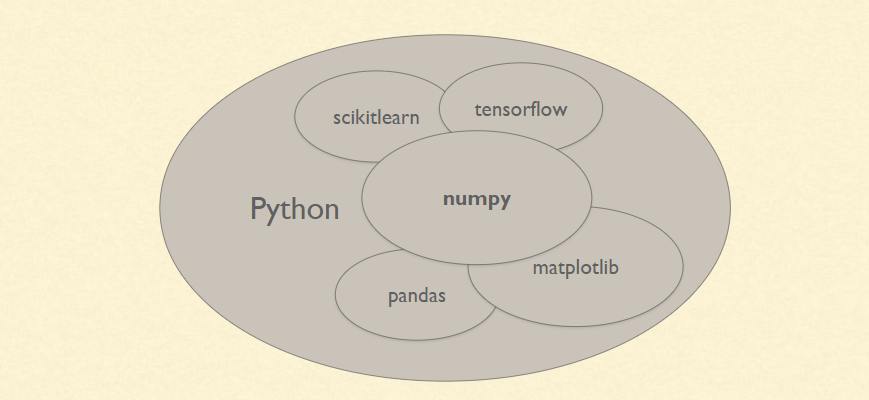
To get a high-level sense of what these libraries do and why they are distinct, watch the following video from IBM Technology.
This video provides an excellent conceptual overview of NumPy and Pandas.
Watch from the beginning to the introduction to understand the context. Continue with the segment on NumPy's purpose, which explains its focus on numerical computing. Next, watch the section on Pandas' strengths in data analysis and manipulation. Finally, the segment on how they relate clarifies that Pandas is built on NumPy and offers guidance on their use.
How to Import Modules and Packages
In JavaScript, you use import or require to bring modules into your files, and you manage these dependencies with npm and a package.json file. Python has a very similar system.
pip: The standard package manager for Python, analogous tonpm. You use it from your terminal to install packages (e.g.,pip install numpy).- PyPI (Python Package Index): The central repository where packages are hosted, much like the NPM registry.
importstatement: The keyword used within a Python script to make a package's code available.
Let's look at the mechanics of importing. The following video from Corey Schafer provides a crystal-clear guide to the different ways you can use the import statement.
Python Tutorial for Beginners 9: Import Modules and Exploring The Standard Library
This video demonstrates the essential import syntax you will use in every Python project.
Watch the first part, "Importing a Module", to see the basic import module syntax and how to use its functions. Pay close attention to the next segment, "Aliases and Selective Imports", which explains two extremely common patterns: import my_module as mm (using an alias). This is how you will always import NumPy and Pandas. from my_module import function. This allows you to use a function directly without prefixing it with the module name.
To solidify this and connect it directly to your JavaScript background, the following article from freeCodeCamp is tailor-made for you. It explicitly compares Python's module system and dependency management with that of Node.js.
How to Learn Python for JavaScript Developers [Full Handbook]
This article section provides a direct comparison between Python's module and package management (import, pip) and JavaScript's (import/require, npm), which will make the concepts feel very familiar.
Please read the section titled "Modules, Packages, and Dependency Management". You can find it by searching for that heading. Focus on the comparisons drawn between Python's and JavaScript's approaches. The examples showing import statements side-by-side and the comparison of pip with npm will be particularly helpful.
Putting It into Practice: Importing NumPy and Pandas
Now that you understand the syntax, let's see why these libraries are indispensable.
NumPy: The Need for Speed
Python lists are flexible but slow for numerical calculations. NumPy introduces the ndarray (n-dimensional array), which looks like a list but is incredibly fast because its operations are written in highly optimized C code. This concept of applying an operation to an entire array at once, rather than looping through its elements, is called vectorization.
This is the "why" behind NumPy. For the kinds of repetitive mathematical operations at the heart of machine learning, this speed-up is not just a convenience—it's a necessity.
NumPy and pandas for Data Analysis – Dataquest
This article from Dataquest provides a perfect demonstration of NumPy's power and introduces you to its core data structure.
First, read the section "Lesson 1 – Introduction to NumPy". It will show you how to import NumPy and create your first array. Most importantly, pay close attention to the subsection on the power of vectorization. The code examples comparing the time taken by a standard Python loop versus a NumPy operation clearly illustrate the performance benefits. This is a core concept in scientific computing.
As you saw, the standard way to import NumPy is:
import numpy as np


# Create a NumPy array from a Python list
my_list = [1, 2, 3, 4]
my_array = np.array(my_list)

print(my_array)
print(type(my_array))
Output:
[1 2 3 4]
<class 'numpy.ndarray'>
Pandas: Data in a Table
While NumPy gives us raw computational power, Pandas provides the tools to work with data in a structured, intuitive way. It introduces the DataFrame, a two-dimensional table of data with labeled rows and columns, and the Series, which represents a single column.
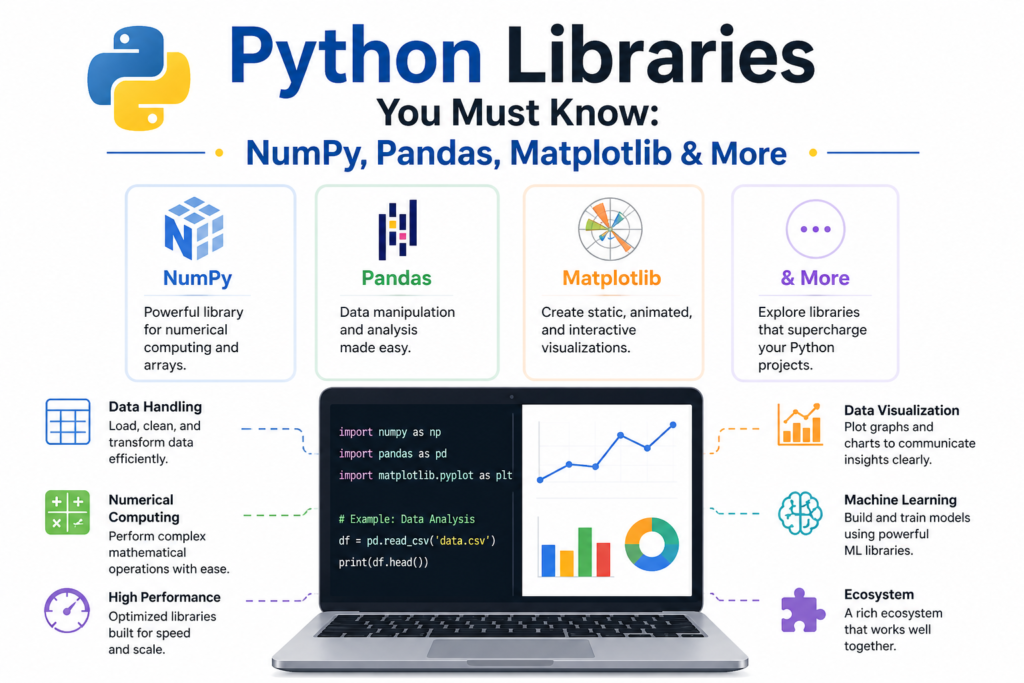
Let's see how to import Pandas and use it for a common first step in any project: loading data.
NumPy and pandas for Data Analysis – Dataquest
This next section of the same Dataquest article introduces Pandas and its relationship to NumPy.
Read "Lesson 3 – Introduction to Pandas". It explains how to import Pandas and load a CSV file into a DataFrame. It also clarifies the relationship between a DataFrame and a Series. Then, quickly review the two short FAQ sections at the end of the article: "What's the difference between NumPy arrays and pandas Series..." "How can combining NumPy and pandas enhance..." These will help you understand how the two libraries complement each other.
The conventional way to import Pandas is:
import pandas as pd


# Create a Pandas Series from a Python dictionary
data = {'Alice': 30, 'Bob': 25, 'Charlie': 35}
age_series = pd.Series(data)

print(age_series)
print(type(age_series))
Output:
Alice      30
Bob        25
Charlie    35
dtype: int64
<class 'pandas.core.series.Series'>
Notice how the Series automatically used the dictionary keys as labels (the index) for the data. This labeling capability is a key feature of Pandas.
Conclusion
In this lesson, we opened the door to Python's powerful data science ecosystem. You've learned the critical skill of importing packages and have been introduced to the two most important libraries for your journey into AI and machine learning.
Here are the key takeaways:
- Modules and Packages: Python's functionality is extended through packages, which are installed with
pipfrom the PyPI repository, a system analogous tonpmin the JavaScript world. - The
importStatement: You can import an entire library (import numpy), give it a standard alias (import numpy as np), or import specific components (from pandas import DataFrame). The alias method is the standard for NumPy and Pandas. - NumPy: The foundational package for numerical computing. Its core strength lies in the
ndarrayobject and vectorized operations, which provide massive performance improvements over standard Python loops. - Pandas: The essential tool for data manipulation and analysis. It provides the
DataFrameandSeries, which allow you to work with labeled, tabular data efficiently.
You now have the foundational knowledge to start working with data. In our next lesson, we will dive deeper into NumPy, where you will learn to create, index, and reshape NumPy arrays for numerical computation.