Welcome back! In our previous lesson, we explored the computational power of NumPy, learning how to perform fast, vectorized operations on numerical arrays. This gave us a solid foundation for handling raw numerical data.
Today, we'll build on that by introducing Pandas, the most important library for data analysis and manipulation in Python. While NumPy is excellent for arrays of numbers, real-world data is rarely just numbers; it comes with labels, like column headers in a spreadsheet or keys in a JSON object. Pandas excels at handling this kind of labeled, tabular data. Our goal in this lesson is to learn how to create the two fundamental Pandas data structures—the Series and the DataFrame—from the Python lists and dictionaries you're already familiar with.
From NumPy Arrays to Pandas Series
The first core data structure in Pandas is the Series. You can think of a Series as a one-dimensional array, much like a NumPy array, but with an important addition: an explicit index. This index provides labels for each element, allowing for more flexible and intuitive data access. A Series can hold any data type.
A Series is the building block for the more complex DataFrame, representing a single column of data.
You can create a Series from various Python objects, but the most common ways are from a list or a dictionary.
- When created from a list, Pandas assigns a default integer index (
0, 1, 2, ...), just like a standard list or array. - When created from a dictionary, Pandas automatically uses the dictionary's keys as the index labels.
The following video provides a concise demonstration of these methods.
Part 1 - Pandas Series with Lists/Dictionaries | Pandas Complete Tutorial Playlist
This video from the "Build with Akshit" channel will walk you through the basics of creating a Pandas Series.
First, watch the segment on creating a Series from a list and how to assign your own custom index. Next, see how you can create a Series from a dictionary, and notice how the keys are naturally used as the index.
As you can see, creating a Series is straightforward. For a more formal definition and further examples, you can refer to the official Pandas documentation.
Intro to data structures — pandas 2.3.3 documentation - PyData |
The official Pandas documentation provides a technical overview of the Series object.
Read the introductory section on the Series data structure. Focus on the examples showing creation from an ndarray (NumPy array) and a dictionary. This reinforces what you saw in the video.
The DataFrame: Your Primary Tool for Data Analysis
While the Series is useful for one-dimensional data, most of the time you'll be working with tabular data—think spreadsheets, database tables, or, in terms you might be familiar with from JavaScript, an array of objects. This is where the DataFrame comes in.
A DataFrame is a two-dimensional, labeled data structure with columns of potentially different types. It is the most commonly used Pandas object and the workhorse for nearly all data analysis tasks.
There are many ways to create a DataFrame, but we will focus on the most common and intuitive methods using dictionaries and lists.
Method 1: From a Dictionary of Lists (Column-Oriented)
This is arguably the most common and readable way to create a DataFrame. You construct a dictionary where each key represents a column name and its corresponding value is a list of the data for that column. All lists must have the same length.
This is a "column-oriented" approach, as you are essentially defining the DataFrame one column at a time. The image below provides a perfect illustration.

The following short video demonstrates this process in a very clear, hands-on way.
DataFrames in Pandas are easy! 🔢
This video from the "Bro Code" channel gives a quick, practical example of creating a DataFrame from a dictionary of lists.
Watch the first two minutes of the video, which cover creating a DataFrame from a simple dictionary and printing the result.
Method 2: From a List of Dictionaries (Row-Oriented)
Another powerful method is to use a list where each element is a dictionary representing a single row of data. The keys in each dictionary correspond to the column names. This "row-oriented" approach is very common when working with data from APIs, which often return data as a JSON array of objects.
Pandas is smart about this; if a dictionary in the list is missing a key, Pandas will automatically fill that spot in the DataFrame with NaN (Not a Number), which is the standard marker for missing data.
For example:
import pandas as pd

data = [
    {'name': 'Alice', 'age': 30, 'city': 'New York'},
    {'name': 'Bob', 'age': 25, 'city': 'Paris'},
    {'name': 'Charlie', 'age': 35} # 'city' is missing here
]

df = pd.DataFrame(data)
print(df)


# Output:
#       name  age       city
# 0    Alice   30   New York
# 1      Bob   25      Paris
# 2  Charlie   35        NaN
Other Common Creation Patterns
While the two methods above are the most frequent, it's useful to know a few others. You can also create DataFrames from a list of lists or by combining separate lists using Python's zip() function. The following article details these different approaches.
6 Ways to Convert a List to Pandas DataFrame - Built In
This article from "Built In" provides clear, code-driven examples for several DataFrame creation methods.
Please read the following two sections to see these patterns in action: Method 4: Convert Dictionary of Lists to a Pandas DataFrame. Find the section with this title and review the explanation and code example. This reinforces the first method we discussed. Method 3: Pandas List to DataFrame With Multidimensional Lists. Now, find this section to learn the "row-oriented" approach using a list of lists. Pay attention to how you must explicitly pass the column names in this case.
Row-Oriented vs. Column-Oriented: A Visual Summary
To help you build a strong mental model, it's useful to visualize the difference between "row-oriented" and "column-oriented" data structures for creating a DataFrame. The image below provides an excellent summary of the patterns we've discussed.
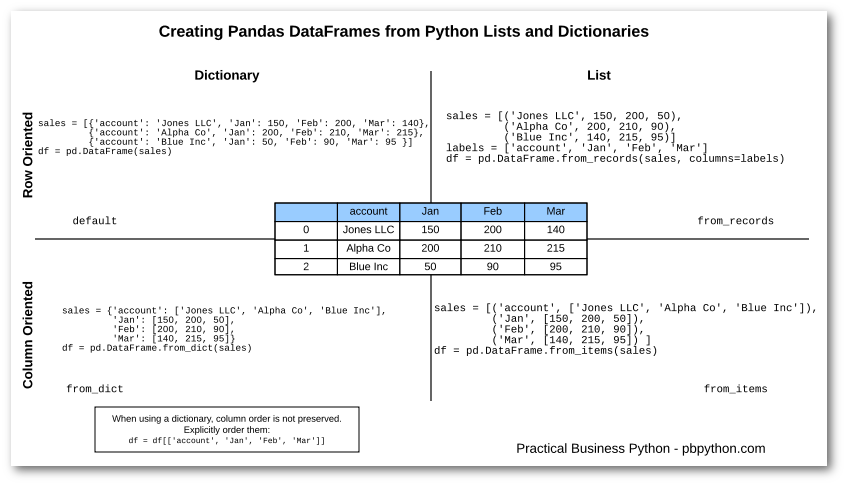
Understanding both approaches is valuable. The "column-oriented" method (dictionary of lists) is often more efficient and readable for manual data entry. The "row-oriented" method (list of dictionaries) is more common when processing data fetched from external sources like APIs.
Conclusion
In this lesson, you have learned how to construct the fundamental data structures of the Pandas library, moving from raw numerical arrays to labeled, tabular data ready for analysis.
Here are the key takeaways:
- A
Seriesis a 1D labeled array, representing a single column of data with an index. - A
DataFrameis a 2D labeled table, analogous to a spreadsheet, and is the central object in Pandas. - You can create a
DataFrameusing a column-oriented approach (a dictionary of lists) or a row-oriented approach (a list of dictionaries or a list of lists). The method you choose often depends on the original format of your data.
You are now equipped to take raw Python data and structure it for analysis. In our next lesson, we will explore how to interact with these DataFrames. You'll learn the essential skills of selecting and filtering data—grabbing specific rows, columns, and slices of data to answer questions and prepare for machine learning tasks.