Welcome to your next lesson on Docker! In our previous session, we traced the journey of the docker run hello-world command, uncovering the hidden dance between the client, daemon, and underlying runtimes. You saw firsthand how Docker, when asked to run a container, automatically fetched an image named hello-world from a public registry (Docker Hub) and then used it to create and run a container on your machine.
Today, we will formalize our understanding of these three pillars of the Docker ecosystem. This lesson is dedicated to clearly defining and distinguishing between Docker images, containers, and registries. By the end, you will have a solid conceptual model of what each component is, what it does, and how they relate to one another, setting a firm foundation for the practical skills to come.
A Powerful Analogy: From Blueprint to Building
Before we dive into technical definitions, it's helpful to start with an analogy. The relationship between images and containers is often compared to building a house. A video from Tiny Technical Tutorials explains this analogy very well.
What Are Containers? Docker Basics Explained for Absolute Beginners | Step-by-Step Tutorial
This video provides an excellent, easy-to-understand analogy that frames the core concepts of Docker.
Please watch the segment from the house analogy. The presenter maps the process of building a house (blueprint -> kit -> house) to the Docker workflow (Dockerfile -> image -> container). Pay close attention to how each element is defined in this comparison.
As the video explained, you can think of it this way:
- A Dockerfile is the blueprint for the house, containing all the instructions.
- An Image is the prefabricated kit created from the blueprint. It's a static, unchangeable package containing all the necessary materials (walls, windows, etc.).
- A Container is the actual built house. It's a running, live instance created from the kit, where people can live.
Now, let's take this mental model and build upon it with more precise definitions, placing each component within the overall Docker architecture.
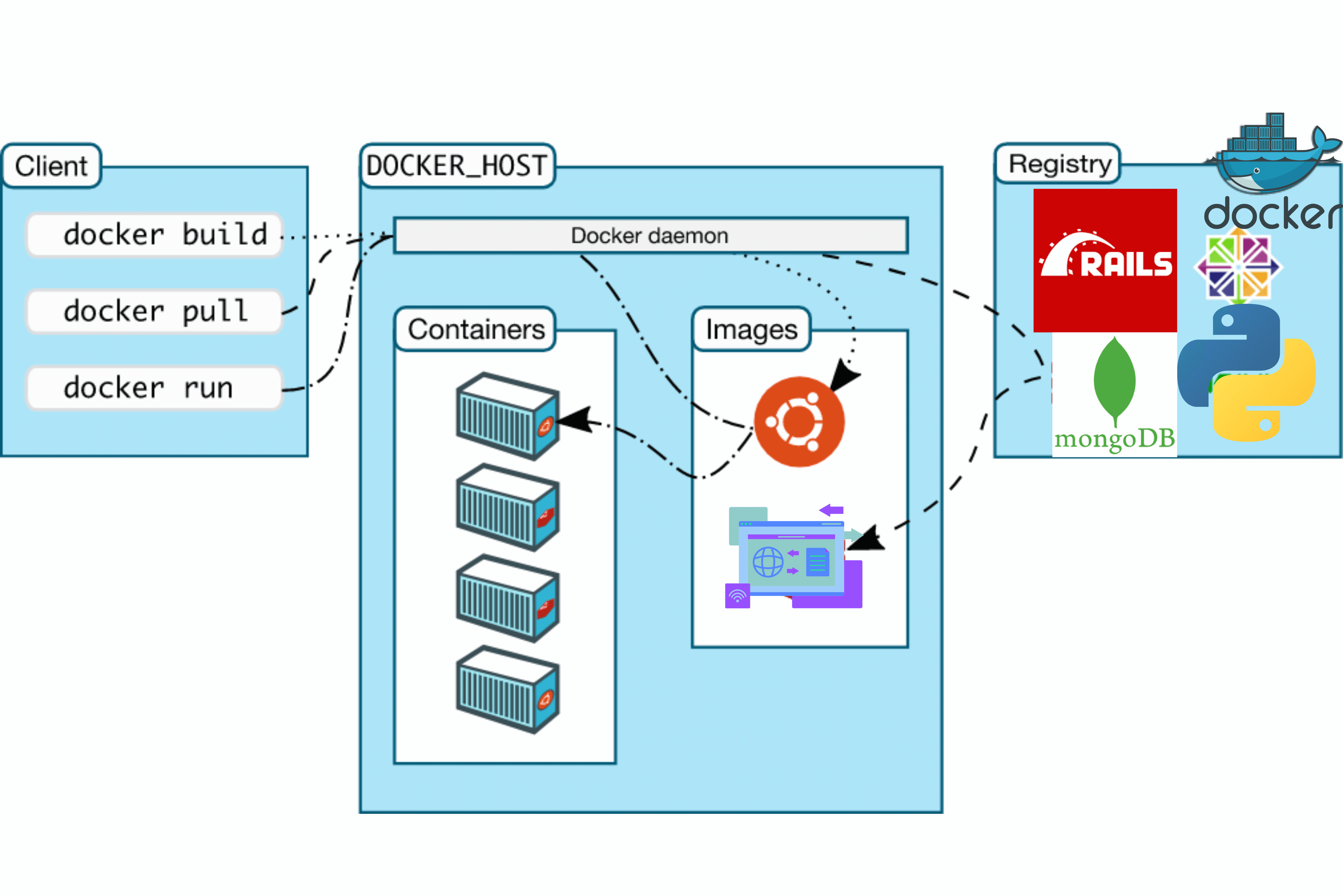
Docker Images: The Immutable Blueprint
A Docker image is the "kit" from our analogy. It is a static, read-only template that contains everything needed to run a piece of software: the application code, a runtime (like the Python interpreter), system tools, libraries, and settings.
Think of the hello-world image you used. It was a self-contained package that included a tiny executable and knew exactly how to run it.
Container Images: Structure, Security, and Best Practices
The article "Container Images" by Wiz provides clear definitions and a helpful comparison.
First, read the section A Docker image to get the formal definition. Then, carefully study the comparison table under the same heading that contrasts images and containers across features like state, storage, and execution.
The most critical technical feature of an image is its layered structure. An image isn't one monolithic file; it's a stack of read-only layers. Each layer represents an instruction from the image's blueprint (the Dockerfile). This has a significant advantage: when you have multiple images based on a common foundation (like the official Python image), they can share the underlying layers, saving a tremendous amount of disk space.
Docker architecture, images and containers
This document provides a concise technical explanation of the layered filesystem.
Please read the section titled Docker image layers. Focus on how it describes the image as a series of read-only layers and introduces the concept of the writable "container layer" that gets added on top.
Docker Containers: The Living Instance
If an image is the static blueprint, a container is a live, running instance of that image. When you execute docker run, you are bringing an image to life as a container.
The key technical difference lies in what the PDF you just read called the "container layer." When Docker creates a container from an image, it doesn't copy the whole image. Instead, it keeps the read-only image layers and adds a thin writable layer on top.
This is known as a Copy-on-Write (CoW) strategy.
- If the container just needs to read a file from the image, it accesses the underlying read-only layers directly.
- If the container needs to modify a file, it first copies that file from the read-only layer up into its own writable layer and then modifies the copy. The original image file remains untouched.
This is why you can run hundreds of containers from the same base image without each one needing its own full copy. Each container only stores the differences from the image in its own private writable layer. This makes containers incredibly lightweight and fast to start.
However, this also means that containers are ephemeral by default. When you delete the container, its writable layer is destroyed, and any changes made inside it are lost. We will address how to persist data properly in a later module on Docker Volumes.
Docker Registries: The Shared Library
So, we have blueprints (images) and buildings (containers). But where do you get the blueprints? That's where registries come in.
A Docker registry is a storage and distribution system for Docker images. It's a central repository—a library—where you can store your images and share them with others, or pull images that others have created.
- Public Registries: The most famous is Docker Hub, which is the default registry Docker communicates with. It hosts hundreds of thousands of official images (like
python,ubuntu,postgres) and community-contributed images. This is where thehello-worldimage came from. - Private Registries: Organizations often run their own private registries for security and performance reasons. This allows them to store proprietary application images securely and have faster access within their internal network. Examples include AWS ECR, Google Container Registry (GCR), or a self-hosted Docker Registry.
In our architecture diagram, the "Registry" is the remote location that the Docker daemon communicates with (via docker pull and docker push commands) to fetch or store images.
Docker architecture, images and containers
Let's get a formal definition for registries from the same PDF.
Read the section titled What is a docker registry? This section succinctly defines a registry and its organization into repositories.
Conclusion
You have now established a clear mental and technical model for the three most fundamental concepts in the Docker ecosystem. Let's summarize the key distinctions:
- Image: A static, immutable, read-only template built from a Dockerfile. It exists as a set of layers and acts as a blueprint.
- Container: A live, running instance of an image. It consists of the read-only image layers plus a thin, writable layer on top for any changes made during its lifecycle.
- Registry: A server-side application that stores and distributes Docker images. It's the library from which you get your blueprints.
With this solid foundation, you are ready to start working with these components directly. In our next lesson, we will begin exploring the Docker Command Line Interface (CLI) in earnest. You'll learn how to pull images from Docker Hub and use docker image inspect to look inside them, putting your newfound knowledge into practice.