Welcome to your first lesson in our course on Docker! We're starting at the very beginning to build a strong foundation for your deep dive into containerization. Today, we will explore the landscape of application deployment by comparing three fundamental models: bare-metal servers, virtual machines, and containers.
Your goal for this lesson is to be able to explain the key differences between these three approaches, specifically focusing on how they handle application isolation and resource usage. Understanding this is crucial, as it sets the stage for appreciating the problems Docker solves and why it has become an essential tool in modern DevOps.
The Foundation: Running on Bare Metal
Before virtualization and containerization became widespread, the standard practice was to deploy an application directly onto a physical server, often referred to as "bare metal." This means the application runs on an operating system installed directly on the server's hardware.
To get a clear picture of this starting point, including its advantages and disadvantages, please watch this first segment from a ByteByteGo video.
Big Misconceptions about Bare Metal, Virtual Machines, and Containers
This video, "Big Misconceptions about Bare Metal, Virtual Machines, and Containers", clearly explains the characteristics of each model.
Please watch the section that defines bare metal servers. Focus on the benefits of performance and isolation, as well as the significant downsides of cost and management overhead.
As the video explains, running on bare metal gives you unparalleled performance and security isolation because your application has exclusive access to all the server's resources. However, this model is often inefficient. If your Python web app only uses 15% of the server's CPU and memory, the other 85% is wasted. Scaling up requires purchasing, installing, and configuring a new physical server, which is a slow and expensive process.
This inefficiency and inflexibility directly led to the development of virtualization.
The First Evolution: Virtual Machines (VMs)
Virtualization introduced a way to run multiple applications in isolation on a single physical server, dramatically improving resource utilization. This is achieved using a piece of software called a hypervisor. The hypervisor sits on top of the host operating system (or directly on the hardware) and carves the physical resources (CPU, RAM, storage) into multiple virtual "computers," each known as a Virtual Machine (VM).
Each VM contains not only your application and its dependencies but also a complete, independent guest operating system.
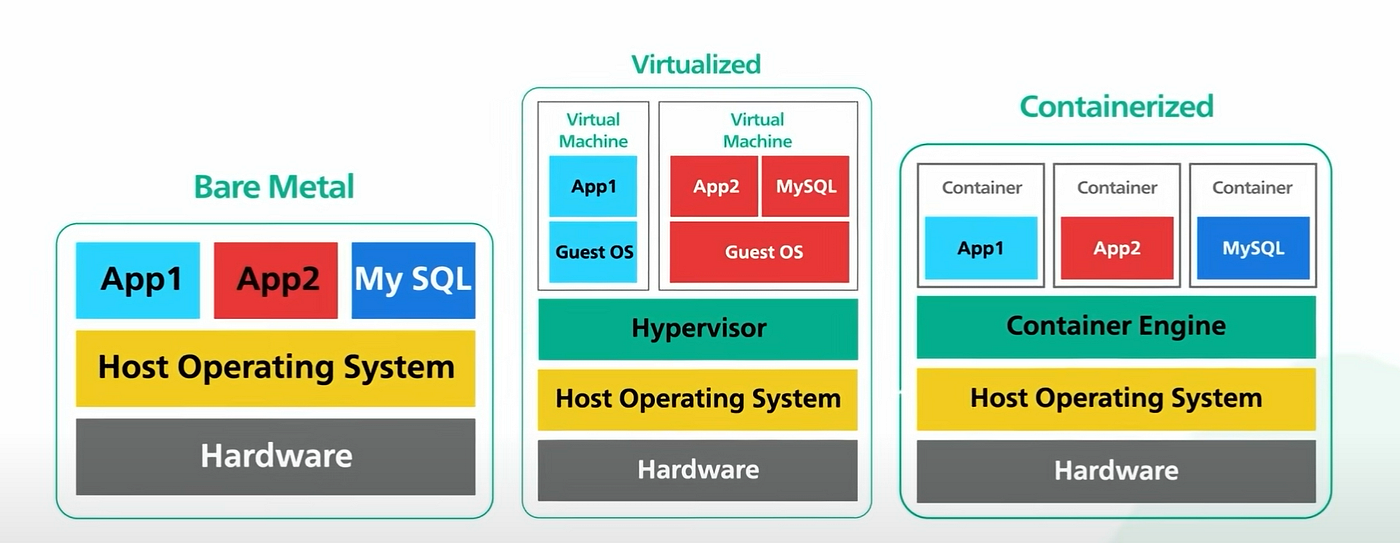
To visualize this architecture and understand its implications, let's turn to a helpful animated explanation.
Virtual Machines vs Containers
The video "Virtual Machines vs Containers" by PowerCert Animated Videos provides a great visual breakdown of these concepts.
First, watch the segment explaining how virtual machines work and how they solve the server utilization problem. Then, continue with the next section discussing the drawbacks of VMs. Pay close attention to the architectural diagram shown and the reasons why VMs are considered "heavy."
Let's break down the two key aspects for VMs:
-
Isolation: VMs provide very strong isolation. Because each VM has its own operating system and a virtualized set of hardware, it is completely separated from other VMs on the same host. A crash or security compromise in one VM generally does not affect the others. This is often described as hardware-level virtualization.
-
Resource Usage: This is the main drawback of VMs. Each VM must run a full guest OS, which consumes significant amounts of disk space (gigabytes), memory, and CPU cycles just to boot up and run, even before your application starts. This overhead limits the number of VMs you can run on a given host and leads to slower startup times.
While VMs were a huge leap forward from bare metal, their resource-heavy nature left room for a new, more efficient approach: containerization.
The Next Leap: Containerization
Containerization offers a more lightweight way to isolate applications. Instead of virtualizing the entire hardware stack, containers virtualize the operating system itself. This means multiple containers can run on a single host, all sharing the same host OS kernel.
Each container packages just the application and its specific libraries and dependencies. There is no guest operating system inside the container, which is the fundamental difference from a VM.
The "Containerized" column in the diagram above illustrates this perfectly. Notice the absence of the "Guest OS" layer found in the virtualization model. A Container Engine (like Docker) manages the containers and ensures they are isolated from one another.
To understand how this works and its benefits, let's dive into a more detailed article.
Containerization vs. virtualization: Key differences explained
This article from Wiz.io provides an excellent, in-depth comparison of virtualization and containerization, particularly around architecture and security.
Please read the following sections: Start with the section titled "What is containerization?". This part introduces the core concept and mentions the two key Linux features that make it possible: namespaces and control groups (cgroups). We will explore these in depth later in the course. Next, read the section "Architecture and isolation". This directly contrasts the "fortress wall" isolation of VMs with the "apartments in a building" model of containers. Finally, read the section on "Performance and scalability". This highlights the dramatic differences in startup time and resource footprint.
Let's summarize what you've just read in the context of our two key themes:
-
Isolation: Containers provide OS-level isolation. On Linux, the container engine uses namespaces to give each container its own isolated view of the system's resources (e.g., its own process tree, network interfaces, and filesystem mounts). While this is generally secure, all containers ultimately share the same host kernel. A critical vulnerability in the kernel could potentially affect all containers on that host. This is a weaker form of isolation compared to VMs.
-
Resource Usage: This is where containers shine. Because they don't bundle a guest OS, they are incredibly lightweight.
- Size: Containers are measured in megabytes, whereas VMs are measured in gigabytes.
- Startup Time: Containers can start almost instantly (milliseconds to seconds), as there is no OS to boot. VMs take minutes.
- Density: You can run significantly more containers than VMs on the same hardware, leading to much better server utilization.
Summary of Differences
You have now seen the progression from physical servers to virtual machines and finally to containers. Each step represents a trade-off between isolation, performance, and efficiency.
Here is a summary table to consolidate your understanding:
| Feature | Bare Metal | Virtual Machines (VMs) | Containers |
|---|---|---|---|
| Architecture | One OS on physical hardware | Multiple guest OSs on a hypervisor | Apps sharing one host OS kernel via a container engine |
| Isolation | Complete physical isolation | Strong (Hardware-level virtualization) | Weaker (OS-level virtualization via namespaces) |
| Resource Overhead | None (but host is often underutilized) | High (Full guest OS for each VM) | Very Low (No guest OS) |
| Size | N/A | Gigabytes (GB) | Megabytes (MB) |
| Startup Time | Minutes (full server boot) | Minutes (full OS boot) | Milliseconds to seconds |
| Density | 1 application per server | Low (e.g., 10s of VMs per server) | High (e.g., 100s of containers per server) |
Conclusion
In this lesson, you've established the foundational concepts that underpin containerization. You learned that:
- Bare-metal servers offer maximum performance but are inefficient and inflexible.
- Virtual Machines solve the efficiency problem by running multiple isolated OS instances on one server, but they are resource-heavy and slow to start.
- Containers provide a lightweight alternative by sharing the host OS kernel, resulting in near-instant startup times, minimal overhead, and high density, at the cost of slightly weaker isolation compared to VMs.
This understanding of what a container is and how it differs from its predecessors is the first essential step. In our next lesson, we will build on this by exploring the specific problems that containerization solves in software development and DevOps workflows, giving you a clear picture of why Docker is such a powerful and popular tool.