In our previous lesson, we established a clear understanding of what containers are by comparing them to virtual machines and bare-metal servers. You learned that their lightweight nature and OS-level virtualization give them unique characteristics in terms of resource usage and isolation. Now, we'll build on that foundation to explore the why. This lesson addresses the specific, persistent problems in software development and operations that containerization was designed to solve.
Your goal is to be able to describe the challenges that developers and DevOps teams face in software delivery and explain how containerization provides elegant solutions. Understanding this "problem-solution" dynamic is key to appreciating Docker's impact and will motivate the technical skills you'll acquire throughout this course.
The Problem: Inconsistent Environments
One of the most persistent and frustrating issues in software development is the "it works on my machine" syndrome. A developer writes code that runs perfectly on their local setup, but it fails when a colleague tries to run it, or when it's deployed to a testing or production server. These failures are almost always due to subtle differences between environments.
These inconsistencies can arise from:
- Different operating system versions (e.g., macOS on a developer's laptop vs. Ubuntu Linux in production).
- Slightly different versions of programming language runtimes (e.g., Python 3.9.5 vs. 3.9.7).
- Mismatched versions of system libraries or dependencies that aren't managed by a language-specific package manager.
- Discrepancies in environment variables or configuration files.
To see how this problem manifests in both development and deployment workflows, and how Docker addresses it, the following video provides an excellent animated overview.
Docker Crash Course for Absolute Beginners [NEW]
This segment from "Docker Crash Course for Absolute Beginners" by TechWorld with Nana clearly illustrates the "before" and "after" of using containers.
First, watch the part that explains the challenges of setting up a local development environment. Pay attention to the issues of OS differences, manual installation steps, and version conflicts. Next, watch the segment on the application deployment process. This highlights the friction and potential for error when handing off an application from the development team to the operations team.
The video you just watched breaks down two sides of the same coin: inconsistency creates friction during development and introduces risk during deployment. Let's dig a little deeper into these pain points.
The Solution: A Universal Package for Software
Containerization solves the problem of inconsistency by packaging an application with its entire environment. A Docker container image is a single, immutable artifact that bundles:
- The application code (e.g., your Python scripts).
- The runtime (e.g., a specific version of the Python interpreter).
- All application dependencies (e.g., packages from
requirements.txt). - System-level libraries and tools (e.g., database clients or image manipulation libraries).
- Environment configuration and startup commands.
This package becomes a self-contained, portable unit that runs identically on any machine with Docker installed. It effectively eliminates environmental drift between a developer's laptop, the CI/CD server, and the production environment.
For a more developer-focused discussion on this, let's turn to a podcast transcript that addresses this from a Python developer's perspective.
Episode #308 - Docker for Python Developers (2021 Edition)
This transcript from the Talk Python To Me podcast offers practical insights into why Docker is so valuable for developers.
First, read the brief summary of Docker as the Universal Environment. Then, in the full transcript, listen to the conversational segment starting from this discussion. The speakers touch on the "it works on my machine" problem, the challenge of inconsistent patching across a fleet of servers, and the subtle but critical issues that arise from developing on one OS (like macOS) and deploying to another (like Ubuntu).
As the transcript highlights, this consistency is not just a convenience; it's a fundamental enabler of modern DevOps practices. It makes development more reliable and deployments far more predictable.
Tackling Complexity in Modern Applications
Modern applications are rarely single, monolithic programs. They are often composed of multiple collaborating services. For example, a typical web application might include:
- A web server (like Gunicorn for a Python app).
- The application backend itself (e.g., a Flask or Django API).
- A database (like PostgreSQL).
- A caching service (like Redis).
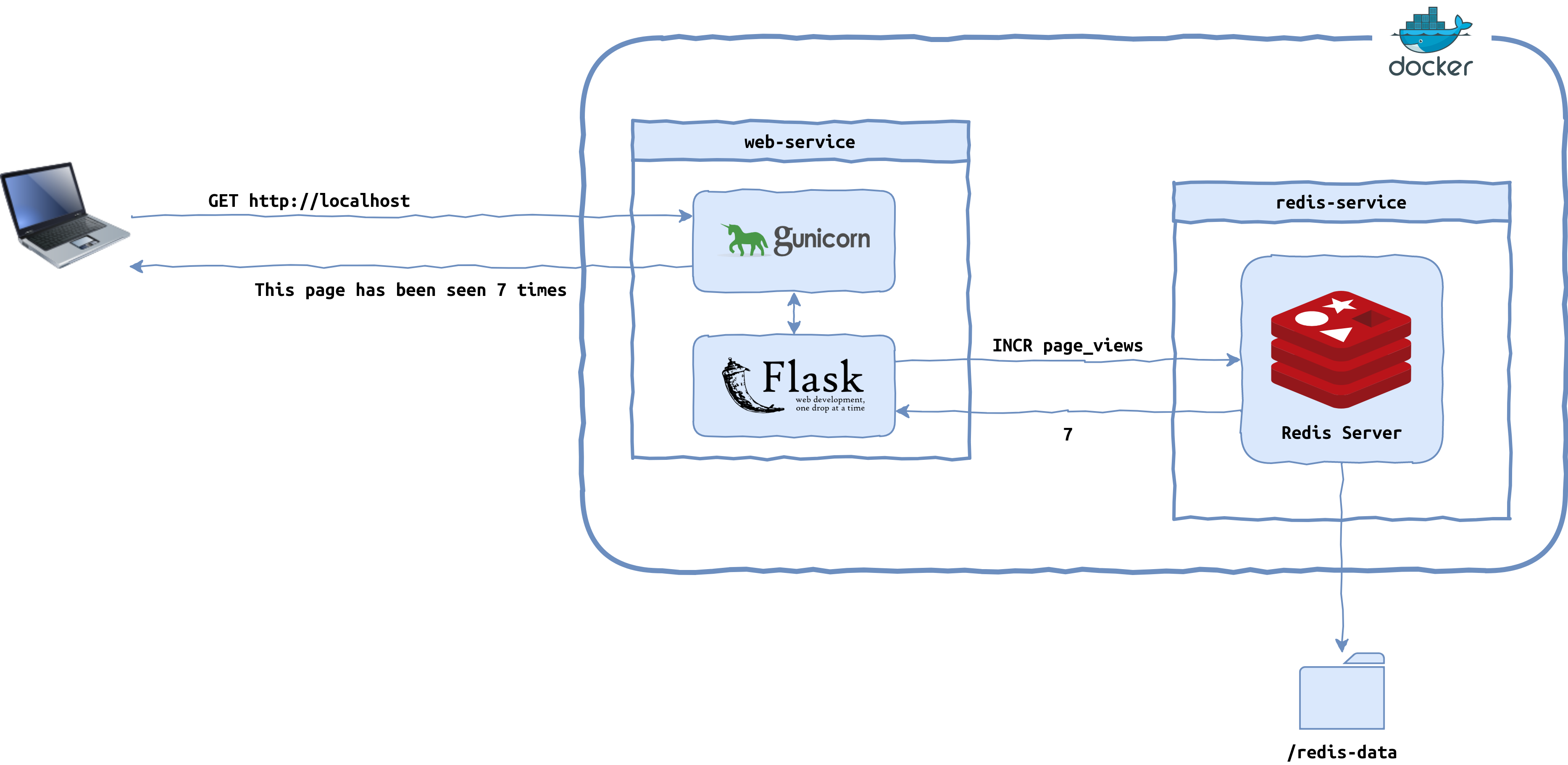
Setting up this entire stack on a local machine is challenging. You need to install and configure each service, manage different versions (what if Project A needs PostgreSQL 12 while Project B needs PostgreSQL 14?), and ensure they can all communicate with each other. This complexity creates a significant barrier to productivity.
Containers solve this by isolating each service. You can run PostgreSQL 12 in one container and PostgreSQL 14 in another, on the same machine, without any conflicts. Docker provides the tools to define this entire stack of services and run it with a single command.
The Talk Python transcript provides an excellent account of this very problem.
Episode #308 - Docker for Python Developers (2021 Edition)
Let's revisit the podcast transcript to hear about managing multi-service applications.
First, read the summary on Simplifying Complex Development. This introduces Docker Compose, a tool we will cover in-depth later. Then, find the segment in the full transcript that discusses the challenges of running microservices and multiple databases locally. This perfectly captures the problem that multi-container setups solve.
Accelerating DevOps Workflows
The consistency and simplicity provided by containers have a profound impact on several key DevOps workflows.
1. Faster Developer Onboarding
A direct benefit of simplifying complex application setup is that new developers can become productive almost immediately. Instead of spending their first week wrestling with a 20-page setup guide, they can clone the project's repository and use Docker to launch the entire development environment in minutes.
2. Robust CI/CD Pipelines
Containers are the ideal artifact for Continuous Integration and Continuous Delivery (CI/CD) pipelines. The workflow looks like this:
- Commit: A developer pushes code to a version control system like Git.
- Build (CI): An automated system (like Jenkins, GitHub Actions, etc.) pulls the code, builds a Docker image, and runs automated tests against a container created from that image.
- Push: If the tests pass, the immutable image is tagged and pushed to a container registry.
- Deploy (CD): The exact same image is then pulled from the registry and deployed to staging and production environments.
This process ensures that what was tested is exactly what gets deployed, eliminating last-minute surprises.
The following resources provide a great summary of how Docker enables these streamlined workflows.
Docker Crash Course for Absolute Beginners [NEW]
Let's return to the TechWorld with Nana video for a final big-picture view.
Watch the segment showing how Docker fits into the complete software lifecycle, from local development through a CI/CD pipeline to a server deployment.
Episode #308 - Docker for Python Developers (2021 Edition)
Finally, let's read two more short sections from the podcast transcript that connect these ideas.
Read the point on DevOps and Infrastructure as Code. This formalizes the idea of treating your environment definition as code. Then, jump to the transcript segment about the pain of onboarding, which reinforces how Docker transforms this experience.
Conclusion
In this lesson, you've moved from the what to the why of containerization. You've seen that Docker isn't just a piece of technology; it's a solution to fundamental problems that have plagued software development and operations for decades.
Here are the key takeaways:
- The Core Problem: Inconsistencies between development, testing, and production environments lead to the "it works on my machine" problem, causing bugs and slowing down delivery.
- The Container Solution: Docker solves this by packaging an application and its entire environment into a single, portable, and immutable container image.
- Simplifying Complexity: Containers make it easy to define, run, and manage complex, multi-service applications without version conflicts.
- Accelerating DevOps: By providing a reliable and reproducible unit of software, containers streamline developer onboarding and form the backbone of modern CI/CD pipelines, making software delivery faster and more reliable.
Now that you understand what containers are and why they are so crucial, our next lesson will begin to peel back the layers of Docker itself. We will identify the main components of the Docker architecture—the client, the daemon, containerd, and runc—to see how your commands are translated into running containers.