Hello! Welcome to the first lesson of our second module, Building Standard and Batch Macros.
In our previous lesson, we concluded our module on data integration by tackling API pagination. We briefly touched upon the idea of an iterative macro as a powerful way to handle situations where you need to loop through API calls until all pages are retrieved. That concept of creating reusable, looping, or batch-processing logic is exactly what we'll be diving into in this new module.
Today's lesson addresses the learning outcome: Explain the primary use cases for standard, batch, and iterative macros. We will define what a macro is in the Alteryx ecosystem and then explore the "why" and "when" for each of the three main types. Mastering these concepts is the essential first step before we begin building them ourselves.
1. What is an Alteryx Macro?
At its core, a macro is a workflow that has been packaged into a single tool that you can reuse in other workflows. Think of any repetitive process you've built—perhaps a specific set of data cleansing steps or a complex calculation. Instead of copying and pasting those tools every time, you can convert them into a macro.
This offers several key advantages:
- Efficiency: Build it once, use it everywhere.
- Consistency: Ensures the same logic is applied every single time, reducing errors.
- Simplicity: Hides complex processes behind a single, user-friendly tool icon.
- Shareability: You can share your custom tools with colleagues, standardizing processes across your team.
To get a formal definition, let's turn to a helpful article on the topic.
Understanding Macros in Alteryx | phData
The following article from phData provides a concise definition of what macros are and lists the different types available in Alteryx.
Please read the first two sections of the article: 'What Is A Macro In Alteryx?' and 'Types Of Macros In Alteryx'. Focus on the fundamental definition of a macro as a reusable collection of tools.
As the article mentions, there are a few types of macros. We will focus on the three primary types that are fundamental to advanced Alteryx development and the certification: Standard, Batch, and Iterative.
2. An Overview of the Three Macro Types
Before we break down each type, let's get a quick, high-level overview of how they differ.
This video from The Information Lab provides a very clear and concise introduction to the three main macro types.
Please watch the first 1 minute and 15 seconds of the video. The presenter, Molly Hatch, gives a brief definition for standard, batch, and iterative macros that will set the stage for the rest of our lesson.
Now, let's explore the specific use cases for each of these in more detail.
3. Use Case: The Standard Macro
As the name implies, this is the most basic type of macro. A standard macro runs once from start to finish, processing the data you feed into it.
Primary Use Case: To package a sequence of tools that performs a common, repeatable task. It's the digital equivalent of creating a shortcut for a process you do all the time.
When to use it:
- You have a set of data cleansing steps you apply to many different datasets (e.g., trimming whitespace, changing data types, handling nulls).
- You have a complex parsing logic (like a RegEx expression) that you want to apply in multiple workflows without rebuilding it.
- You want to create a custom report format that can be applied to different data inputs.
The following blog post demonstrates a perfect example of this.
Macro in Alteryx (Part 1) - The Data School
This article from The Data School shows a practical scenario where a standard macro is used to avoid duplicating a data parsing process.
Please read Section 1, 'Standard Macro'. Notice how the same set of tools is needed for two different tables. Instead of copying the tools, they are converted into a single macro tool that is used for both.
Essentially, if you find yourself copying and pasting a group of tools, you should consider creating a standard macro.
4. Use Case: The Batch Macro
A batch macro is more dynamic. It takes a primary data input and a second input called a Control Parameter. The macro then runs the entire workflow for each record in that control input. After all runs are complete, it unions the results together.
Primary Use Case: To repeat a workflow for a list of varying inputs or parameters.
When to use it:
- You need to import and process multiple sheets from one Excel file, where each sheet has a similar structure.
- You have a list of file paths and want to read and process each file.
- You need to make an API call for a list of different postcodes, states, or IDs.
The defining feature is that you are feeding a list of something into the macro to control how many times it runs.
This short clip from a video by The Information Lab introduces the concept of a batch macro and its distinctive 'control' input.
Please watch from 00:11 to 00:42. Pay attention to the explanation that the macro runs for each record and unions the results, and notice the unique 'upside down question mark' icon for the control input.
Now, let's see a detailed example of this in action.
Macro in Alteryx (Part 1) - The Data School
We'll return to The Data School article, which provides an excellent walkthrough for a classic batch macro use case: combining multiple sheets from an Excel file.
Please read Section 2, 'Batch Macro'. Focus on understanding the goal—to combine multiple sheets—and how the Control Parameter is used to feed each sheet name into the workflow one by one.
The key takeaway is this: if you need to run the same process on a batch of files, sheets, or values, the batch macro is the right tool.
5. Use Case: The Iterative Macro
An iterative macro is designed for looping. It runs the workflow over and over, with the output of one run (or iteration) being used as the input for the next, until a specified condition is met.
Primary Use Case: To solve goal-seeking problems or to process data until a condition is satisfied, especially when the total number of loops is not known in advance.
When to use it:
- API Pagination: As we discussed in the last lesson, when an API gives you a "next page" link, you use an iterative macro to keep calling the next link until no more exist.
- Goal Seeking: Finding an optimal value. For example, calculating loan payments by iterating through different interest rates until the total payment reaches a target number.
- Data Convergence: Repeatedly applying a calculation to a dataset until the values stabilize (e.g., the change between iterations is less than 0.01%).
The logic involves splitting the output within the macro. One output stream contains the results that should be passed back to the start for the next iteration. The other output stream contains the final results that meet the stopping condition.
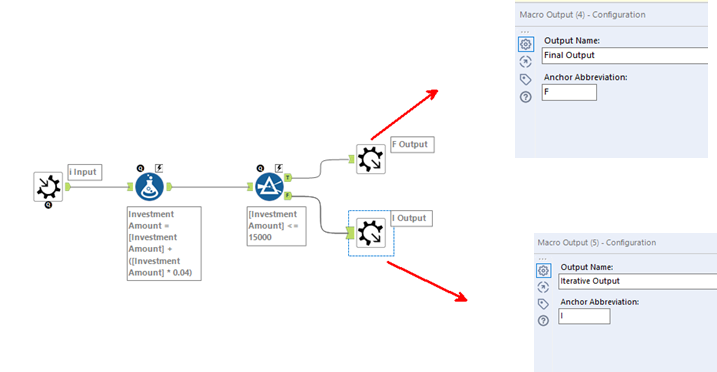
The analogy from the phData article is very apt: an iterative macro is very similar to a for or while loop in a programming language.
Conclusion
You have now learned the conceptual differences and primary use cases for the three main types of Alteryx macros. Understanding when to use each one is just as important as knowing how to build them.
Key Takeaways:
| Macro Type | Core Function | Primary Use Case | Simple Analogy |
|---|---|---|---|
| Standard | Runs once per execution. | Encapsulating a repetitive process to save time and ensure consistency. | Creating a keyboard shortcut for a multi-step command. |
| Batch | Runs for each record in a control input. | Applying the same process to a list of inputs (e.g., files, sheets, IDs). | Running a mail merge: one letter template, many recipient records. |
| Iterative | Runs repeatedly until a condition is met. | Goal-seeking or processes where the number of loops is unknown. | Clicking the "Next Page" button in a web browser until you reach the last page. |
In our next lesson, we will roll up our sleeves and get practical. We will begin building our first macro, focusing on the Standard Macro. You will learn how to configure its essential components: the Macro Input, Macro Output, and the basic Interface tools that allow users to interact with your new custom tool.