Introduction
Welcome back! In our last lesson, you learned how to use Performance Profiling to diagnose your workflows and pinpoint the exact tools that are slowing them down. This is a crucial diagnostic skill, but it's only the first half of the story. Knowing what is slow is one thing; knowing how to fix it is another.
This lesson directly addresses that second part. We will focus on three fundamental and highly effective optimization techniques that form the bedrock of building efficient, scalable workflows in Alteryx. Specifically, you will learn to apply optimization techniques such as filtering early, using the Select tool, and optimizing joins.
Mastering these skills is essential for your goal of achieving the Advanced Certification, as it demonstrates your ability to move beyond just building functional workflows to building high-performing, production-ready solutions.
1. The Golden Rule of Optimization: Reduce Your Data Early
The single most important principle for improving workflow performance is this: the less data Alteryx has to process, the faster your workflow will run.
Every column and every row you carry through your workflow requires memory and processing time. The key is to get rid of any data you don't need for your final output as early as possible. We'll explore two primary ways to do this: filtering out rows and deselecting columns.
To start, let's read a section from an article that lays out these core strategies clearly.
Workflow Optimization in Alteryx
The following section from the article 'Workflow Optimization in Alteryx' provides an excellent overview of how to reduce the amount of data in your workflow. It covers the exact techniques we will be discussing.
Please read the entire section titled 'Reduce the Amount of Data'. Pay close attention to the first three points: 'Drop Unnecessary Fields', 'Filter Out Unnecessary Records', and 'Choose the Smallest Data Type You Can'.
Let's break down those techniques.
Technique 1: Filter Early (Reducing Rows)
As the article you just read points out, unnecessary records will slow down your workflow. The Filter tool is your best friend here.
The logic is simple: if you are analyzing sales data for a single country, there is no reason to join, sort, or perform calculations on data from all the other countries first.
- Best Practice: Place a
Filtertool as close to yourInput Datatool as possible. By removing millions of rows at the start of your workflow, every subsequent tool has significantly less work to do.
Imagine you have 10 million sales records but only need to analyze the 100,000 records from the 'North' region. By filtering for 'North' first, you've reduced the data volume for all downstream tools by 99%.
Technique 2: Use the Select Tool Wisely (Reducing Columns & Size)
The Select tool is one of the most powerful optimization tools in Alteryx, and it works in two ways:
-
Removing Unnecessary Columns: Just like rows, every extra column consumes memory. If you start with a dataset of 50 columns but only need 5 for your analysis, use a
Selecttool immediately after your input to deselect the 45 you don't need. This is especially critical before using resource-intensive tools likeJoinorSpatial Match. -
Optimizing Data Types: As the resource mentioned, different data types take up different amounts of memory. A
Double(8 bytes) is much larger than anInt16(2 bytes). While theAuto Fieldtool can do this automatically, for production workflows that need to be robust and predictable, it's better to take manual control.
Implementing Workflow Strategy: Scalability - Alteryx Community
The following excerpt from the Alteryx Community discusses why you should be intentional with your data types and prefer the Select tool over Auto Field for production-grade workflows.
Please read the section that begins with 'Auto Field → Select'. This provides a strong argument for using the Select tool to manage your data types intentionally.
Using a Select tool to change a V_WString (variable-width string) with a maximum length to a more constrained String of a specific size, or changing a Double to an Integer where appropriate, can significantly reduce the memory footprint of your workflow.
2. Optimizing Joins
Join tools are frequently identified as bottlenecks by Performance Profiling. This is because they can be computationally "expensive," especially when dealing with large datasets or imperfectly structured data. Applying our "reduce data early" rule is the first step, but there are other join-specific optimizations to consider.
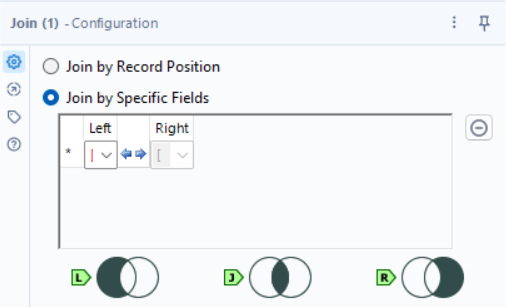
Let's look at how to prevent a common performance killer: the Cartesian join.
Implementing Workflow Strategy: Scalability - Alteryx Community
This final reading from the Alteryx Community blog post explains the dangers of Cartesian (or cross) joins and provides a practical strategy to prevent them.
Please read the section starting with 'Large appends and cartesian joins → put proper safeguards in place'. Focus on the discussion about the regular Join tool and the recommendation to 'deduplicating your join keys'.
Technique 3: Prevent Cartesian Joins
As you just read, a Cartesian join occurs when a join key is not unique in the input data, causing records to be duplicated exponentially. If you join a table with 1,000 rows to another table, and the join key appears 3 times in the second table, you will generate 3,000 rows for that single key match alone. This can quickly explode your dataset from thousands of rows to millions or billions, grinding your workflow to a halt.
The Fix: Deduplicate Your Join Keys
- Best Practice: Before feeding data into a
Jointool, ensure your join keys are unique, especially on the "right" input (which is often a smaller, lookup-style table). - How: Use a
Uniquetool on the join key column(s) to keep only the first occurrence. If you need to handle duplicates more carefully (e.g., by choosing the most recent record), you might use a combination ofSortandSample, orSummarizeto aggregate data before the join.
By ensuring your join keys are unique, you prevent the Join tool from creating an unexpectedly massive number of records.
3. Practical Application: Optimizing a Sales Report
Let's put these three techniques into practice. Imagine you have two (very large) datasets:
Transactions.csv: Contains 10 million sales records with columns likeTransactionID,StoreID,ProductID,SaleAmount,SaleDate, and 50 other descriptive fields.Stores.csv: Contains 5,000 store records with columns likeStoreID,Region,City,StoreManager,OpeningDate, and 10 other fields.
Your Goal: Create a report of total sales for stores in the 'East' region only.
You don't need to use actual large files. You can use Text Input tools to mock up the structure of these inputs with a few rows of sample data. The key is to build the workflow with the correct logic.
Task:
-
Build the "Unoptimized" Workflow:
- Input
Transactionsdata. - Input
Storesdata. - Use a
Jointool to combine them onStoreID. - Use a
Filtertool to keep only records whereRegionis 'East'. - Use a
Summarizetool to group byStoreIDand sum theSaleAmount.
- Input
-
Build the "Optimized" Workflow:
- Transactions Stream:
- Input
Transactionsdata. - Use a
Selecttool immediately after to keep onlyStoreIDandSaleAmount.
- Input
- Stores Stream:
- Input
Storesdata. - Use a
Filtertool immediately after to keep only records whereRegionis 'East'. - Use a
Selecttool after the filter to keep onlyStoreID.
- Input
- Use a
Jointool to combine the two optimized streams onStoreID. - Use a
Summarizetool to group byStoreIDand sumSaleAmount.
- Transactions Stream:
Reflection:
Think about the difference in the amount of data being processed at each step. In the unoptimized workflow, the Join tool is attempting to match 10 million rows against 5,000 rows, carrying dozens of unnecessary columns. In the optimized workflow, the Join tool is matching 10 million rows against a much smaller number of stores (only those in the 'East' region) and is only carrying a few essential columns. The performance difference in a real-world scenario would be dramatic.
Conclusion
In this lesson, you've moved from diagnosing performance issues to actively fixing them. By internalizing these three techniques, you can drastically improve the speed and scalability of your Alteryx workflows.
Key Takeaways:
- The Golden Rule: Reduce your data as early as possible. Less data means faster processing.
- Filter Early: Use the
Filtertool right after your inputs to remove any rows you don't need for your final analysis. - Use Select Wisely: Use the
Selecttool to remove unnecessary columns and to set the smallest appropriate data types for your fields. AvoidAuto Fieldin production. - Optimize Joins: Always reduce the width (columns) and length (rows) of your data before joining. Prevent performance-killing Cartesian joins by ensuring your join keys are unique.
Preview of the Next Lesson:
So far, we've focused on optimizing workflow runtime. But what about optimizing your development time? In the next lesson, we will cover techniques to make the process of building and testing your workflows faster. You will learn how to use the Cache and Run Workflow feature to improve development speed, allowing you to test changes on complex workflows without re-running the entire process from the beginning.