Introduction
Welcome back! In our last lesson, you learned how to build complex operations by nesting S-expressions, evaluating them from the inside out. You've already been using the *scratch* buffer and the C-x C-e command as your primary tools for this exploration.
This lesson builds directly on that foundation. Our learning outcome is to use the Emacs scratch buffer and ielm as interactive Elisp evaluation environments. We will formalize your understanding of the *scratch* buffer, introduce new ways to evaluate code within it, and then explore a more powerful, dedicated environment called IELM (Inferior Emacs Lisp Mode). By the end, you'll understand the strengths of each tool and know when to choose one over the other, giving you a complete interactive toolkit for your journey into Elisp.
1. The *scratch* Buffer: Your Lisp Notepad
You're already familiar with the *scratch* buffer. As its opening comment says, it's for "notes you don't want to save, and for Lisp evaluation." Think of it as a digital notepad where you can freely write, edit, and test code snippets.
You've been using C-x C-e (eval-last-sexp) to run the expression right before your cursor. The result appears in the minibuffer at the bottom of your Emacs frame.
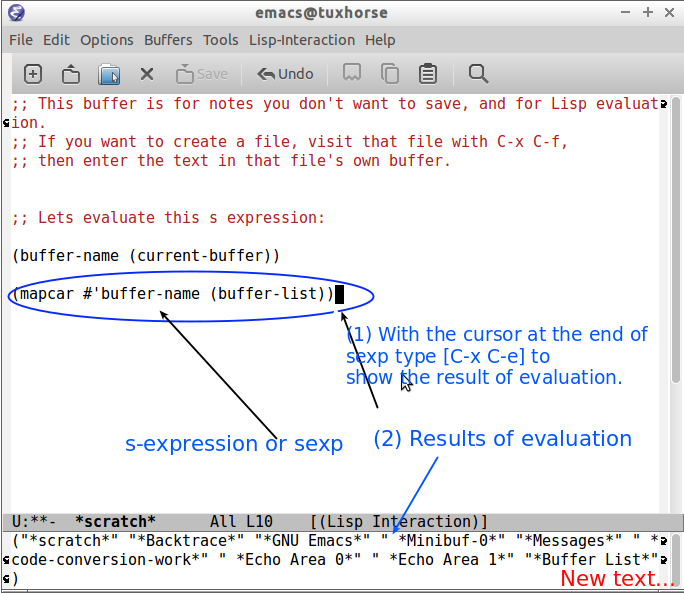
While C-x C-e is excellent for testing one expression at a time, the *scratch* buffer (which uses lisp-interaction-mode) offers other convenient ways to evaluate code.
To learn more about these methods, let's turn to a helpful article by Sacha Chua.
Read Lisp, Tweak Emacs [Beginner 1/4]: How to try Emacs Lisp
The article 'Read Lisp, Tweak Emacs' provides a clear overview of the different ways you can evaluate code in the *scratch* buffer.
Read the section titled 'The scratch buffer and Emacs Lisp .el files'. It introduces a few new commands for evaluation that are very useful.
Based on that reading, here are the key evaluation commands for the *scratch* buffer:
C-x C-e(eval-last-sexp): Evaluates the S-expression before the point (cursor). You've used this one a lot.C-j(eval-print-last-sexp): Similar toC-x C-e, but it prints the result directly into the buffer on the next line. This is extremely useful for seeing results without looking down at the minibuffer.M-x eval-region: Evaluates all the code in the currently selected region. This is how you can run multiple expressions at once.M-x eval-buffer: Evaluates every S-expression in the entire buffer.
The *scratch* buffer is ideal when you are drafting something, like a function you plan to save later. You can write it, edit it, and evaluate it in place. However, it's less ideal for a rapid, back-and-forth "conversation" with Lisp. For that, we have a better tool.
2. IELM: Your Interactive Lisp Console
IELM stands for Inferior Emacs Lisp Mode. It is a REPL, which stands for Read-Eval-Print Loop. This is a classic programming tool that:
- Reads an expression you type.
- Evaluates that expression.
- Prints the result.
- Loops back to the beginning to wait for your next input.
It provides a conversational interface to the Lisp interpreter. Since you're interested in foundational programming concepts, understanding the REPL model is important; it's a cornerstone of interactive and exploratory programming, especially in Lisp-family languages.
Let's see it in action.
LEARN EMACS LISP - Mostly The Strange Parts
This short clip from Gavin Freeborn's video provides a quick demonstration of launching and using IELM.
Watch from 02:22 to 02:55. The presenter launches IELM with M-x ielm and evaluates a simple message expression by pressing Enter.
To dig deeper into what makes IELM so powerful, we'll consult two resources.
Read Lisp, Tweak Emacs [Beginner 1/4]: How to try Emacs Lisp
First, Sacha Chua's article provides a great initial introduction to IELM.
Read the section titled 'M-x ielm (Inferior Emacs Lisp Mode)'. It explains the basic usage and how to navigate your input history.
Next, the 'Mastering Emacs' blog gives more detail on IELM's advanced features, framing it as a 'proper REPL'.
Read the section 'IELM: The Interactive Emacs-Lisp Mode'. Focus on the descriptions of 'Multi-line editing', 'Output Variables', and 'History'.
Here’s a summary of IELM's key features:
- Launch: Start it with
M-x ielm. - Evaluation: Type an expression and press
RET(Enter). The result appears immediately below your input. - History: Navigate previous inputs using
M-p(previous) andM-n(next), just like in a command-line shell. - Result Variables: IELM automatically stores the last three results in special variables:
*: The most recent result.**: The second-to-last result.***: The third-to-last result.
You can use these variables in subsequent calculations, which is incredibly handy. For example, after evaluating(+ 10 20), you can immediately evaluate(* 2)to get60.
3. Choosing the Right Tool for the Job
So, when should you use *scratch* and when should you use ielm?
| Feature | *scratch* Buffer |
IELM (Interactive Emacs Lisp Mode) |
|---|---|---|
| Primary Use | Drafting, editing, and testing multi-line code snippets. | Quick, interactive exploration and "conversing" with Lisp. |
| Evaluation | Manual: C-x C-e, C-j, eval-region. |
Automatic: Press RET. |
| Output | Appears in minibuffer or is inserted into the buffer. | Appears directly below the input in the IELM buffer. |
| State & History | Just a text buffer; no built-in history of results. | Maintains a history of inputs (M-p/M-n) and results (*). |
| Analogy | A code scratchpad or workbench. | A command line or calculator for Lisp. |
Often, you'll use both together. You might write a function in your *scratch* buffer, evaluate it with C-x C-e to make Emacs aware of it, and then switch to IELM to test it with different arguments.
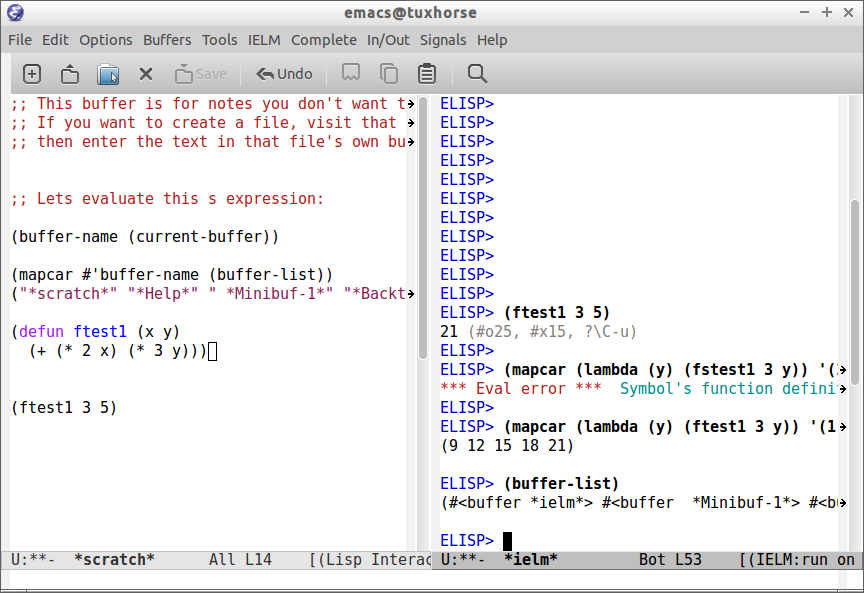
Finally, there's one more tool for your interactive arsenal, perfect for when you don't even want to switch buffers.
Read Lisp, Tweak Emacs [Beginner 1/4]: How to try Emacs Lisp
The article from Sacha Chua also introduces a command for one-off evaluations.
Read the short section 'M-: (eval-expression)'. Note the use of the universal argument C-u to insert the result.
M-: (eval-expression) prompts you for an S-expression in the minibuffer and prints the result there. If you use C-u M-: it will insert the result directly into your current buffer at the cursor position. It's fantastic for quick calculations.
4. Practice
Let's apply these new tools.
Exercise 1: Exploring IELM
- Start IELM with
M-x ielm. - Evaluate the expression
(* 6 7). You should see42. - Now, evaluate
(+ * 8). This uses the result variable*to calculate . You should see50. - Press
M-ptwice to go back to the(* 6 7)expression. Change it to(* 6 8)and pressRET.
Exercise 2: Using the *scratch* buffer
- Switch to your
*scratch*buffer. - Type the expression
(concat "Hello" " " "from " "Elisp!"). - Place your cursor after the final parenthesis and press
C-j. You should see the resulting stringHello from Elisp!printed on the next line. - Now, on two separate lines below that, write:
(message "This is the first message.") (message "This is the second message.") - Select both lines (using
C-SPCat the start and moving your cursor to the end) and runM-x eval-region. You will see both messages appear in the minibuffer in sequence.
Exercise 3: The Quick Calculator
- While still in your
*scratch*buffer, type the text: "The answer is: ". - With your cursor at the end of that text, type
C-u M-:(eval-expressionwith the universal argument). - At the prompt in the minibuffer, enter
(+ 100 23)and pressRET. - The number
123should be inserted directly into the buffer, completing the line.
Conclusion
You now have a complete set of tools for interacting with Emacs Lisp. You've seen that while the *scratch* buffer is an excellent workbench for writing and refining code, IELM provides a fluid, conversational REPL for exploration and quick tests.
Key Takeaways:
- The
*scratch*buffer is a notepad for drafting code. You evaluate expressions manually with commands likeC-x C-e(evaluate last expression),C-j(evaluate and print), andeval-region. - IELM is a true REPL (Read-Eval-Print Loop) for interactive exploration. You evaluate with
RETand can access previous inputs (M-p) and results (*). M-:(eval-expression) is a command for executing a single expression from anywhere in Emacs, without switching buffers.- Choosing the right tool depends on the task: drafting and editing (
*scratch*) versus exploring and conversing (ielm).
Preview of the Next Lesson:
These interactive environments are the stage on which you'll explore Elisp's most profound concept. In our next lesson, we will dive into homoiconicity—the principle that code and data have the same form. You will learn to use the ' (quote) special form to stop evaluation, allowing you to treat a list of symbols as data. This is the first step toward your goal of writing code that can write or modify other code, a unique power of the Lisp family.