Introduction
Welcome back! In our previous lesson, we established the theoretical foundation of Elisp's syntax, exploring the structure of S-expressions and the logic of prefix notation. You learned that everything in Lisp, from data to code, is represented by this single, consistent structure.
Today, we transition from theory to practice. It's time to take those S-expressions and make them do something. This lesson is your first hands-on experience with writing and running live Elisp code directly within Emacs.
Your learning outcome is to: Evaluate simple arithmetic and string S-expressions in the Emacs scratch buffer. We'll focus on the essential tools and commands that allow you to get immediate feedback from the Lisp interpreter, turning Emacs into a dynamic, interactive programming environment.
1. Your Interactive Playground: The *scratch* Buffer
Emacs provides a special buffer called *scratch* that is created automatically every time you start it. This buffer is an ideal place to experiment with Elisp because it's temporary and set up for interactive evaluation.
The primary command you'll use to evaluate Elisp code is eval-last-sexp, which is bound to the key combination C-x C-e. When you invoke it, Emacs looks backward from your cursor (what Emacs calls the "point"), finds the first complete S-expression it can, evaluates it, and prints the result in the minibuffer (the small area at the bottom of your Emacs window).
Let's see this in action.
Emacs-Lisp Basics | Syntax, Variables, Functions and Lists | Switching to Emacs #6.1
The video 'Emacs-Lisp Basics | Syntax, Variables, Functions and Lists' from the Augusto channel provides a clear, practical introduction to evaluating code in the scratch buffer.
Watch from 00:28 to 02:30. Pay close attention to how the presenter uses C-x C-e to evaluate an S-expression. Notice the importance of placing the cursor after the final closing parenthesis. The video also shows what happens when you try to evaluate from the middle of an expression, which helps clarify how eval-last-sexp works.
The key points to remember are:
- The
*scratch*buffer is your sandbox. - The command is
C-x C-e(eval-last-sexp). - Your cursor must be positioned after the S-expression you want to evaluate.
- The output appears in the minibuffer.
Here is a static image that reinforces this workflow.
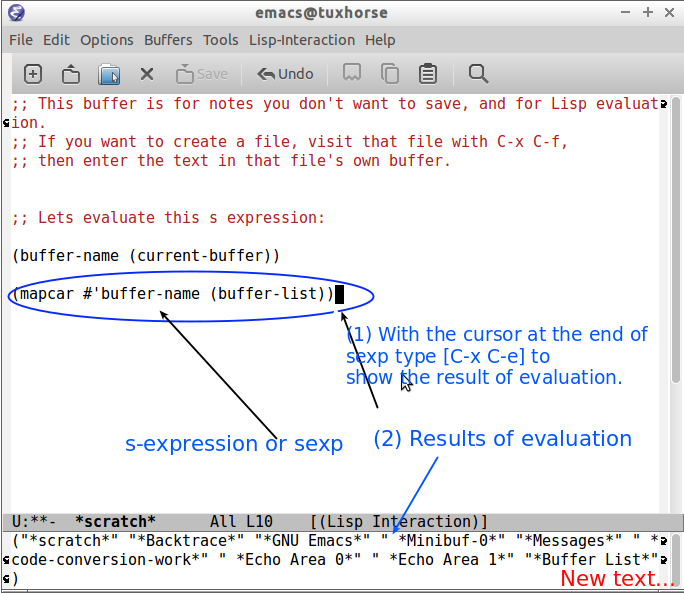
For a detailed textual explanation of this process, you can refer to the following article. It's a great resource to bookmark for future reference.
The article 'Evaluating Elisp in Emacs' by Mickey Petersen provides an excellent, in-depth guide to various evaluation methods.
Read the sections 'Evaluating Expressions' -> 'By S-Expression' and 'Interactive Evaluation' -> 'The Scratch Buffer'. This will solidify your understanding of C-x C-e and the role of the scratch buffer. The article also mentions C-j (eval-print-last-sexp) which is a useful alternative in *scratch* that prints the result directly into the buffer.
2. Evaluating Your First S-Expressions: Atoms
Let's start with the simplest form of S-expression: the atom. As you learned in the last lesson, atoms are indivisible values like numbers and strings.
In Elisp, many atoms are self-evaluating. This means that when you evaluate them, the result is the atom itself.
Let's Try It:
- Open your
*scratch*buffer in Emacs. If you've closed it, you can get it back withC-x b *scratch* RET. - Type a number, for example:
42. - Position your cursor immediately after the
2. - Press
C-x C-e.
You should see 42 appear in your minibuffer. The number evaluates to itself.
Now, let's try a string:
- On a new line in your
*scratch*buffer, type a string:"Speculative fiction". - Position your cursor immediately after the closing double-quote.
- Press
C-x C-e.
The minibuffer will display "Speculative fiction". The string also evaluates to itself. This simple behavior is the foundation upon which more complex evaluations are built.
This short video clip demonstrates exactly this process.
Emacs-Lisp Basics | Syntax, Variables, Functions and Lists | Switching to Emacs #6.1
Let's return to the 'Emacs-Lisp Basics' video to see the evaluation of self-evaluating atoms.
Watch from 04:08 to 04:51. The presenter demonstrates evaluating both a number and a string, showing how they return themselves.
3. Function Calls: Arithmetic and Strings
Things get more interesting when we evaluate lists. As you know, a list like (+ 2 3) is interpreted as a function call using prefix notation.
Let's use the *scratch* buffer to perform some basic arithmetic. The functions are the symbols you'd expect: +, -, *, and / for division.
Let's Try It:
Evaluate each of the following expressions in your *scratch* buffer using C-x C-e. Remember to place your cursor after the final parenthesis for each one.
(+ 100 50)

(- 100 50)

(* 10 5)

(/ 100 5)
The video you've been watching has a great segment covering these arithmetic functions. It also shows the common error of trying to use infix notation, which will help solidify your understanding of the Lisp way.
Emacs-Lisp Basics | Syntax, Variables, Functions and Lists | Switching to Emacs #6.1
This clip demonstrates the basic arithmetic functions in Elisp.
Watch from 05:45 to 07:44. Observe how the function always comes first, followed by its arguments. The video shows addition, multiplication, subtraction, and division.
The same function call syntax applies to all operations, not just math. Let's use the message function, which takes a string as an argument and displays it in the minibuffer. This is incredibly useful for debugging and providing feedback in your own functions later.
Let's Try It:
Evaluate the following in your *scratch* buffer:
(message "Hello from Elisp!")
After you press C-x C-e, you'll see "Hello from Elisp!" appear in the minibuffer. You'll also see the return value of the message function, which is the string itself: "Hello from Elisp!". This distinction between a function's action (a "side effect") and its return value is a key programming concept we will revisit.
4. Practice and Exploration
You now have the fundamental skill for interacting with Elisp. The best way to internalize it is through practice.
Exercise:
In your *scratch* buffer, write and evaluate Elisp S-expressions to answer the following questions:
- What is the result of
2017 - 1982? - If a book has 42 chapters and each chapter has approximately 12 pages, how many pages are in the book?
- Display the message "Code is data." in the minibuffer.
This simple cycle—write code, evaluate, see result—is the core feedback loop you'll use constantly as you learn Elisp and build your own customizations.
For a final review of the different ways to evaluate Elisp, the following guide is an excellent summary.
How to read Emacs Lisp so that you can customize Emacs
The article 'How to read Emacs Lisp so that you can customize Emacs' offers a concise summary of the evaluation techniques you've learned and introduces a few others you might find useful.
Read the section titled '"How can I try Emacs Lisp code?"'. It provides a great overview of the methods we've discussed (C-x C-e and the *scratch* buffer) and also introduces M-x ielm and M-: (eval-expression), which are powerful alternatives for interactive evaluation.
Conclusion
In this lesson, you made the crucial leap from knowing what an S-expression is to actually executing one. You have configured nothing, installed nothing, and yet you've turned your text editor into a live programming environment. This interactive nature is a hallmark of Lisp and a cornerstone of what makes extending Emacs so powerful.
Key Takeaways:
- The
*scratch*buffer is your primary environment for quick Elisp experiments. C-x C-e(eval-last-sexp) is the fundamental command for evaluating the S-expression before your cursor.- The result of an evaluation is displayed in the minibuffer.
- Simple atoms like numbers and strings are self-evaluating.
- Lists are evaluated as function calls using prefix notation, whether for arithmetic (
+,*) or other tasks (message).
Preview of the Next Lesson:
You've evaluated single, self-contained expressions. But the real power of Lisp comes from composition. In the next lesson, we will learn how to nest S-expressions, building complex operations by using the result of one function call as an argument to another. This will unlock a new level of expressiveness and allow you to start writing more sophisticated code.