Introduction
In our last lesson, you learned to use with-temp-buffer to create powerful text-processing commands that operate in a clean, isolated environment without cluttering your workspace. You built a practical tool to format and log notes, but you still had to run it manually with M-x. The real power of Emacs customization comes from automating such tasks.
This lesson introduces the primary mechanism for automation in Emacs: hooks. We will address the learning outcome: Explain what hooks are and add functions to them using 'add-hook'. You will learn how to make your functions run automatically when specific events occur, like opening a file or starting a particular mode. This is the first step toward building an Emacs environment that truly adapts to your creative and professional workflows.
1. What Are Hooks?
At its core, a hook is a special kind of variable that holds a list of functions. When a specific event happens in Emacs—such as a file being saved, a mode being enabled, or Emacs itself starting up—Emacs runs all the functions stored in the corresponding hook variable.
Think of it as a trigger system in a project plan. When a milestone is reached (the "event"), a predefined set of actions (the "hook functions") is automatically executed. This mechanism allows you to inject your own custom behavior into Emacs's standard operations without modifying its source code.
These hook variables follow a clear naming convention, almost always ending in -hook, such as text-mode-hook or before-save-hook.
To get a clear, foundational understanding, let's start with a short article that provides a minimal, step-by-step example.
The article 'Introduction to Emacs Hooks' by Dan Liden provides a concise and clear explanation of what hooks are and how they work. It's a perfect starting point.
Please read from the beginning of the article down to the end of the 'Hooks Example' section. Focus on the three key components identified: the hook variable, the hook functions, and the run-hooks function.
As you read, you saw that we define a hook (which is just a variable), define functions to run, and then add those functions to the hook. The article provides a diagram that nicely visualizes this process.
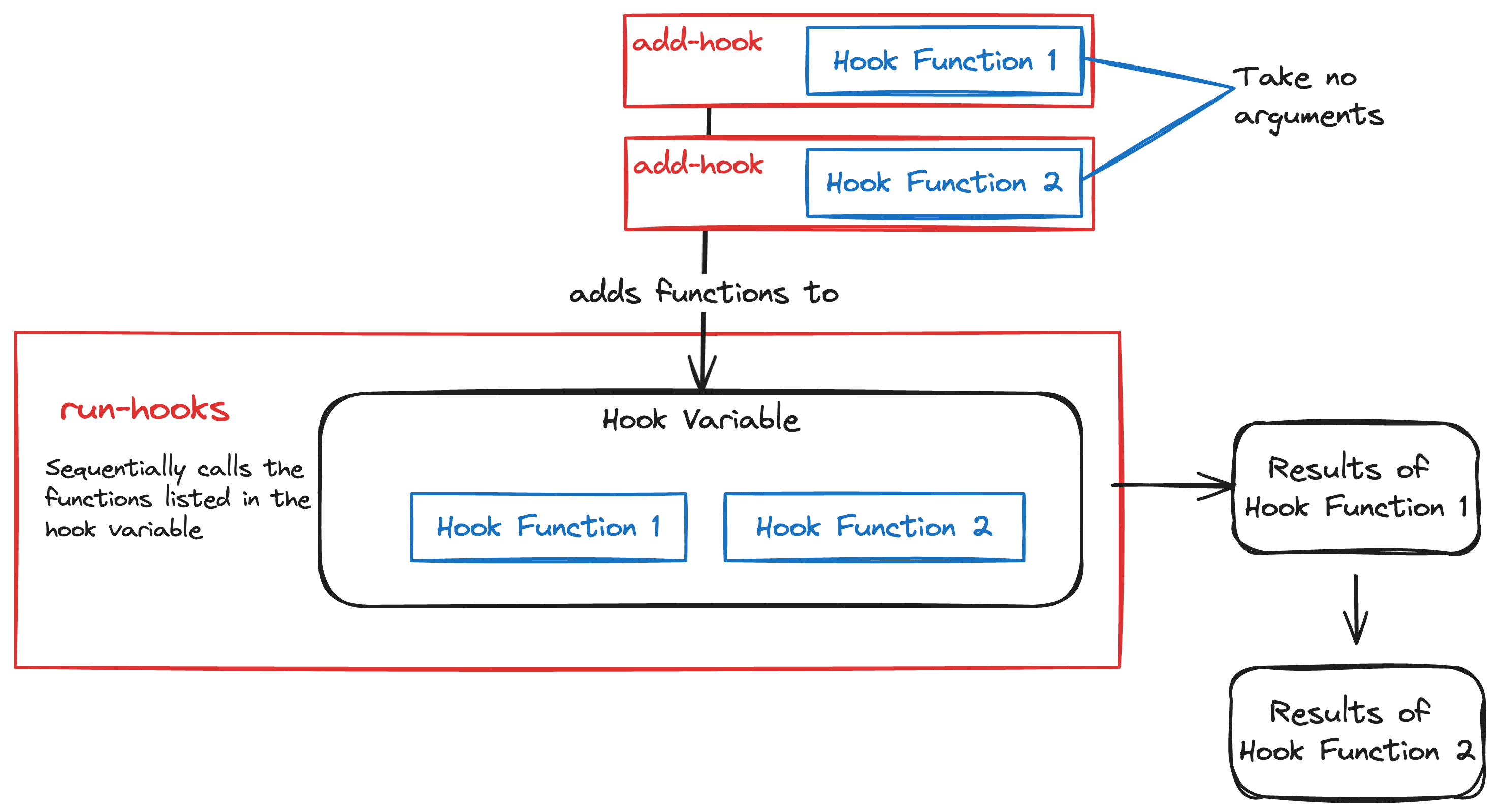
The most important function in this process is add-hook. It is the standard, safe way to add one of your functions to a hook's list. Its basic structure is:
(add-hook 'HOOK-VARIABLE #'FUNCTION-TO-ADD)
Notice the quoting:
'HOOK-VARIABLE: The hook is a variable, so we pass its symbol to the function.#'FUNCTION-TO-ADD: The function to be added is passed as a function object. The#'(sharp-quote) is shorthand for(function ...), ensuring we are referring to the function itself, not the value of a variable with the same name.
2. The Most Common Use: Mode Hooks
The most frequent and powerful application of hooks is customizing major modes. Since you have a strong background in writing, you can imagine wanting different behaviors when you're editing a plain text file versus an Org mode file or a script. Mode hooks make this possible.
Nearly every major mode defines and runs a hook just after it has finished setting itself up. For text-mode, this is text-mode-hook; for org-mode, it's org-mode-hook, and so on. By adding a function to one of these hooks, you can execute code that customizes the environment only when that mode is active.
Let's see a classic example. A common preference for writers is to have long lines wrap automatically. The minor mode for this is visual-line-mode. We can use a hook to enable it automatically for all plain text files.
;; This line tells Emacs to run the `visual-line-mode` command
;; every time `text-mode` is started.
(add-hook 'text-mode-hook #'visual-line-mode)
You can evaluate this expression directly in your *scratch* buffer. Afterwards, if you open any new file ending in .txt (or any other file that triggers text-mode), you'll see that visual-line-mode is already active.
This article by Protesilaos Stavrou, a prolific Emacs developer, provides further detail and context.
The article 'Emacs Lisp Elements' offers a more in-depth look at hooks and their relationship with major and minor modes.
Please read the section titled '11. Hooks and the advice mechanism'. Focus on the explanation of add-hook, remove-hook, and the distinction between 'normal' and 'abnormal' hooks. Don't worry about the 'advice mechanism' for now; we'll cover that later.
3. Your Turn: Customizing Your Writing Environment
Now it's time to apply this concept yourself. Let's create a simple customization for your creative writing workflow. We will define a function that displays a small piece of encouragement in the echo area and then hook it into text-mode.
Step 1: Define the function
First, define the following function by typing it into your *scratch* buffer and evaluating it with C-x C-e.
(defun ar-show-writing-prompt ()
  "Display a motivational writing prompt in the echo area."
  (message "First utterance, final draft."))
The message function is a simple way to display text to the user without interrupting them. You'll learn more about debugging with it later.
Step 2: Add the function to a hook
Now, use add-hook to attach your new function to text-mode-hook. Evaluate this line in your *scratch* buffer as well.
(add-hook 'text-mode-hook #'ar-show-writing-prompt)
Step 3: Test your hook
To see the result, you need to trigger the hook. Find or create a plain text file (e.g., test.txt) and open it in Emacs using C-x C-f. As the buffer opens and text-mode is activated, you should see your message "First utterance, final draft." appear briefly at the bottom of the screen.
This simple exercise demonstrates the core feedback loop of Emacs customization:
- Identify an event (
text-modestarting). - Write a function to perform an action (
ar-show-writing-prompt). - Connect the action to the event using a hook (
add-hook).
For a dynamic demonstration of using a hook to customize a programming mode, you can watch this short video segment.
Learn Emacs Lisp in 30 Minutes
The video 'Learn Emacs Lisp in 30 Minutes' shows another practical example of using a mode hook, this time for customizing emacs-lisp-mode.
Watch the segment from 00:26:33 to 00:27:11. The presenter uses emacs-lisp-mode-hook to set a mode-specific indentation style. This reinforces the concept of using hooks for targeted customizations.
The presenter also draws a parallel to "autocmds" in Vim, which may be familiar from your experience with NeoVim. Hooks are Emacs's more structured and, as some find, less "finicky" equivalent.
4. A Note on Hook Types and Scope
As you saw in the "Emacs Lisp Elements" article, there are a few more details about hooks that are good to know.
- Normal vs. Abnormal Hooks: Most hooks you'll encounter are "normal" hooks, like
text-mode-hook. They simply run a list of functions that take no arguments. "Abnormal" hooks (often ending in-functions) pass one or more arguments to the functions in their list. You'll encounter these when you need to write more complex functions that need context about the event that triggered them. - Global vs. Local Hooks: By default,
add-hookmodifies the hook globally. However, you can add a hook that applies only to the current buffer by providing a non-nilfinal argument, as in(add-hook 'some-hook #'my-function nil t). This is useful for temporary, buffer-specific behavior.
You don't need to master these details now, but being aware of them will help you understand documentation and other people's code as you progress.
Conclusion
In this lesson, you've unlocked one of the most fundamental concepts for extending Emacs. You now understand how to use hooks to automatically trigger your own Elisp functions in response to built-in events.
Key Takeaways:
- A hook is a variable containing a list of functions that run when a specific event occurs.
- The
add-hookfunction is the standard way to add your custom functions to a hook. - Mode hooks (e.g.,
text-mode-hook,org-mode-hook) are the primary mechanism for tailoring Emacs's behavior to specific file types or tasks. - This "event-driven" model allows you to build a highly personalized and automated workflow without altering Emacs's core code.
Preview of the Next Lesson
You've learned the "what" and "how" of adding a function to a hook. In the next lesson, "Write a practical hook function to customize behavior for a specific major mode," we will build on this foundation. You'll design and implement a more complex, multi-step function and attach it to a mode hook to solve a more substantial workflow problem, moving closer to your goal of extending Emacs to fit your unique needs.