Introduction
In our previous lesson, we established the building blocks of decision-making in Elisp with if, when, and unless. These are excellent tools for binary choices: if this, then that; otherwise, do something else. But what happens when a decision isn't a simple fork in the road, but a crossroads with multiple paths? While you could construct a tangled web of nested if statements, Elisp provides a much more elegant and readable solution.
This lesson directly addresses the learning outcome: Use cond for multi-branch conditional logic. We will explore how cond acts like a "switch" or a series of "if/else if/else" checks, allowing you to test a sequence of conditions and execute the code associated with the first one that proves true. This structure is fundamental for writing clean, comprehensible functions that need to handle a variety of cases—a key skill for building the sophisticated, custom tools you envision for your Emacs workflow.
1. From Two Paths to Many: The cond Special Form
Imagine you're sorting mail. You don't just have two piles (e.g., "mine" and "not mine"). You might have piles for bills, personal letters, magazines, and junk mail. The cond special form is designed for precisely this kind of multi-category sorting.
The basic structure of cond is a list of clauses. Each clause is itself a list containing a test and one or more expressions to execute if that test is true.
(cond (TEST-1 BODY-FORM-1 BODY-FORM-2 ...)
      (TEST-2 BODY-FORM-3 BODY-FORM-4 ...)
      ...
      (TEST-N ...))
Elisp evaluates TEST-1. If it's non-nil (true), it executes the body forms of that clause and stops, returning the value of the last form. If TEST-1 is nil, it moves on to TEST-2 and repeats the process. It continues until a test succeeds or it runs out of clauses.
This image provides a classic, clear example of cond in action.
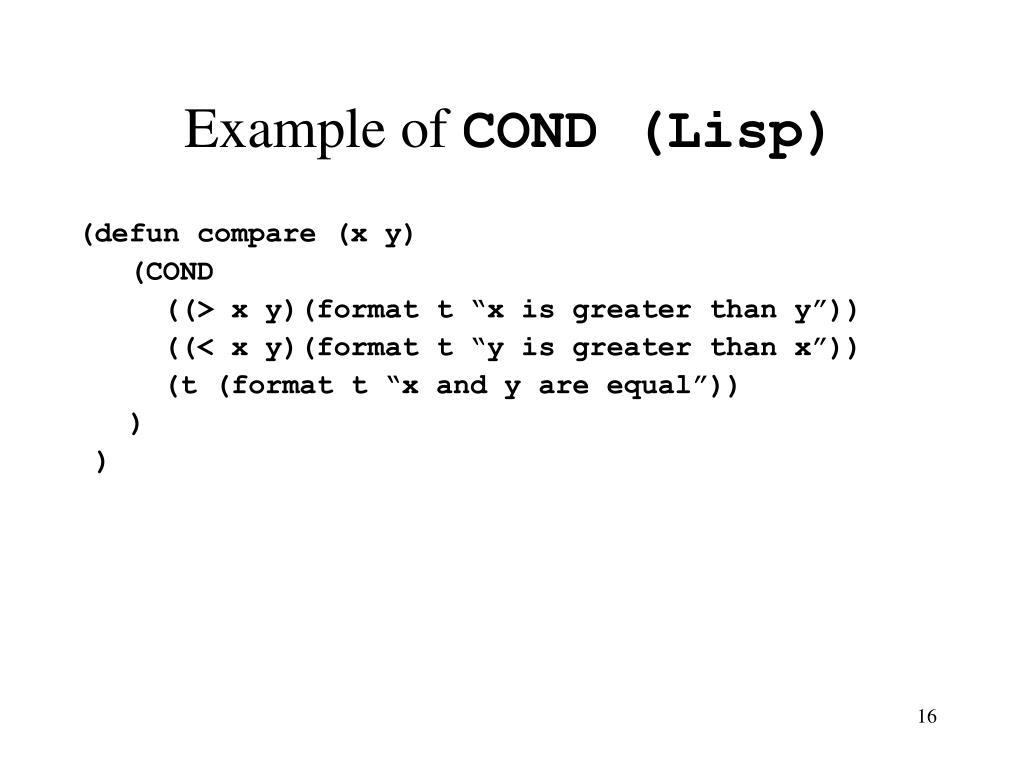
In the compare function shown, cond first checks if (> x y). If true, it prints "x is greater than y" and the cond expression is finished. If not, it proceeds to the next clause, checking if (< x y). If that's true, it prints its message and stops. If neither of the first two tests passes, it means x must be equal to y.
Notice the final clause: (t (format t "x and y are equal")). In Elisp, t is the symbol for "true." Since t is always true, this clause acts as a catch-all or default case, similar to an else at the end of a chain of if/else if. It guarantees that if no other condition is met, this final block of code will run.
2. Seeing cond in Action
Let's watch a video that demonstrates cond with a variable, so you can see how changing the input affects which branch is chosen.
Types, Conditionals, and Loops - Learning Emacs Lisp #2
The System Crafters channel provides a very clear, step-by-step walkthrough of cond. This will help solidify the syntax and the concept of the default t clause.
Watch the segment from 01:06:20 to 01:08:13. Pay attention to how the cond expression evaluates different clauses as the value of the variable a is changed.
Now, let's replicate this in your *scratch* buffer to get a feel for it.
- Define a variable
a.(setq a 2) - Write the
condexpression.(cond ((= a 1) "a is one.") ((> a 1) "a is greater than one.") (t "a is something else.")) - Place your cursor after the
condexpression and pressC-x C-e. You should see"a is greater than one."in the echo area. - Now, go back and change the value of
ato1and re-evaluate the(setq ...)expression. Then, re-evaluate thecondexpression. You'll get"a is one.". - Finally, change
ato-5and repeat. You'll see the default case,"a is something else.", is triggered.
This simple exercise demonstrates the core flow of cond: test, succeed, and stop; or test, fail, and continue.
3. A More Practical Example: Identifying Data Types
The previous example is good for demonstration, but let's look at something more functional. cond is perfect for building functions that inspect an object and behave differently based on its type.
Emacs-Lisp Conditionals | Logical Operators, Tests, Ifs, Conds | Switching to Emacs #6.2
This video from the Augusto channel shows a great practical use of cond to build a function that identifies the type of any Lisp object you give it.
Watch from 13:34 to 16:10. The presenter builds a type-of function using cond. Notice how each clause uses a predicate function (like numberp, stringp) as its test.
This type-of function is a fantastic example because it's something you might genuinely use while debugging or exploring Elisp. It highlights how cond can be used to check a series of properties about an object. The order of the clauses matters. As the video notes, if the symbolp test came before the functionp test, a function name like message would be identified as a symbol, not a function, because function names are also symbols.
4. Your Turn: Build a "Mode Describer" Command
Now let's apply this to your goal of building practical Emacs extensions. We will create a new interactive command that tells you something about the current buffer's major mode.
Your *scratch* buffer is likely in lisp-interaction-mode, but if you open a .el file, it will be in emacs-lisp-mode. If you open a .md file, it will be in markdown-mode. Our command will use cond to check the current major-mode and provide a friendly message.
-
Start with the function definition:
(defun describe-current-mode () "Display a message describing the current major mode." (interactive)) -
Add the
condblock. The variablemajor-modealways holds the symbol for the current buffer's major mode. We'll useeqto compare it to different mode symbols.(defun describe-current-mode () "Display a message describing the current major mode." (interactive) (cond ;; Add clauses here )) -
Add the clauses. Let's add a few for common modes. Notice that each body just calls the
messagefunction.(defun describe-current-mode () "Display a message describing the current major mode." (interactive) (cond ((eq major-mode 'emacs-lisp-mode) (message "You are editing some powerful Emacs Lisp!")) ((eq major-mode 'lisp-interaction-mode) (message "This is the *scratch* buffer, great for testing Elisp.")) ((eq major-mode 'markdown-mode) (message "Writing in Markdown, are we?")) ;; The default case (t (message "This buffer is in %s." major-mode))))The final
(t ...)clause is our robust fallback. It will handle any mode we didn't explicitly list, usingmessage's formatting capability (%s) to insert the name of the mode into the string. -
Evaluate and test. Press
C-x C-eafter the final parenthesis to define the function.- Now, run
M-x describe-current-modein your*scratch*buffer. You should see the message forlisp-interaction-mode. - Open a new file called
test.md. Emacs will put it inmarkdown-mode. RunM-x describe-current-modethere. You'll get the Markdown message. - Open a
.txtfile. It will likely open intext-mode. Run the command, and you'll see the default case in action:This buffer is in text-mode.
- Now, run
You've successfully created an intelligent command that adapts its output based on a series of conditions, all neatly organized with cond.
Conclusion
You have now moved beyond simple binary decisions and can write code that handles a multitude of scenarios gracefully. cond is a cornerstone of Lisp programming, valued for its clarity and power in expressing complex conditional logic.
Key Takeaways:
condis Elisp's primary tool for multi-branch conditional logic, evaluating a series of clauses in order.- The structure is
(cond (TEST-1 BODY-1...) (TEST-2 BODY-2...) ...). - It executes the body of the first clause whose test evaluates to a non-
nilvalue and then stops. - A clause can have multiple forms in its body, which are executed sequentially (an "implicit
progn"). - The pattern
(t ...)is used to create a default or else case that runs if no other conditions are met. - For logic involving more than two distinct paths,
condis almost always cleaner and more readable than nestedifstatements.
Preview of the Next Lesson
So far, our tests have been simple, single expressions like (eobp) or (= a 1). But what if you need to check if two, or three, or more things are true at the same time? In the next lesson, we will explore the logical operators and, or, and not, which allow you to combine and invert conditions to build even more precise and powerful tests for your if and cond expressions.