Introduction
Welcome to the next lesson in our journey through Elisp's control structures. In the previous lesson, we mastered cond, a powerful tool for navigating multiple decision paths, much like sorting mail into different piles. We created a describe-current-mode command that could identify the context you're working in.
However, the tests we used—(eq major-mode 'emacs-lisp-mode)—were simple, one-dimensional questions. Real-world logic is often more nuanced. You might want to ask, "Am I in an Elisp buffer and has this buffer been saved?" or "Is this a help buffer or is it read-only?"
This lesson focuses on exactly that, directly addressing the learning outcome: Combine conditions using 'and', 'or', and 'not'. These three logical operators are the fundamental tools for constructing complex questions. They allow you to chain, invert, and create alternatives within your conditional tests, giving you the precision needed to build truly intelligent and responsive Emacs commands.
1. A Quick Recap: Truthiness in Elisp
Before we combine conditions, let's briefly revisit what Elisp considers "true" or "false". This concept is the foundation of all conditional logic.
- False: The only values Elisp considers false are
niland its identical twin, the empty list'(). - True: Everything else is considered true. This includes the symbol
t, any number (including0), any non-empty string (including""), and any other Lisp object.
This is a key Lisp convention. Unlike some languages where 0 or empty strings are treated as false, in Elisp, the distinction is purely between nil and everything else.
2. The Building Blocks of Logical Expressions
Logical operators take truth values as input and produce a new truth value. While this might remind you of formal logic, in Lisp, they have some unique and powerful behaviors.
Let's look at a standard truth table for a quick overview of the basic logic.

Now, let's explore how Elisp implements these with not, and, and or.
Logic Expressions in Emacs Lisp
The System Crafters guide provides a concise summary of Elisp's logic operators. This will serve as a great textual reference.
Please read the sections titled 'What is true?' and 'Logic operators'. These sections reinforce the concept of truthiness and provide a clear definition for not, and, and or along with simple examples.
As you read, you'll have noticed these operators are special forms, not functions, and they have two distinctive properties: their return values and their short-circuiting behavior. Let's watch a video that explains these properties in detail.
Types, Conditionals, and Loops - Learning Emacs Lisp #2
The System Crafters video 'Types, Conditionals, and Loops' offers an excellent explanation of how these logic operators work in practice, focusing on their unique return values and evaluation rules.
Watch the segment from 55:15 to 01:00:29. Pay close attention to the concepts of 'short-circuiting' and what value and and or actually return.
Let's break down what we've just learned.
not
This is the most straightforward. It inverts the truthiness of its argument.
- If the argument is
nil,notreturnst. - If the argument is anything other than
nil,notreturnsnil.
Open your *scratch* buffer and try these (C-x C-e to evaluate):
(not t)       ; ==> nil
(not nil)     ; ==> t
(not "hello") ; ==> nil (because "hello" is true)
(not 0)       ; ==> nil (because 0 is true)
and
The and form evaluates expressions one by one, from left to right.
- It stops and returns
nilas soon as it encounters an expression that evaluates tonil. - If all expressions evaluate to something other than
nil, it returns the value of the last expression.
This "return the last value" behavior is a powerful Lisp idiom. It allows you to use and not just for checking a condition, but also for returning a value if the condition is met.
(and t t "success")      ; ==> "success"
(and (> 5 3) "positive") ; ==> "positive"
(and (> 5 3) nil "foo")  ; ==> nil (stops at nil)
or
The or form also evaluates expressions one by one.
- It stops and returns the value of the first expression that is not
nil. - If all expressions evaluate to
nil, it returnsnil.
This behavior is useful for providing default values. For instance, (or user-custom-value default-value).
(or nil nil "default") ; ==> "default"
(or "first" "second")  ; ==> "first" (stops at "first")
(or nil 0 "third")     ; ==> 0 (stops at 0, since 0 is not nil)
Short-Circuiting Visualized
The term "short-circuiting" means the evaluation stops as soon as the final result is known. This is an efficiency feature. For and, if any part is false, the whole thing is false. For or, if any part is true, the whole thing is true.
This flowchart clearly illustrates the concept for an OR operation.
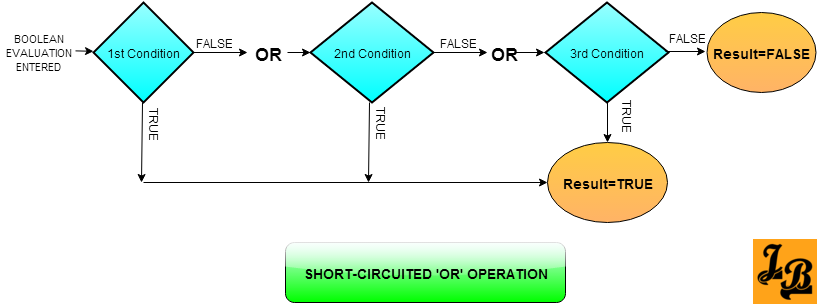
An and operation has a similar flow: it would stop and return nil as soon as the first nil (false) condition is found.
3. Practical Application: A Smarter describe-current-mode
Let's apply these operators to enhance the describe-current-mode command we built in the last lesson. Here is the original code for reference:
(defun describe-current-mode ()
  "Display a message describing the current major mode."
  (interactive)
  (cond ((eq major-mode 'emacs-lisp-mode)
         (message "You are editing some powerful Emacs Lisp!"))

        ((eq major-mode 'lisp-interaction-mode)
         (message "This is the *scratch* buffer, great for testing Elisp."))

        ((eq major-mode 'markdown-mode)
         (message "Writing in Markdown, are we?"))

        (t
         (message "This buffer is in %s." major-mode))))
Let's make it more specific.
Enhancement 1: Use or to handle multiple REPLs
Your Emacs might have more than one kind of interactive Lisp environment, like ielm-mode. We can use or to create a single rule for both.
Replace this clause:
((eq major-mode 'lisp-interaction-mode)
 (message "This is the *scratch* buffer, great for testing Elisp."))
with this one:
((or (eq major-mode 'lisp-interaction-mode)
     (eq major-mode 'ielm-mode))
 (message "You're in an interactive Lisp environment!"))
Now our command is more robust, treating these two similar modes with the same logic.
Enhancement 2: Use and and not for more specific context
What if you're editing an Elisp file, but it's a read-only one (like a built-in Emacs library file)? Let's add a special message for that.
Add this new clause before the existing emacs-lisp-mode clause. The order in cond matters! We want to check for the more specific case first.
((and (eq major-mode 'emacs-lisp-mode)
      buffer-read-only)
 (message "You are viewing a read-only Elisp file."))
The variable buffer-read-only is t if the buffer cannot be modified, and nil otherwise. Our and expression checks both conditions.
Now, let's use not. Perhaps we only want to give our encouraging message if the file is not read-only. We would modify the original emacs-lisp-mode clause:
((and (eq major-mode 'emacs-lisp-mode)
      (not buffer-read-only))
 (message "You are editing some powerful Emacs Lisp!"))
Your final, enhanced function should look something like this. Evaluate it in your *scratch* buffer to redefine it.
(defun describe-current-mode ()
  "Display a message describing the current major mode."
  (interactive)
  (cond ((and (eq major-mode 'emacs-lisp-mode)
              buffer-read-only)
         (message "You are viewing a read-only Elisp file."))

        ((and (eq major-mode 'emacs-lisp-mode)
              (not buffer-read-only))
         (message "You are editing some powerful Emacs Lisp!"))

        ((or (eq major-mode 'lisp-interaction-mode)
             (eq major-mode 'ielm-mode))
         (message "You're in an interactive Lisp environment!"))

        ((eq major-mode 'markdown-mode)
         (message "Writing in Markdown, are we?"))

        (t
         (message "This buffer is in %s." major-mode))))
4. Your Turn: Create a "Save Status" Checker
Now it's time to build a small command from scratch that uses these logical operators. Your task is to create an interactive command named check-save-status.
This command should check two things:
- Is the buffer associated with a file? The function
(buffer-file-name)returns the file path (a string, which is true) ornilif there is no file. - Has the buffer been modified? The function
(buffer-modified-p)returnstif there are unsaved changes, andnilotherwise.
Your command should behave as follows:
- If the buffer has a file and it has been modified, it should display:
"Buffer has unsaved changes." - If the buffer has a file and it has not been modified, it should display:
"Buffer is saved." - If the buffer does not have a file, it should display:
"This is a temporary buffer."
Instructions:
- Use
defunto define an interactive commandcheck-save-status. - Use
condto structure the different cases. - Use
and,or, and/ornotwithin yourcondclauses to create the precise logic required. - Test your command in different scenarios: in your
*scratch*buffer, in a saved file, and in a file after you've typed something but before saving.
Click here to see a possible solution.
(defun check-save-status ()
  "Check if the current buffer is saved, unsaved, or temporary."
  (interactive)
  (cond
   ;; Case 1: Buffer has a file AND is modified.
   ((and (buffer-file-name) (buffer-modified-p))
    (message "Buffer has unsaved changes."))

   ;; Case 2: Buffer has a file AND is NOT modified.
   ((and (buffer-file-name) (not (buffer-modified-p)))
    (message "Buffer is saved."))

   ;; Case 3: Default for buffers without a file.
   (t
    (message "This is a temporary buffer."))))

;; A slightly more concise version using the fact that (buffer-file-name) is the test itself
(defun check-save-status-concise ()
  "Check if the current buffer is saved, unsaved, or temporary."
  (interactive)
  (if (buffer-file-name)
      ;; This is the 'then' block, which runs if the buffer has a file.
      (if (buffer-modified-p)
          (message "Buffer has unsaved changes.")
        (message "Buffer is saved."))
    ;; This is the 'else' block, for temporary buffers.
    (message "This is a temporary buffer.")))
This exercise combines everything from the last few lessons: defining functions, making them interactive, and using cond with complex logical tests.
Conclusion
You have now learned how to weave together multiple conditions using and, or, and not. This skill transforms your if and cond statements from simple forks in the road into sophisticated, multi-point decision-making systems.
Key Takeaways:
notinverts a condition:nilbecomest, and anything else becomesnil.andevaluates expressions until one isnil(and returnsnil), or returns the value of the last expression if all are true.orevaluates expressions until one is non-nil(and returns its value), or returnsnilif all arenil.- This "short-circuiting" behavior is efficient, and the unique return values are a powerful feature of Lisp.
- Combining these operators allows you to write precise and highly specific tests inside your conditional forms.
Preview of the Next Lesson
In our cond examples, the "body" of each clause—the part that runs when a test is true—has been a single expression, like (message "..."). The if form is even more restrictive in its "true" branch. But what if you want to do several things when a condition is met? In the next lesson, we will learn about progn, a special form that lets you group multiple expressions together to be executed sequentially, allowing you to build more complex action sequences within your conditional logic.