Introduction
In our last lesson, we focused on non-destructive list operations. We saw how cons and append create and return new lists, leaving the original variables pointing to their original, unaltered lists. This is like working with photocopies to preserve the master document.
Today, we'll explore the other side of the coin, fulfilling our goal of clearly distinguishing between non-destructive and modifying operations. This lesson directly addresses the learning outcome: Modify a variable containing a list using the push and pop macros.
We will learn about push and pop, two indispensable macros in Elisp. They provide a convenient and efficient way to treat a list like a stack—a "last-in, first-out" (LIFO) data structure. You'll see how these macros modify the variable itself, making them ideal for common programming tasks like gathering results or managing a sequence of items.
1. push: Adding an Element and Updating a Variable
In the previous lesson, if we wanted to add an element to the front of a list and update the variable, we would write:
(setq my-list '(b c))
(setq my-list (cons 'a my-list))
;; my-list is now (a b c)
This pattern is so common that Lisp provides a more concise and expressive way to do it: the push macro. The push macro handles both the cons operation and the setq assignment in one step.
List Variables (GNU Emacs Lisp Reference Manual)
The GNU Emacs Lisp Reference Manual provides the official definition of push. This short reading explains exactly what it does.
Please read the section 'Modifying List Variables', focusing on the description of the push macro. Note its equivalence to (setq listname (cons element listname)). You can ignore the mention of setf and 'generalized variables' for now; we'll touch on that concept later.
As the manual states, (push ELEMENT LISTNAME) is the standard way to prepend an element to a list stored in a variable. Let's try it in your *scratch* buffer.
- Define a list of your FOSS tools:
(setq foss-tools '("Linux" "Git")) - Now, use
pushto add Emacs to the front:
Evaluate this expression with(push "Emacs" foss-tools)C-x C-e. The return value will be the full list:("Emacs" "Linux" "Git"). - Now, check the value of the
foss-toolsvariable itself:
Placing your cursor after the symbol and pressingfoss-toolsC-x C-ewill show("Emacs" "Linux" "Git")in the echo area. Thefoss-toolsvariable has been permanently modified to point to this new list.
2. How push Works: Reassigning Pointers
It's important to understand what "modifying the variable" really means. The push macro does not destructively alter the existing cons cells of the original list. Instead, it performs a non-destructive cons operation to create a new list, and then it reassigns the variable to point to this new list.
This distinction is subtle but crucial for understanding how Lisp manages memory.
Lisp lists and destructive functions
This blog post by 'Yoo Box' offers an excellent explanation with diagrams that visualize what happens when you use push.
Read the section titled '10. what it means to modify a list'. Focus on the explanation that (push 10000 aa) expands to (setq aa (cons 10000 aa)). Pay close attention to the two diagrams showing the state of the variables aa and bb before and after the push operation. They perfectly illustrate how the aa variable's pointer is moved to a new cons cell, leaving the original list structure intact for bb to still reference.
The key takeaway is that push is a macro, not a function. It rewrites your short, expressive code (push "Emacs" foss-tools) into the longer, underlying implementation (setq foss-tools (cons "Emacs" foss-tools)) before it gets evaluated. This "code that writes code" is a manifestation of Lisp's homoiconicity, a topic you were interested in. You write in a high-level way, and the macro handles the low-level details.
3. pop: Removing an Element and Updating a Variable
The logical counterpart to push is pop. The pop macro performs two actions at once:
- It returns the first element (
car) of the list. - It modifies the list variable to point to the rest (
cdr) of the list.
This makes pop perfect for processing items from a list one by one.
Let's continue with our foss-tools list in the *scratch* buffer. It should currently be ("Emacs" "Linux" "Git").
-
Evaluate the following
popexpression:(pop foss-tools)The
*Messages*buffer (or echo area) will display"Emacs", which was the first element of the list. -
Now, check the value of
foss-toolsagain:foss-toolsEvaluating this will show
("Linux" "Git"). The variable has been updated.
Together, push and pop perfectly implement a stack. You push items onto the top, and you pop them off the top. This LIFO (Last-In, First-Out) behavior is a fundamental pattern in programming.
4. The Idiomatic Use of push: Accumulating Results
One of the most common uses for push is to build a list by accumulating results inside a loop or an iterator. You start with an empty list and push each new item onto it.
The image below shows a real-world example from the Emacs source code.
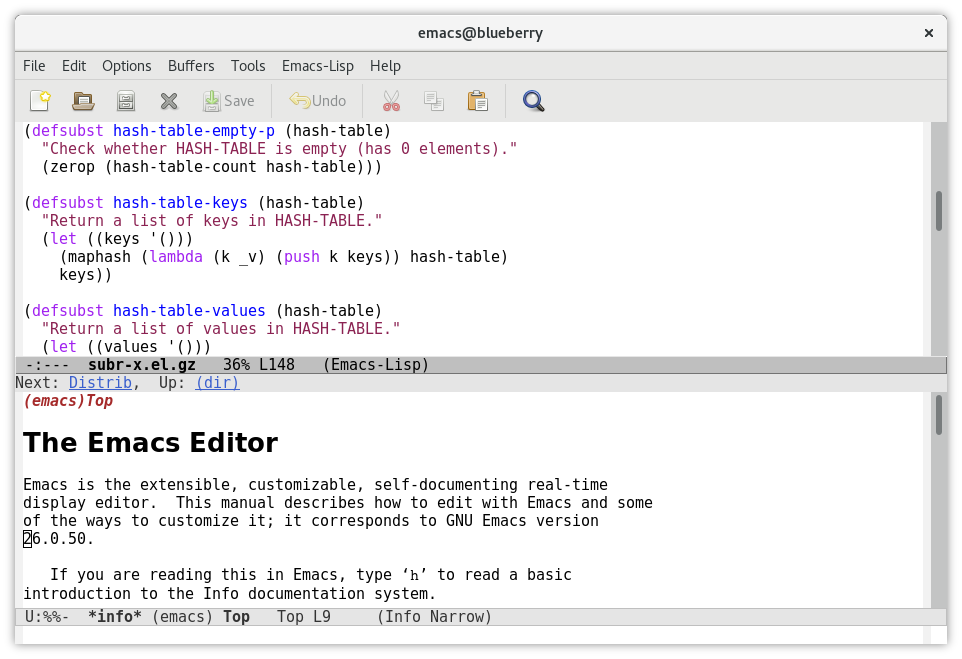
This pattern is powerful and efficient. It's often followed by (nreverse list) to put the elements back in their original order, since push naturally reverses them. (We will discuss nreverse in a future lesson on destructive operations).
The Emacs Lisp manual even explicitly recommends this approach for building lists in your programs.
List Variables (GNU Emacs Lisp Reference Manual)
To reinforce this point, let's look at one final piece from the GNU Manual. This brief text explains why push is the preferred tool for this job.
In the 'List Variables' document, find the description of the add-to-list function. Read the paragraph that begins 'This function is for adding elements to configuration variables...'. It concludes by explicitly recommending push for constructing arbitrary lists in Lisp programs.
5. Hands-On Application: Managing a Writing To-Do List
Given your background in creative writing and project management, let's build a simple to-do list manager for your next speculative fiction piece.
In your *scratch* buffer, follow these steps:
-
Initialize Your Task List: Use
defvarto create a global variable for your tasks. This is good practice for variables you might want to inspect or interact with.(defvar speculative-fiction-tasks '("Outline the core world-building rules" "Draft the opening scene") "A list of tasks for my current writing project.")Evaluate this
defvarform. -
Add a New Task: You just had a great idea for a new character. Use
pushto add this task to the top of your list.(push "Develop the protagonist's backstory" speculative-fiction-tasks)Evaluate this, and then evaluate
speculative-fiction-tasksto confirm the list has been updated. -
Work on a Task: Now, you're ready to get to work. Use
popto grab the most recent task off the list.(pop speculative-fiction-tasks)Evaluate this expression. Notice that the echo area shows you the task you just popped:
"Develop the protagonist's backstory". -
Check Your Remaining Tasks: Finally, evaluate
speculative-fiction-tasksone more time. You'll see that it now only contains the original two items.
This simple exercise perfectly mimics a stack-based workflow, a common pattern for managing nested tasks or tracking state.
Conclusion
In this lesson, you've learned how to use the push and pop macros to efficiently manage lists stored in variables. This is a fundamental skill that moves beyond simple data storage into dynamic data manipulation.
Key Takeaways:
pushis a macro that adds an element to the front of a list and updates the variable in a single step. It is a convenient shorthand for(setq my-list (cons element my-list)).popis a macro that removes the first element from a list, modifies the variable to point to the rest of the list, and returns the removed element.- Together,
pushandpoptreat a list variable as a stack (Last-In, First-Out). - Using
pushto accumulate items into a list is the idiomatic and recommended way to build lists dynamically in Elisp programs.
Preview of the Next Lesson
We've now seen non-destructive list-building (cons, append) and variable-modifying macros (push, pop). However, we have yet to see a truly destructive function—one that modifies the cons cells of a list in-place.
In the next lesson, we will explore nconc, the destructive counterpart to append. This will complete your understanding of the critical difference between non-destructive and destructive operations, a specific area you wanted to master.