Introduction
Welcome back! In our last lesson, we learned how to deconstruct lists and access their contents using car (for the first element), cdr (for the rest of the list), and nth (for access by position). This gave us the tools to read data stored within lists.
Now that we can build lists and read from them, the next step is to modify them by adding new information. This lesson focuses on the learning outcome: Add elements to a list non-destructively using cons and append.
We will explore two fundamental functions for this purpose. First, we'll revisit cons, which we've briefly met as the conceptual building block of lists, to see how it's used to add a single element to the front of a list. Then, we'll introduce append, a function for combining two or more lists into one. A central theme of this lesson is the concept of "non-destructive" operations—a key principle in Lisp that ensures predictability and safety in your code.
1. The Principle of Non-Destructive Operations
Before we dive into the functions themselves, it's crucial to understand what "non-destructive" means. In the context of list manipulation, a non-destructive function does not change the original data it operates on. Instead, it returns a new piece of data (in our case, a new list) that represents the result of the operation.
Think of it like working with a master document. A non-destructive edit is like making a photocopy and writing your changes on the copy. The original master document remains pristine and unaltered. A destructive edit, which we will cover in a later lesson, would be like writing directly on the master document itself.
This approach of preferring non-destructive operations is a cornerstone of the functional programming style that Lisp embodies. It helps prevent unintended side effects, making code easier to reason about and debug.
To see how this works at a low level, let's look at how Lisp represents lists in memory.
Programming in Emacs Lisp - How Lists are Implemented
This brief reading from 'Programming in Emacs Lisp' explains the underlying structure of lists as 'cons cells'. Understanding this will make it crystal clear why functions like car, cdr, and cons behave the way they do.
Please read the text starting from 'How Lists are Implemented' up to, but not including, the section that begins 'The function cons adds a new pair...'. Focus on the diagrams that show a list as a chain of pairs (cons cells), where each pair points to an element and to the next pair.
The key idea is that a variable holding a list just stores the memory address of the first cons cell. Non-destructive functions work by creating new cons cells and linking them to existing ones, without altering the originals.
2. Adding an Element to the Front: cons
We've seen car and cdr take a list apart. Their counterpart, cons (short for "construct"), builds lists. It takes two arguments: an element and a list, and it returns a new list with the element added to the front.
The syntax is: (cons NEW-ELEMENT EXISTING-LIST)
Let's try this in your *scratch* buffer. First, define a list:
(setq core-tools '("org-mode" "git"))
Now, let's use cons to create a new list that includes a brainstorming tool.
(setq extended-tools (cons "mind-mapping" core-tools))
Evaluate extended-tools using C-x C-e on the symbol. The *Messages* buffer will show ("mind-mapping" "org-mode" "git").
Now, critically, evaluate core-tools again. You'll see it's still ("org-mode" "git"). The cons function did not change our original list; it returned a brand-new one.
The reading below explains exactly what cons is doing with the underlying cons cells.
Programming in Emacs Lisp - How Lists are Implemented
This section continues from the previous reading. It shows with a diagram how cons non-destructively adds an element by creating just one new cons cell that points to the original list.
Now, read the rest of the page, starting from the text 'The function cons adds a new pair...'. Pay close attention to the diagram showing the state of the bouquet and flowers variables. It illustrates perfectly how a new element can be added without modifying the existing list structure.
In essence, cons is highly efficient. It only creates a single new cons cell. The cdr of this new cell simply points to the memory address where the original list begins.
3. Combining Lists: append
While cons is perfect for adding one element to the front, you'll often need to combine two or more lists. The append function is the tool for this job. It takes any number of lists as arguments and returns a single new list containing all their elements in order.
Let's go back to our *scratch* buffer.
(setq writing-tools '("org-mode" "git"))
(setq publishing-tools '("pandoc" "latex"))

(setq full-workflow (append writing-tools publishing-tools))
Evaluating full-workflow yields ("org-mode" "git" "pandoc" "latex"). As you would expect, writing-tools and publishing-tools are both unchanged.
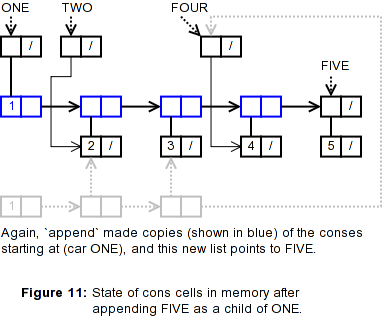
But how does append achieve this non-destructively? Unlike cons, append must copy the elements of the lists it joins. Specifically, append works by creating copies of the cons cells of all list arguments except the last one. The new chain of cells is then linked to the last list argument.
The official GNU Emacs Lisp manual provides the definitive explanation.
Building Lists (GNU Emacs Lisp Reference Manual)
The 'Building Lists' section of the GNU Emacs Lisp Reference Manual details how append works. It's a slightly more technical read but precisely explains the copying mechanism.
Please read the section for the append function. Focus on the explanation and the box diagram showing the trees and more-trees variables. This visualizes how append copies the first list to link it to the second.
This diagram helps visualize the result of the append operation described in the manual.
4. cons vs. append
A common point of confusion is when to use cons versus append. The distinction is critical:
consadds a single element to a list.appendjoins two or more lists.
Let's see what happens if we mix them up.
;; What if we `cons` a list onto another list?
(cons '(a) '(b c))
;; => ((a) b c)
;; The result is a nested list, because '(a) is treated as a single element.

;; What if we try to `append` an element (that isn't a sequence)?
(append 'a '(b c))
;; This will cause an error: "wrong-type-argument sequencep a"
;; `append` expects its arguments (except possibly the last) to be sequences (like lists or strings).
So what if you want to add a single element to the end of a list? You can't use cons directly. Instead, you append a new list containing just that one element.
(setq my-list '(a b))

;; Add 'c' to the end
(append my-list (list 'c))
;; => (a b c)
Notice we had to wrap 'c in (list 'c) to turn it into a list that append can work with. This pattern is very common. The footnote in the manual you just read provides an excellent summary of this exact point.
Building Lists (GNU Emacs Lisp Reference Manual)
This footnote from the Emacs Lisp manual succinctly compares cons and append for adding an element to a list, highlighting the non-destructive approach.
Please read the text of Footnote (6) at the very end of the document. It directly addresses the task of adding an element to the end of a list and contrasts the available methods.
5. Hands-on Application: Building a Custom Workflow
Let's put this together in a practical scenario. Your background includes creative writing and an interest in FOSS tools. Imagine you're building up configurations for different writing stages.
-
Define your base setup: In your
*scratch*buffer, define a list of your essential tools for writing a first draft.(setq draft-tools '("emacs" "git")) -
Create a research-phase setup: For the research phase, you want to add
zotero-citation-pickerto the front of your tool list. Useconsto create a new list calledresearch-tools.(setq research-tools (cons "zotero" draft-tools)) ;; Evaluate this and check its value. -
Create a final production setup: For producing the final document, you need to add formatting and conversion tools. Create a list for these.
(setq production-tools '("pandoc" "latex"))Now, use
appendto combine yourdraft-toolswithproduction-toolsinto a new list calledproduction-workflow.(setq production-workflow (append draft-tools production-tools)) ;; Evaluate this and check its value. -
Verify non-destruction: Finally, re-evaluate the original
draft-toolsvariable.draft-tools ;; => ("emacs" "git")Confirm that it was not altered by either the
consorappendoperations. This exercise demonstrates how you can build different configurations from a common base without modifying it.
Conclusion
In this lesson, you have learned how to add elements to lists in a safe, predictable, and efficient manner—a foundational skill for Elisp programming.
Key Takeaways:
- Non-destructive functions like
consandappendare fundamental to Lisp. They return new lists without modifying the original input lists. consadds a single element to the front of a list. It is very fast as it only creates one new cons cell.appendconcatenates two or more lists. It creates a new list by copying the elements of all but its final argument.- To add an element to the end of a list non-destructively, use the pattern
(append original-list (list new-element)).
Preview of the Next Lesson
We've focused on non-destructive operations, which are the default in functional programming. However, there are times when you intentionally want to modify a list "in-place" for efficiency or convenience. In our next lesson, we will explore this other side of the coin by learning how to modify a variable containing a list using the push and pop macros. This will directly address your request to clearly distinguish between destructive and non-destructive operations.