Introduction
Hello! In our previous lesson, we established how to programmatically navigate the Emacs environment by finding, retrieving, and switching between buffers. We treated buffers as high-level objects. Now, we're going to zoom in and learn how to move within a specific buffer.
This lesson continues our exploration of Module 10, "Manipulating the Emacs Environment." Our learning outcome is to manipulate the 'point' and 'mark' using functions like goto-char, point, and point-max'. You're familiar with the cursor (point) and the region (defined by the point and mark) from your daily use of Emacs. Today, we'll learn to control them with Elisp.
Mastering these concepts is the absolute foundation for writing any function that reads from, writes to, or modifies text in a buffer. For your goal of building custom workflow tools, this is an essential skill.
1. Understanding "Point"
In Elisp, the cursor's location is called the point. It's not just a visual marker; it's a fundamental concept representing a position within the buffer's text.
The best way to think about the point is as an integer that indicates a position between characters. A buffer is treated as one long sequence of characters, with the first position being 1.
An introduction to Emacs Lisp - Christian Johansen
This article, 'An introduction to Emacs Lisp' by Christian Johansen, provides a very clear explanation of the 'point' and how it's indexed. It's a great starting point for our discussion.
Please read the two subsections titled 'Point' and 'Looking about without moving'. Focus on the analogy of a buffer being a single string of characters indexed from 1.
As the reading explains, Elisp gives us functions to query the value of the point:
(point): Returns the current integer position of the point.(point-min): Returns the minimum possible point value (always 1 in a non-empty buffer).(point-max): Returns the maximum possible point value, which is one greater than the number of characters in the buffer.
Let's Try It
Open your *scratch* buffer and type a few lines of text. Now, move your cursor around and evaluate these expressions using C-x C-e.
;; Place your cursor somewhere and evaluate this
(point)

;; The beginning of the buffer
(point-min)

;; The end of the buffer
(point-max)
You'll see the integer position of the point change as you move your cursor, while point-min and point-max remain constant for the given buffer content.
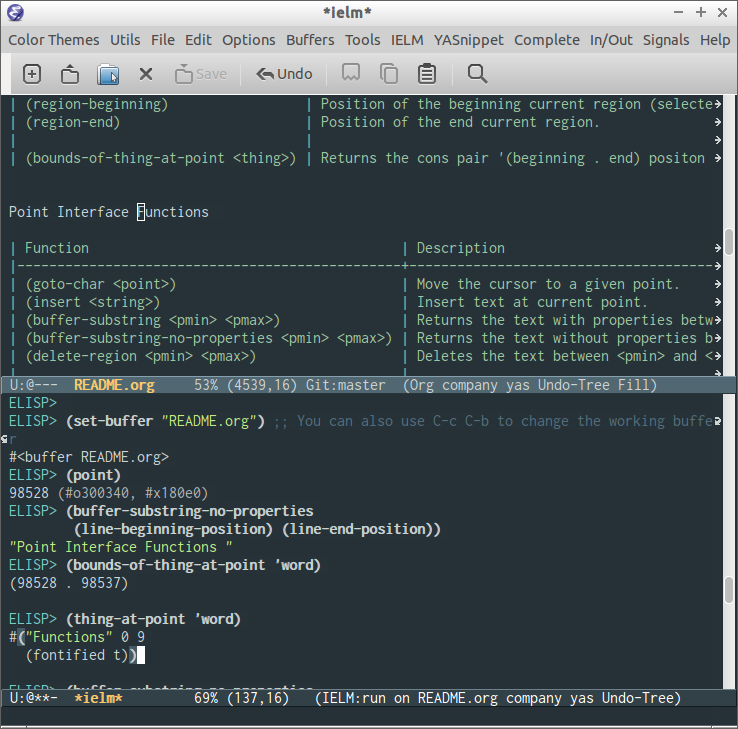
2. Moving the Point Programmatically
Now that we can get the point's position, let's learn how to set it. The primary function for this is goto-char, which takes an integer and moves the point to that position.
The following video demonstrates goto-char and its relationship with point-min and point-max very clearly.
Emacs Lisp 101 - Write a useful function Today!!
This clip from the 'Emacs Lisp 101' series by Mostly Code will show you these functions in action.
Watch from 02:07 to 04:27. Observe how goto-char is used with a specific number and then with the values returned by point-min and point-max to move to the buffer's boundaries.
As you saw, you can move to the beginning and end of the buffer like this:
;; Move to the end of the buffer
(goto-char (point-max))

;; Move to the beginning of the buffer
(goto-char (point-min))
For readability and convention, Emacs provides dedicated functions for these common operations: (beginning-of-buffer) and (end-of-buffer). Under the hood, they achieve the same goal as the code above, but they express the intent more clearly.
3. Safe Movement: save-excursion
A crucial aspect of Elisp is managing side effects. Functions like goto-char have a very visible side effect: they move the user's cursor. Often, when writing a function, you need to move around the buffer to gather information, but you want to return the cursor to its original position when you're done.
This is the job of the save-excursion macro. It acts as a wrapper: it records the position of the point (and mark, as we'll see) before executing any code, runs the code, and then restores the point to its original position, no matter what happens inside.
An Introduction to Programming in Emacs Lisp - GNU
Let's turn to the canonical 'An Introduction to Programming in Emacs Lisp' to understand save-excursion. This is one of the most important forms in all of Elisp.
Please read section 3.10, 'save-excursion', and the subsection 'Point and Mark'. This explains the 'why' behind this essential tool.
Here is a practical example. Try evaluating this in your *scratch* buffer. The message will report the position at the end of the buffer, but your cursor won't move.
(save-excursion
  (goto-char (point-max))
  (message "The buffer ends at position %d" (point)))
Now, try the same thing without save-excursion. Your cursor will jump to the end.
(goto-char (point-max))
(message "The buffer ends at position %d" (point))
This pattern of wrapping buffer-modifying code in save-excursion is fundamental to writing well-behaved Elisp functions that don't disrupt the user's workflow.
4. Defining Regions: The Mark
The mark is the "other end" of a selection. The text between the point and the mark constitutes the active region. While you can only have one point per buffer, Emacs maintains a mark-ring—a list of previous mark positions—which is what allows you to cycle back through locations with C-u C-SPC.
Programmatically, you can set the mark and move the point to define a region.
(push-mark): Sets the mark at the current point.(set-mark LOCATION): A simpler function that sets the mark to a specificLOCATION(an integer position).
A common task is to select the entire buffer. The function mark-whole-buffer does exactly this: it moves the point to the beginning of the buffer and sets the mark at the end.
An Introduction to Programming in Emacs Lisp - GNU
The GNU manual provides a good breakdown of how a function like mark-whole-buffer is constructed.
Please read the brief overview in section 4.3, 'The Definition of mark-whole-buffer.' You don't need to dive into the body of the function yet, just understand what it does.
The power of programmatically controlling point and mark is that you can build custom tools that are more intelligent than the defaults. For instance, you could write a function to mark the current paragraph, or the contents of the nearest set of parentheses. This is a glimpse into how you can tailor Emacs to understand the structure of your text, which is especially powerful for creative writing and world-building.
Your Turn: Highlight to End-of-Line
Let's write a simple interactive command that uses these concepts. The goal is to create a function that highlights the text from the current point to the end of the line.
Your task is to define an interactive command named ar-highlight-to-eol.
It should:
- Be an interactive command.
- Set the mark at the current cursor position.
- Move the point to the end of the current line.
Here are the functions you'll need:
(defun ...)to define the function.(interactive)to make it a command.(point)to get the current position.(set-mark ...)to set the mark at a given position.(end-of-line)to move the point to the end of the line.
Give it a try in your *scratch* buffer. Once you've defined it with C-x C-e, you can run it with M-x ar-highlight-to-eol.
Click here for a solution
(defun ar-highlight-to-eol ()
  "Highlight text from point to the end of the current line."
  (interactive)
  (set-mark (point))
  (end-of-line))
Conclusion
In this lesson, you've learned to programmatically control the fundamental units of position and selection within an Emacs buffer. These are not just abstract concepts; they are the handles you'll use to build almost any text-manipulation tool.
Key Takeaways:
- Point is an Integer: The point is a number representing the position between characters in a buffer. You can get its value with
(point), and find the buffer boundaries with(point-min)and(point-max). - Moving the Point:
(goto-char POSITION)is the fundamental function for moving the point. Higher-level functions like(beginning-of-buffer)are often used for clarity. - Safe Excursions:
(save-excursion ...)is the essential macro for moving around in a buffer to inspect it without permanently changing the user's cursor position. - Mark Defines the Region: The mark is the other end of the region. You can set it programmatically with
(set-mark ...)or(push-mark)to define a region for subsequent operations.
Preview of the Next Lesson
We can now navigate to any buffer and move to any position within it. The next logical step is to start changing things. In our next lesson, we will learn how to insert text into a buffer programmatically using insert. You'll combine your knowledge of with-current-buffer and goto-char to place text exactly where you want it.