Introduction
Hello! In the last module, we built a solid foundation in Elisp's data structures, culminating in a strategic guide for choosing between alists, plists, and hash tables. We've been working with the "what" of Elisp data. Now, we shift our focus to the "where"—the Emacs environment itself.
This lesson marks our entry into Module 10: Manipulating the Emacs Environment. Our goal is to learn how to retrieve and switch between buffers programmatically. As someone who has used Emacs for a year, you're familiar with buffers as the containers for your text, but we're about to peel back the curtain and see them as Lisp objects that we can control with code. This is the first step toward writing functions that can navigate and modify your workspace automatically.
We'll start by understanding what a buffer is from Elisp's perspective, learn how to find the buffers we need, and then master the techniques for switching between them safely and efficiently.
1. What is a Buffer?
In your daily use of Emacs, you interact with buffers constantly—the *scratch* buffer, buffers visiting files, the *Messages* buffer, and buffers created by packages like Magit. From a programming standpoint, a buffer is a fundamental Lisp object that holds text and its associated properties (like syntax highlighting). It can be linked to a file, but it doesn't have to be.
This video from System Crafters provides an excellent overview of what buffers are in the context of Elisp and why they are so central to extending Emacs.
Reading and Writing Buffers in Practice - Learning Emacs Lisp #5
To start, let's watch this brief segment from the 'Reading and Writing Buffers in Practice' video. It explains the versatile role buffers play in Emacs, from editing files to creating user interfaces.
Please watch from 00:31 to 02:18. This will set the conceptual foundation for the functions we're about to learn.
2. Finding and Retrieving Buffers
Before we can switch to a buffer, we first need a way to get a reference to it. Elisp provides several functions for this, each suited for a different situation. You can think of this as querying the Emacs environment for the specific buffer object you want to work with.
The following text from System Crafters (the companion article to the video) clearly lays out the most important functions for retrieving buffers. We'll walk through them one by one.
Reading and Writing Buffers In Practice - System Crafters
This article, 'Reading and Writing Buffers In Practice', details the core functions for finding and creating buffers. We'll use it as a reference as we explore these functions.
For now, just have this article open. We'll refer to specific sections as we go. You don't need to read it all at once.
A. Getting a List of All Buffers
The most comprehensive way to see what's happening is to get a list of all active buffers. The buffer-list function returns a list of all buffer objects.
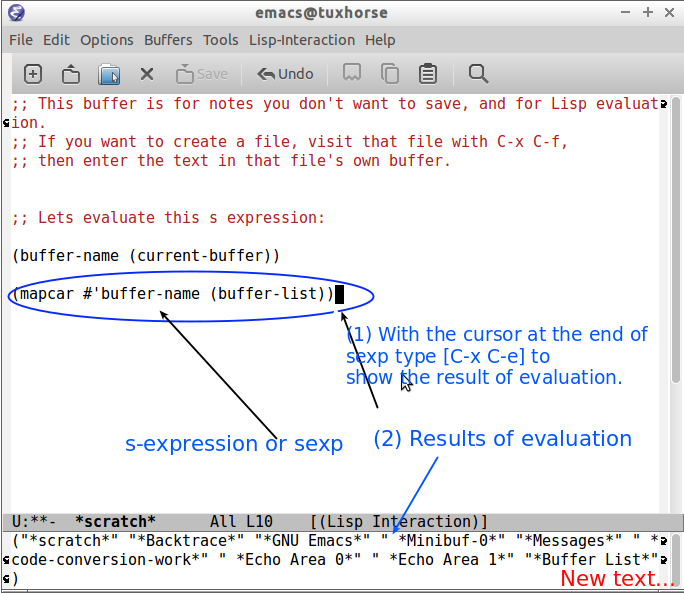
To make this list human-readable, we can use mapcar (which you'll remember from our lesson on lists) to apply the buffer-name function to each buffer object.
Try this in your *scratch* buffer:
(mapcar #'buffer-name (buffer-list))
After you evaluate this with C-x C-e, the minibuffer will show you a list of the names of every buffer currently open in your Emacs session.
B. Getting Specific Buffers
More often, you'll want to target a specific buffer. Here are the primary functions for doing so, as covered in the System Crafters article:
current-buffer: Returns the buffer object that the Lisp code is currently executing in. This is not necessarily the buffer visible in the active window.(current-buffer) ; => #<buffer *scratch*>get-buffer "buffer-name": Returns the buffer object corresponding to a given name. It returnsnilif no such buffer exists.(get-buffer "*scratch*") ; => #<buffer *scratch*> (get-buffer "non-existent") ; => nilget-buffer-create "buffer-name": Likeget-buffer, but if the buffer doesn't exist, it creates a new, empty one with that name. This is useful for creating temporary or utility buffers.(get-buffer-create "my-notes-buffer")get-file-buffer "path/to/file.txt": Returns the buffer object that is visiting a specific file. Returnsnilif no buffer is visiting that file.find-file-noselect "path/to/file.txt": This is a powerful one. It opens a file into a buffer but does not display it in any window. It returns the buffer object. This is essential for programmatically reading or modifying a file in the background.
The following video segment demonstrates these functions in action.
Reading and Writing Buffers in Practice - Learning Emacs Lisp #5
Let's return to the System Crafters video to see these functions used in practice. Pay close attention to the common pattern of combining get-file-buffer with find-file-noselect.
Watch the following segments: Getting Buffers (07:00 - 09:37): Covers current-buffer, get-buffer, and get-buffer-create. Working with File Buffers (13:52 - 17:36): Covers buffer-file-name and get-file-buffer. Loading Files (20:28 - 22:21): Introduces find-file-noselect. Putting it Together (22:21 - 24:47): Shows the idiomatic use of (or (get-file-buffer ...) (find-file-noselect ...)) to ensure you always get a buffer for a file, whether it's already open or not.
The (or ...) pattern shown at the end is a cornerstone of robust Elisp. Since or stops and returns the first non-nil value, this expression elegantly says: "Try to get the buffer if it's already visiting the file; if that fails, then load the file into a new buffer."
3. Switching the Context: switch-to-buffer vs. set-buffer
Now that we can retrieve buffer objects, we can switch to them. There are two fundamentally different ways to "switch," and the distinction is crucial for writing correct Elisp.
switch-to-buffer: This is for human interaction. It changes which buffer is displayed in the currently selected window. It's the function that runs when you typeC-x b.set-buffer: This is for programmatic control. It changes Elisp's "current buffer" context without affecting what the user sees on screen. After(set-buffer ...), subsequent functions likeinsertorpointwill operate on that new buffer.
The classic Programming in Emacs Lisp manual explains this key difference very clearly.
Programming in Emacs Lisp - Switching Buffers
This section from the Emacs Lisp manual clearly distinguishes between switching buffers for human display versus programmatic context.
Please read the section titled 'Switching Buffers'. Focus on the explanation of the difference between switch-to-buffer and set-buffer.
Safe Programmatic Switching with with-current-buffer
Directly using set-buffer can be dangerous. If you change the buffer context in your function, it might not get set back, causing other code that runs after yours to operate on the wrong buffer.
The correct, idiomatic way to operate on another buffer is with the with-current-buffer macro. It temporarily switches to the specified buffer, runs your code, and—no matter what happens, even if there's an error—it guarantees the original buffer context is restored afterwards.
(with-current-buffer "buffer-name"
  ;; ... code inside here operates on "buffer-name" ...
  (insert "This text goes into the other buffer."))

;; ... code here continues in the original buffer ...
The System Crafters video explains this safety mechanism well.
Reading and Writing Buffers in Practice - Learning Emacs Lisp #5
This final video segment explains why direct use of set-buffer is risky and demonstrates the safe alternative, with-current-buffer.
Watch from 09:37 to 13:52. This is one of the most important concepts for writing well-behaved Elisp code.
4. Practical Application: A Smart Buffer Switcher
Let's see how these pieces come together to build a genuinely useful tool. The following video by Mike Zamansky shows the creation of a function to intelligently switch between Eshell buffers. This is a perfect real-world example of programmatic buffer retrieval and switching.
Using Emacs Episode 66 - Switching Eshell buffers in Elisp
In this video, you'll see a complete function being built from scratch. It finds all 'Eshell' buffers, and then decides whether to create a new one, switch to the most recent one, or offer a choice. This demonstrates almost every concept from our lesson.
Watch from 06:12 to 18:50. As you watch, notice how the author: Uses buffer-list to get all buffers. Filters this list using cl-remove-if-not and a lambda to find only the Eshell buffers. Uses cond to handle the logic for different scenarios. Uses switch-to-buffer to perform the final action.
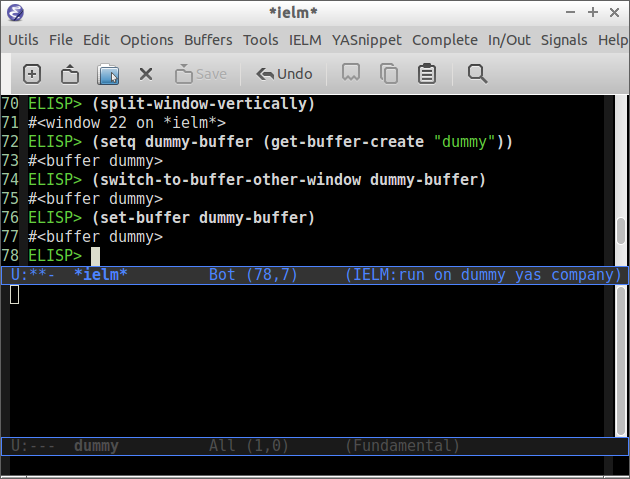
As a complement to switch-to-buffer, there is also switch-to-buffer-other-window, which is useful when you are working with a split-window layout.
Your Turn: A Custom Writing Buffer Switcher
Given your background in creative writing and your use of Emacs for it, let's build a tool for your workflow. Your task is to create an interactive command named ar-switch-to-writing-buffer.
This command should:
- Get a list of all current buffers.
- Filter this list to find only your "writing" buffers. For this exercise, let's define a writing buffer as any buffer whose name ends in
.org. You can usestring-suffix-pfor this check, e.g.,(string-suffix-p ".org" (buffer-name buffer-object)). - Use
condto implement the following logic:- If there are no writing buffers open, print a message like "No writing buffers found." using the
messagefunction. - If there is exactly one writing buffer, switch to it directly using
switch-to-buffer. - If there are multiple writing buffers, use
completing-read(as seen in the Zamansky video) to prompt the user to select one by name, and then switch to the selected buffer.
- If there are no writing buffers open, print a message like "No writing buffers found." using the
Hint: You will need to combine buffer-list, cl-remove-if-not, lambda, mapcar, completing-read, and switch-to-buffer. This is an excellent exercise to tie everything together. Take your time and build it piece by piece in your *scratch* buffer.
Conclusion
In this lesson, you've taken a significant step from being an Emacs user to an Emacs programmer. You now understand how to treat buffers as programmable objects within the Lisp environment.
Key Takeaways:
- Buffers as Objects: Buffers are Lisp objects that hold text, which you can retrieve and manipulate with functions like
buffer-listandget-buffer. - Retrieval Strategies: You can get all buffers (
buffer-list), get one by name (get-buffer), get or create one (get-buffer-create), or get one tied to a file (get-file-buffer,find-file-noselect). - Context vs. Display:
switch-to-bufferchanges the buffer shown in a window, whileset-bufferchanges the context for your code. - Safe Switching: The
with-current-buffermacro is the standard, safe way to temporarily execute code in a different buffer without causing side effects.
Preview of the Next Lesson
We've learned how to find and switch between buffers. The logical next step is to learn how to move and work within them. In our next lesson, we will dive into two of the most fundamental concepts for buffer manipulation: the point and the mark. You'll learn how to programmatically move the cursor, get its position, and define regions of text.