Hello! Welcome to our first lesson on how search engines work.
Given your request for a high-level conceptual overview, this lesson will demystify the first crucial steps that a search engine like Google takes long before you even type a search query. We'll focus on answering the question: How do search engines find and make sense of the trillions of pages on the web?
Specifically, we'll cover the two foundational processes:
- Crawling: The automated discovery of web content.
- Indexing: The organization and storage of that content to make it searchable.
By the end of this 30-minute lesson, you'll be able to explain this entire pre-search process, setting a solid foundation for our next lesson, which will cover how search engines rank this content.
The Big Picture: A Library for the Web
Before diving into the details, let's start with a quick, high-level overview. Search engines don't search the live internet in real-time. That would be impossibly slow. Instead, they search their own, pre-built map of the web, called an index.
To get a feel for this, please watch the first minute of the following video from Google. It provides a simple but powerful analogy of the index as a giant library.
How Google Search Works (in 5 minutes)
This short clip from Google explains the core concept of the search index.
Watch from the beginning until 01:03. Focus on how Google describes the process of 'mapping the web' to create its 'index'.
As the video explains, the challenge isn't just finding pages, but making sense of them. This is where the two-step process of crawling and indexing comes in.
Step 1: Crawling – Discovering the Content
Crawling is how search engines discover new and updated content on the web, such as web pages, images, and videos. This is done by automated programs called crawlers (also known as "spiders" or "bots").
The process is fundamentally a graph traversal problem. The web is a massive graph where pages are nodes and hyperlinks are edges. Crawlers start from a list of known "seed" URLs and traverse these edges to find new nodes.
For a more detailed, yet still conceptual, breakdown of how this works, the following video provides an excellent explanation from a system design perspective.
This video from ByteByteGo details the mechanics of web crawling.
Watch the section on Web Crawling from 00:09 to 02:33. Pay attention to concepts like seed URLs, crawl budget, handling duplicate content, and rendering JavaScript.
Key Aspects of Crawling:
As you saw in the video, crawling isn't just about mindlessly following links. It's a sophisticated process with several key considerations:
- URL Discovery: Crawlers discover URLs by following links from pages they already know about and by processing sitemaps submitted by website owners.
- Crawl Budget: A search engine cannot crawl the entire internet constantly. It allocates a "crawl budget" to each website, determining how many pages to crawl and how often, based on factors like the site's perceived importance and how frequently its content changes. A major news site will be crawled far more often than a personal blog that is updated once a month.
- Politeness: A crawler making too many requests in a short time can overload a website's server. To be "polite," crawlers respect a file found at the root of a website called
robots.txt. This file gives instructions on which parts of the site crawlers are allowed or disallowed from accessing and can suggest a crawl delay.
To see how these rules are implemented, let's briefly look at the system design of a web crawler.
This article from 'Design a Web Crawler' on HelloInterview explains the practical importance of 'politeness' and the robots.txt protocol.
Please read the section titled 'How can we ensure politeness and adhere to robots.txt?'. This will connect the conceptual idea of politeness to its technical implementation.
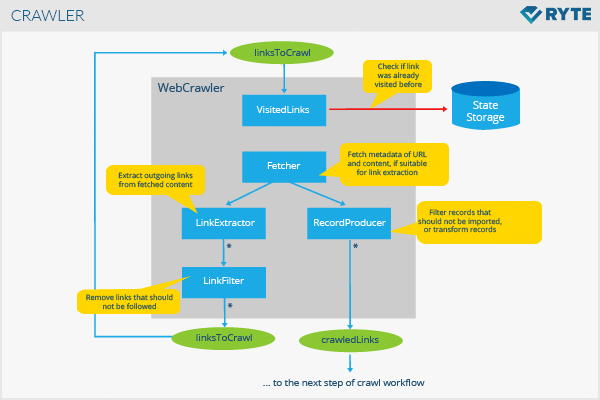
The entire crawling workflow can be visualized as a continuous loop, as shown in the diagram below. The "Frontier Queue" mentioned in the reading is represented here as linksToCrawl.
Test your understanding!
A university wants its course catalog and research publications to be easily found on Google. However, it wants to prevent student information and internal administrative portals from appearing in search results. How could the university's webmaster use the robots.txt file to guide search engine crawlers?
Show answer
The webmaster would configure the robots.txt file to Disallow crawling of the directories containing student information and administrative portals (e.g., /students/ or /admin/). They would ensure there are no Disallow rules for the course catalog and research publication sections, thereby allowing crawlers to access and index them.
Step 2: Indexing – Organizing the Content
Once a page is crawled, the search engine needs to understand and store its content. This process is called indexing. The goal is to create a highly optimized database that allows for near-instantaneous retrieval of relevant documents for any given query.
The core of this process is analyzing the page's content—text, tags, attributes, images, videos—and storing this information.
Let's return to the "How Search Really Works" video to see how this next stage unfolds.
The second half of the ByteByteGo video explains the indexing pipeline.
Watch the section on Indexing from 02:33 to 04:59. Focus on how content is broken down and, most importantly, the concept of the 'inverted index'.
The Inverted Index: A Search Engine's Cheat Sheet
As the video highlights, the most critical data structure in the indexing process is the inverted index. Your computer science background gives you a great head start in understanding its power.
Instead of a simple list of documents, an inverted index is a structure that maps content (like words) to the documents where they can be found. It's like the index at the back of a textbook, but on a planetary scale.
A very simple inverted index might look like this:
| Word | Document List |
|---|---|
| "brown" | [Doc 1, Doc 2] |
| "dog" | [Doc 2] |
| "fox" | [Doc 1] |
| "quick" | [Doc 1] |
| "the" | [Doc 1, Doc 2] |
When you search for "brown fox", the engine can instantly retrieve the lists for "brown" [Doc 1, Doc 2] and "fox" [Doc 1], find the intersection (Doc 1), and know that Doc 1 is a highly relevant result.
Canonicalization
During indexing, Google also determines if a page is a duplicate or very similar to another. It then groups these pages and chooses one to be the canonical (master) version. This prevents search results from being cluttered with multiple identical pages and consolidates ranking signals to a single URL. For a more formal definition, you can refer to the 'Indexing' section of the Google Search documentation.
Test your understanding!
Imagine a search engine has crawled three very simple documents:
- Doc A: "search algorithms are complex"
- Doc B: "ranking algorithms are fast"
- Doc C: "search ranking is complex"
Create a simplified inverted index for the words "algorithms" and "complex".
Show answer
The inverted index would look like this:
- algorithms: [Doc A, Doc B]
- complex: [Doc A, Doc C]
Conclusion
In this lesson, we've unpacked the crucial first steps of how a search engine operates. You now have a conceptual framework for the automated processes that run continuously behind the scenes.
Key Takeaways:
- Search engines operate on an index, which is a massive, organized copy of the web, not the live web itself.
- Crawling is the discovery process where bots follow links to find new and updated content, guided by rules like
robots.txtand limited by acrawl budget. - Indexing is the organization process where crawled content is analyzed and stored in data structures like the inverted index, enabling rapid retrieval.
This entire crawl-and-index pipeline is designed to build the foundation for the main event: answering a user's query. Now that we understand how the "library" is built, our next lesson will explore how the "librarian" finds the best book for you. We'll dive into the fundamental principles of ranking, including the famous PageRank algorithm and the concept of content relevance.