Hello! Welcome back to your journey to becoming a backend developer.
In our last lesson, we covered how to perform arithmetic and string operations. You learned to use Python as a powerful calculator and a text manipulator, which are fundamental skills for handling data.
Today, we're going to add a new layer of intelligence to our programs. So far, our scripts run straight from top to bottom. But real applications need to make decisions based on different conditions. To do that, we first need a way to ask questions that can be answered with a simple "yes" or "no." In Python, this is done using boolean expressions.
This lesson will teach you how to use comparison and logical operators to form these boolean expressions. Mastering this is the critical first step toward controlling your program's flow, a skill you'll use constantly when building APIs.
What are Boolean Expressions?
A boolean expression is any piece of code that evaluates to either True or False. These are the two values of the boolean data type we briefly mentioned a couple of lessons ago. Think of them as the answers to yes/no questions. For example:
- Is the user's age greater than 18? (
TrueorFalse) - Is the password the user entered the correct one? (
TrueorFalse)
We create these expressions using two types of operators: comparison operators and logical operators.
Comparison Operators
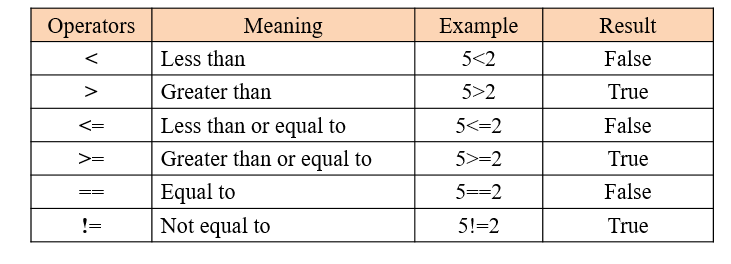
Comparison operators, also known as relational operators, do exactly what their name suggests: they compare two values. The result of the comparison is always a boolean value.
A very common mistake for beginners is to confuse the assignment operator (=) with the equality comparison operator (==).
x = 5means "assign the value 5 to the variable x".x == 5means "is the value of x equal to 5?". This expression will evaluate toTrueorFalse.
The video below gives a great introduction to all the comparison operators.
Comparison, Logical, and Membership Operators in Python | Python for Beginners
Watch this first part of the video from Alex The Analyst. It provides clear examples of how to use comparison operators with both numbers and strings.
Watch the video from the beginning until 02:51. Focus on the different symbols used for comparison and the boolean values they return.
Here is a table summarizing the operators for quick reference.
Let's try this in a code file. Create a new file named conditions.py and experiment with these:
temperature = 25
user_role = "admin"


# Comparing numbers
print(temperature > 20)      # True
print(temperature == 25)     # True
print(temperature <= 18)     # False


# Comparing strings
print(user_role == "admin")  # True
print(user_role != "guest")  # True
print("Apple" < "Banana")    # True, because 'A' comes before 'B' alphabetically
Logical Operators
What if you need to check multiple conditions at once? For example, to log in, a user must provide both the correct username and the correct password. This is where logical operators come in. They allow you to combine multiple boolean expressions into a single, more complex one.
The three logical operators in Python are and, or, and not.
Comparison, Logical, and Membership Operators in Python | Python for Beginners
Now, continue with the same video to learn about logical operators. This section explains how and, or, and not work to combine the simple comparisons we just learned about.
Watch from 02:51 to 05:02. Pay attention to how the and and or operators require different conditions to be met to return True.
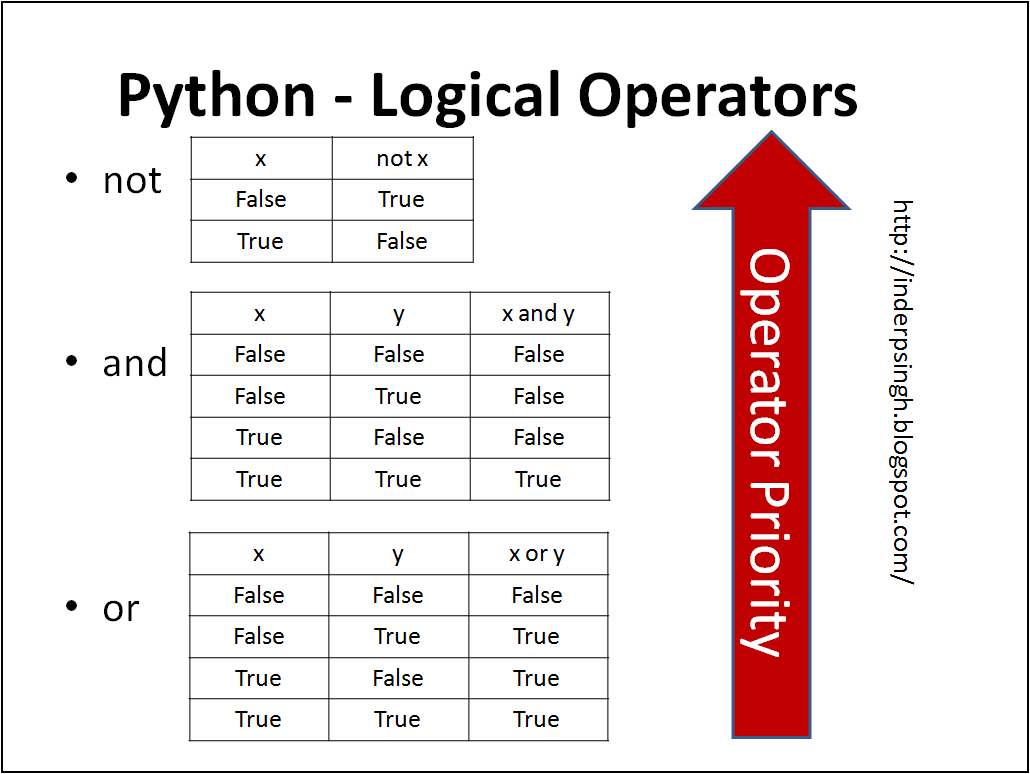
The behavior of these operators can be summarized using "truth tables," which show the outcome for every possible combination of inputs.
Here's a breakdown:
and: ReturnsTrueonly if both expressions areTrue.or: ReturnsTrueif at least one of the expressions isTrue.not: Reverses the boolean value.not TruebecomesFalse, andnot FalsebecomesTrue.
Let's add some examples to your conditions.py file:
age = 22
is_student = True


# Using 'and'
# Is the person an adult AND a student?
print(age > 18 and is_student)  # True, because both conditions are true


# Using 'or'
# Is the person under 18 OR a student?
print(age < 18 or is_student)   # True, because one condition (is_student) is true


# Using 'not'
# Is the person NOT a student?
print(not is_student)          # False, because it reverses the True value of is_student
Deeper Dive: Operator Precedence and Short-Circuiting
When you combine multiple operators in one expression, Python follows a specific order of operations, known as operator precedence.
- Comparison operators (
>,==, etc.) are evaluated first. - Then,
notis evaluated. - Then,
and. - Finally,
or.
Because this can get confusing, it is highly recommended to use parentheses () to group your expressions and make your intentions clear. For example, (age > 18 and has_license) or is_supervised is much easier to read and understand than leaving it to precedence rules.
The following reading provides a great textual summary of everything we've covered and introduces two important related concepts: short-circuit evaluation and operator precedence.
Comparisons & conditionals in Python
Please read the selected sections from 'Comparisons & conditionals in Python' by Launch School. This will reinforce what you saw in the videos and explain the rules Python follows when evaluating complex expressions.
Read the following sections: 'Comparisons', 'Logical Operators', 'Short Circuits', and 'Logical Operator Precedence'. Focus on the advice given about using parentheses to avoid confusion.
Short-circuiting is an efficiency trick Python uses:
- For an
andexpression, if the first part isFalse, Python knows the whole thing must beFalse, so it doesn't bother evaluating the second part. - For an
orexpression, if the first part isTrue, Python knows the whole thing must beTrue, and it skips the second part.
Hands-On Practice
Now it's time to test your understanding. Look at the expressions in the exercise below. Without running the code, try to predict whether each one will evaluate to True, False, or a specific value. Then, you can type them into your Python interpreter or conditions.py file to check your answers.
This exercise is taken from the Launch School resource you just read.
Comparisons & conditionals in Python
Complete Exercise 1 from the Launch School reading. It's a great way to check if you've grasped how Python evaluates these expressions.
Find 'Exercise 1' in the 'Exercises' section at the bottom of the page. Try to solve each expression on your own first, then check your answers against the provided solution.
Here are the expressions from the exercise for your convenience:
False or (True and False)
True or (1 + 2)
(1 + 2) or True
True and (1 + 2)
False and (1 + 2)
(1 + 2) and True
(32 * 4) >= 129
False != (not True)
True == 4
False == (847 == '847')
After you've tried them, expand the section below to see the solutions and explanations.
Click for Solutions and Explanations
False or (True and False)->False or False->FalseTrue or (1 + 2)->True or 3->True(short-circuits afterTrue)(1 + 2) or True->3 or True->3(short-circuits and returns the first truthy value)True and (1 + 2)->True and 3->3(evaluates both and returns the last evaluated value)False and (1 + 2)->False and 3->False(short-circuits afterFalse)(1 + 2) and True->3 and True->True(evaluates both and returns the last evaluated value)(32 * 4) >= 129->128 >= 129->FalseFalse != (not True)->False != False->FalseTrue == 4->FalseFalse == (847 == '847')->False == False->True
Conclusion
Excellent work! You've just acquired one of the most powerful tools in programming: the ability to ask questions and get True/False answers. This is the foundation of all logic in software.
Key Takeaways:
- Comparison operators (
==,!=,<,>,<=,>=) compare two values and produce a boolean result. - Logical operators (
and,or,not) combine or modify boolean expressions to handle complex conditions. - Python evaluates expressions based on operator precedence, but using parentheses
()is the best way to ensure your code is clear and correct. - Logical operators use short-circuit evaluation for efficiency.
Next Up:
Now that you can create expressions that evaluate to True or False, what can you do with them? In the next lesson, we will introduce if, elif, and else statements. These control flow structures use your boolean expressions to decide which blocks of code to execute, finally allowing your programs to adapt and respond to different situations.