Hello! Welcome back to our module on Business Analysis in an Agile Context.
In our last lesson, you learned how to craft a high-quality, individual user story using the standard format and how to define its completion with precise acceptance criteria in Gherkin. This is a vital skill for communicating requirements clearly.
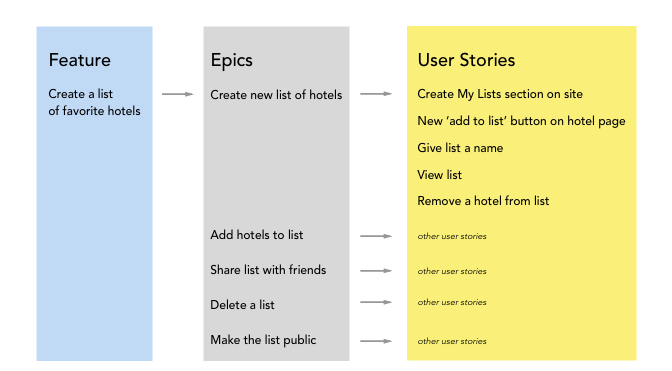
However, business needs rarely arrive as perfectly-sized user stories. More often, they start as large ideas, features, or requests. Today, we'll address how to handle these large-scale requirements. This lesson is dedicated to the learning outcome: Decompose large features (epics) into smaller, manageable user stories.
This skill is at the heart of an Agile Business Analyst's work. It’s how you take a significant stakeholder request and transform it into an actionable plan that a development team can use to deliver value incrementally. Mastering this decomposition process is essential for building and managing a product backlog, and it's a core competency you'll be expected to demonstrate in BA interviews.
1. From Big Ideas to Actionable Stories: Understanding Epics
The Agile world has a term for a large user story that is too complex or broad to be completed in a single development cycle (a sprint): an epic. An epic describes a high-level feature or a large chunk of work. Our job as BAs is to break these epics down.
To get a clear distinction between epics, user stories, and the even smaller "tasks," let's start with a short video.
Stop Feeling Overwhelmed: Split User Stories in 2 Steps
The video 'Stop Feeling Overwhelmed: Split User Stories in 2 Steps' begins by clearly defining and differentiating between epics, user stories, and tasks. This will provide a solid foundation for the rest of our lesson.
Please watch from 00:51 to 04:15. Pay close attention to: The definition of an epic as a collection of user stories. The example of the 'manage my product' epic being broken down. The crucial difference between a user story (which provides business value) and a task (a technical activity).
As the video explains, an epic like "As an online seller, I can manage my product online..." is too big. "Manage" is a vague term that hides complexity. It could mean adding, updating, deleting, or hiding products. Each of these becomes a candidate for a smaller, more focused user story.
2. Why We Split Epics: The Power of Vertical Slicing
Before we learn how to split epics, let's quickly review why it's so important. Breaking down large work items helps teams deliver value faster, get feedback sooner, and plan more accurately.
One of the most critical concepts in story splitting is vertical slicing. Imagine a feature is like a slice of cake with layers: the user interface (UI) on top, the business logic in the middle, and the database at the bottom.
- Horizontal Slicing (Anti-pattern): Creating a story for just the UI, another for the logic, and a third for the database. The problem? None of these stories deliver any value to the user on their own. You only get value when all three are done, which feels like a mini-waterfall project.
- Vertical Slicing (The Goal): Creating a story that cuts through all layers to deliver a small, complete piece of functionality. For example, a story to "view a product" would involve a little bit of UI, a little logic, and a little database work, but it results in something a user can actually see and interact with.
The following video segment explains this concept and other common misconceptions about story splitting.
Stop Feeling Overwhelmed: Split User Stories in 2 Steps
Let's continue with the same video, 'Stop Feeling Overwhelmed'. This section covers the core principles of splitting, including the crucial distinction between horizontal and vertical slicing.
Please watch from 05:03 to 10:25. Focus on: The idea that each split story should be 'shippable and valuable'. The explanation of why horizontal slicing is an anti-pattern. The concept of vertical slicing and how it enables delivering value.
3. A Toolbox of Splitting Techniques
Now for the main event: how do we actually perform this vertical slicing? There are several established patterns you can use to break down epics. We'll explore two popular frameworks: WAHZUR and SPIDR.
The WAHZUR Framework
This framework provides six patterns for finding the "seams" along which you can split a large story.
Stop Feeling Overwhelmed: Split User Stories in 2 Steps
This next clip from 'Stop Feeling Overwhelmed' is the core of the video, detailing six distinct patterns for story splitting, which are summarized by the WAHZUR acronym.
Please watch from 10:25 to 16:37. This is a dense section, so feel free to pause and take notes. For each pattern, focus on understanding the core idea and the example provided: Workflow Steps Acceptance Criteria Happy / Unhappy Path Zero / One / Many User Roles Rules (Business Rules)
The SPIDR Framework
Another powerful mnemonic, developed by Agile expert Mike Cohn, is SPIDR. This framework offers a slightly different, but equally effective, set of lenses for decomposition.

To learn about this framework, we'll turn to a different expert.
SPIDR: 5 Ways to Split User Stories & Bring Any Story Down to Size.
The video 'SPIDR: 5 Ways to Split User Stories' by Mountain Goat Software (Mike Cohn's company) provides a concise explanation of each technique in the SPIDR framework.
Watch from 01:04 to 07:46. This will walk you through each letter of the acronym with clear examples: Spike: A research story to learn more and reduce uncertainty. Paths: Splitting by alternative workflows or user journeys. Interface: Creating simpler UI versions first, then enhancing them. Data: Supporting a subset of data first, then adding more types. Rules: Relaxing complex business rules initially and adding them later.
You can also use the following article as a reference guide that covers many of these techniques, including SPIDR, Workflow Steps, and CRUD (Create, Read, Update, Delete), which is a specific form of data-based splitting.
7 Proven Techniques for Splitting User Stories (with Real Examples)
The article '7 Proven Techniques for Splitting User Stories' from NextGen Analysts offers a great text-based summary of the techniques we've just seen, plus a few others.
Quickly scan the sections 'The SPIDR Framework: A Systematic Approach', 'Split by Workflow Steps', and 'The CRUD Technique'. This will reinforce the video content and introduce the common CRUD pattern.
4. Splitting in Action: An AdTech Example
Let's apply these techniques to an epic relevant to your AdTech background. We can pull a great example from the resource we used in the last lesson.
Epic: "As a marketing manager, I want to track the performance of my advertising campaigns in real-time, so I can optimize my ad spend and make data-driven decisions."
This is a fantastic goal, but it's huge. A "performance tracking" feature could take months to build fully. Let's decompose it.
Using the "Workflow Steps" / "Interface" technique:
What's the most basic, valuable thing the manager needs to do first? Let's say it's seeing top-level numbers.
- Story 1: As a marketing manager, I want to see a summary of total impressions, clicks, and spend for all my campaigns on a single dashboard, so I can get a quick overview of performance. (This is our first valuable, vertical slice).
- Story 2: As a marketing manager, I want to be able to select a date range (e.g., 'Last 7 Days', 'This Month') for the dashboard, so I can analyze performance over specific periods.
- Story 3: As a marketing manager, I want to be able to sort the campaign list on the dashboard by spend, so I can quickly identify the most expensive campaigns.
Using the "Business Rules" / "Paths" technique:
What are other scenarios or rules?
- Story 4: As a marketing manager, I want to filter the campaign list by 'Active' status, so I can focus on currently running campaigns.
- Story 5: As a marketing manager, I want to export the current dashboard view to a CSV file, so I can perform further analysis in Excel.
See how we've taken a massive epic and broken it into five smaller, independently valuable user stories? The team could deliver Story 1 in the first sprint, providing immediate value, and then build on it in subsequent sprints.
Test your understanding!
After splitting an epic, what is the best way to check the quality of your new, smaller user stories?
- Ensure each story involves only one technical layer (e.g., just UI or just database).
- Check if each story aligns with the INVEST criteria (Independent, Negotiable, Valuable, Estimable, Small, Testable).
- Make sure that all the stories can be completed by a single developer.
- Confirm that the product owner has signed off on every technical detail.
Show answer
Option 2 is the correct answer. The INVEST criteria, which you learned about in the previous lesson, serve as the perfect quality checklist for your split stories. Each story should be a self-contained, valuable, and testable piece of work that can fit into a sprint.
- Option 1 describes horizontal slicing, which is an anti-pattern.
- Option 3 is not a requirement; stories are worked on by the team, and collaboration is encouraged.
- Option 4 is incorrect because stories are "negotiable" and technical details are figured out during the "conversation" with the development team, not dictated upfront.
5. Practice Exercise
Now it's your turn. Here is another epic tailored to the AdTech industry. Your task is to decompose it into at least three smaller user stories. For each story you create, mention which splitting technique you primarily used.
Epic: "As a media buyer, I want to be able to create a new advertising campaign, so I can effectively reach my target audience."
Show your proposed user stories
Show a possible answer
Here is one possible way to decompose this epic. Your answers may vary, and that's okay! There's often more than one right way to split a story.
Epic: "As a media buyer, I want to be able to create a new advertising campaign, so I can effectively reach my target audience."
Split Stories:
-
Story: As a media buyer, I want to define the campaign's name, objective (e.g., 'Website Traffic'), and overall budget, so I can set up the basic campaign structure.
- Technique Used: Workflow Steps (This is the first logical step in creating a campaign).
-
Story: As a media buyer, I want to define the target audience for my campaign based on location and age, so I can start with basic demographic targeting.
- Technique Used: Splitting by Data/Rules (We're starting with simple targeting rules—location and age—and can add more complex ones like 'Interests' or 'Behaviors' in later stories).
-
Story: As a media buyer, I want to upload a single image creative for my campaign, so I can run a simple visual ad.
- Technique Used: Splitting by Data/Interface (We're starting with the simplest case—a single image—before adding support for video ads, carousel ads, etc.).
-
Story: As a media buyer, I want to be able to save my new campaign as a 'Draft', so I can come back and finish it later.
- Technique Used: Workflow Steps (This is a key step that provides value before the full 'launch' functionality is built).
Conclusion
Congratulations! You've just learned one of the most practical and powerful skills in the Agile BA toolkit. You now have a repeatable process for taking large, intimidating business requirements and breaking them down into small, valuable, and deliverable pieces of work.
Key Takeaways:
- Epics are large features that must be broken down to fit into Agile sprints.
- The goal is vertical slicing: delivering small, end-to-end pieces of functionality that are valuable on their own.
- Use frameworks like WAHZUR (Workflow, Acceptance Criteria, Happy/Unhappy path, Zero/one/many, User roles, Rules) or SPIDR (Spike, Paths, Interface, Data, Rules) to guide your decomposition.
- After splitting, check your resulting user stories against the INVEST criteria to ensure they are well-formed.
Preview of the Next Lesson:
Now that you can create a list of well-decomposed user stories, what's next? How do you organize them to see the big picture and plan your product's evolution? In our next lesson, we will apply story mapping techniques to visualize product functionality and plan releases. Story mapping is a fantastic visual technique that arranges your user stories into a model that tells the complete story of your product.