Hello! Welcome back to our module on Business Analysis in an Agile Context.
In our last lesson, we established your role as an Agile Business Analyst, acting as a crucial bridge between the Product Owner's vision and the development team's execution. We discussed that a key responsibility is translating high-level needs into clear, actionable items for the team.
Today, we'll master the primary tool for that translation: the user story. This lesson directly addresses the learning outcome: Write effective user stories with clear acceptance criteria (e.g., Gherkin format). This is one of the most fundamental and practical skills for an Agile BA. In your project management roles, you've likely dealt with scope and requirements; think of user stories as the agile way to define and manage scope at a detailed level, piece by piece. Mastering this is critical for both your daily work and for acing BA job interviews.
1. Understanding the User Story
A user story is a short, simple description of a feature told from the perspective of the person who desires the new capability, usually a user or customer of the system. It's a shift from writing about what the system should do to what the user wants to achieve.
To get a solid theoretical foundation, let's watch a video that breaks down the core components of a user story.
User Stories and Acceptance Criteria EXAMPLE (Agile Story Tutorial)
The video 'User Stories and Acceptance Criteria EXAMPLE' by The Business Analysis Doctor clearly defines user stories, explains the 'Three Cs' model, and details the standard 'who, what, why' format.
Please watch from the beginning (00:13) to 05:00. Focus on: The definition of a user story and its user-centric perspective. The Three Cs: Card, Conversation, and Confirmation. The Role-Feature-Value format: 'As a... I want... so that...'
The key takeaway is the standard format:
As a <type of user>, I want <to perform some action>, so that <I can achieve some goal>.
- As a... (The Persona/Role): Who are we building this for? Being specific is better than a generic "user." For example, "As an advertiser" is better than "As a user."
- I want... (The Action/Feature): What is the goal? This should be an action they want to perform, not a technical implementation.
- So that... (The Value/Why): Why do they want this? This is the most important part, as it communicates the business value to the team and helps in prioritization.
For example, in your AdTech context:
As an ad operations manager, I want to bulk-edit the daily budget for multiple campaigns at once, so that I can save time managing large accounts.
Test your understanding!
Which of the following is the most effective user story?
- As a user, I want a button that exports data to a CSV file.
- The system will generate a CSV export of the campaign performance report.
- As a media planner, I want to export the campaign performance report to a CSV file, so that I can perform custom analysis and create charts in Excel for a client presentation.
- As a media planner, I want a faster database query for the reporting dashboard.
Show answer
Option 3 is the best answer. It clearly identifies a specific user persona (media planner), a clear action (export report to CSV), and the business value (custom analysis for a client presentation).
- Option 1 uses a generic "user" and lacks the "so that" clause, hiding the business value.
- Option 2 is a traditional system requirement, not a user story. It describes what the system does, not what the user wants.
- Option 4 describes a technical implementation ("faster database query") rather than a user-facing goal. The user's goal isn't a faster query; it's a responsive dashboard. A better story would be "As a media planner, I want the reporting dashboard to load within 3 seconds, so that I can quickly check campaign status without getting frustrated."
2. What Makes a User Story "Good"? The INVEST Model
Not all user stories are created equal. A popular acronym, INVEST, provides a simple checklist to ensure your user stories are high quality.
Agile User Stories: 40+ user story examples, formats and ...
The article 'Agile User Stories' from Savio Global provides a concise summary of the INVEST model and other best practices.
Please read the section titled 'INVEST in User Stories'. It provides a table that breaks down what each letter in the acronym means.
To summarize, a good user story is:
- Independent: Can be developed and delivered on its own.
- Negotiable: It's a starting point for a conversation, not a rigid contract.
- Valuable: Delivers tangible value to the end-user or business.
- Estimable: The team can roughly estimate the effort required to implement it.
- Small: Small enough to be completed within a single sprint (development cycle).
- Testable: You can prove that it's "done."
This last point, "Testable," brings us to the final "C" of the Three Cs: Confirmation. This is achieved through Acceptance Criteria.
3. Defining "Done": Acceptance Criteria
Acceptance Criteria (AC) are the conditions that a software product must meet to be accepted by a user, a customer, or the product owner. They define the boundaries of a user story and are used to confirm when it is complete and working as intended.
Let's return to our video to get an overview of AC.
User Stories and Acceptance Criteria EXAMPLE (Agile Story Tutorial)
Let's continue with the video 'User Stories and Acceptance Criteria EXAMPLE' to understand the role and types of acceptance criteria.
Please watch from 05:56 to 08:22. This section defines acceptance criteria, explains their importance, and introduces the two main types: rule-based and scenario-based.
While rule-based criteria (checklists) are useful, the most powerful and widely adopted format for describing behavior is the scenario-based approach using Gherkin syntax.
4. Writing Acceptance Criteria with Gherkin
Gherkin is a simple, structured language that helps you describe a system's behavior without detailing the implementation. It is human-readable, which means you, the developers, and your stakeholders can all understand it. The core structure is Given-When-Then.

- Given: The context or precondition. What is the state of the system before the action?
- When: The action or event. What does the user do?
- Then: The expected outcome. What should the system do in response? How has the state changed?
To dive deeper into the practical application of Gherkin, let's review a dedicated guide.
A Formula for Great Gherkin Scenarios (with Given-When-Then Examples)
The article 'A Formula for Great Gherkin Scenarios' from Business Analysis Experts is an excellent deep dive into writing effective acceptance criteria using the Given-When-Then format.
Please read the sections 'What is Gherkin?', 'Gherkin’s Given-When-Then Trio for Better Specifications', and 'GIVEN-WHEN-THEN Examples: The Gherkin Format in Action'. This will give you a solid understanding of the syntax and how to apply it to a user story.
Let's apply this to our AdTech example:
User Story: As an ad operations manager, I want to bulk-edit the daily budget for multiple campaigns at once, so that I can save time managing large accounts.
Here are some possible Gherkin scenarios for this story:
Scenario: Successfully applying a new budget to selected campaigns
Given I am on the 'Campaign Management' page
And I have selected three campaigns with different daily budgets
When I enter "$50" in the 'Bulk Edit Budget' field and click 'Apply'
Then the daily budget for all three selected campaigns should update to "$50"
And I should see a confirmation message: "3 campaigns updated successfully."
Scenario: Attempting to apply an invalid budget
Given I am on the 'Campaign Management' page
And I have selected two campaigns
When I enter "abc" in the 'Bulk Edit Budget' field and click 'Apply'
Then the daily budget for the selected campaigns should not change
And I should see an error message: "Invalid budget amount. Please enter a numeric value."
Notice how each scenario tests a specific piece of behavior. Together, they define what "done" means for this user story.
To see how this looks in a real-world tool, the following video segment shows user stories and Gherkin AC inside Jira, a popular project management tool.
JIRA Tutorial for Agile Business Analysts & Product Owners
The video 'JIRA Tutorial for Agile Business Analysts & Product Owners' demonstrates the practical application of what we've just learned.
Please watch from 10:11 to 13:00. The presenter shows a user story in Jira and specifically points out the 'as I want so that' format and the acceptance criteria written in Gherkin.
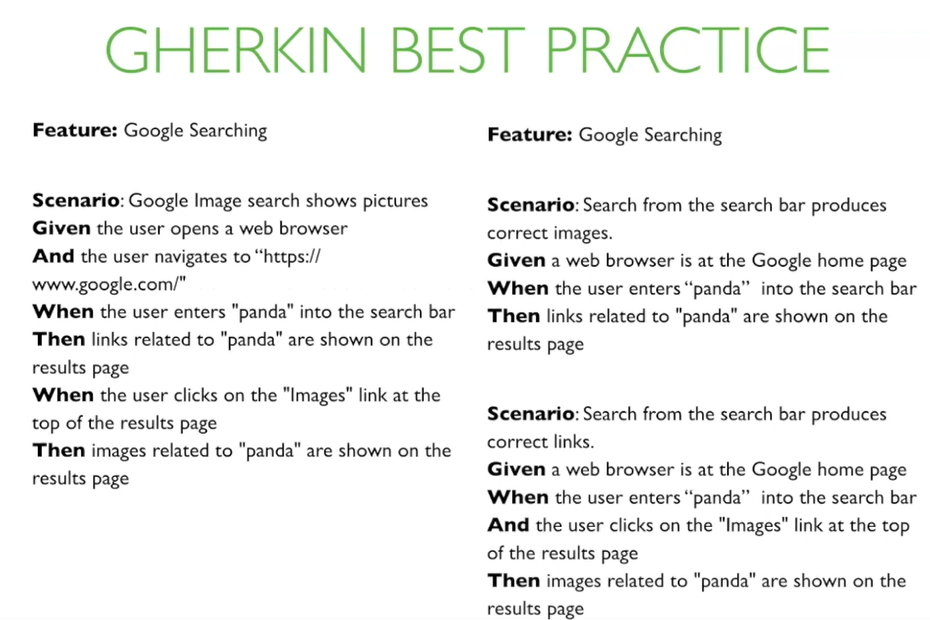
A final tip is to keep your scenarios focused. It's better to write multiple simple scenarios than one complex one.
Practice Exercise
Your Product Owner has given you the following high-level request for an AdTech platform: "Advertisers need a way to pause all their active campaigns at once."
Your task is to:
- Write a full user story using the standard
As a..., I want..., so that...format. - Write at least two acceptance criteria scenarios in Gherkin's
Given-When-Thenformat. Think about the "happy path" (it works as expected) and a potential edge case or alternative path.
Show answer
Here is one possible solution. Your wording might be different, but it should follow the same structure and logic.
1. User Story:
As an advertiser, I want a 'Pause All' button on my dashboard, so that I can quickly stop all ad spend during an emergency or after business hours.
2. Acceptance Criteria:
Scenario 1: Pausing active campaigns successfully (Happy Path)
Given I am logged in as an advertiser
And I have 5 campaigns currently in 'Active' status
And I have 2 campaigns already in 'Paused' status
When I click the 'Pause All' button on my dashboard
And I confirm my action in the confirmation pop-up
Then the 5 'Active' campaigns should change to 'Paused' status
And the 2 already 'Paused' campaigns should remain in 'Paused' status.
Scenario 2: No active campaigns to pause (Edge Case)
Given I am logged in as an advertiser
And I have no campaigns in 'Active' status
Then the 'Pause All' button on my dashboard should be disabled or greyed out.
Conclusion
You have now learned the fundamental building block of Agile requirements documentation. By combining a clear, value-driven user story with precise, testable acceptance criteria, you provide the development team with everything they need to build the right feature, the right way. This skill directly addresses the need for formal IT documentation within a fast-moving Agile environment.
Key Takeaways:
- User stories capture requirements from an end-user's perspective using the "As a..., I want..., so that..." format.
- The INVEST model helps ensure your user stories are well-formed (Independent, Negotiable, Valuable, Estimable, Small, and Testable).
- Acceptance Criteria define the "done" state for a user story.
- Gherkin syntax (Given-When-Then) is the industry standard for writing clear, scenario-based acceptance criteria that both business and technical team members can understand.
Preview of the Next Lesson:
A single user story is great, but big projects are never just one story. They start as large ideas or features. In our next lesson, we will focus on the skill of decomposing large features (known as 'epics') into smaller, manageable user stories, ensuring that a complex business need can be delivered incrementally.